




 here!
I’m your shopping assistant for PC builds, upgrades, and everything tech.
Got questions? Ask away!
Start a conversation
here!
I’m your shopping assistant for PC builds, upgrades, and everything tech.
Got questions? Ask away!
Start a conversation



Any questions? Ask CelesteSM will help you find out quickly.

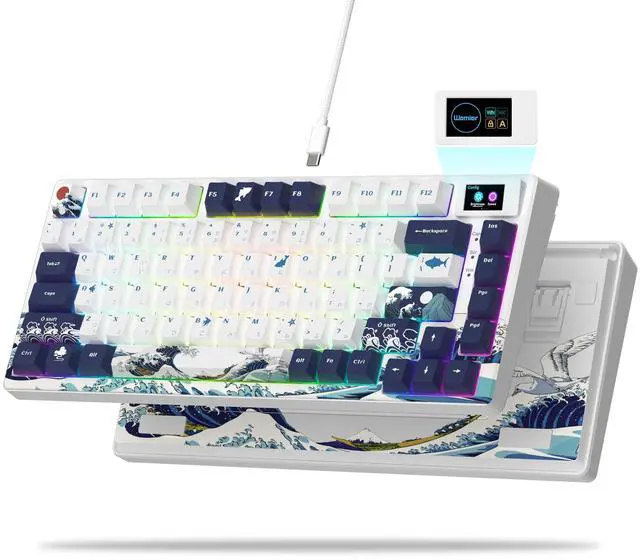
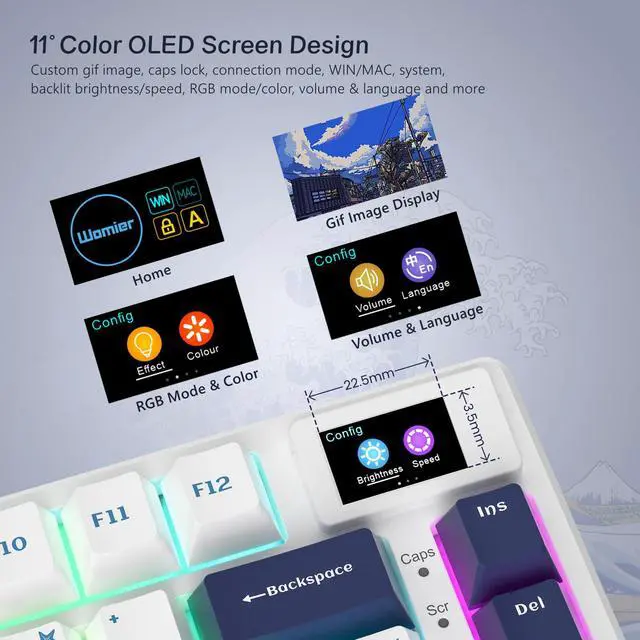
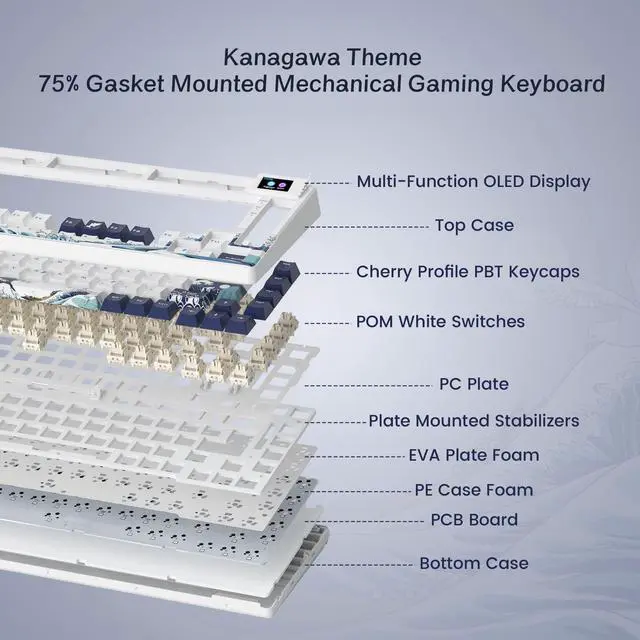
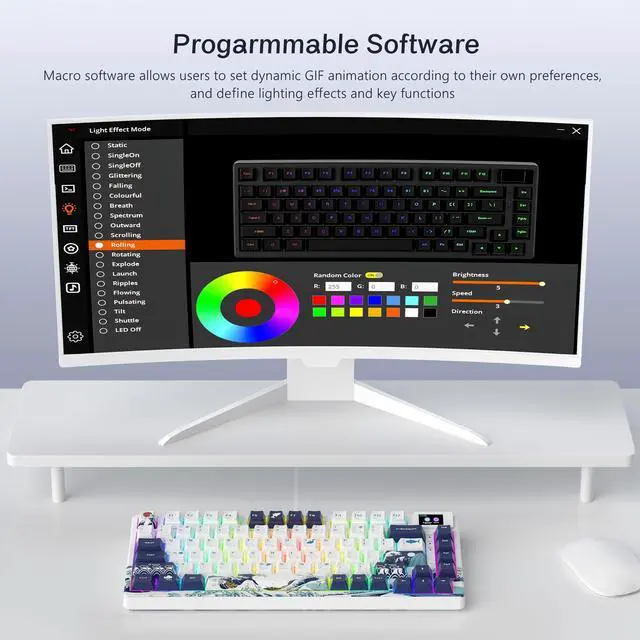
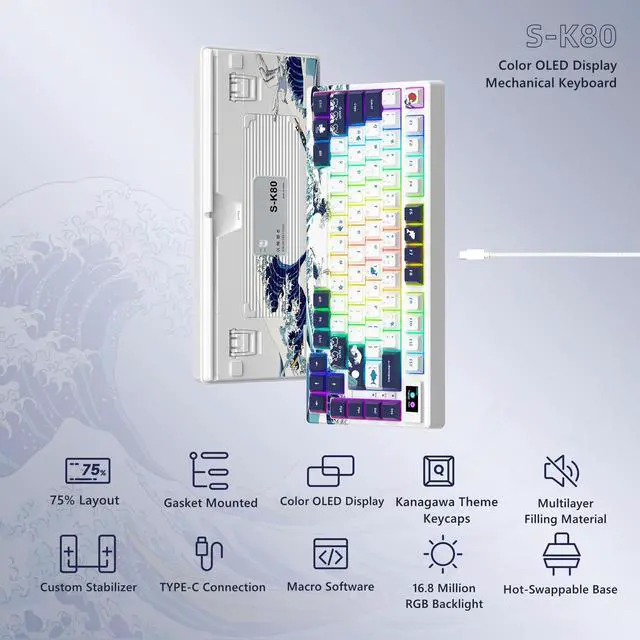
75% theme Multimedia Display color screen mechanical game keyboard. You can customize the GIF dynamic picture to make the keyboard more colorful. The keyboard adopts PC positioning board, and we have debugged the comfortable configuration in the keyboard feel.

Please note: For this keyboard with a color screen, disassembling the keyboard is not recommended, because the wires connecting the screen are very fine and easily damaged, causing the screen to be unusable.

Customized stabilizer, not shaky to use, more stable.

Compatible with both WIN and MAC systems.

2-stage foot mat, adjustable to your needs.

Multi-direction wire slot, so that the desktop clean and orderly.
 Womier SK80 PRO |  Womier VK66 PRO |  Womier WK68 |  Womier WK61 Kanagawa |  Womier WK61 |  Womier SK71 PRO |  Womier SK75 Blue | |
|---|---|---|---|---|---|---|---|
Customer Reviews | — | — | — | — | — | — | — |
Price | — | — | — | — | — | — | — |
Keyboard Size | 75% Keyboard | 60% Keyboard | 60% Keyboard | 60% Keyboard | 60% Keyboard | 75% Keyboard | 75% Keyboard |
Keycap Profile | Cherry MX Profile | MDA Profile | OEM Profile | OEM Profile | OEM Profile | Cherry MX Profile | Cherry MX Profile |
Connection Mode | Bluetooth/2.4G/Wired | Type-C (Plug and Play) | Type-C (Plug and Play) | Type-C (Plug and Play) | Type-C (Plug and Play) | Bluetooth/2.4G/Wired | Bluetooth/2.4G/Wired |
Hot Swappable | Yes | Yes | Yes | Yes | Yes | Yes | Yes |
Software Customization | Yes | Yes | Yes | Yes | Yes | Yes | Yes |


75% theme Multimedia Display color screen mechanical game keyboard. You can customize the GIF dynamic picture to make the keyboard more colorful. The keyboard adopts PC positioning board, and we have debugged the comfortable configuration in the keyboard feel.

Please note: For this keyboard with a color screen, disassembling the keyboard is not recommended, because the wires connecting the screen are very fine and easily damaged, causing the screen to be unusable.


Customized stabilizer, not shaky to use, more stable.
Compatible with both WIN and MAC systems.
2-stage foot mat, adjustable to your needs.
Multi-direction wire slot, so that the desktop clean and orderly.
Womier SK80 PRO | Womier VK66 PRO | Womier WK68 | Womier WK61 Kanagawa | Womier WK61 | Womier SK71 PRO | Womier SK75 Blue |
|---|---|---|---|---|---|---|
| Customer Reviews | ||||||
| — | — | — | — | — | — | — |
| Price | ||||||
| — | — | — | — | — | — | — |
| Keyboard Size | ||||||
| 75% Keyboard | 60% Keyboard | 60% Keyboard | 60% Keyboard | 60% Keyboard | 75% Keyboard | 75% Keyboard |
| Keycap Profile | ||||||
| Cherry MX Profile | MDA Profile | OEM Profile | OEM Profile | OEM Profile | Cherry MX Profile | Cherry MX Profile |
| Connection Mode | ||||||
| Bluetooth/2.4G/Wired | Type-C (Plug and Play) | Type-C (Plug and Play) | Type-C (Plug and Play) | Type-C (Plug and Play) | Bluetooth/2.4G/Wired | Bluetooth/2.4G/Wired |
| Hot Swappable | ||||||
| Yes | Yes | Yes | Yes | Yes | Yes | Yes |
| Software Customization | ||||||
| Yes | Yes | Yes | Yes | Yes | Yes | Yes |
| Brand | Womier |
| Compatible Devices | PC |
| Connectivity Technology | USB-C |
| Keyboard Description | Mechanical |
| Recommended Uses For Product | Gaming |
| Special Feature | 75% layout, Color OLED Screen, Gaming Keyboard, Hot-Swappable |
| Color | Kanagaa White |
| Keyboard backlighting color support | RGB |
| Style | Kanagawa White |
| Material | Polybutylene Terephthalate |
| Package Dimensions | 14.68 x 6.69 x 2.28 inches |
| Item Weight | 1.98 pounds |
| Manufacturer | XVX |
| Item model number | SK80 |
| Date First Available | January 1, 2023 |
The Womier S-K80 is a wired 75% mechanical gaming keyboard with a color multimedia display, RGB lighting, linear switches, gasket mounting, and hot-swappable 3-pin/5-pin switch support. It suits gamers and keyboard enthusiasts who want a customizable layout, softer typing feel, and visual control information in a compact design.
| Attribute | Value |
|---|---|
| Best For | PC users seeking a compact 75% mechanical gaming keyboard with linear switches, RGB backlighting, and USB-C connectivity |
| Layout And Construction | Compact 75% layout with 82 buttons, PBT material, Kanagawa White design, and right-hand orientation |
| Switches And Typing | Mechanical keyboard with linear key switches |
| Lighting And Controls | RGB backlighting for illuminated key control |
| Connectivity And Compatibility | USB-C wired connection for PC use |
| Power And Included Accessories | USB-powered operation with a USB cable included |
| Model Identifiers | Womier S-K80, part number XVX S-K80 |
Q: Should I get the Womier S-K80 or the AULA F75?
A: Choose the Womier S-K80 if you want a wired 75% keyboard with a customizable color display, Kanagawa-themed design, hot-swappable switches, and a soft gasket-mounted typing feel. Choose the AULA F75 if wireless connectivity, a rotary knob, and a more conventional productivity-focused layout matter more than the S-K80’s screen and themed appearance.
Q: Is the Womier S-K80 or the S-K80 Pro better for wireless use?
A: The S-K80 Pro is the better choice for wireless use because it adds Bluetooth and 2.4GHz connectivity, while the standard S-K80 is wired-only. Choose the standard S-K80 when you plan to use it primarily at a desk and prefer a simpler, lower-cost wired setup; choose the Pro when switching between devices or using the keyboard away from a fixed desk is important.
Q: Should I buy the Womier S-K80 or a premium Keychron Q1?
A: Choose the Womier S-K80 if you want a lighter, wired 75% keyboard with a built-in customizable display, themed keycaps, RGB lighting, and hot-swappable linear switches. Choose the Keychron Q1 if your priority is a heavier full-aluminum chassis, rotary-knob options, VIA/QMK-style customization, and a more conventional enthusiast-grade build. The S-K80 emphasizes visual customization and desk appeal, while the Q1 emphasizes chassis construction and firmware-level customization.
Q: Is the Womier S-K80 better than a smaller 60% or 65% keyboard?
A: Choose the S-K80 if you want dedicated function-row keys, arrow keys, a compact 75% footprint, and a more complete work-and-gaming layout. Choose a 60% or 65% keyboard if minimizing desk space and maximizing mouse room are more important than having the S-K80’s function row and additional navigation keys. The S-K80 is the more practical choice for users who frequently switch between gaming and productivity tasks.
Q: Is the Womier S-K80 suitable for everyday office work and long typing sessions?
A: Yes. The S-K80 is suitable for desk-based office work, note-taking, and general typing if you prefer mechanical linear switches. Its 75% layout keeps arrow keys and function-row access while saving desk space, and the gasket mount with EVA cushioning is designed for a softer typing feel. It is wired and lacks a dedicated number pad, so it is less suitable for users who need wireless mobility or frequent data entry. ([bestbuy.com](https://www.bestbuy.com/site/questions/hyperx-alloy-rise-75-75-wired-mechanical-linear-switch-gaming-keyboard-with-rgb-lighting-black/11006248?utm_source=openai)
Q: Is the Womier S-K80 good for travel or use with multiple devices?
A: It is reasonably compact for a desk or occasional transport because it uses a 75% layout, but it is not a travel-first keyboard. The S-K80 requires a wired USB-C connection, has no Bluetooth or 2.4 GHz wireless mode, and includes no built-in battery. It is best for a fixed workstation, gaming setup, or portable desk setup where a cable is acceptable. ([us.amazon.com](https://us.amazon.com/nuphy-Wireless-Mechanical-Keyboard-Swappable/dp/B0DZMLL649?utm_source=openai)
Q: Can the switches be replaced without soldering?
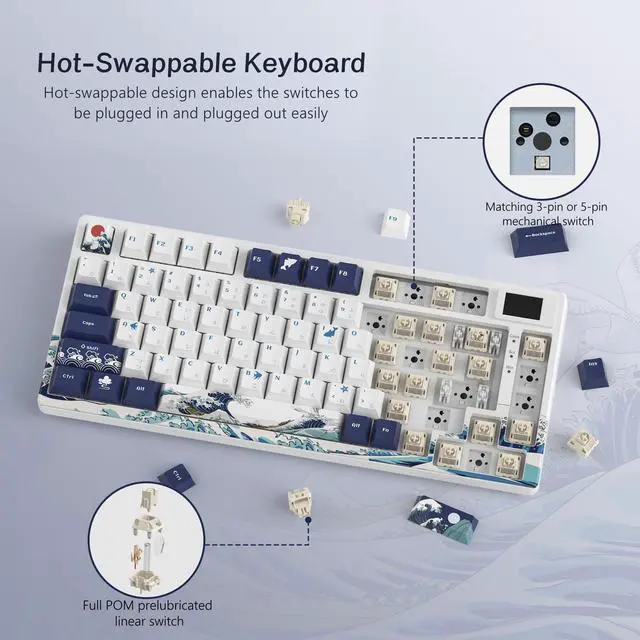
A: Yes. The S-K80 has a hot-swappable PCB that supports both 3-pin and 5-pin mechanical switches, so compatible switches can be changed without soldering. This is useful if you want to alter the key feel, sound, or actuation characteristics later. ([bestbuy.com](https://www.bestbuy.com/site/questions/hyperx-alloy-core-full-size-wired-gaming-membrane-keyboard-with-rgb-lighting-black/6283508?page=4&utm_source=openai)
Q: Does the Womier S-K80 work with Mac and Windows computers?
A: The product listing identifies the S-K80 for Mac and Windows use and includes a WIN/MAC display mode. Because it is a wired USB-C keyboard, compatibility also depends on the computer having a suitable USB port or adapter. Some software-based customization features may be more dependent on the available operating-system driver than basic typing. ([bestbuy.com](https://www.bestbuy.com/site/questions/hyperx-alloy-core-full-size-wired-gaming-membrane-keyboard-with-rgb-lighting-black/6283508?page=4&utm_source=openai)
Q: Is the Womier S-K80 quiet enough for shared workspaces or meetings?
A: It is designed to be quieter than many clicky mechanical keyboards because it uses pre-lubed linear switches, gasket mounting, and internal cushioning. However, it is not silent: mechanical key presses can still be audible in a shared office or during an open microphone meeting. Users who need very low noise should consider silent switches, desk damping, or a non-mechanical keyboard. ([bestbuy.com](https://www.bestbuy.com/site/questions/hyperx-alloy-core-full-size-wired-gaming-membrane-keyboard-with-rgb-lighting-black/6283508?page=4&utm_source=openai)
Q: Is the Womier S-K80 worth buying for a budget mechanical keyboard?
A: It can be a reasonable budget choice if you want a wired 75% keyboard with a built-in color display, RGB lighting, gasket mounting, and hot-swappable switches. Community discussion generally describes it as good value at entry-level pricing, but it is not positioned as a premium keyboard and some users question the practical usefulness of the screen.
Q: Who is the Womier S-K80 best suited for?
A: It is best suited for users who want a compact 75% layout with dedicated function keys, wired USB-C connectivity, linear switches, RGB lighting, and visual customization through the display. It is less suitable for users who need wireless operation, a full-size number pad, or a discreet office-style design.
Q: What are the main trade-offs of the Womier S-K80?
A: The main trade-offs are wired-only connectivity, a primarily plastic construction, and reliance on proprietary software for display, RGB, and macro customization. The screen and themed design add visual appeal, but users who prioritize premium materials, wireless use, or highly standardized firmware may prefer another keyboard.
Q: Is the Womier S-K80 a good choice for keyboard customization?
A: Yes, it supports meaningful hardware and software customization: the PCB accepts compatible 3-pin and 5-pin switches, while the software controls RGB effects, macros, and display GIFs. However, Reddit users have reported problems uploading GIFs and occasional display or connection issues, so it is better for casual customization than for users who require highly reliable enthusiast firmware.


