here!
I’m your shopping assistant for PC builds, upgrades, and everything tech.
Got questions? Ask away!
Start a conversation
here!
I’m your shopping assistant for PC builds, upgrades, and everything tech.
Got questions? Ask away!
Start a conversation



Any questions? Ask CelesteSM will help you find out quickly.


A lower weight allows you to move, accelerate, and stop the mouse with more precision, making it easier than ever to track targets and hit your flicks.


How to use 2.4G wireless connection or wired connection?
1) 2.4G connection:
Turn the switch on the back of the mouse to 2.4G, and plug the USB receiver into the computer to use it.
2) Wired connection:
Adjust the switch to "OFF" - insert the USB cable, which can be used directly and charge the mouse.
How to use Bluetooth connection?
a) Toggle the switch on the back to Bluetooth.
b) Long press the Bluetooth button for 3 seconds
b) Turn on the Bluetooth switch of the device, find the device named "X3-5.2 mouse/X3-5.4 mouse", click to connect.
How to precisely adjust the DPI value?
You can enter the required value under the DPI setting of the software and click the save button to apply it. Supporting minimum 50 DPI step setting. If you do not see the input box, please download the latest driver software.


A lower weight allows you to move, accelerate, and stop the mouse with more precision, making it easier than ever to track targets and hit your flicks.


How to use 2.4G wireless connection or wired connection?
1) 2.4G connection:
Turn the switch on the back of the mouse to 2.4G, and plug the USB receiver into the computer to use it.
2) Wired connection:
Adjust the switch to "OFF" - insert the USB cable, which can be used directly and charge the mouse.
How to use Bluetooth connection?
a) Toggle the switch on the back to Bluetooth.
b) Long press the Bluetooth button for 3 seconds
b) Turn on the Bluetooth switch of the device, find the device named "X3-5.2 mouse/X3-5.4 mouse", click to connect.
How to precisely adjust the DPI value?
You can enter the required value under the DPI setting of the software and click the save button to apply it. Supporting minimum 50 DPI step setting. If you do not see the input box, please download the latest driver software.
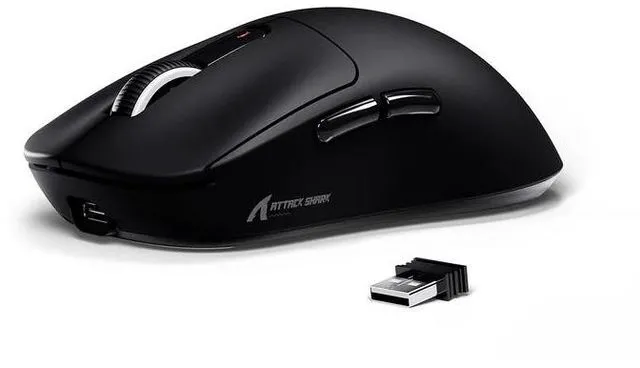
The ATTACK SHARK X3 is a 49g tri-mode wireless gaming mouse for PC and Mac, featuring a PAW3395 optical sensor with up to 26,000 DPI, 1,000Hz polling, and five programmable buttons. It suits competitive gamers who want precise tracking, low weight, and flexible wired, 2.4G wireless, or Bluetooth connectivity.
| Attribute | Value |
|---|---|
| Best For | Gaming and multi-device desktop use with optical tracking, 26,000 DPI resolution, five buttons, and Bluetooth, 2.4G wireless, or USB-C wired connectivity |
| Tracking And Performance | Optical tracking with adjustable resolution up to 26,000 DPI |
| Connectivity | Bluetooth 5.2, 2.4G wireless, and USB Type-C wired connection modes |
| Controls | Five-button layout for gaming and desktop control |
| Design And Dimensions | Black mouse weighing 49 grams and measuring 4.67 × 2.4 × 1.56 inches (11.85 × 6.1 × 3.97 cm) |
| Model Identifiers | ATTACK SHARK X3 gaming mouse |
Q: Should I buy the ATTACK SHARK X3 or the VXE R1 Pro?
A: Choose the ATTACK SHARK X3 if you want Bluetooth, 2.4GHz wireless, and USB-C wired connectivity in one mouse, especially for switching between a gaming PC, laptop, and other devices. Choose the VXE R1 Pro if your priority is gaming-only 2.4GHz performance, higher polling-rate options, and a shape that feels longer and lower in the hand. Both are lightweight budget gaming mice, so shape preference and wireless reliability matter more than their headline sensor specifications.
Q: Is the ATTACK SHARK X3 Pro worth choosing over the regular X3?
A: Choose the X3 Pro if you specifically want 8KHz polling and the lower reporting interval that can benefit high-refresh competitive gaming. Choose the regular X3 if 1000Hz polling, a 49g design, and tri-mode connectivity already meet your needs. For general gaming, office work, and Bluetooth use, the regular X3 provides the more practical feature set; the Pro is mainly justified by its higher polling-rate capability.
Q: How does the ATTACK SHARK X3 compare with the Logitech G PRO X SUPERLIGHT 2?
A: Choose the ATTACK SHARK X3 when low weight, Bluetooth connectivity, and a lower-cost tri-mode design are more important than premium competitive features. Choose the Logitech G PRO X SUPERLIGHT 2 when you want a more established software and support ecosystem, a 2.4GHz gaming connection rated for up to 8KHz polling, and a longer stated warranty. The X3 is listed at 49g and 1000Hz, while the Logitech model is listed at 60g, up to 8KHz, and up to 95 hours of battery life.
Q: Is the ATTACK SHARK X3 good for competitive FPS gaming?
A: The ATTACK SHARK X3 is suitable for casual and competitive-style FPS play when its small symmetrical shape fits your hand and grip. It provides a PAW3395 sensor and 1000Hz polling, but professional testing reports higher click latency than some competing budget mice. Choose it for its low weight and price; choose a higher-performance competitive mouse if minimizing click latency and maximizing polling rate are your main priorities.
Q: Is the ATTACK SHARK X3 better for travel than a wired gaming mouse?
A: Choose the ATTACK SHARK X3 for portability because it weighs about 49g and supports Bluetooth, 2.4GHz wireless, and USB-C wired operation. Bluetooth is convenient for laptops and general use, while the included 2.4GHz receiver is the better choice for gaming. Choose a wired mouse instead if you want to avoid charging and do not need wireless or multi-device flexibility.
Q: Can I use the ATTACK SHARK X3 with both a PC and a Mac?
A: Yes. The X3 supports Windows and Mac use through Bluetooth 5.2, 2.4G wireless, or USB-C wired mode. Bluetooth is the most convenient option for devices without a traditional USB port, while 2.4G wireless is better suited to gaming. The product information does not specify whether every driver feature is supported equally on macOS.
Q: Is the X3 suitable for office work, travel, and switching between multiple devices?
A: It is suitable for users who want one compact mouse for gaming, office work, and multiple computers. The 49-gram design is easy to carry, Bluetooth supports device flexibility, and the product is specified to connect with up to four devices. The main trade-off is that its gaming-focused shape, click feel, and five-button layout may be less office-oriented than a quiet productivity mouse.
Q: Which connection mode should I use for gaming?
A: Use 2.4G wireless for cable-free gaming, USB-C wired mode when you want the most direct connection or need to charge, and Bluetooth for general desktop use or device compatibility. The X3 supports a 1000Hz polling rate and PAW3395 sensor, but the provided specifications do not state separate latency figures for each connection mode.
Q: Who is the ATTACK SHARK X3 best suited for?
A: The X3 is best suited for PC or Mac users who want a lightweight gaming mouse that also works for everyday computing. Its 49-gram weight, adjustable DPI up to 26,000, 1000Hz polling rate, five programmable buttons, and three connection modes fit competitive gaming, general gaming, and multi-device use. It may be less suitable for users who prefer a large, heavily contoured ergonomic mouse or need more than five programmable buttons.
Q: Does the X3 require software to customize its buttons?
A: The product information states that the driver can customize the five buttons, DPI, polling rate, lift-off distance, shortcuts, and macros. Basic cursor use should be possible without customization, but users who want remapping or macros should plan to install the supported driver. The provided information does not confirm the driver's exact macOS feature set.
Q: Is the ATTACK SHARK X3 worth buying as a budget wireless gaming mouse?
A: It can be a good value for buyers who prioritize a 49 g lightweight design, PAW3395 sensor, and tri-mode connectivity at a low price. Community discussions also report quality-control, software, and connection issues, so it is a better fit for buyers who accept more reliability risk than with established brands.
Q: Does the ATTACK SHARK X3 have reliable wireless connectivity?
A: Wireless reliability appears inconsistent across community reports. Some users report stable 2.4 GHz and Bluetooth operation, while others describe intermittent disconnections, cursor interruptions, or better behavior in wired mode. Buyers who need dependable wireless performance should consider the return policy and be prepared to use USB-C wired mode if necessary.
Q: How suitable is the ATTACK SHARK X3 for long gaming or office sessions?
A: The 49 g body is suitable for users who prefer a lightweight mouse and may reduce hand movement effort during long sessions. Its approximately 118.5 × 61 × 39.7 mm symmetrical shape is more likely to suit small-to-medium hands and claw, fingertip, or relaxed grips than users who prefer a large ergonomic palm mouse. Community reports also mention that the stock feet and weight balance may not suit everyone.
Q: What are the main long-term risks of choosing the ATTACK SHARK X3?
A: The main reported risks are battery degradation, double-clicking or other quality-control problems, software or firmware issues, and occasional wireless faults. Some owners report months or more than a year of successful use, but long-term outcomes appear variable. It is best suited to buyers who value low weight and specifications more than predictable long-term durability.
Q: Is the ATTACK SHARK X3 a practical replacement for a wired mouse?
A: Yes, if you want the flexibility of 2.4 GHz wireless, Bluetooth 5.2, and USB-C wired operation in one mouse. Wired mode provides a fallback when charging or wireless performance is inconvenient, while Bluetooth is useful for compatible laptops and other devices. It is less suitable if you want a simple plug-and-play mouse with no driver or firmware troubleshooting.