


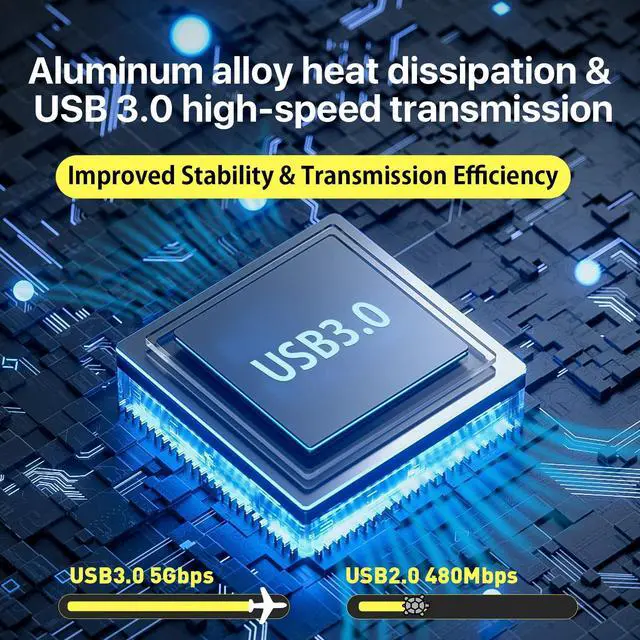


Work with Switch 2/Switch 1/OLED/Steam Deck/PS4/PS5/Xbox/DSLR, etc.
HDMI Capture Card Demo.
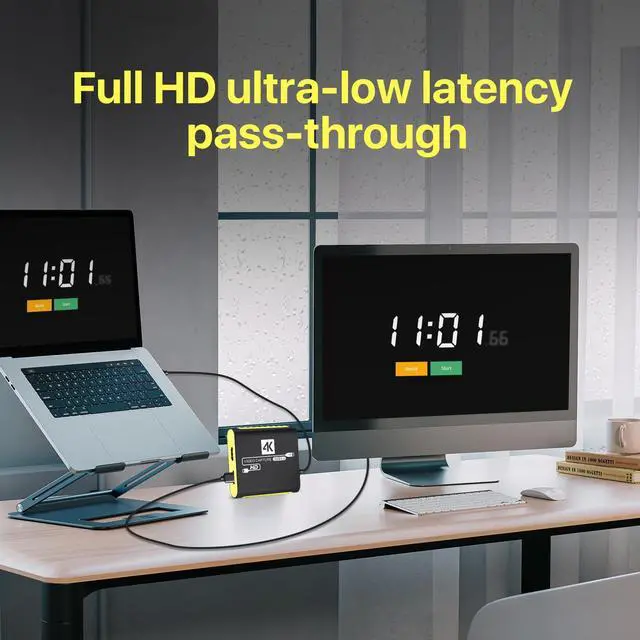
Merchant VideoHDMI capture card for gaming. Works perfectly for Switch, PS5, PS4, Xbox Series X/S, Xbox One, and Steam Deck. Supports 1080P 60FPS capture for live streaming, game recording, and content creation. Features zero-latency passthrough, smooth OBS broadcasts, with USB 3.0 speed and built-in mic support.
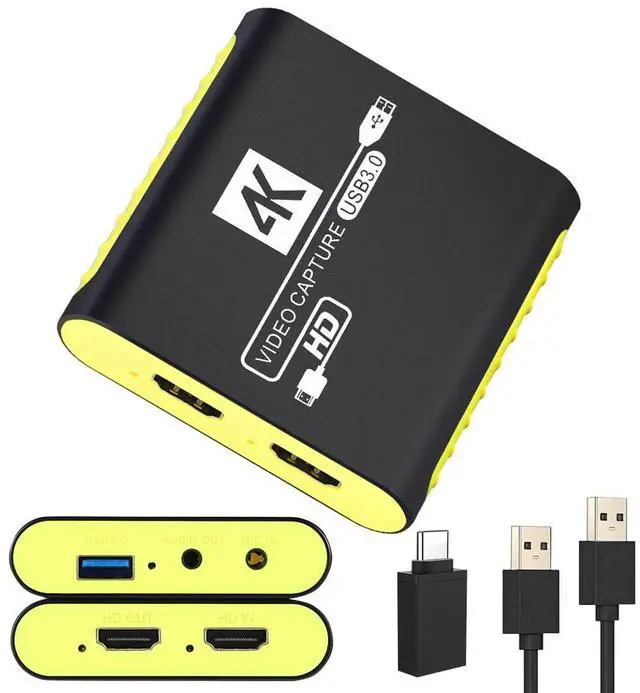
USB 3.0 HDMI Video Capture Card Device with Loop-Out for Gaming, Live Streaming

This USB 3.0 HDMI capture card supports YUY2 format, built-in pass-through output, and driver-free operation. Compatible with major streaming platforms and various devices, it delivers 1080P 60FPS capture for smooth live streams and gameplay recording.
Professional HDMI Capture Card for Gaming & Streaming
Key Features at a Glance
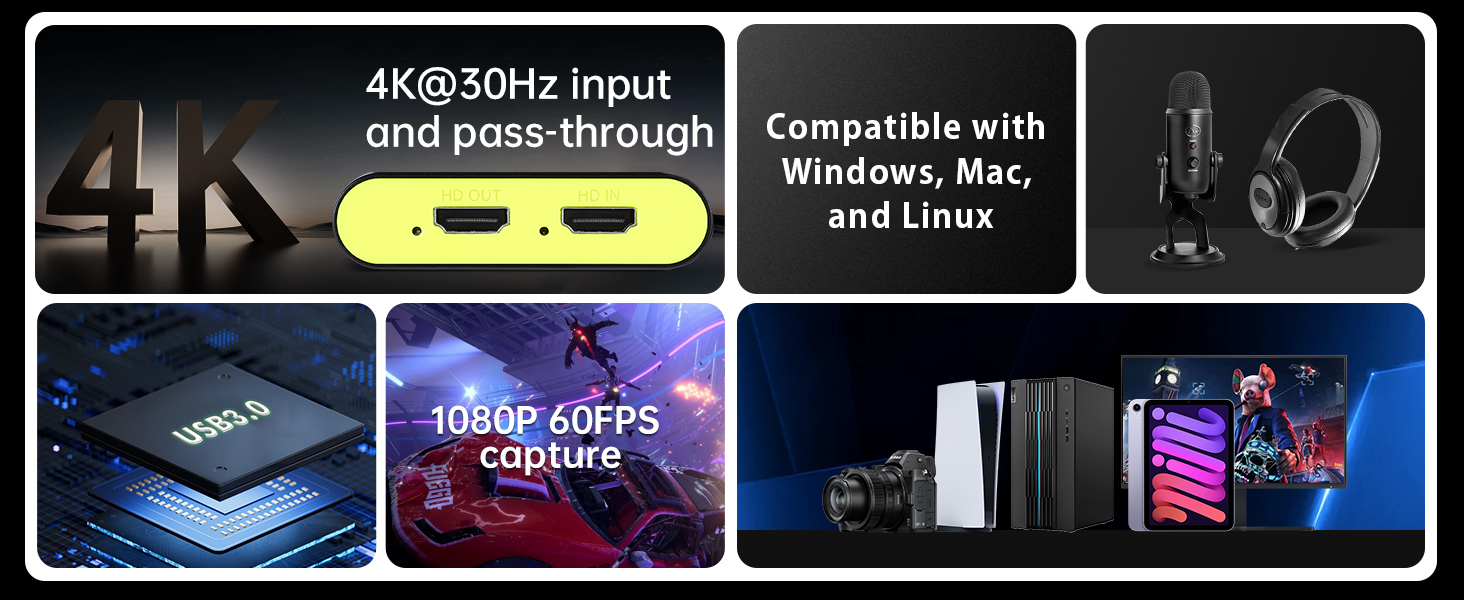
Supports 4K@30Hz pass-through and 1080P 60FPS capture via USB 3.0. Works seamlessly with Windows, Mac, and Linux for smooth live streams and game recording.
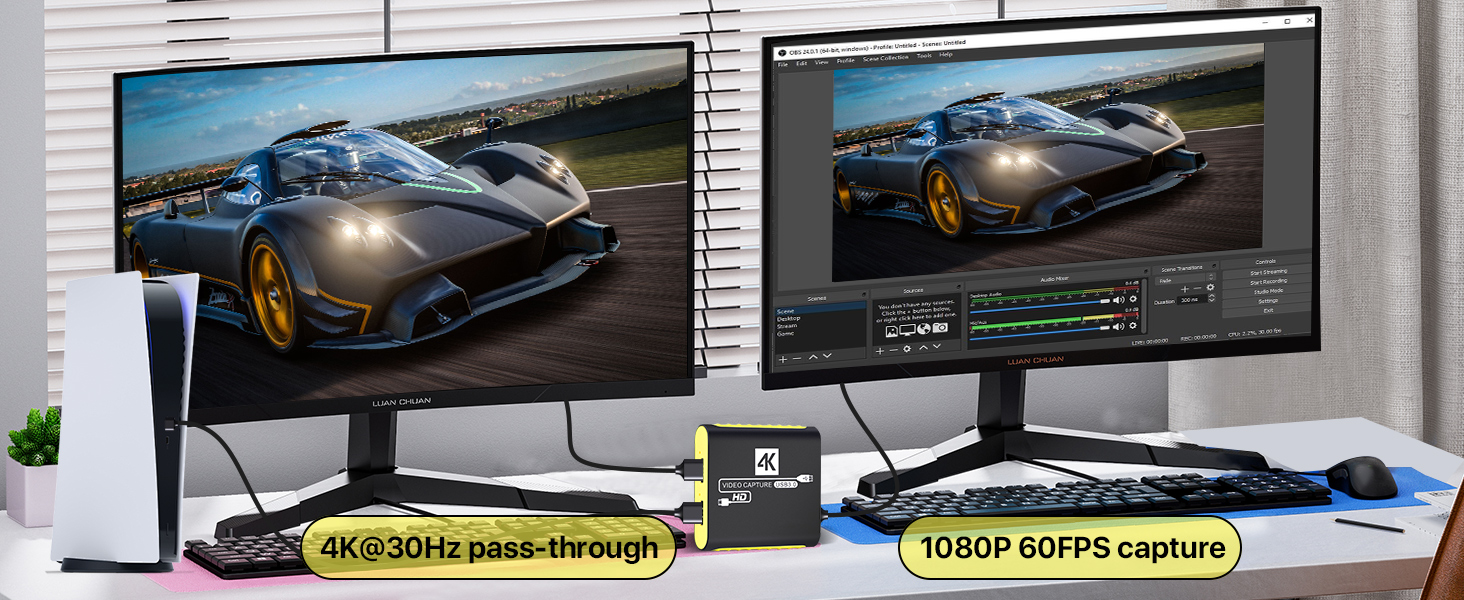
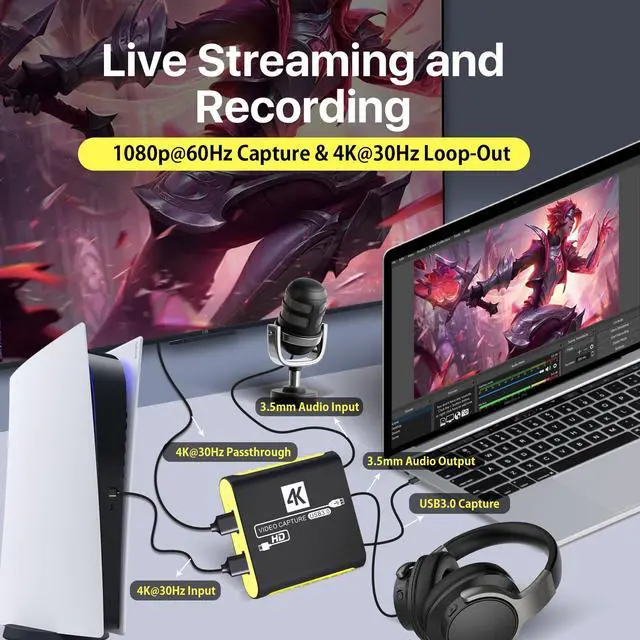
4K Passthrough + 1080P Capture
Enjoy real-time gameplay with 4K@30Hz pass-through while capturing smooth 1080P 60FPS footage. Perfect for live streaming, game recording, and sharing your epic moments with zero lag.
This HDMI capture card supports 4K@30Hz pass-through and 1080P 60FPS capture via USB 3.0. It works seamlessly with Windows, Mac, and Linux for smooth live streams, game recording, and real-time gameplay monitoring.
Versatile HDMI Capture Card for Gaming & Streaming
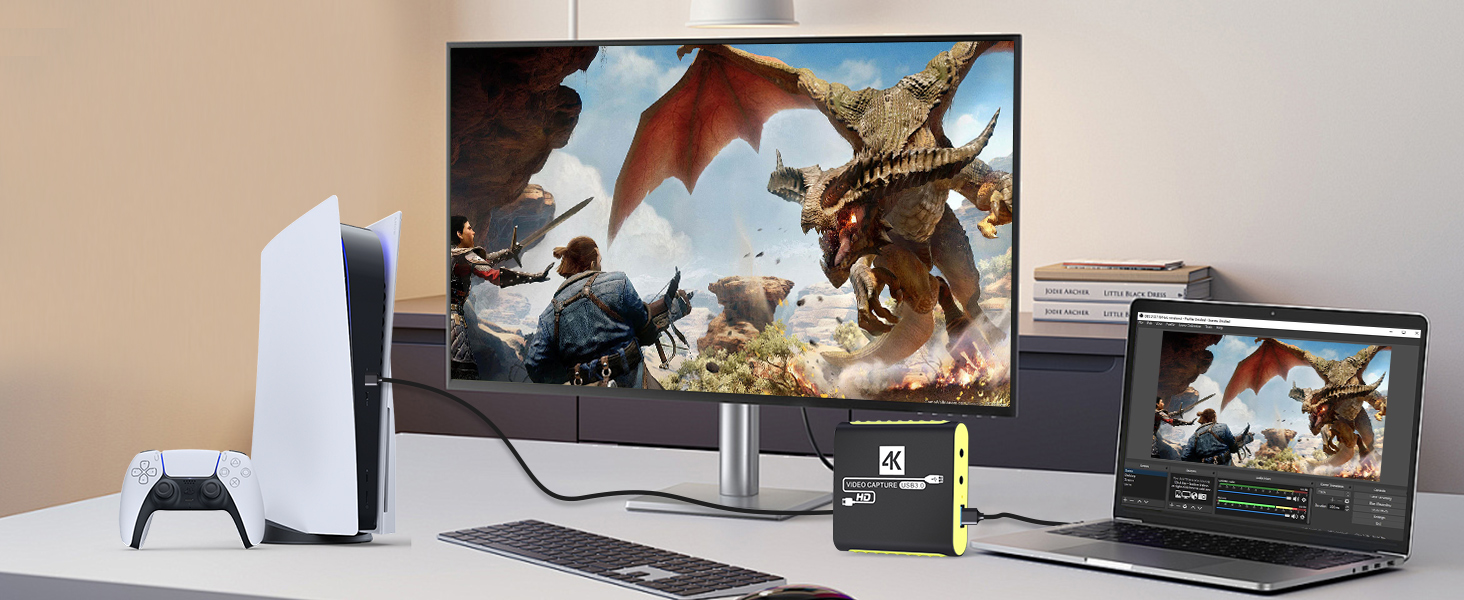
Works with PS5
Capture and stream console gameplay in smooth 1080P 60FPS. Enjoy zero-latency pass-through while sharing your epic gaming moments with live audiences.
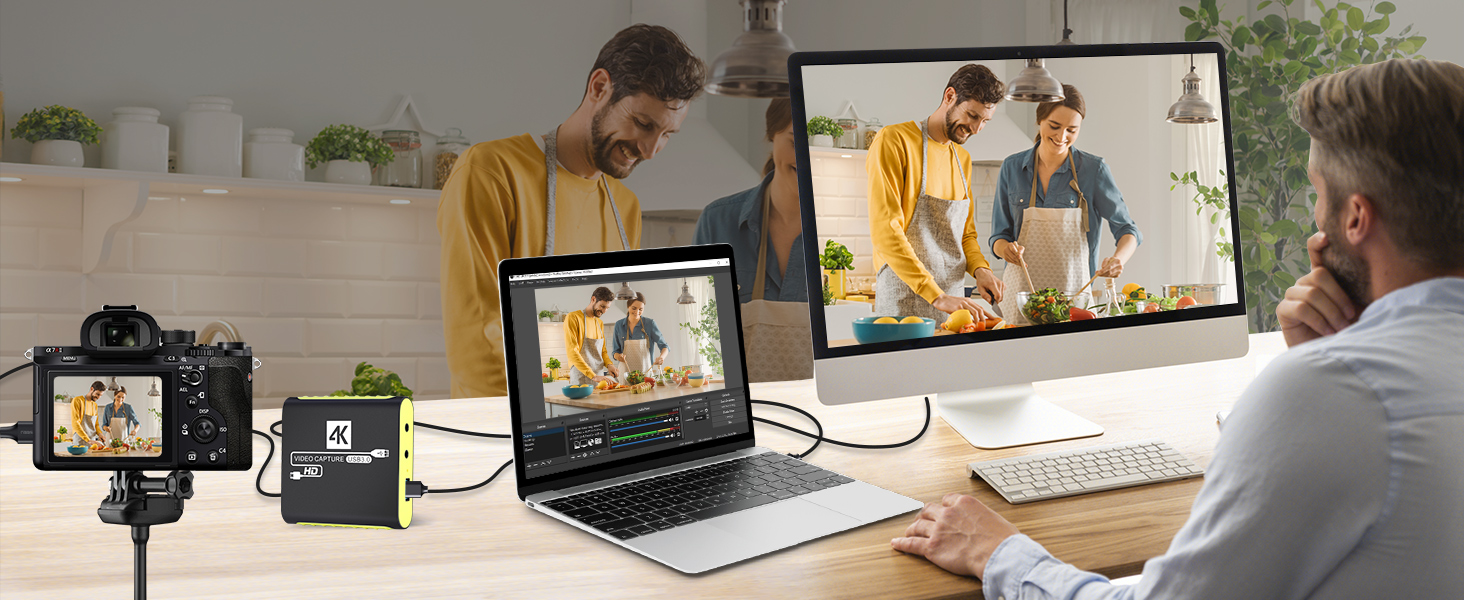
Work with DSLR/Camera
Turn your camera into a professional streaming setup. Capture high-quality video for cooking shows, vlogs, and online meetings with this plug-and-play HDMI capture device.
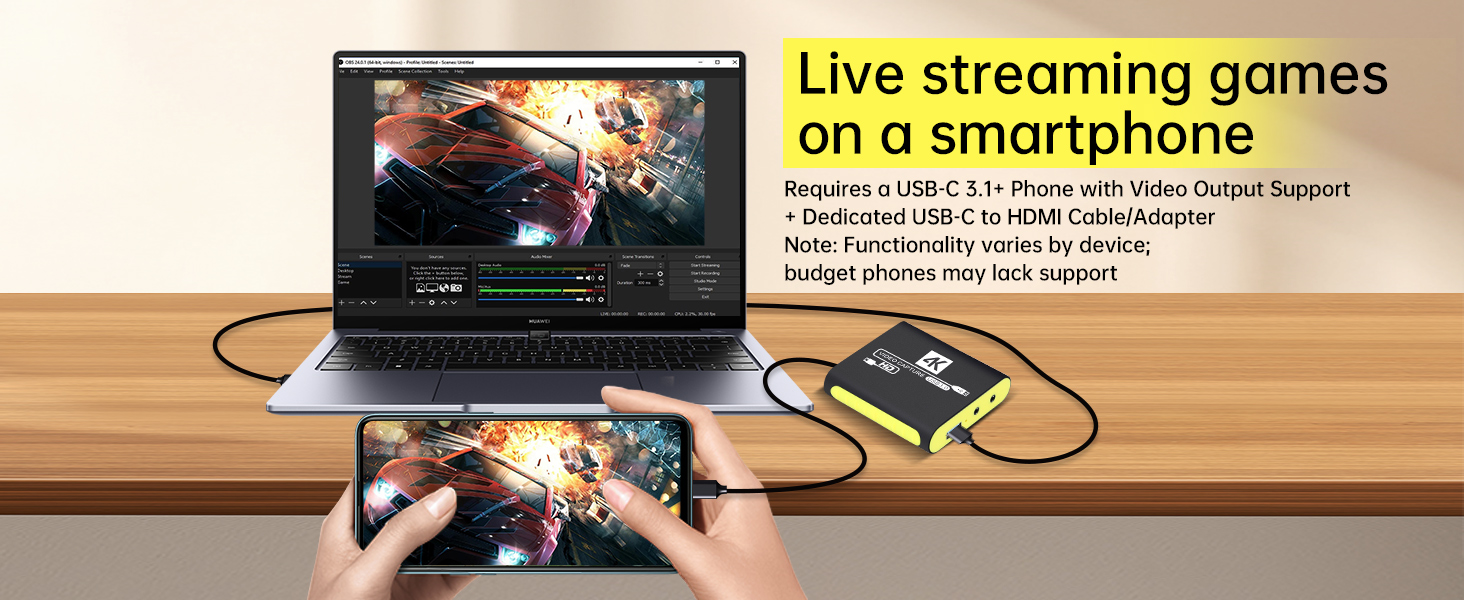
Work with SmartPhone
Stream mobile games directly to your PC. With the right adapter, you can capture gameplay from your phone for live broadcasts, just like a pro streamer.
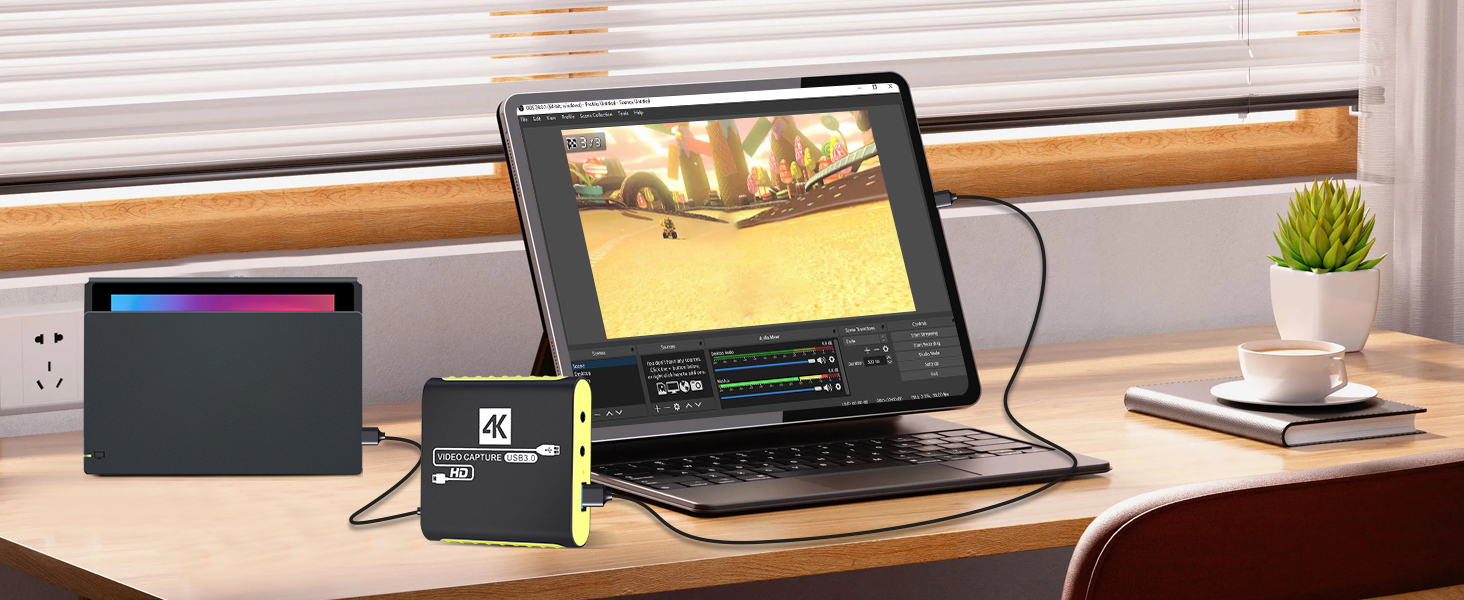
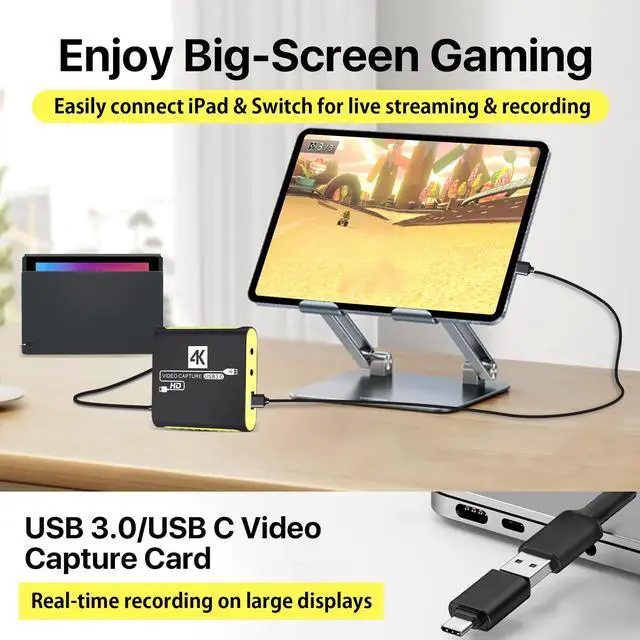
Work with Switch 2/Switch
Stream your favorite handheld games in crisp 1080P. Enjoy zero-lag monitoring and smooth capture for both casual play and competitive streaming sessions.
This versatile HDMI capture card supports 1080P 60FPS capture with zero-latency pass-through. It works with game consoles, cameras, mobile devices, and more, ideal for live streaming, game recording, and content creation.
Compatible with All Major Streaming Platforms & Software

This HDMI capture card works seamlessly with major streaming platforms and popular software. It supports live streaming and recording, making it easy to share your gameplay, vlogs, and content with audiences worldwide.
Easy Setup & Troubleshooting for Your Capture Card
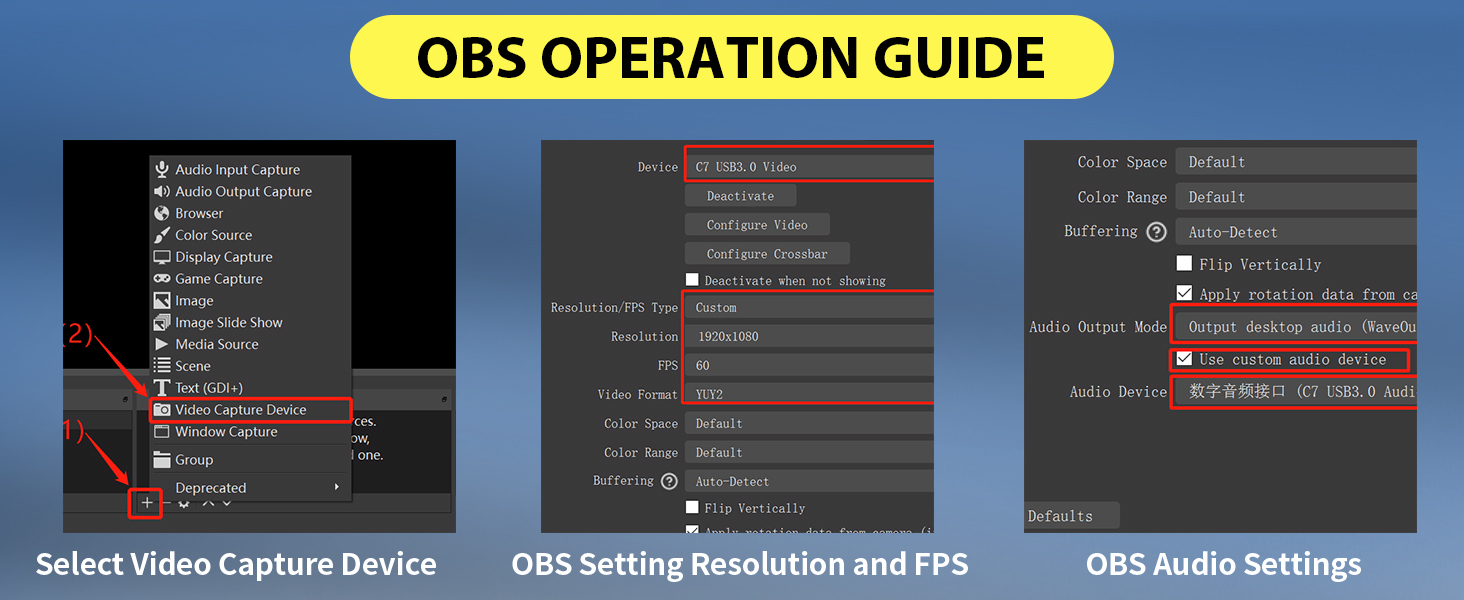
Step-by-Step OBS Setup Guide
Get started quickly with our easy-to-follow OBS guide. Learn how to select your capture device, set resolution and FPS, and configure audio settings for smooth streaming.
Optimize Your Audio in OBS
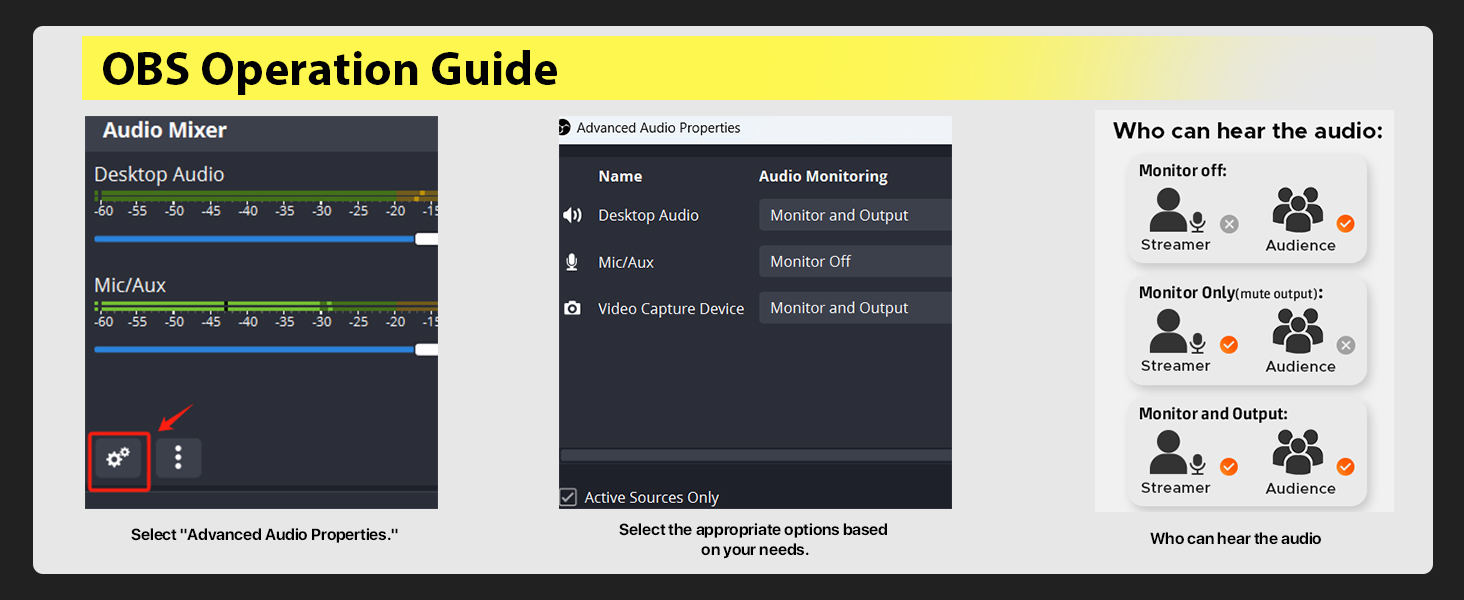
Perfect your stream audio with our guide. Adjust audio monitoring settings to ensure your voice and game sound are clear and balanced for your audience.
Quick Answers to Common Questions
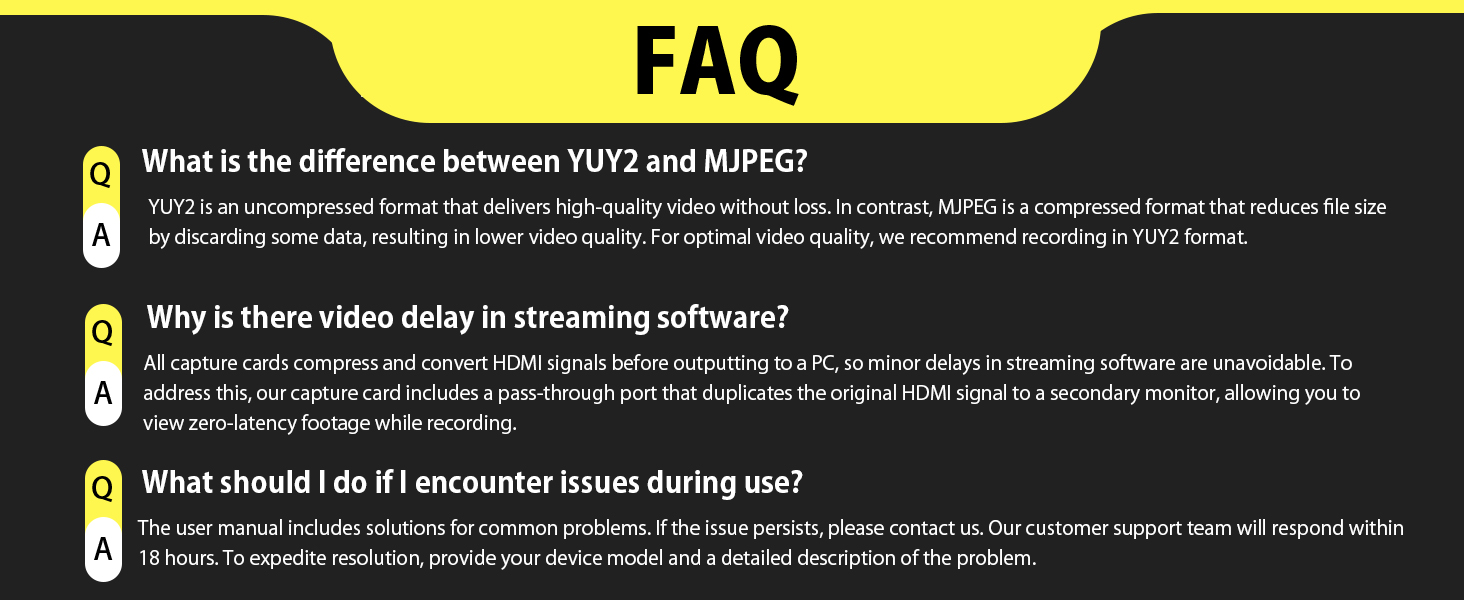
Find solutions to common issues like format differences, video delay, and troubleshooting tips. Our support team is ready to help if you need further assistance.
We've got you covered every step of the way. From easy setup guides to clear answers to common questions, you'll have all the help you need to get your capture card working perfectly for streaming and recording.
Specifications, Setup & Troubleshooting Guide
Full Product Specifications
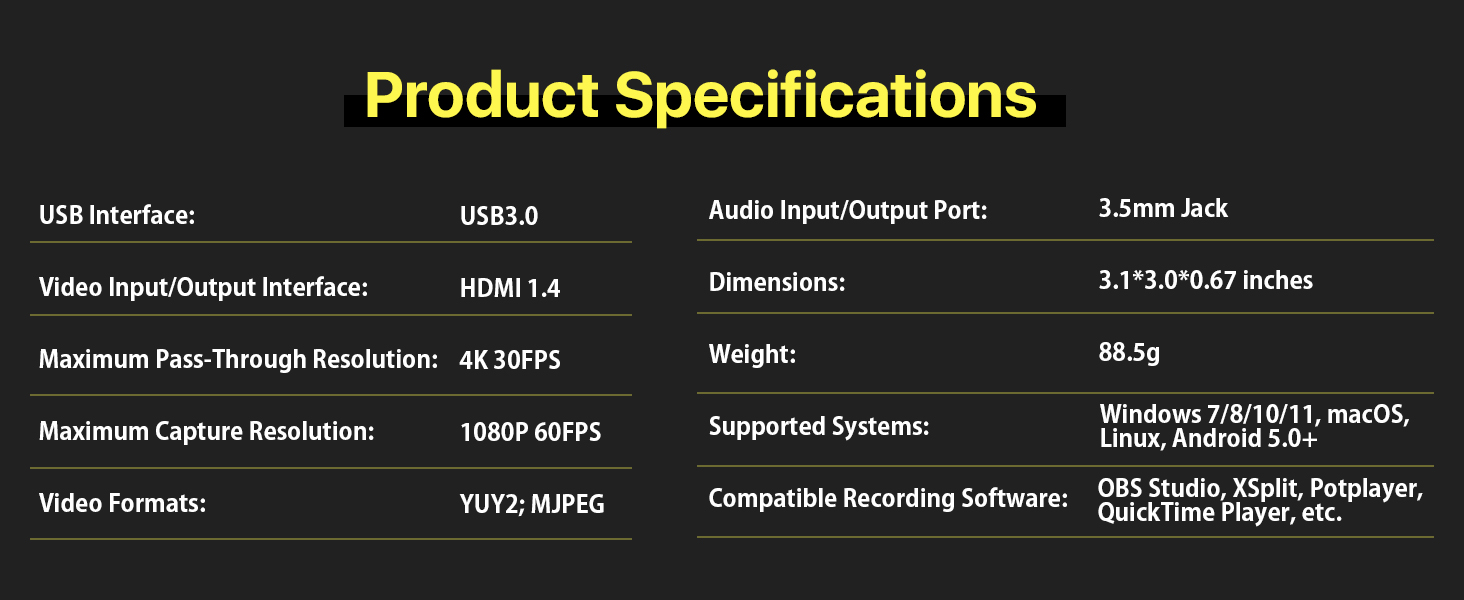
Get all the key specs you need. This capture card features USB 3.0, 4K pass-through, 1080P 60FPS capture, and support for multiple systems and video formats.
Simple Connection Diagram
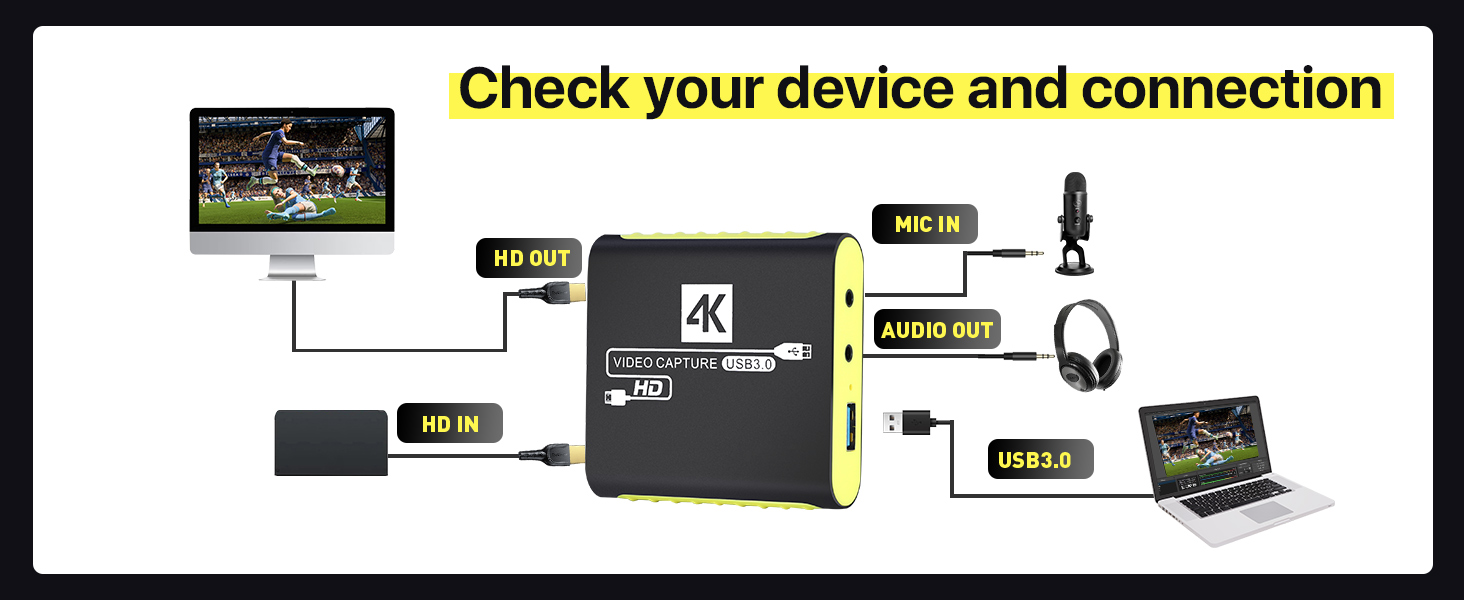
See how to connect your devices quickly. Follow our clear diagram to link your console, camera, or other source to your computer with the capture card.
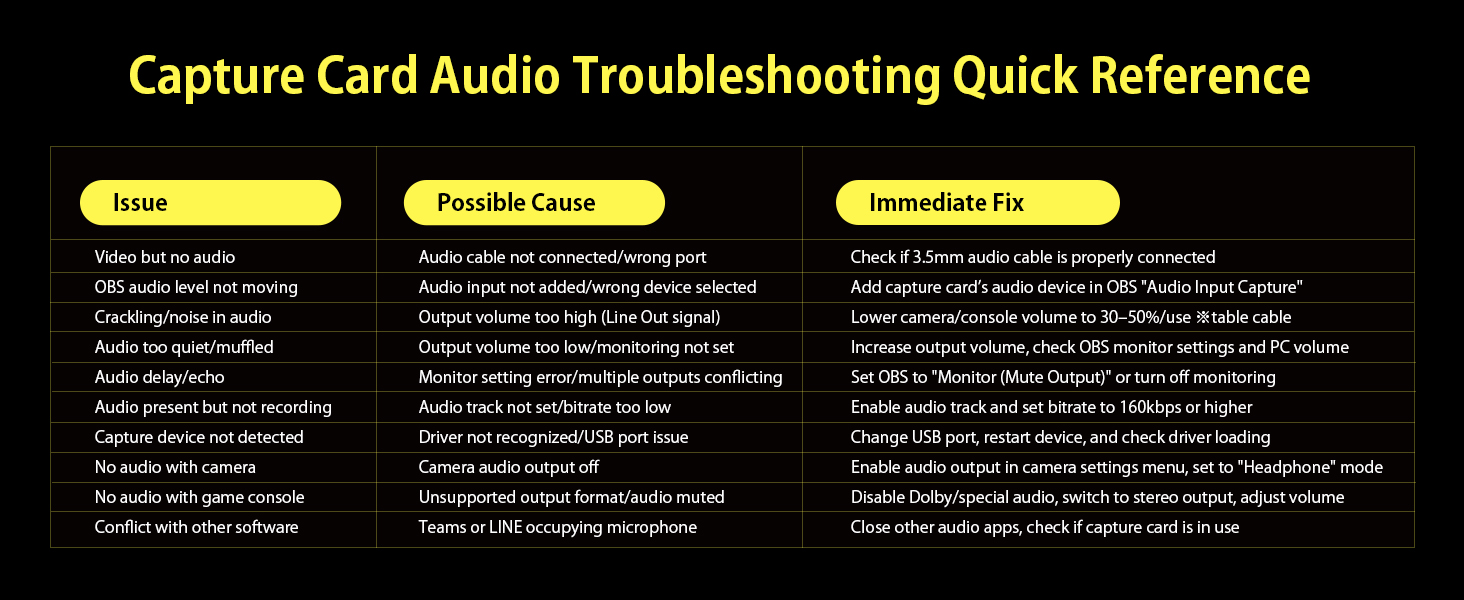
Audio Troubleshooting Guide
Solve common audio issues with ease. Our quick reference helps you fix problems like no sound, static, or audio delay in your streams and recordings.
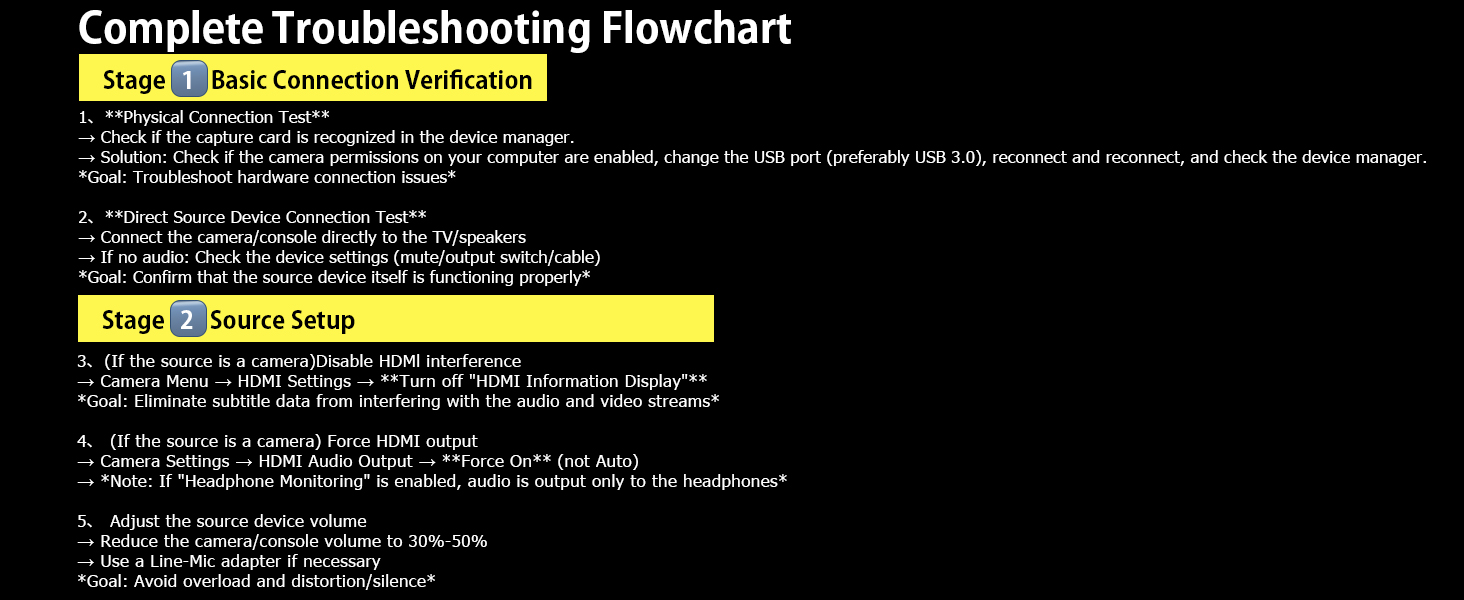
Complete Troubleshooting Flowchart
Follow our step-by-step guide to diagnose and fix issues. From basic connection checks to advanced settings, we’ve got you covered.
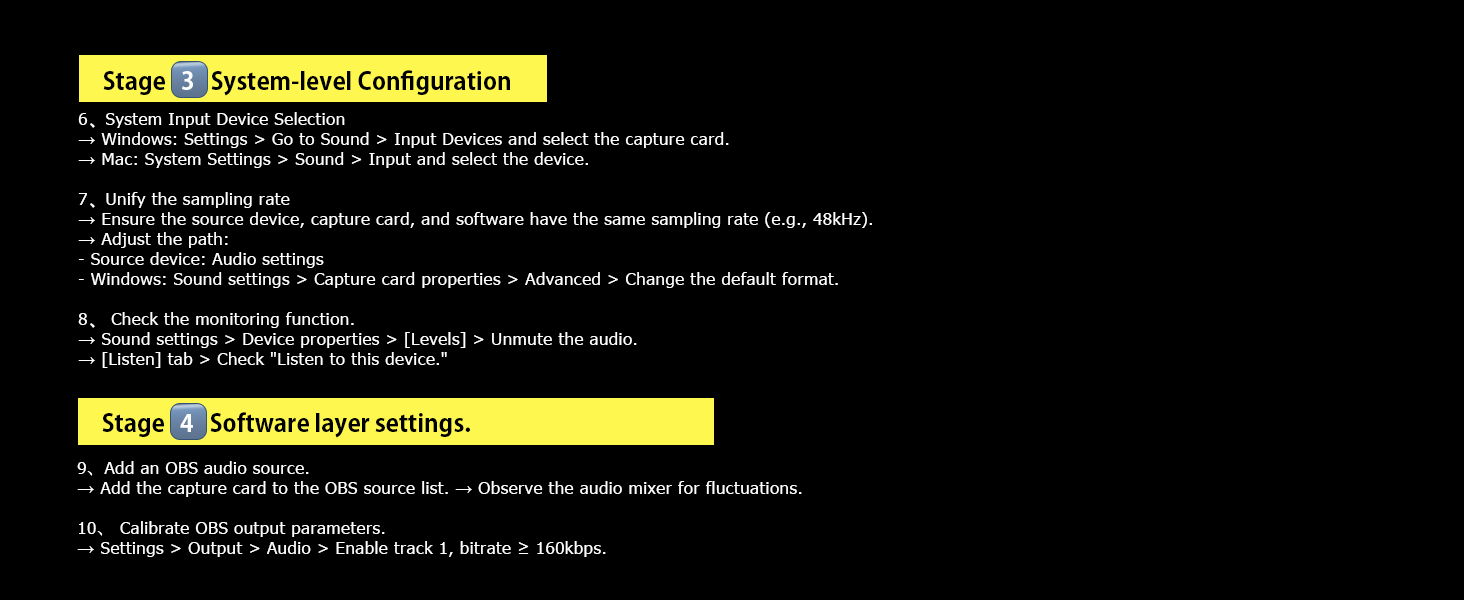
System & Software Configuration
Optimize your setup with our detailed guide. Learn how to adjust system settings and configure your streaming software for the best performance.
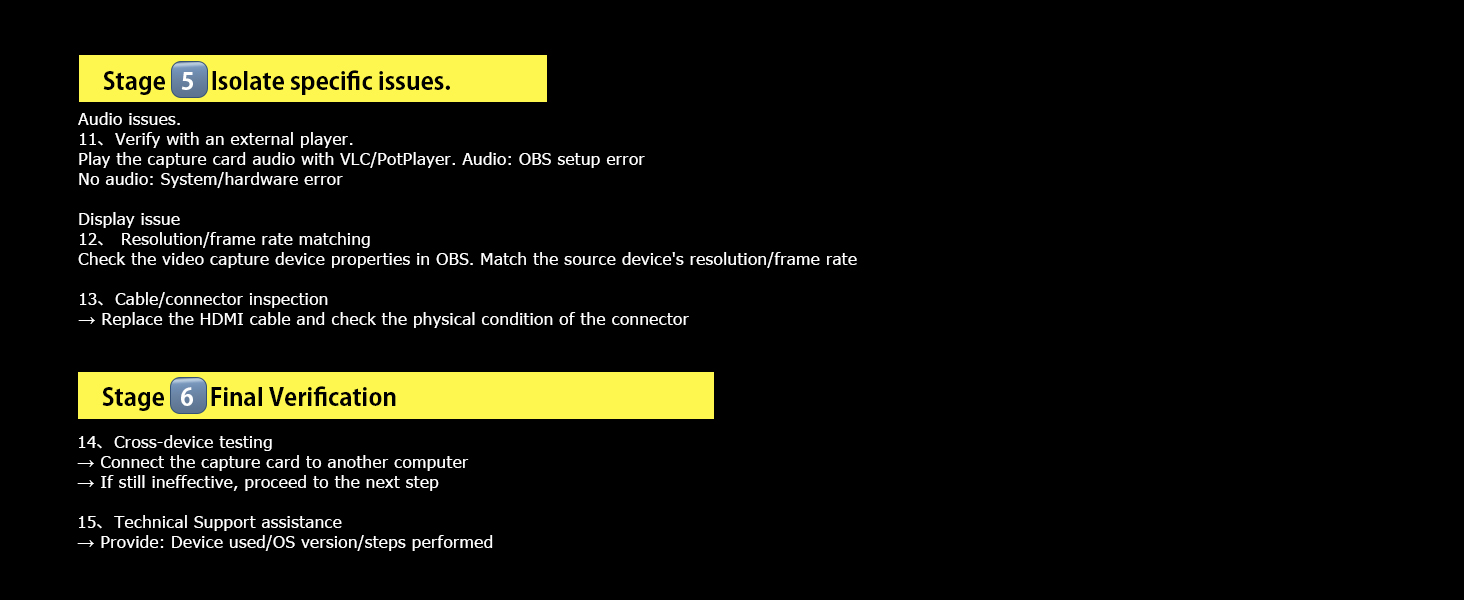
Final Checks & Support
Make sure everything is working perfectly for your HDMI Video capture card.
We’ve included all the specs, setup guides, and troubleshooting help you need. From connecting your devices to solving common issues, you’ll have everything to get your capture card working smoothly.
Work with Switch 2/Switch 1/OLED/Steam Deck/PS4/PS5/Xbox/DSLR, etc.
HDMI Capture Card Demo.
Merchant VideoHDMI capture card for gaming. Works perfectly for Switch, PS5, PS4, Xbox Series X/S, Xbox One, and Steam Deck. Supports 1080P 60FPS capture for live streaming, game recording, and content creation. Features zero-latency passthrough, smooth OBS broadcasts, with USB 3.0 speed and built-in mic support.
USB 3.0 HDMI Video Capture Card Device with Loop-Out for Gaming, Live Streaming

This USB 3.0 HDMI capture card supports YUY2 format, built-in pass-through output, and driver-free operation. Compatible with major streaming platforms and various devices, it delivers 1080P 60FPS capture for smooth live streams and gameplay recording.
Professional HDMI Capture Card for Gaming & Streaming
Key Features at a Glance
4K Passthrough + 1080P Capture


Supports 4K@30Hz pass-through and 1080P 60FPS capture via USB 3.0. Works seamlessly with Windows, Mac, and Linux for smooth live streams and game recording.
Enjoy real-time gameplay with 4K@30Hz pass-through while capturing smooth 1080P 60FPS footage. Perfect for live streaming, game recording, and sharing your epic moments with zero lag.
This HDMI capture card supports 4K@30Hz pass-through and 1080P 60FPS capture via USB 3.0. It works seamlessly with Windows, Mac, and Linux for smooth live streams, game recording, and real-time gameplay monitoring.
Versatile HDMI Capture Card for Gaming & Streaming
Works with PS5
Work with DSLR/Camera
Work with SmartPhone
Work with Switch 2/Switch


Capture and stream console gameplay in smooth 1080P 60FPS. Enjoy zero-latency pass-through while sharing your epic gaming moments with live audiences.
Turn your camera into a professional streaming setup. Capture high-quality video for cooking shows, vlogs, and online meetings with this plug-and-play HDMI capture device.
Stream mobile games directly to your PC. With the right adapter, you can capture gameplay from your phone for live broadcasts, just like a pro streamer.
Stream your favorite handheld games in crisp 1080P. Enjoy zero-lag monitoring and smooth capture for both casual play and competitive streaming sessions.
This versatile HDMI capture card supports 1080P 60FPS capture with zero-latency pass-through. It works with game consoles, cameras, mobile devices, and more, ideal for live streaming, game recording, and content creation.
Compatible with All Major Streaming Platforms & Software

This HDMI capture card works seamlessly with major streaming platforms and popular software. It supports live streaming and recording, making it easy to share your gameplay, vlogs, and content with audiences worldwide.
Easy Setup & Troubleshooting for Your Capture Card
Step-by-Step OBS Setup Guide
Optimize Your Audio in OBS
Quick Answers to Common Questions


Get started quickly with our easy-to-follow OBS guide. Learn how to select your capture device, set resolution and FPS, and configure audio settings for smooth streaming.
Perfect your stream audio with our guide. Adjust audio monitoring settings to ensure your voice and game sound are clear and balanced for your audience.
Find solutions to common issues like format differences, video delay, and troubleshooting tips. Our support team is ready to help if you need further assistance.
We've got you covered every step of the way. From easy setup guides to clear answers to common questions, you'll have all the help you need to get your capture card working perfectly for streaming and recording.
Specifications, Setup & Troubleshooting Guide
Full Product Specifications
Simple Connection Diagram
Audio Troubleshooting Guide
Complete Troubleshooting Flowchart
System & Software Configuration
Final Checks & Support


Get all the key specs you need. This capture card features USB 3.0, 4K pass-through, 1080P 60FPS capture, and support for multiple systems and video formats.
See how to connect your devices quickly. Follow our clear diagram to link your console, camera, or other source to your computer with the capture card.
Solve common audio issues with ease. Our quick reference helps you fix problems like no sound, static, or audio delay in your streams and recordings.
Follow our step-by-step guide to diagnose and fix issues. From basic connection checks to advanced settings, we’ve got you covered.
Optimize your setup with our detailed guide. Learn how to adjust system settings and configure your streaming software for the best performance.
Make sure everything is working perfectly for your HDMI Video capture card.
We’ve included all the specs, setup guides, and troubleshooting help you need. From connecting your devices to solving common issues, you’ll have everything to get your capture card working smoothly.