Newegg.com - A great place to buy computers, computer parts, electronics, software, accessories, and DVDs online. With great prices, fast shipping, and top-rated customer service - Newegg shopping upgraded ™
If you are reading this message, Please click this link to reload this page.(Do not use your browser's "Refresh" button). Please email us if you're running the latest version of your browser and you still see this message.
Newegg.com - Computer Parts, Laptops, Electronics, HDTVs, Digital Cameras and More!
Sold and Shipped by Newegg
LOADING...
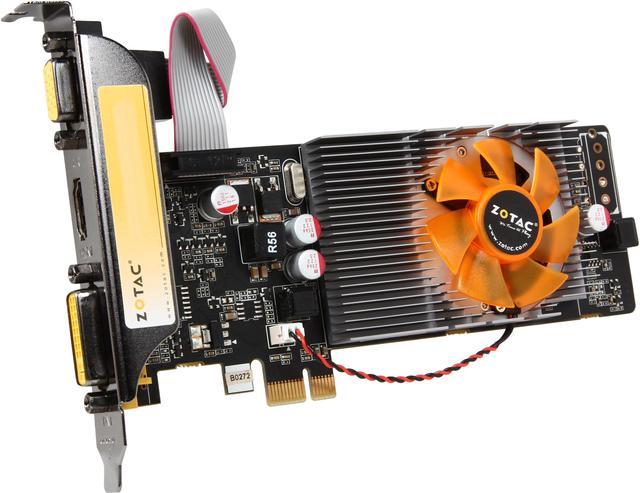
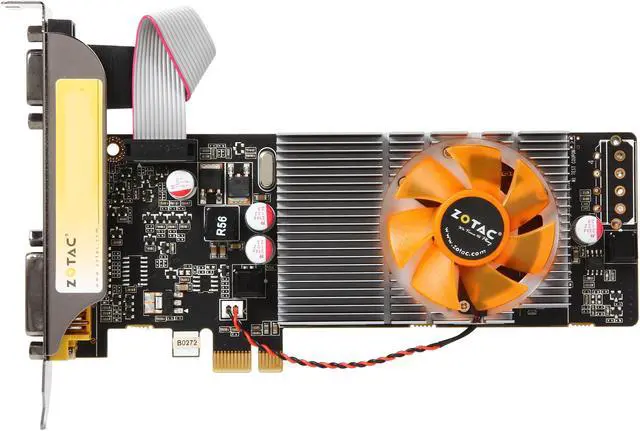
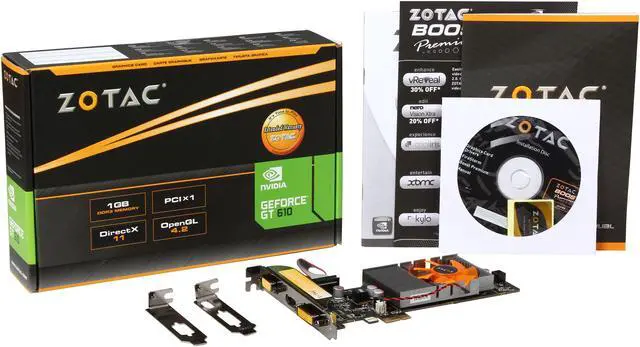
Your PC is now more visual with the Zotac GeForce GT 610 VGA card. It supports DirectX 11 standards and brings you a taste of the latest graphics innovation at an affordable price. With an assortment of advanced technology, this card gives you performance kick and enhanced functionality for everyday use: your photo rendering, video editing, web surfing and even Window 7 operations are fast and smooth. HDMI, DVI and D-Sub round out your user experience for an instant productivity boost.
NVIDIA CUDA Technology CUDA technology unlocks the power of the GPU’s processor cores to accelerate the most demanding tasks, including video transcoding, physics simulation, ray tracing, and more. It also delivers incredible performance improvements over traditional CPUs.
NVIDIA PhysX Technology Full support for NVIDIA PhysX technology enables a totally new class of physical gaming interaction, and a more dynamic and realistic experience with GeForce.
NVIDIA Adaptive Vertical Sync Nothing is more distracting than framerate stuttering and screen tearing. The first tends to occur when framerates are low, the second when framerates are high. Adaptive V-Sync is a smarter way to render frames. At high framerates, V-sync is enabled to eliminate tearing; at low frame rates, it's disabled to minimize stuttering. It gets rid of distractions so you can get on with gaming.
NVIDIA FXAA Technology Shader-based anti-aliasing technology enables ultra-fast anti-aliasing in hundreds of PC games.
Blu-ray 3D Support Connect your PC to any 3D-enabled TV over HDMI. You'll enjoy a cinematic 3D experience in your home, with seamless support for 1080p Blu-ray 3D discs.
Pros: Worked out of the box perfectly when I needed a PCI Express graphics card that would fit into a 4x slot instead of the standard 16x. Even came with low profile slot covers, but we didn't need them.
Cons: None.
Other Thoughts:
I needed this card to add graphics to a network storage appliance that was using software RAID. We managed to lose a second drive from a RAID5 while a spare was only partially sync'd in. With this 1x card plugged into a PCI Express 4x slot we were able to boot off some rescue media and force the kicked drive back in long enough to get the sync completed.
Saved my bacon.
Pros: I bought this for the PCIE x1 connector to install in a Dell Poweredge 2950 rack server - worked perfectly.
Cons: Nothing so far - installation was simple as expected.
Other Thoughts: Note: Dell does not support graphics card upgrades for servers. The system takes a while to boot between the bios screen and the OS splash screen.
Pros: This little card has been able to withstand almost everything I have thrown at it without overheating or damaging it, and I put it under a lot of heavy stress as well as some heavy overclocking. If you plan to game you are limited. Battlefield 3 only runs with 35 avg FPS on minimum. Lasted me a few years and I plan to move it to a server computer shortly.
Cons: NOT for gaming. This is the equivalent of on-board graphics.
Other Thoughts: I bought this for $49.99 two years ago but I feel the price today isn't suitable.
Pros: I have a lot of customers who buy Dell Inspiron desktops... they have one PCI 16x slot and two PCI 1x slots... this card is great for when they want more than two monitors. I can slap two of them on the PCI 1x slots and get up to four monitors. For a business customer who wants to run spreadsheets, word processing, email and websites, they're great. Will they play games? not many... will they handle adobe photoshop? not very well... but they work great for their intended audience... business apps on multiple monitors. I buy a couple of these every month it seems here late.y
Cons: none assuming you're using them for what they're designed for...
Pros: Good Price
Cons:
Did not work on a older Windows 8.1 Machine. Does not state that on NewEggs product description. On Zotac web page, it does state Windows Vista, Windows 7, but does not state it will work on Windows 8 any place.
At start up, it would get a NMI hardware error. Talked to Zotac support, put no luck. Suggested trying it with a new install of Windows 8.1, but still didn't work in Client's machine. Tried it on another Windows 8.1 machine and it worked fine. Saw on line that others have had this issue as well.
Pros: If it's not DOA it's good
Cons: Arrived DOA and you wouldn't exchange it
Other Thoughts: Horrible Service
Pros:
great video card for my PowerEdge 840 that my work was throwing out - It works with Ubuntu, Mint and Fedora latest versions,,,I have not tried Windows as I do not use it at home,,,so not promising anything there- had an old dell soundcard and the video card picks audio up with no problems- hooked into my 46" tv and looks and sounds amazing though HDMII...you have to dl the latest ,run file with ..I got it to run by:
First, download the latest Nvidia drivers to a familiar location, such as Downloads. Log out of the account and press CTRL-ALT-F1 in order to bring up the terminal. Enter the following commands:
sudo service lightdm stop
cd ~/Downloads
sudo chmod a+x NVIDIA-Linux-x86-304.51.run
./ NVIDIA-Linux-x86-304.51.run
I would recommend Ubuntu as looks the sweetest though HDMI - the other distros..
Also, if you are installing Ubuntu on the PE 840 with or without this card - turn off "allow operating install" in bios- or worded similar...
but 8 g of memory and this med to low end server gets boosted to a home media machine,,,I will install SteamOS later when out of beta- have not tried yet- but sure it will look good with this card...also- I installed Wine and Diablo3 after finally figuring out how too- and it ran very smooth,,,doubt if games like Crisis will do well but- you get what you paid for....
Cons: none for the price- takes a little Linux knowledge to get driver down- but you can google your way though - and refer to my post
Other Thoughts: nice for the price- with Linux distros== not sure if windows works
Loading...

Newegg’s website and online services use cookies and similar technology for a number of reasons: Some technologies allow the site to function. These functional cookies are required to use the site and complete purchases. Another set of technologies improve the browsing experience and personalize it. Here are all the details about Newegg’s Cookie and Privacy Policies. Please select and accept your settings before you continue. Thank you.
To use this third-party content we need your approval to share your data with them. Here are all the details about Newegg’s Cookie and Privacy Policies. Please accept if you wish to continue with third-party features. Thank you.
Pros: Bought this on a whim years ago and going good. Little guy has come in handy when bench testing and display problems occur.
Not the strongest by far, but plays good classics and is very stable. Zotac has never failed me ^_^
Cons: Pretty much vintage now.