Skip to: |

Newegg.com - A great place to buy computers, computer parts, electronics, software, accessories, and DVDs online. With great prices, fast shipping, and top-rated customer service - once you know, you Newegg.

If you are reading this message, Please click this link to reload this page.(Do not use your browser's "Refresh" button). Please email us if you're running the latest version of your browser and you still see this message.

Newegg.com - Computer Parts, Laptops, Electronics, HDTVs, Digital Cameras and More!

  • | Wish List
  • Help
Home
Home > 
Computer Hardware > 
Computer Cases > 
Computer Cases > 
APEVIA CORP. > 
Item#: N82E16811144254

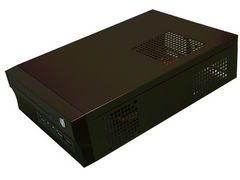
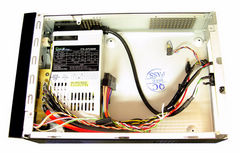
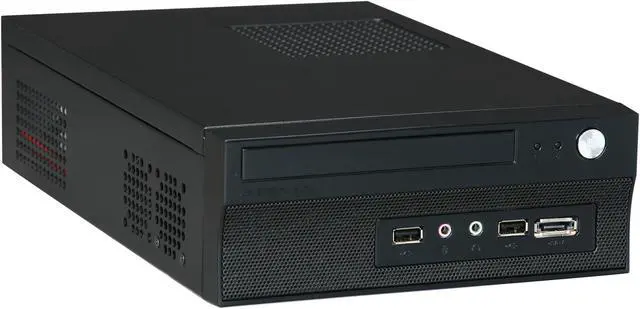
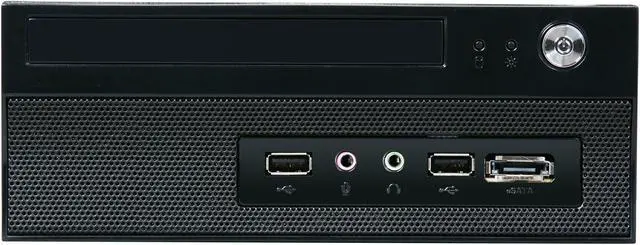
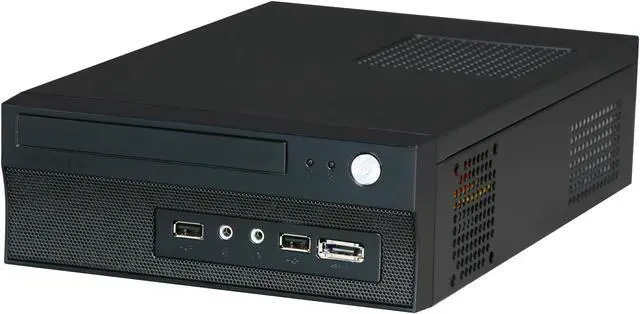
APEVIA X-FIT-100 Black Steel Mini-ITX Tower Computer Case 250W Power Supply

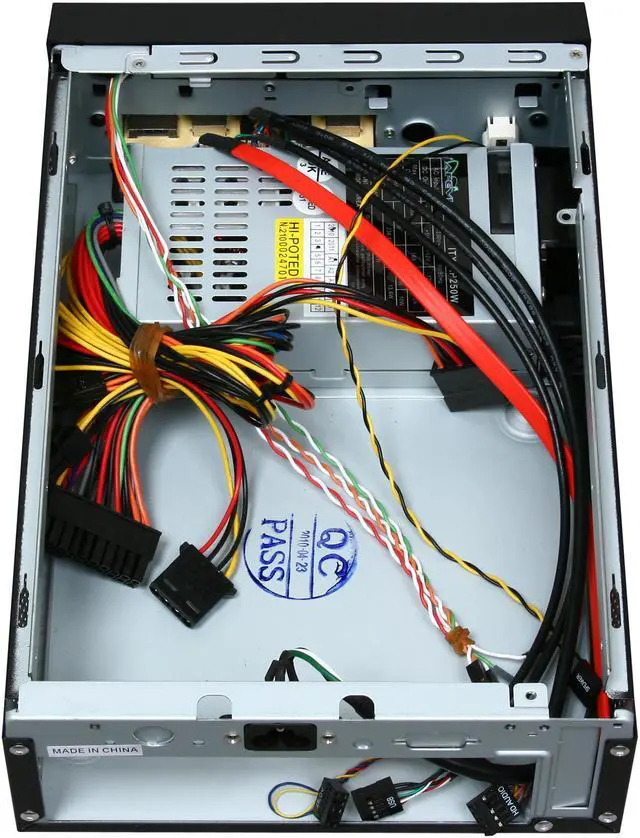
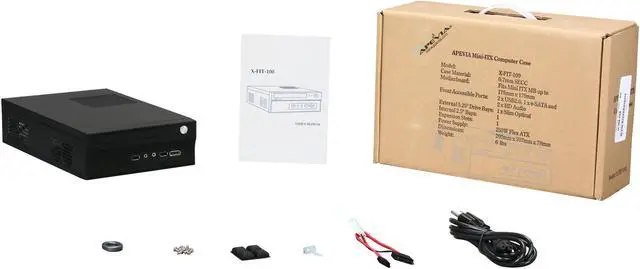
  • Steel Mini-ITX Tower
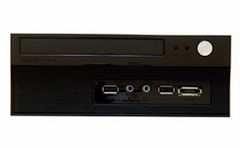
  • 2 x USB 2.0, 2 x HD Audio, 1 x eSATA Front Ports
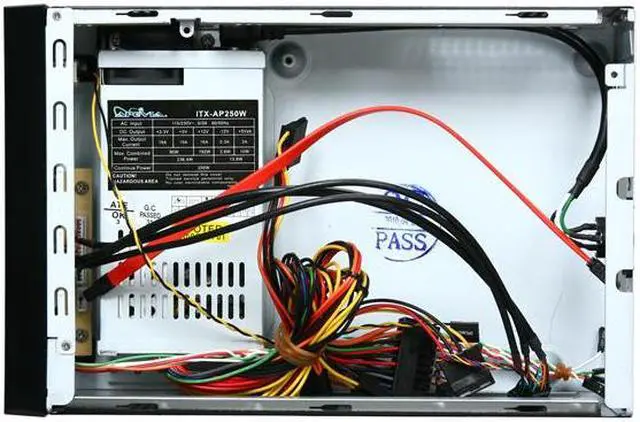
  • 250W Power Supply
  • 1 x Slim 5.25" External 5.25" Drive Bays
  • Pin It
  • Email this page
ICON Loading...

Learn more about the APEVIA CORP. X-FIT-100

Model

Brand
APEVIA
Model
X-FIT-100

Spec

Type
Mini-ITX Tower
Color
Black
Case Material
Steel
With Power Supply
Yes
Power Supply
250W
Motherboard Compatibility
Mini-ITX

Expansion

External 5.25" Drive Bays
1 x Slim 5.25"
Internal 2.5" Drive Bays
1
Expansion Slots
1

Front Ports

Front Ports
2 x USB 2.0, 2 x HD Audio, 1 x eSATA

Physical Spec

Dimensions
12.09" x 7.87" x 3.07"
Weight
6.5 lbs.

Manufacturer Warranty

Parts
1 year limited
Labor
1 year limited

Quick Info

Warranty

  • Limited Warranty period (parts): 1 year
  • Limited Warranty period (labor): 1 year


Customer Reviews of the APEVIA CORP. X-FIT-100

Do you own this product? Write a Review

Filter Results

Go
  • sconley
  • 5/14/2013 2:38:58 PM
  • Tech Level: High
  • Ownership: 1 month to 1 year
  • Verified Owner

2 out of 5 eggsmeh...

Pros: It's small and compact which is nice

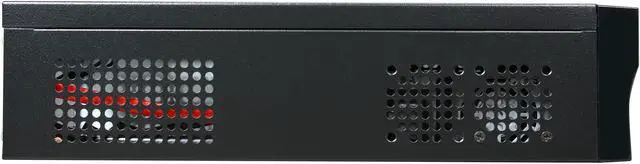
Cons: The design is super compact which is nice but it gets very hot and there are no fans. Also it has a single slot for a low profile video card but all low profile video cards won't fit with the top on. They are just a smidge too tall.

Other Thoughts: I would get something more cube like next time to accommodate a "low-profile" video card. Overall good case if all you are doing is motherboard only.

Did you find this review helpful? Yes No

  • N/A
  • 3/2/2013 9:12:59 PM
  • Tech Level: Somewhat High
  • Ownership: 1 month to 1 year
  • Verified Owner

3 out of 5 eggs

Pros: I'm actually not using it as a computer. It's just an enclosure and PSU for an electronics project. For that, it works just fine. It's easy to make changes to the projects and I was able to interface with all the switches, lights, etc. on the front.

Cons: When I first turn it on, the PSU fan sounds like a jet is taking off. It stays like that for a few minutes and then it slowly tapers off to a regular volume.

Did you find this review helpful? Yes No

  • Digidoc
  • 12/25/2012 8:36:15 AM
  • Tech Level: High
  • Ownership: more than 1 year
  • Verified Owner

1 out of 5 eggsBuy it for the case if you need something this small - pick up a good PSU while you're at it

Pros: (this is a 14 month follow-up to my earlier reviews of this case).

Pros:
It's small. That's it. If you don't need to use the "expansion" slot on it, it's a great sized case for something like a network appliance.

Comes with a SATA adapter for laptop CD/DVD drives.

Cons: The included PSU is a festering pile of you-know-what. Apevia won't take ownership of any problems their shoddy part causes.

PSU had died after 14 days of minimal use (less than 5 hours total over a 14 day period), taking out nearly everything inside the build. Only components that miraculously survived was the RAM.

Expansion slot is rather pointless/useless since the case is too small to accommodate even half-height cards.

Other Thoughts: 14 months ago the PSU that came with this case failed spectacularly, taking out nearly everything inside the build. After my last review I called Apevia to see if they'd take ownership of their shoddy product. Instead of getting any help I got the run-around; specifically the person I talked to insisted that their only liabilty was to the PSU. When I pressed, he changed his tune and said that a certified tech would need to examine the build to make sure it was the PSU that killed everything. It just so happens that not only am I an A+ certified tech, I also work alongside three other A+ certified techs whom I showed the build to and did agree that the PSU was at fault. At that point he balked and stone-walled me.

I figured I'd give Apevia some time to think it over. I know they're reading these reviews (see their comments in reviews below). I figured that maybe they'd want to make good on their product self-destructing and taking out almost $300 in components, but since calling them (and my earlier review) I have heard not a peep from them. So much for customer satisfaction, huh?

Since Apevia wasn't willing to do anything I contacted Newegg to see if anything could be done. The CSR I talked to was fantastic! They were willing to take care of the issue and take back the parts but unfortunately I had thrown away the boxes after I did my initial burn-in so they couldn't take the parts back. I can't blame Newegg one bit for that though; without the boxes they can't return them to the manufacturers for replacement either. Lesson learned on my part.

The only components that survived the PSU failure was the 8GB of GSkill RAM. Everything else: the Pentium G620T CPU (it killed one core, memory controller, and the integrated video), the fan on the heatsink, the Asus P8H61-i motherboard, dual-port Intel server NIC, and the OCZ SSD were destroyed. Thankfully Intel replaced the NIC under warranty. Everything else minus the RAM was a total loss. I ended tossing everything else in the garbage since there was no hope of getting any of it repaired or replaced.

Personally I will *NEVER* buy or recommend another Apevia product to anyone I know ever again after what happened and the way Apevia handled all of this. Apevia: sticking your collective heads in the sand doesn't make the issue go away; it just causes lost sales down the road.

If you simply must have a case this small, it's about the only thing out there unfortunately. If even after reading what I wrote here you decide to get this piece of junk, buy either another internal PSU for it, or get an external brick based PSU to power your build. The included PSU is just too much of a hunk of trash to trust your build and your money to. Also, considering Apevia had 14 months to make good on this for me and they chose not to, that speaks more about their commitment to customer satisfaction than anything.

6 out of 6 people found this review helpful. Did you? Yes No

  • Knux Kitsune
  • 11/9/2012 3:02:10 PM
  • Tech Level: Somewhat High
  • Ownership: 1 day to 1 week
  • Verified Owner

3 out of 5 eggsDon't mean to be negative but...

Pros: Small, compact, comes with decent PSU, room for expansion even in such a small case.

Cons: Why in the world is there a slot for a low profile video card if a low profile card sticks out the top? It works just fine with the cover off, but I want to cover it. I think I'm going to have to make a custom cover for it, or cut the existing one.

Other Thoughts: Everything works in theory. I'm surprised I was able to squeeze as much performance out of a small form factor.

System setup:

ASRock FM2A75M-ITX
A10-5800K
8gb GSkill Ares 1866mhz RAM
WD Scorpio Blue 250gb SATA III 2.5"
PowerColor AX6670 1gb

0 out of 1 people found this review helpful. Did you? Yes No

  • N/A
  • 1/2/2012 11:21:57 PM
  • Tech Level: High
  • Ownership: 1 month to 1 year
  • Verified Owner

1 out of 5 eggsAnother Blown Power Supply

Pros: Looks nice.

Cons: The power supply is obviously a major flaw in this case. I purchased mine on 12/30/2010, and exactly one year later the power supply went out with a horrible stench of burnt electronics.

After reading about all the PS problems, I decided to not even bother with trying to get a warranty replacement case from the manufacturer. Instead I've ordered a replacement PS from a company that knows how to build one that lasts longer than 12 months.

If I was Apevia, I would be ashamed to be selling such a low quality product.

Other Thoughts: Do yourself a favor...buy a different product. Or if you do buy it, just realize that you'll have to spend about another $50 bucks at some point in the near future on a replacement PS.

2 out of 8 people found this review helpful. Did you? Yes No

  • N/A
  • 12/30/2011 12:41:38 PM
  • Tech Level: High
  • Ownership: 1 month to 1 year
  • Verified Owner

4 out of 5 eggsGreat case, but plan around hight and PSU limitations.

Pros: if you plan it right you can fit one heck of a computer in a case just a little bigger than a cigar box. I've got this loaded with a quad core, 8g of ram and a Blu-Ray drive (slim).
downside, forced to use MoBo embedded ATI HD4250 graphics (the PCIE slot is worthless because even a low profile card is too tall). Also, it does run hot.The a product page states "...needs no extra cooling fan." Maybe if you are putting in one of these embedded atom boards? Even then 250W doesn't seem like much....but when it's sideways in the box with 2 drives practically sitting on it...? There are some trade offs, but something that unassuming looking, and that powerful....Why not?

Cons: Downside 1: the PSU is too weak. Downside 2: forced to use MoBo embedded ATI HD4250 graphics (the PCIE slot is worthless because even a low profile card is too tall). Also, it does run hot.The a product page states "...needs no extra cooling fan." Maybe if you are putting in one of these embedded atom boards? Even then 250W doesn't seem like much....but when it's sideways in the box with 2 drives practically sitting on it...? But if the pciex16 is a problem there is the x-fit 200 which takes a 5.25 drive and has room for a slim card.

Other Thoughts: as of 10/21/11 I've built 8 of these. Folks seem to like them.
Athena makes a 350 watt TFX PSU (Athena Power AP-MFATX35P8) that fits with a very small tweak. I just moved on to the i5 2500k and the i7 2600k. While I am not concerned with overclocking ......the k series have the Intel 3000 hd graphics on the chip where as the 2500 and 2600 have the 2000 hd. (the 3000 hd. With this case (unusable pciex16) you would want the best onboard graphics you can find. This is why I moved over to the i series CPU and the z68 MoBo) With the i series the z68 chipset on the MOBO is a must (using the AS Rock Z68M-ITX/HT.) . It combines some of the clocking ability of the 'P' chipset (P67) with the graphics of the 'H' chipset (H67). The p chipset DOES NOT support onboard graphics. The complete system power draw with the i5 and i7 k models is remarkably similar (just slightly over 310watts using hd 3000 onboard graphics and 8 gigs of 1600 ram). A 300 watt PSU starved them at load to BSOD....was no

3 out of 4 people found this review helpful. Did you? Yes No

  • foryouipray
  • 11/19/2011 8:44:27 AM
  • Tech Level: High
  • Ownership: 1 day to 1 week
  • Verified Owner

2 out of 5 eggsClose but no cigar

Pros: The case is sturdy. It seems to be well made. Pretty easy to install components but an expected tight fit so plan ahead.

Cons: Unfortunatly the power supply is very loud for what I expected for a mini itx case. I mean this thing is louder than some of my tower PCs. Also the case gets so hot from the power supply. It over heats inside and the case itself gets pretty hot. A deal breaker for me. The expansion slot is not good enough. It's really hard to find a card that would fit that would perform well enough for HTPC purposes.

Other Thoughts: I have had a few Apevia cases and they were great. The idea of this case I love but it seems like they stopped at about 80% of the design process. The PSU is really loud, it gets really hot in the case and the expansion slot is not quite good enough.

2 out of 2 people found this review helpful. Did you? Yes No

  • Digidoc
  • 10/21/2011 9:17:24 PM
  • Tech Level: High
  • Ownership: 1 week to 1 month
  • Verified Owner

1 out of 5 eggsAVOID AT ALL COSTS

Pros: This is a follow-up to my review below. No, this is not a good follow-up.

Cons: I've had this case for less than a month and the included 250W PSU COMPLETELY FRIED MY MOTHERBOARD. The PSU literally went up in a puff of smoke, taking the motherboard along with it. We're talking about a brand new motherboard that I ordered at the same time as this case. It also took out my SSD too. I have no idea if the processor and RAM I had in the system still works either, but given the damage at this point I'm pretty sure they're fried too.

Apevia, YOU OWE ME A NEW SYSTEM, *NOT* just a new power supply. I've been a service tech for 20 years and this is literally the first time I've had a BRAND NEW power supply completely fry everything inside the case. I've fixed C-64's, Amigas, I'm HP certified, repaired Dells, and I've built and serviced a multitude of clones over the years. There is ZERO excuse for this. I have half a mind to take Apevia to small-claims court to recoup my costs on this. Yes, *I AM THAT ANGRY ABOUT THIS*.

Other Thoughts: I will tell everyone I know to avoid *ANYTHING* made by Apevia. If I could give this thing zero eggs I would. Before anyone claims I "overloaded" the PSU, here's what I had in the system:

Asus ASUS P8H61-I Motherboard
8GB GSkill RAM
Intel Pentium G620T CPU (...it's a 35W CPU)
OCZ 32GB SSD
Intel Dual-Port NIC (it uses 4W under load).

It doesn't take a genius to figure out that I'm considerably under 250W.. Heck, I'm not even breaking 50W!

7 out of 13 people found this review helpful. Did you? Yes No

  • Digidoc
  • 10/6/2011 8:43:54 AM
  • Tech Level: High
  • Ownership: less than 1 day
  • Verified Owner

4 out of 5 eggsNice case... but....

Pros: Sturdy, well built case that's amazingly small and lightweight. Good sized power supply included too. Cable management is surprisingly easy to do too if you take your time and assemble the system correctly.

Cons: Can't fit an Intel E1G42ET dual-port NIC in the case. It's literally 1/4" too high so the top can't be put back on.

No right-angle expansion port slot.

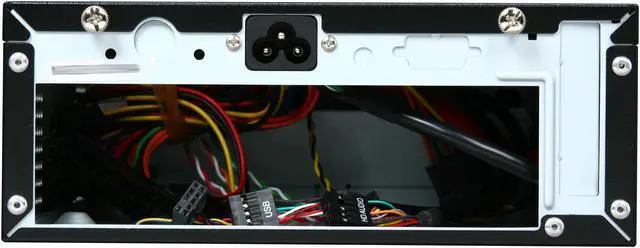
Power cord receptacle could be placed better.

Other Thoughts: I bought this case to build a network gateway. It's literally the perfect size for it except for one tiny little problem... the case is just a hair too small (explained above). It's not a huge problem to overcome really; I ordered a flexible PCI-E riser card that will let me mount the card horizontally inside the case and just run the ethernet cables to my NIC through the expansion slot hole. It would have been great if the case had a horizontal expansion slot hole though to accommodate a right-angle (or flexible) riser card.

The location of the AC receptacle isn't optimal since it forces you to route the incoming power line right over the motherboard. If anything I wish the receptacle had been placed further away from the expansion slot hole to make it easier to accommodate horizontal cards.

Overall it's a really good case (more so if you know the flaws with the case and how to work around them). If you're building a low-power system it's a perfect choice.

Did you find this review helpful? Yes No

  • Zimbo
  • 9/11/2011 9:21:47 PM
  • Tech Level: Somewhat High
  • Ownership: 1 day to 1 week
  • Verified Owner

4 out of 5 eggsI like it, but know what you're getting

Pros: Pretty inexpensive (especially with the rebate) for a case of their caliber. It does look pretty nice -- OK, not "thousand-dollar stereo system" nice, but it certainly fits in well with most mass-consumer electronics these days. AFAIK, the smallest case you can get with an *internal* power supply that accommodates a 5 1/4" slim-line drive and a 2 1/2" drive.

The 250W power supply is pretty nice, specifically allowing you to run more powerful boards than just Atom (or similar)-based ones.

Cons: As another reviewer mentioned, the 4-pin 12V power plug really needs to be at least a inch or so (3-4" would be great) longer -- my motherboard also ends up with it running over the top of the CPU fan.

A quieter power supply fan would be nice, but given that there's only one in the entire case, I don't mind too much.

My case came with one internal metal "finger" (a screw hole) bent; it took a few minutes with a needle-nosed pliers to fix this.

The fact that a PCI card can only be 55mm tall (lower than even a low-profile bracket) should be called out in the description here. Yeah, it's not deceptive marketing as that one guy claims, but it is a potentially significant limitation that isn't obvious to the casual reader either, which is poor marketing.

I'd have liked to have seen another 2.5" mounting bracket maybe somewhere towards the middle-back, although I realize this just might be reasonable given the myriad of motherboards available.

Other Thoughts: The power cord isn't "non-standard" as someone stated: It's a standard "Mickey Mouse"-type plug which, while not as popular as the one most PC power supplies come with, is still *massively* popular for power supplies in general (e.g., every HP laptop I've ever seen uses one).

I've built many of PCs over time, and what I want to impress upon people is this: When you purposely choose a very small case like this, you need to be prepared to hit some limitations that you wouldn't expect in a normal-sized case; it's just not reasonable to give this case bad reviews because it's not as flexible as a normal-sized case -- no case of this size could possibly be. (An alternative interpretation of this might be: If you only need to build one PC, or need to build one in a hurry, don't use this case -- it's absolutely more of an "enthusiast's" case, meant for people who won't be unhappy if they need to, e.g., find a few extension cables, come up with "creative" mounting solutions, etc.)

4 out of 4 people found this review helpful. Did you? Yes No

ICON Loading...
Are you an E-Blast Insider? Subscribe Newegg e-Blast

Buzz

Buy it for the case if you need something this small - pick up a good PSU while you're at it

1 out of 5 eggs
The included PSU is a festering pile of you-know-what. Apevia won't take ownership of any problems their shoddy part ...
— Digidoc 12/25/2012

I like it, but know what you're getting

4 out of 5 eggs
Pretty inexpensive (especially with the rebate) for a case of their caliber. It does look pretty nice -- OK, not ...
— Zimbo 9/11/2011


PayPal
Shop without retyping payment details. Secure shopping made faster.
Check out with PayPal.

Financing


Home
Home > 
Computer Hardware > 
Computer Cases > 
Computer Cases > 
APEVIA CORP. > 
Item#: N82E16811144254
LOADING... LOADING...
Shop by Region: United States | Canada | China
Follow us:   RSS Feeds Youtube
VeriSign Reliability Seal1This site protected by Trustwave's Trusted Commerce program Inc500
Policy & Agreement | Privacy Policy  © 2000-2013 Newegg Inc.  All rights reserved.
If the Adobe Reader does not appear when you click on a link for a PDF file, you can download Adobe Reader from the Adobe web site. nassau