Skip to: |

Newegg.com - A great place to buy computers, computer parts, electronics, software, accessories, and DVDs online. With great prices, fast shipping, and top-rated customer service - once you know, you Newegg.

If you are reading this message, Please click this link to reload this page.(Do not use your browser's "Refresh" button). Please email us if you're running the latest version of your browser and you still see this message.

Newegg.com - Computer Parts, Laptops, Electronics, HDTVs, Digital Cameras and More!

  • | Wish List
  • Help
Home Video
Search
Home
Home > 
Electronics > 
Home Video > 
Universal Remotes > 
Adesso [Home Living] > 
Item#: N82E16823166095

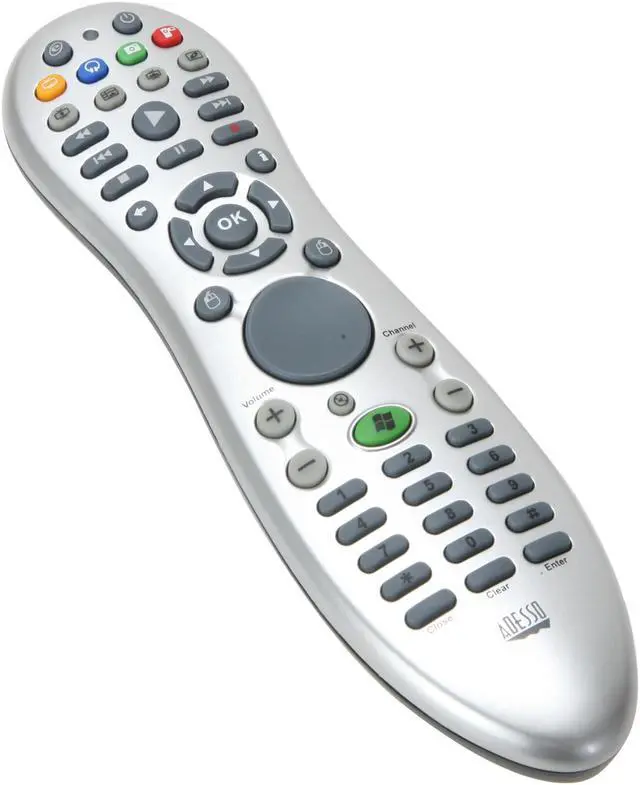
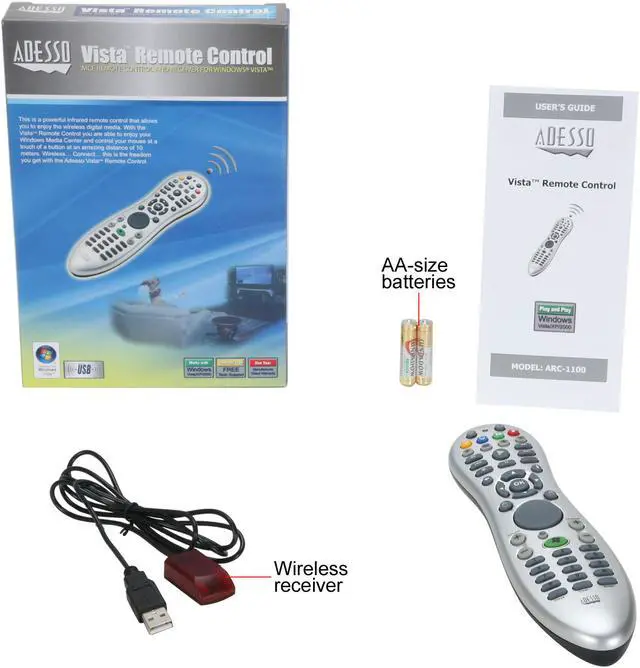
Adesso ARC-1100 MCE Infrared Remote Control

  • IR receiver with 47.2 inch USB cable
  • Range 30 ft. (10m)
  • Handy Pop-Up Windows Media Center Menus
  • Easy to Use in Visual Presentations and Conferences
  • Instant Access to Your Digital Television
  • Pla
  • Pin It
  • Email this page
ICON Loading...

Take control of your PC’s Media Center (MCE) from the palm of your hand, wirelessly. The Adesso Vista Remote Control provides a powerful infrared MCE remote that offers you a 30 feet range and various media hotkeys, so you can move freely when navigating your home theater system or during presentations. Now, you can control your PC’s Media Center in a whole new way, free of wires or from one location, with the Adesso Vista Remote Control.

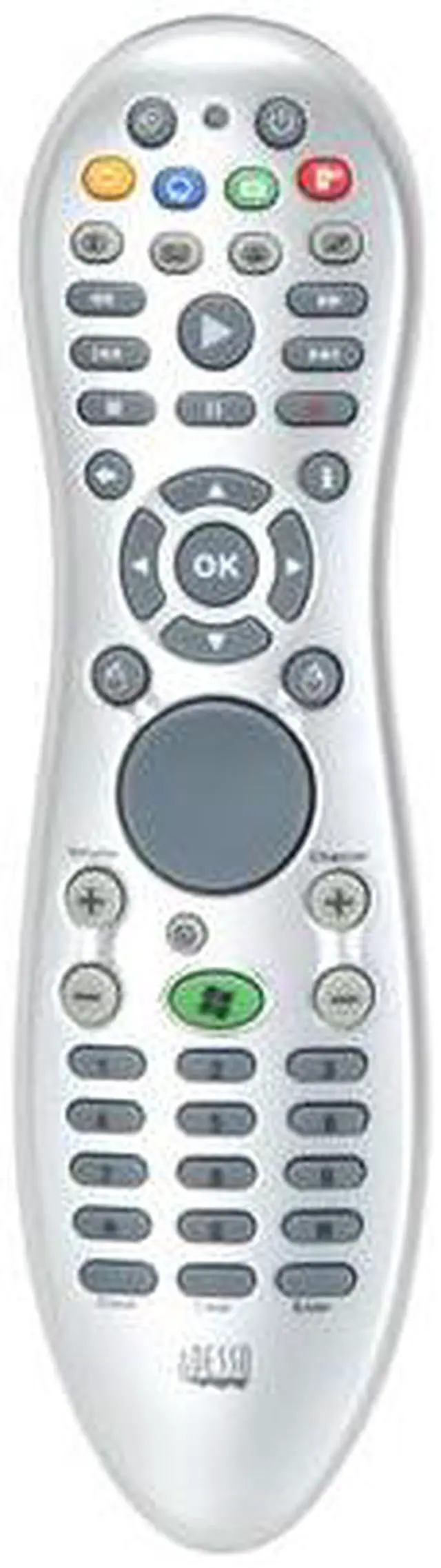
  • newegg Complete Control of Windows Media Center Take your media center experience to a new level with a complete remote control solution. With 46 media keys plus 3 mouse keys, the Adesso ARC-1100 MCE remote allows you to access all great features of Microsoft Media Center including TV, PVR, EPG, slide shows, music, video and DVD playback without leaving your comfortable sofa.
  • newegg Infrared Wireless Freedom Up to 30 ft The package includes a wireless receiver with 47.2-inch USB extension cable maximizing wireless coverage. With up to 30 ft infrared wireless range, you can move freely while navigating web, or during presentations.
  • newegg Easy to install The Adesso ARC-1100 MCE remote is easy to install. No drivers needed.

Learn more about the Adesso [Home Living] ARC-1100

General

Brand
Adesso
Model
ARC-1100

Features

Features
Handy Pop-Up Windows Media Center Menus

Easy to Use in Visual Presentations and Conferences

Instant Access to Your Digital Television

Play, Pause and Record Music and Videos

DVD/VCD Control Capability

Control Your Cursor/Desktop without Needing Mouse

Go Online and Navigate the Web

Easy to Install, No Drivers Needed

46 Multimedia Keys and 3 Cursor Keys

Specifications

Type
MCE
Range
30 ft. (10m)
Wireless Technology
Infrared
Receiver
IR receiver with 47.2 inch USB cable
Battery Type
2 x AAA batteries
Color
Silver

System Requirement

System Requirement
Operating System: Windows 7, Windows Vista, Windows XP or Windows XP Media Center

Hardware: Pentium 4 or Higher Processors

Software: Internet Explorer 6.0 or later

Connectivity Technology: USB Port for Infrared Receiver

Dimensions & Weight

Dimensions
7.8" x 2.1" x 1.3"
Weight
0.2 lbs.

Manufacturer Warranty

Parts
1 year limited
Labor
1 year limited

Quick Info

Warranty

  • Limited Warranty period (parts): 1 year
  • Limited Warranty period (labor): 1 year


Customer Reviews of the Adesso [Home Living] ARC-1100

Do you own this product? Write a Review

Filter Results

Go
  • N/A
  • 4/10/2013 5:39:07 PM
  • Tech Level: High
  • Ownership: 1 month to 1 year

3 out of 5 eggsOK but not good for dark

Pros: Pros are it works fine without drivers in Windows 7. And yes, it does have last channel, just like all these WMC remotes, you hit the Enter key at the bottom right and it will go to the last channel. Frame advance and frame back are available when you hit pause and then hit either the forward chapter button or back.

Cons: Terrible in the dark. For some horrible reason the number keys at the bottom are dark grey with black numbers. Impossible to read in any kind of dim lighting. My cheapo Rosewill is much easier to read and does the same thing as this.

Did you find this review helpful? Yes No

  • N/A
  • 4/1/2013 12:02:51 PM
  • Tech Level: High
  • Ownership: 1 month to 1 year

5 out of 5 eggsBest HTPC remote

Pros: Works flawlessly with WMC, nothing to install. Has a mouse pad, which is great for those times you need to minimize or do something outside of the WMC interface. Buttons can be re-programmed (using the free LM Remote software).

Cons: None.

Other Thoughts: I have gone through several different Logitech universal remotes, and looked into several others, but all seem to miss the mouse control pad. Even with Logitech's new Harmony remote... they still have no mouse support. This simple, extremely easy to use control is a must have for any HTPC. I use it primarily with WMC, but also with JRiver Media Center. I actually bought 3 more once I saw how great this works. I still am waiting for a universal remote with mouse support, but since that will likely never happen, this is the next best thing.

Did you find this review helpful? Yes No

  • slow
  • 2/17/2013 5:36:04 AM
  • Tech Level: Somewhat High
  • Ownership: 1 month to 1 year
  • Verified Owner

1 out of 5 eggsTiny Little Buttons

Pros: It works.

Cons: No flash back to previous channel.
No programmable favorite channel buttons.
The buttons are too small and are not illuminated.

Other Thoughts: It works, but I find it easier to just use the Windows On-Screen Keyboard.

0 out of 2 people found this review helpful. Did you? Yes No

  • xtralives
  • 1/3/2013 9:13:52 AM
  • Tech Level: High
  • Ownership: 1 month to 1 year
  • Verified Owner

5 out of 5 eggsworks great with my htmpc

Pros: The remote works well with wmc and xbmc and I love the added "mouse disk" in the center. it's a bit slow.. but it's still usually quicker than launching an app on my phone or trying to use keyboard shortcuts when trying to use hulu or get to a specific button on the screen.
The included ir adapter was really nice to have as it allowed me to "hide" my htmpc from view and still be able to control it with the remote.

Cons: *if i had to be picky I'd say this:
1. the cord for the ir reader is a bit short. (easily remedied by a usb extender)
2. The sn was on a cheap sticker and the number rubbed off within a month or so of normal use... If I were you I would take a picture or the sn or write it down just in case something goes wrong.

haven't' really seen any other "cons" with this unless you really hate slow moving mice...

Other Thoughts: I would say overall that I'm pleased with the remote and would suggest it to anyone looking for a mouse enabled remote in this price range.

0 out of 1 people found this review helpful. Did you? Yes No

  • N/A
  • 12/19/2012 1:35:40 PM
  • Tech Level: High
  • Ownership: 1 month to 1 year
  • Verified Owner

5 out of 5 eggsGreat remote!

Pros: All the basic controls you want, plus a mouse pad. Bright infared reaches very well. Battery life is great.

Cons: None to speak of. NOTE: Not as good for windows 8. See below

Other Thoughts: Note: The changes to the UI in Windows 8's Time/Metro apps makes this remove not nearly as handy as it was. This is a change to windows, NOT the remote. That back button and many of the mutimedia buttons from keyboards no longer work in the new Windows 8 API (e.g. backspace went back in all older programs and do not in the new Windows 8 apps). As such this remote is MUCH better suited for Win XPMCE, Vista, and 7. It uses basic keyboard drivers, using known keys that worked as remote commands in software. Works great in Windows Media Center, and most media software. Simply be wary that many of the keys do not have the same functionality in Windows 8.

2 out of 2 people found this review helpful. Did you? Yes No

  • zc2
  • 12/12/2012 2:44:36 PM
  • Tech Level: Average
  • Ownership: 1 day to 1 week
  • Verified Owner

5 out of 5 eggsoutstanding

Pros: Mouse!!! HID device - no drivers/software required. Suspends and wakes up the HTPC remotely.

Cons: Soap-like shape

Other Thoughts: This remote rocks! You've got a media keyboard (well, without alpha keys) plus a mouse in your palm.
The mouse emulator works fine. May be it'd be better if it was a touchpad, though.
The media keys do not work in the Netflix player, but that problem could be solved with a small translation script of AutoHotKey or EventGhost.

Did you find this review helpful? Yes No

  • N/A
  • 11/8/2012 11:16:34 AM
  • Tech Level: Average
  • Ownership: 1 month to 1 year
  • Verified Owner

5 out of 5 eggsMCE Remote

Pros: what i like the most is the tracking pad, because you can replace the mouse with this , so i dont have to stand from my couch wile i watch movies or surf internet on my 46 inch plasma

Cons: none

Did you find this review helpful? Yes No

  • Tommy
  • 11/1/2012 1:47:24 PM
  • Tech Level: Average
  • Ownership: 1 day to 1 week
  • Verified Owner

2 out of 5 eggsPartially Works

Pros: Easy set-up, sleek, easy to use

Cons: Play, pause, stop and volume do not work

Other Thoughts: Most of the navigation buttons worked, but since my main purpose for this remote is to use the DVR function of media center, not being able to pause or stop is pretty significant. I contacted Adesso and they said all buttons should work and no drivers are needed since it's plug n play. They said it's probably defective and suggested returning it. I have already ordered a different remote that IS MS certified, as this one is not. I don't want to take my chances that a replacement unit will do the same thing and I'll have to pay for return shipping again.

0 out of 2 people found this review helpful. Did you? Yes No

  • sixy
  • 9/29/2012 2:52:48 PM
  • Tech Level: Somewhat High
  • Ownership: 1 week to 1 month
  • Verified Owner

5 out of 5 eggsWorks Great in XBMC/Linux

Pros: Bought this for my HTPC setup using XBMC and Xubuntu 12.04. It worked out of the box. I'm going to remap some of the buttons, but it works great.

Cons: None

Did you find this review helpful? Yes No

  • N/A
  • 9/10/2012 11:52:19 AM
  • Tech Level: High
  • Ownership: less than 1 day
  • Verified Owner

2 out of 5 eggsDOA

Pros: As always with NewEgg service and speed is superb. The remote seemed to be decent to good quality so I gave it 2 eggs. RMA and waiting on NewEgg to send another.

Cons: IR receiver was DOA. Tried remote and receiver on 3 different computers but it wouldn't work. Programmed a Harmony for the remote and the receiver still did not respond. Called their tech support just to be sure. Minimal navigation, got someone in the US.

Other Thoughts: You can't really complain when you only pay $18 for a MCE remote. No big deal really.

0 out of 2 people found this review helpful. Did you? Yes No

ICON Loading...
Are you an E-Blast Insider? Subscribe Newegg e-Blast

Buzz

Works great, exactly what I was looking for!

5 out of 5 eggs
I love this remote, especially because it has the mouse. I've had several remotes, and regardless of your skill with ...
— 6/23/2009

Works w/ Ubuntu Linux & Harmony 300i

5 out of 5 eggs
Works great in Linux. Just plug it in, and it works. Because this device appears as a mouse & keyboard to the PC, there ...
— knnniggett 3/26/2011


PayPal
Shop without retyping payment details. Secure shopping made faster.
Check out with PayPal.

Financing


Home
Home > 
Electronics > 
Home Video > 
Universal Remotes > 
Adesso [Home Living] > 
Item#: N82E16823166095
LOADING... LOADING...
Shop by Region: United States | Canada | China
Follow us:   RSS Feeds Youtube
VeriSign Reliability Seal1This site protected by Trustwave's Trusted Commerce program Inc500
Policy & Agreement | Privacy Policy  © 2000-2013 Newegg Inc.  All rights reserved.
If the Adobe Reader does not appear when you click on a link for a PDF file, you can download Adobe Reader from the Adobe web site. nassau