If you are visually impaired and are having difficulty navigating this site, please call our Customer Support line via our toll free number (800) 390-1119.
Newegg.com - A great place to buy computers, computer parts, electronics, software, accessories, and DVDs online. With great prices, fast shipping, and top-rated customer service - once you know, you Newegg.
If you are reading this message, Please click this link to reload this page.(Do not use your browser's "Refresh" button). Please email us if you're running the latest version of your browser and you still see this message.
AVS Gear GP-IR02BK Vista 2 channel IR Remote Control
Image Viewer
Original Price: $34.99
You Save: $9.34
$25.65
Special Offers
No interest for up to 12 months. Plus, New Preferred Account Customers: Save $20 off $100. Subject to credit approval. Details
No Payments for up to 6 months. Minimum purchase required. Subject to credit approval. Details
Similar Items
Not the product you're looking for? We can make some suggestions to help you decide on a product that fits your needs. view similar products
Manufacturer Warranty
Beyond any applicable Newegg return policy, this item is warranted independently by the product's Manufacturer. Below is a summary provided for convenience only and may not be accurate or current.
Use this link for full details.
Manufacturer Limited Warranty period (parts): 1 year
Manufacturer Limited Warranty period (labor): 1 year
Tech Level: somewhat high - Ownership: 1 month to 1 year
This user purchased this item from Newegg
Pros: Recognised out of the box with W7 RC
Cons: Has an irritating double click issues. So if I arrow over to a DVD title as an example, I skip past it, then try to arrow back and it goes the other way. All the buttons do not work either. I had to download another program to allow me to asign buttons, but with the double click issue and inability to control TV volume, I decided to put it back in the box. I was hoping to get rid of the mouse on my HTPC, but am stuck with using one.
1 out of 1 people found this review helpful.
Did you?
Thanks for the valuable feedback you provided!
Works well
Reviewed By: Makafre on 10/15/2009
Tech Level: somewhat high - Ownership: 1 week to 1 month
This user purchased this item from Newegg
Pros: Nice colored control, HTPC oriented. It also puts the PC to sleep and wakes it up. Green button to starts MCE.
Cons: Couldn't find a way to program the green button for something else than MCE. I had to disable MCE to use MediaPortal otherwise they would conflict, but that is normal.
Other Thoughts: I bought this control for the IR receiver which I use with a Harmony 550. My HTPC is built with MediaPortal on Windows 7 and everything is working perfectly with both, the Anyware and Harmony controls. The only thing I could not program yet is the green button which starts MCE instead of MediaPortal. I actually use both controls as I enjoy the MyTV, MyPic, etc. buttons on the Anyware, which I don't have on the Harmony.
2 out of 2 people found this review helpful.
Did you?
Thanks for the valuable feedback you provided!
Terribad quality
Reviewed By: MediaCenterMan on 10/14/2009
Tech Level: high - Ownership: 1 day to 1 week
This user purchased this item from Newegg
Pros: It looks nice. Hopefully newegg will work with me on returning it.
Cons: Right out of the box this remote felt cheap. I followed the instructions and the remote seemed to work with my system. However when I try to use it to navigate the WMC interface the arrows double tap which gets very frustrating (doesn't matter out light or heavy I push). Was never able to get this remote into "learning mode" as described in the instructions. The remote will not run my TV as described. It will not even turn it on or off.
Other Thoughts: Im running a Samsung TV and windows vista ultimate and this thing is garbage.
0 out of 1 people found this review helpful.
Did you?
Thanks for the valuable feedback you provided!
Model
Brand
AVS Gear
Model
GP-IR02BK
Features
Features
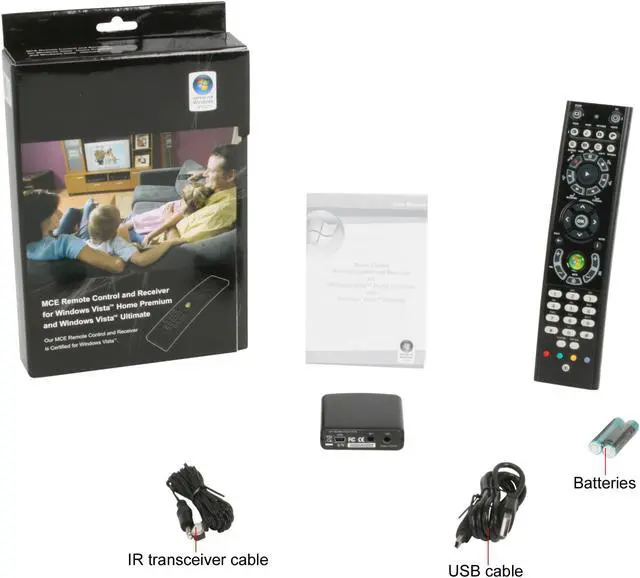
Efficiently access your digital entertainment with the MCE remote control A single remote control gives you the freedom to access your entertainment from anywhere in the room. The friendly Mediate Center on-screen menus are specially designed for remote control interaction, delivering a fun, engaging and integrated digital media experience.
All-access digital entertainment as close as your MCE remote control Use the MCE remote control to enjoy more type of entertainment offered by your Windows Vista Home Premium and Windows Vista Ultimate PC. The MCE Remote Control and Receiver uses the on-screen interface to offer you TV / Video recording, personal Video, Movies, Music, Photos, and Radio. TV tuner card with FM radio capability required for live TV and radio functionality.
Control your TV with this Remote Control The receiver also emits signal that will allow you to control your TV with this Remote Control at the same time. 2 in 1 Function!
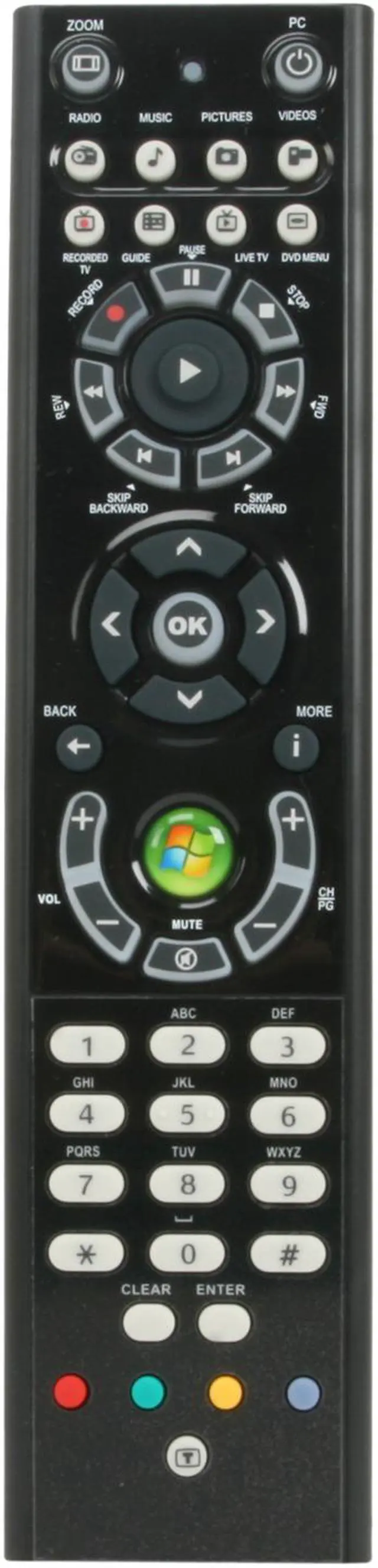
Power: your Media Center PC and / or TV with our remote control
Record: selected television programs
Play: selected media
Replay: jumps recorded TV back few seconds, or jumps back one music track or one DVD chapter
Pause: audio, video, a slide show, or live or recorded TV*
Start: and launches the Media Center Start menu
Videos: accesses your video collection
Music: accesses your music collection
Pictures: access your photo collection
Guide: opens TV Program Guide to display available channels and programs
Live TV: launches full-screen live TV *
* TV tuner card with FM radio capability required for live TV and radio functionality
Certified for Windows Vista Home Premium and Vista Ultimate Operating Systems only.
Will not work with Windows XP Media Center Edition 2005