
Your Browsing History


donald b.
Joined on 10/11/04
0
0
product reviews
- 9
Nice unobtrusive nas
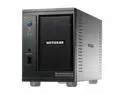
NETGEAR RND2110-100NAS 1TB ReadyNAS Duo 2-bay Network Storage (NAS)
Pros: Easy to use; replaced drives with 2TB Seagate ones, now three years in and no problems at all. Device monitors itself, emails me if it ever has a hiccup, cough or tummyache. Gives off no heat, usb ports easy to use to transfer files from thumbdrives. Good support on netgear forums.
Cons: Older versions MUST have their firmware updated, and you must update your raidar and radiator versions as well, or nothing will work correctly. Once done, everything works seamlessly and you have multi TB capacity. Netgear official support sucks. However, they have reps who monitor the support forums, and it seems that there are lots of other users out there who are IT professionals who know what they are doing, so it's easy to get information.
Overall Review: I own two of these, purchase the second after having the first for two years with no problems. If you want to use these as backups, just buy extra drives identical to the ones in the nas and switch out the drive on the right hand side of the device. The nas will format it and copy everything from the left side drive onto the new one during normal use, you'll never even know it's busy other than the little flashing light indicator. Terrific product.
8/15/2014See more detail
Almost there....
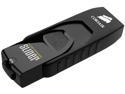
Corsair 128GB Voyager Slider USB 3.0 Flash Drive (CMFSL3B-128GB)
Pros: Sliding cover, easy to use, fast.
Cons: Needs a hole big enough to put a NORMAL keychain through on it. This isn't rocket science, guys. The most convenient place to put these things is on our keychains, and not with a piece of fishing line as an extension either.
5/1/2014See more detail
It works w/Intel 1155 ATX - BOXDH77KC Motherboard
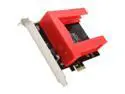
SYBA SD-PEX40044 PCI-Express 2.0 SATA III (6.0Gb/s) RAID Caddy Controller Card
Pros: I installed this in a new windows 7 enterprise box that had limited sata ports before re-installing windows. On installation windows found the device and installed drivers for it, and it worked from the start. Motherboard is: Intel 1155 ATX - BOXDH77KC if that helps. 2 years later everything is still working fine. Drives used are 1 240 GB Sandisk ssd and 1 480 GB Samsung 840,
Cons: Of course, it does take up two slots, but the only other options would be to make the card twice as long but narrower. If you're out of sata ports and need more drives, hopefully you have a tower case that also has a MB that has enough slots. Of course you could always run a pci-e extension and mount this card off of the motherboard if absolutely necessary. Other than the width, no cons that I'm aware of.
6/19/2014See more detail
buggy software, not for beginners
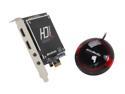
AVerMedia C985 Live Gamer HD - Capture & Share Your PC Game Footages
Pros: Does a good capture when it works; but make sure you select your options or you can easily get a format that won't play on anything. The 'wizard' might pick .ts output file of a bizarre resolution on you
Cons: Software loads, then disappears from desktop; seems no way to return it after capture. Stopping the process kills something else, and the software won't re-load until after a reboot. Multiple visits to their website delivers not a standard pdf file for info, but a chm link to nowhere. So, you're stuck with the poorly designed paper manual which is almost unreadable, printed with pale blue text on a blue backround page. Why? What's wrong with good old black print on white page? Seems they are trying to reinvent the wheel.
Overall Review: I can work around the problems, considering the quality of the eventually created videos. But for $200, I was expecting better quality.
8/19/2013See more detail
Great product, excellent quality
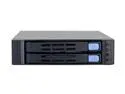
CHENBRO SK51201 1 x FDD bay to 2 x 2.5" hot-swap SATAII HDD bays
Pros: Perfect fit for SSD's. You can use several of these in 3.5" hotswap cages where the backs come off, enabling you to put six 2.5" SSD's into a 3.5" cage that fits into two 5 1/2 inch bays (one full height bay). I mounted such an array into my Silverstone SG01F case. Works great, I can now easily switch through multiple operating systems simply by replacing the whole OS drive with another. Takes seconds.
Cons: drive door releases plastic, I don't know how long they'll last with daily use. But I suppose if you treat them gently, you won't have any problem at all. They're not flimsy, but they're not hardened steel either. Take care of them and they should last a decade, easy.
Overall Review: They're still available in large quantities, just not here at the egg. I don't know why. It's a great product.
7/5/2013See more detail
no better than regular case...
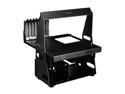
LIAN LI PC-T60B Black Aluminum ATX / Micro-ATX TEST BENCH Computer Case
Pros: Easy to see everything. Looks cool to unknowing outsiders. needs alterations to really be what it should. If you have a dremel and some plate aluminum, some flat black paint (or whatever color you want to use) you can actually fix this into something usable.
Cons: You can assemble a regular case system and leave the side off just as fast as you can build one on this 'test bench'. I thought a test bench would be designed for quick access to all mounting parts and screws; this is not the situation here. You have to remove the top handle to remove the motherboard. You have to remove the platform from the side supports to remove any of the drives, as the mounting screw holes are hidden tightly behind those uprights. Same with the optical drive and power supply support parts, you have to dissasemble the thing to remove stuff. This is not what a 'test bench' should be.
Overall Review: The shape of the side upright pieces is the big problem; not tall enough to make easy installation and removal of the MB or extra large video cards, makes the top handle an odd shape, and the uprights block access to the drive and power supply cages screws, requiring removal to get to them. I don't know what engineer designed this, but I never took any design courses but I quickly drew up a plan to make this what it should have been, and it only took me about 20 minutes. Back to the drawing board
3/3/2013See more detail