here!
I’m your shopping assistant for PC builds, upgrades, and everything tech.
Got questions? Ask away!
Start a conversation
here!
I’m your shopping assistant for PC builds, upgrades, and everything tech.
Got questions? Ask away!
Start a conversation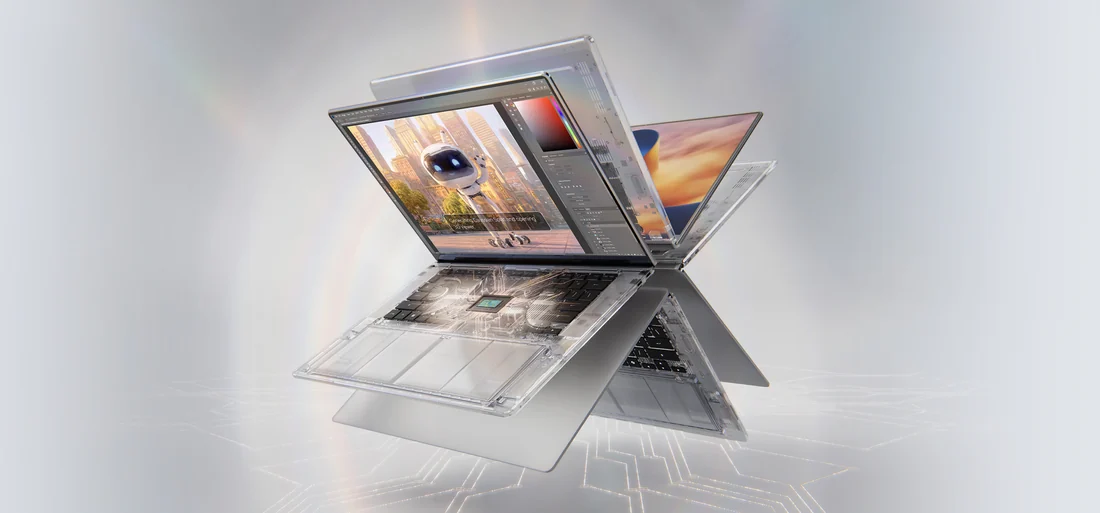
AI Development, Creating and Gaming — All on One Windows PC.
The NVIDIA RTX Spark superchip brings NVIDIA CUDA natively to Windows — now in slim laptops that last all day and compact desktops built to run personal AI agents around the clock. Build and run AI agents, accelerate 3D, video and AI apps with NVIDIA Studio, and play the latest games with ray tracing, DLSS and Reflex, with up to 128GB of unified memory.
Specifications vary by system and configuration. *RTX Spark N1X with 6,144-core GPU and 20-core CPU, used in all RTX Spark desktops and select laptops; other laptops use the 5,120-core GPU, 18-core CPU version. **128GB on select configurations.
Discover the latest NVIDIA RTX Spark laptops featuring cutting-edge graphics and performance designed for gamers and creatives alike. Explore a wide selection of models with Black November deals and Black Friday deals to find the perfect laptop for your needs.
Selecting the perfect NVIDIA RTX Spark laptop during the Black November deals involves balancing several crucial features. Here are the top aspects to weigh:
At the heart of the NVIDIA RTX Spark laptops lies the advanced Tensor Cores technology. These cores specialize in matrix math crucial for AI acceleration, enabling significantly faster performance on neural network inference and training tasks compared to standard GPU cores. This means smoother handling of workloads such as real-time ray tracing fused with AI-driven upscaling and image reconstruction. For those shopping Black November deals, focusing on the count and generation of Tensor Cores can differentiate the laptop’s capabilities drastically—higher counts deliver more parallel AI calculation power and improved efficiency in applications that make use of AI frameworks and professional creative suites. These same Tensor Cores also enhance gaming experiences by supporting DLSS (Deep Learning Super Sampling), offering sharper images at higher frame rates without taxing the GPU excessively.
For advanced users, developers, and researchers, NVIDIA RTX Spark laptops extend beyond gaming into serious AI research and content creation environments. Built on NVIDIA’s latest Ampere architecture, these laptops excel in AI workloads with dedicated Tensor Cores designed for deep learning inference and real-time data processing. This makes them ideal for professionals running frameworks like TensorFlow or PyTorch, or for creative professionals using AI-assisted editing tools. Many models also support CUDA and OptiX, enabling accelerated rendering and simulation. If your Black Friday deals search is geared toward an AI-ready development platform, these laptops provide a mobile, powerful solution that supports your growing professional workflow needs right out of the box.
Newegg shopping tip: When comparing NVIDIA RTX Spark Laptops, pay close attention to the GPU generation and VRAM size to ensure smooth performance for your needs. Also, consider the display quality and battery life, especially as Black November deals and Black Friday deals offer a wide range of options that balance power and portability.
Built on NVIDIA’s latest Ampere architecture, these laptops excel in AI workloads with dedicated Tensor Cores designed for deep learning inference and real-time data processing.
If you’re stepping into the world of high-performance laptops, NVIDIA RTX Spark models offer an excellent mix of power and versatility. Designed with NVIDIA’s cutting-edge Ampere architecture, these laptops are perfect for those who want a seamless balance of stunning graphics and AI capabilities. Whether you’re upgrading from a basic setup or entering gaming and creative workflows for the first time, RTX Spark laptops provide a significant boost in speed and image quality. For a deeper dive into capabilities, check out our selection of AI Ready models that handle both everyday tasks and advanced projects with ease.
For gamers looking to maximize their experience, NVIDIA RTX Spark laptops are a standout choice. The powerful GPUs deliver smooth frame rates and lifelike graphics, transforming gameplay with ray tracing and DLSS support. These laptops handle demanding titles at high settings, making them ideal for competitive gaming or immersive story-driven adventures. When scouting your next gaming rig, keep an eye on the refresh rate, GPU performance, and cooling capabilities to ensure long hours of play without compromise. Black November deals and Black Friday deals offer great opportunities to snag models equipped for serious gaming power.
Content creators including video editors, 3D artists, and graphic designers benefit immensely from the robust performance found in NVIDIA RTX Spark laptops. The combination of Tensor Cores and RT Cores accelerates tasks such as rendering, real-time ray tracing, and AI-enhanced editing workflows. This means faster project turnaround and more time focused on creativity rather than waiting on your machine. Explore options tailored for creative applications to ensure your software suite runs smoothly and efficiently during this busy holiday shopping season. Take advantage of Black November deals on NVIDIA RTX Spark Laptops to upgrade your workstation without breaking the bank.
Research more: If you’re exploring NVIDIA RTX Spark Laptops this season, be sure to check out Newegg Insider buying guides for detailed insights and comparisons. These guides can help you navigate Black November deals and Black Friday deals to find the laptop that best fits your needs.
Last Updated: November 2026 | Newegg NVIDIA RTX Spark Laptops Buying Guide
RTX Spark laptops generally outperform older GTX models thanks to improved ray tracing and AI-powered features, delivering smoother gameplay and better visuals, especially in the latest titles.
For gaming and creative work, having more VRAM helps with handling complex textures and larger projects, but a faster GPU clock speed boosts overall frame rates; ideally, you want a balance depending on your usage.
These laptops pack NVIDIA’s latest RTX GPUs, delivering excellent real-time ray tracing and AI-powered features that handle gaming and creative work smoothly at high settings.
Yes, most models in this category feature enhanced cooling solutions like multi-fan setups and vapor chambers to keep temperatures down and maintain performance under heavy loads.
If gaming is your main goal, look for models with higher refresh rate screens and better cooling systems. For creative tasks, focus on laptops with more VRAM and a color-accurate display to handle intensive design or rendering work.
Last year’s RTX Spark laptops still pack a punch and are often more affordable, making them a solid choice if you’re on a budget. However, newer models offer improved efficiency and features that better support upcoming games and software.
Most users report solid performance without widespread defects, but like any high-performance laptop, some units may run hot or experience fan noise under heavy load. Checking recent user reviews can help spot any recurring issues for specific models.
Watch for repeated complaints about overheating, battery life far below advertised specs, or build quality problems like fragile hinges. Also, pay attention to how responsive customer service is when issues arise, as that can save you headaches later.
Just power it on and go through the initial Windows setup like any other laptop. Make sure to connect to Wi-Fi and update your NVIDIA drivers using GeForce Experience for the best performance right away.
Open the NVIDIA control panel or GeForce Experience app to adjust settings and enable features like DLSS and Ray Tracing based on your game’s support. Keeping your drivers up to date also ensures you get the smoothest experience.