





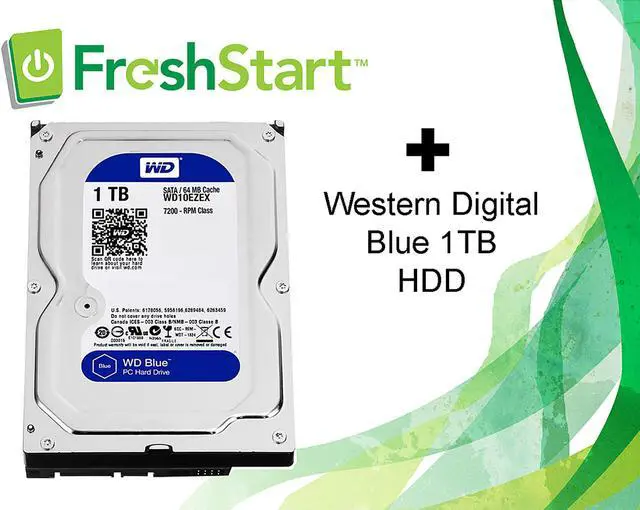


WD Blue PC Desktop Hard Drive + FreshStart
What You Will Get with Your Purchase:
- A new WD replacement drive – WD Blue PC Desktop Hard Drive
- A FreshStart License Key good for one* imaging use
- Links to download the FreshStart Imaging Tool
- Additional resources and instructions available on the CyberSpa website
* A key has unlimited rewrite abilities on the same imaging machine for up to 90 days. The same replacement drive must be used for each reimage.

WD Blue PC Desktop Hard Drive
Offering multiple capacity options up to 6TB, the WD Blue PC Desktop Hard Drive enables you to store a massive amount of content on your PC desktop. Acronis True Image WD Edition software allows for easy backup and upgrade while NoTouch Ramp Load technology keeping your data well protected.
Improve PC Performance
Give your desktop a performance and storage boost when you combine your hard drive with an SSD to maximize speed of data access and a WD Blue drive for up to 6TB of additional capacity.
Plan for the Future
With better technology comes bigger storage needs. Digital cameras that record ultra-high definition video at 4K resolution and 30 frames per second require a ton of storage. Handling all that media is a snap with our 6TB drive.

Easy Backup and Upgrade
Acronis True Image WD Edition software, available as a free download, can clone drives and backup your operating system, applications, settings and all of your data.

Technology to Help Protect Your Data
NoTouch Ramp Load technology safely positions the recording head off the disk surface to help protect your data.
Drive replacement is easier with FreshStart

What is FreshStart?
FreshStart is a drive replacement software tool that automates all of the tedious aspects of drive replacement, such as imaging the new drive and setting up the Windows profile. A FreshStart service also includes a fully automated virus scan to check for and isolate any viruses, malware, or bloatware found on the old drive.
All of your clean files, favorites, and settings are copied from the old drive and mirrored in the same place on the replacement drive - even your desktop photo will be right where you left it. FreshStart also makes it easy to reinstall all of your third-party programs by collecting the keys and saving them to a text document, which is saved to your C drive.
How does it work?
You must have a working PC to image your replacement drive with a FreshStart WIM image. To do this, visit the CyberSpa website and download the imaging tool, then follow the instructions to choose and download the WIM image you will need for the new drive. Once you have imaged the drive with the imaging tool provided you can remove the old drive and replace it with the new drive.
The FreshStart program will automatically load upon PC restart and tell you to connect the old drive when prompted. The FreshStart program performs a forensic analysis of the old drive to ensure that the data can safely be copied, and, if no issues are found, will virus-scan and then copy-over those files. Disconnect the old drive when prompted, and allow the PC to reboot several times. If the drive is damaged or infected with ransomware, the Start Fresh option is available as a way to complete the service without data transfer.
The FreshStart program will remove itself from the drive and the process will be complete when you see the "After a FreshStart" PDF guide appear. Follow the steps in this guide to complete a few easy setup steps we are unable to automate, and then your PC is ready to go!
Additional Supplies You Will Need:
- A Windows 7 or Windows 10 PC with at least 20GB of free space and a working USB port to host the FreshStart Imaging Software and the FreshStart WIM image for your replacement drive
- SATA to USB cable (laptop), a drive dock (desktop), or a drive case (laptop) with USB cable (if you plan to use the old drive for backup or storage purposes)
- Tools for removing the old drive
**For users upgrading a desktop from an HDD to an SD, a drive sled to secure the new, smaller drive in place is recommended
Apps and Software Loaded
The FreshStart program provides automatic installation for the following programs:
- Internet Explorer
- VLC LAN Player
- Adobe Reader
- Adobe Player
- Eset Smart Security
- The selected Windows OS
It will install the following if they are found on the old drive:
- Firefox
- Google Chrome
- Skype
- iTunes
- Office 2010 (if it finds a valid install / license key)
All other software applications such as TurboTax, QuickBooks or other programs will need to be reloaded using the keys collected from the old drive. Office 2007 and earlier versions are no longer available or supported by Microsoft and must be upgraded, while Office 2013 and later versions can be easily downloaded directly after logging into your Microsoft account.
All these Office and 3rd party program's data files, are transferred and kept in their appropriate folders. If the program had a license key stored in your computer, it has been placed in a folder for you. To see how to recover these license keys click on the "After your FreshStart" tab and open the "After Your FreshStart PDF."
Terms of Use
The FreshStart License Key buyer agrees to the following terms:
- Buyer will not decrypt or attempt to decrypt, reverse engineer, tamper with, alter, supplement, revise, analyse, or recreate, FreshStart software.
- Buyer will download and use the most recent copy of the FreshStart Drive imaging tool and the FreshStart WIM image for the PC to be serviced. Both items are available and downloadable for free from the link on our corporate website.
- Buyer will update the AV definitions prior to imaging the hard drive
- Buyer will review the instructional videos or other material prior to attempting to perform a FreshStart service for the first time, and will perform the service as specified in our training material
- Buyer is responsible for determining if the target PC is a FreshStart candidate as spelled out in the training videos on our website.
- Buyer is liable for any damages to the computer during the performance of the service.
- CyberSpa warranties our FreshStart software to work as specified in our training material and the product documentation found on our corporate website.