







Please read carefully before purchasing
1:This laptop docking station is compatible with Thunderbolt 4/3 or USB-C 3.1 Gen 2 or higher ports with full-featured USB Type-C ports supporting Power Delivery, DisplayPort and Alternate Mode. These full-featured USB-C ports should support display, charging and data transfer protocols. But not all USB-C devices are compatible with this laptop docking station, please check if your laptop's USB-C port supports the above functions before purchasing.
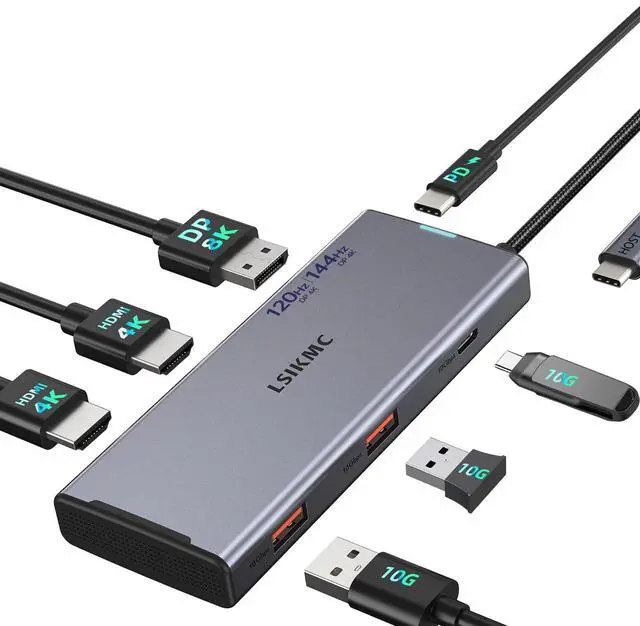
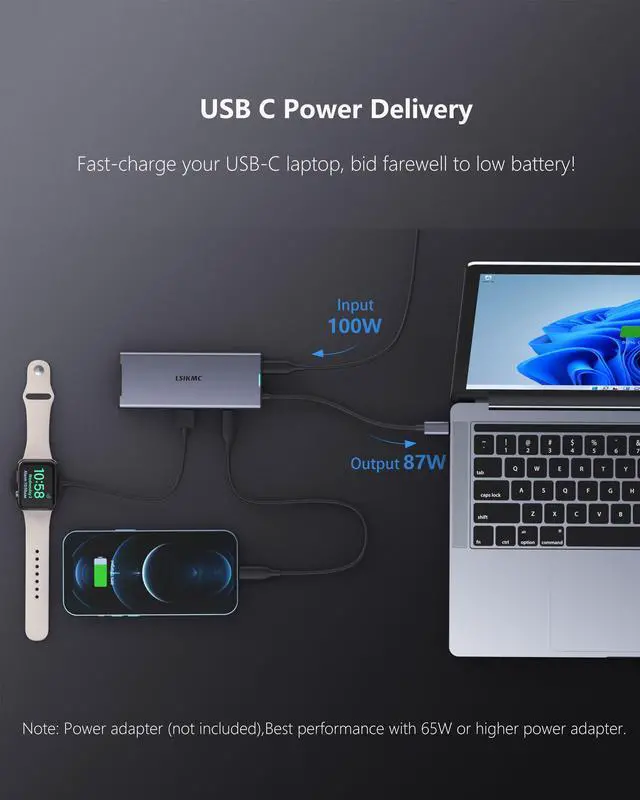
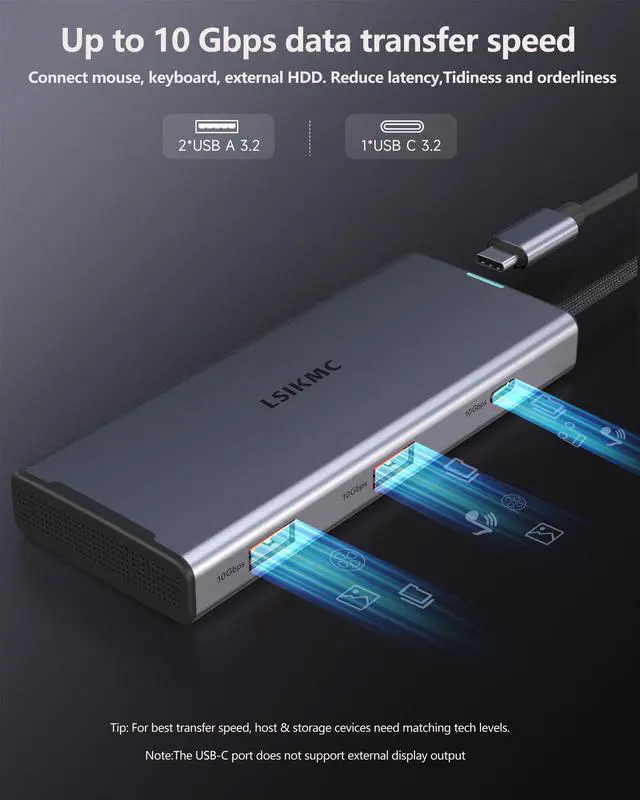
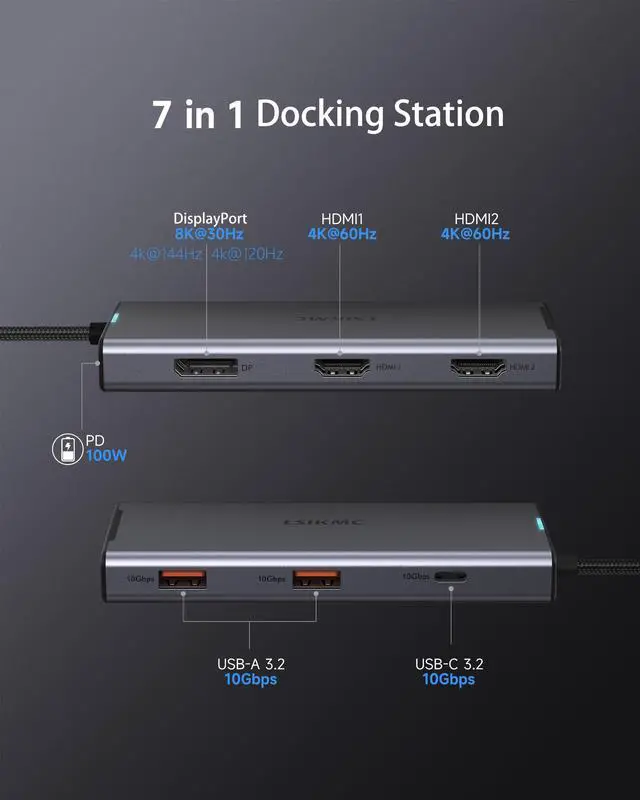
2:The docking station does not include a charger or cable. To power your computer, you need to connect an external charger to the PD charging port on the docking station. Note: USB C PD power supply and USB C 5Gbps data transmission port do not support video extension;The USB-C hub requires 6-7W of power to ensure the other ports function properly. It's best to keep the hub charged for optimal performance. If you see a slow charging warning, you can ignore it. To enable fast charging, use a power supply of 65W or higher.
3:This triple monitor docking station cannot be used with converters (such as HDMI to DVI, HDMI or USB to USB-C to VGA, etc.). The length of the video cable must not exceed 3 meters.
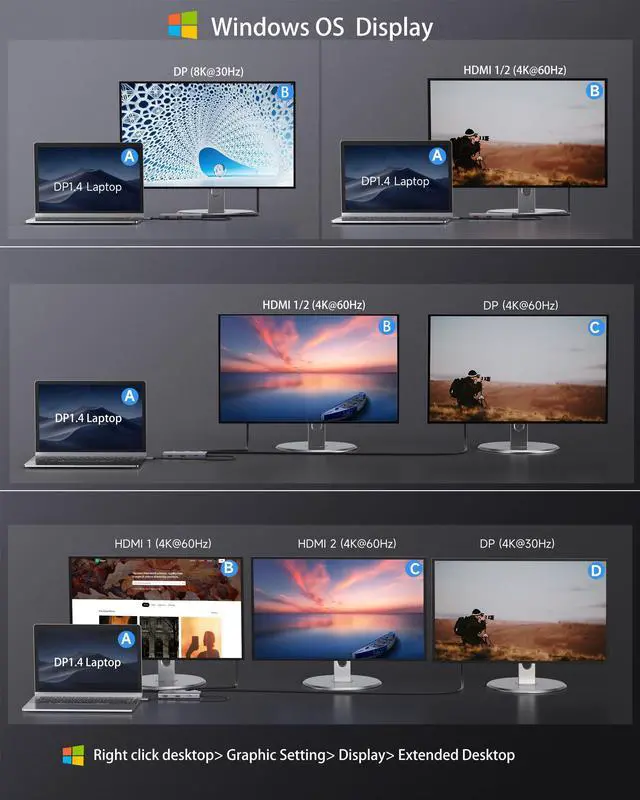
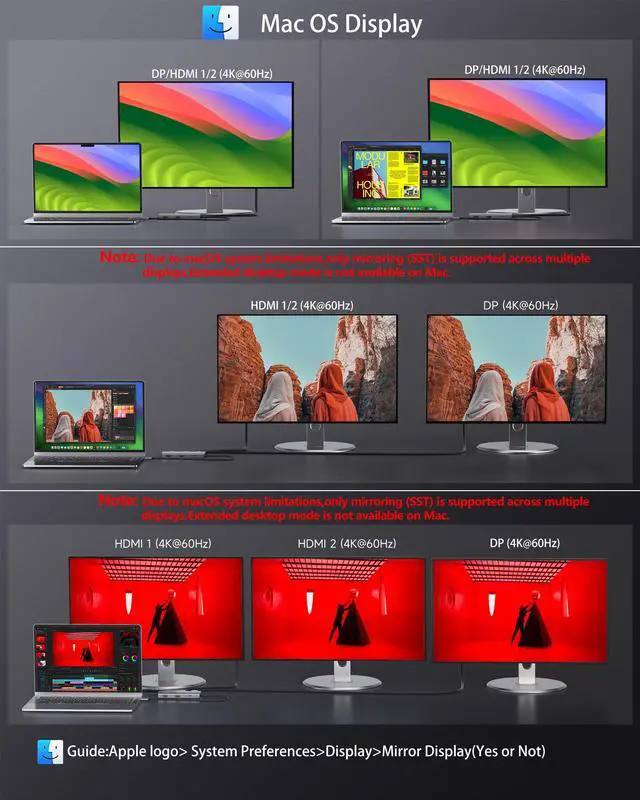
4:Only when your laptop is a DP1.4 source can the screen resolution reach its best.Make sure your device supports 4K displays (both the external monitor and the laptop) and uses an HDMI 2.0 or higher cable.----Windows OS Guide:Right click desktop> Graphic Setting> Display> Extended Desktop> Resolution Settings------Mac OS Guide:Apple logo>System Preferences>Display>Mirror Display(Yes or Not)>Resolution Settings
5:Windows OS Laptop GPU source DP1.4 single display:A--DisplayPort (8K@30Hz or 4K@144Hz/4K@120Hz/4K@60Hz), A--HDMI1/HDMI2(4K@60Hz);2.Windows OS Laptop GPU source DP1.2 single display:A--DisplayPort /HDMI1/HDMI2(4K@30Hz/1080P@60Hz)
6:Windows OS Laptop GPU source DP1.4 Dual display:A--HDMI1/HDMI2+DisplayPort(4K@60Hz+4K@60Hz));Windows OS Laptop GPU source DP1.2 Dual display:A--HDMI1/HDMI2+DisplayPort(1080P@60Hz+1080P@60Hz);
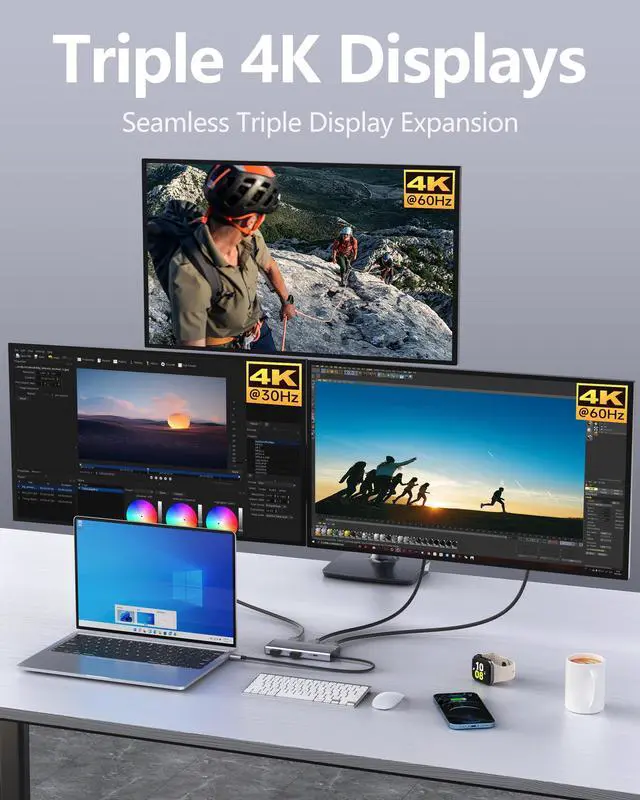
7:Windows OS Laptop GPU source DP1.4Triple display:A--HDMI1+HDMI2+DisplayPort(4K@60Hz+4K@60Hz+4K@30Hz);Windows OS Laptop GPU source DP1.2 Triple display:A--HDMI1+HDMI2+DisplayPort(1080P@60Hz+1080P@60Hz+1080P@60Hz);
8:Mac OS Laptop GPU source DP1.4 single display:A--DisplayPort (4K@144Hz/4K@120Hz/4K@60Hz),single display Dual display Triple display A--HDMI1/HDMI2/DisplayPort(4K@60Hz);Mac OS Laptop GPU source DP1.2 single display Dual display Triple display : A--HDMI1+HDMI2+DisplayPort(4K@30Hz)
9:All Mac devices only support Mirror Mode: AA, AAA, AAAA and Extend Mode: AB, ABB, ABBB. It does not support A-B+C or A-B+C+D, which are only supported on Windows laptops.If mirroring displays on a Windows system, the monitor's resolution will always match that of the laptop.
LSIKMC Docking station Compatibility with Device Models (Non-Exhaustive List)


Please read carefully before purchasing
1:This laptop docking station is compatible with Thunderbolt 4/3 or USB-C 3.1 Gen 2 or higher ports with full-featured USB Type-C ports supporting Power Delivery, DisplayPort and Alternate Mode. These full-featured USB-C ports should support display, charging and data transfer protocols. But not all USB-C devices are compatible with this laptop docking station, please check if your laptop's USB-C port supports the above functions before purchasing.
2:The docking station does not include a charger or cable. To power your computer, you need to connect an external charger to the PD charging port on the docking station. Note: USB C PD power supply and USB C 5Gbps data transmission port do not support video extension;The USB-C hub requires 6-7W of power to ensure the other ports function properly. It's best to keep the hub charged for optimal performance. If you see a slow charging warning, you can ignore it. To enable fast charging, use a power supply of 65W or higher.
3:This triple monitor docking station cannot be used with converters (such as HDMI to DVI, HDMI or USB to USB-C to VGA, etc.). The length of the video cable must not exceed 3 meters.
4:Only when your laptop is a DP1.4 source can the screen resolution reach its best.Make sure your device supports 4K displays (both the external monitor and the laptop) and uses an HDMI 2.0 or higher cable.----Windows OS Guide:Right click desktop> Graphic Setting> Display> Extended Desktop> Resolution Settings------Mac OS Guide:Apple logo>System Preferences>Display>Mirror Display(Yes or Not)>Resolution Settings
5:Windows OS Laptop GPU source DP1.4 single display:A--DisplayPort (8K@30Hz or 4K@144Hz/4K@120Hz/4K@60Hz), A--HDMI1/HDMI2(4K@60Hz);2.Windows OS Laptop GPU source DP1.2 single display:A--DisplayPort /HDMI1/HDMI2(4K@30Hz/1080P@60Hz)
6:Windows OS Laptop GPU source DP1.4 Dual display:A--HDMI1/HDMI2+DisplayPort(4K@60Hz+4K@60Hz));Windows OS Laptop GPU source DP1.2 Dual display:A--HDMI1/HDMI2+DisplayPort(1080P@60Hz+1080P@60Hz);
7:Windows OS Laptop GPU source DP1.4Triple display:A--HDMI1+HDMI2+DisplayPort(4K@60Hz+4K@60Hz+4K@30Hz);Windows OS Laptop GPU source DP1.2 Triple display:A--HDMI1+HDMI2+DisplayPort(1080P@60Hz+1080P@60Hz+1080P@60Hz);
8:Mac OS Laptop GPU source DP1.4 single display:A--DisplayPort (4K@144Hz/4K@120Hz/4K@60Hz),single display Dual display Triple display A--HDMI1/HDMI2/DisplayPort(4K@60Hz);Mac OS Laptop GPU source DP1.2 single display Dual display Triple display : A--HDMI1+HDMI2+DisplayPort(4K@30Hz)
9:All Mac devices only support Mirror Mode: AA, AAA, AAAA and Extend Mode: AB, ABB, ABBB. It does not support A-B+C or A-B+C+D, which are only supported on Windows laptops.If mirroring displays on a Windows system, the monitor's resolution will always match that of the laptop.
LSIKMC Docking station Compatibility with Device Models (Non-Exhaustive List)
| For Dell Laptops | Dell Precision 3470/3480/3570/3571/3580/3581/5470/5480/5570/5680/7780/7770/7680/7670/7750/7730/3551;Dell Vostro 5620/5410; XPS 9380/13/15/17;Dell G15-5530/G16-7630;Dell Inspiron 7420/7425/7430/7435/7506 /7610/7620/7630/7635/7791/3420/5420/5425/5430/5620/5625/5630/5635;Dell Latitute /3420/3440/3445/3510 /3520 /3540/9420/9430/9440/7230/7280/7300/7330/7320/7340/7400/7410/7420/7430/7440/7480/7490/7530/7640/5310 /5340 /5411/5420 /5421 /5430 /5400 /5440 /5491/5510/5520/5540/5530/5580; |
|---|---|
| For Dell Laptops | Precision Workstation Model 3591/3581/3480/3580/3590/3490/5570/5680/5690/5490/7780/7680/5480;Inspiron 16 2-in-1 Laptop 7630/7635 2-IN-1; Inspiron 14 2-in-1 Laptop Model 7435;Inspiron 16 Plus 7630/7640;Inspiron 16 5630; Inspiron 14 Model5430/3420;x16/x16 R2 Gaming/ x17 R2 Gaming Laptop;Alienware m16/m16 R2/m18/m18 R2 Gaming Laptop;Alienware x15 R2 Gaming Laptop/ x15 R7 Gaming Laptop/ x14 R2 Gaming Laptop;Gaming Laptop G16 Model7630/G15 Model 5530 5535; |
| For HP Laptops | HP Elitebook 650 G9/830 G9 Pro/830 G9 13.3in/830 G10 13.3 in/830 G8/840 G7/840 G8/840 G9 14 in/840 G10 14 in/850 G5/855 G8/860 G10 16 inch/860 G9 16inch/1040 G9 14inch/1040 G10 14 in;ZBook 17 G4/ 15 G3/FURY 16 in G10/Fury 15.6 in G10/ STUDIO 16 in G10/FIREFLY 16 inch G10/Power 15.6 inch G10/ Firefly 14 inch G10/Firefly 14 g7/Firefly g8 Laptop;HP Spectre x360/Spectre x2/Spectre x360 13t/Spectre Laptop 13-af001TU/Spectre folio (13t-ak000cto); |
| For Hp Laptops | HP ProBook 450 G5 G6 G7/440 G9/450 G9/455 G8/470 G5/455 15.6 inch G10/450 G10 15.6 inch/440 G10 14 inch;Pavilion 2-IN-1 X360 14 in Laptop 14-EK1040TU/14-EK1025TU/14-EK1026TU/14-EK1027TU; Omen 16.1 in Laptop 16-wf0015TX/wf0014TX/WF0013TX; Victus 15.6 in Laptop 15-fa0023TX/FA1035TX, HP Elite×2 1012/Elitebook Folio G1;Envy x360 13-bd0080ng/X360 2-IN-1 Laptop 15-EW0007TX/ 360 convertible 15/Laptop 16-h1047nr/Envy 2-IN-1 X360 15.6 in Laptop 15-FE0001TU /FE0000TX/Envy 16 in Laptop 16-H1003TX; |
| For Lenovo Laptops | Lenovo Yoga 9;Lenovo Yoga 900/920/720/730;ThinkPad t490;ThinkPad L13/L390/X380/X390 Yoga (13")Laptop;ThinkBook 16p Gen 4 (16? Intel) Laptop;E15 Gen 4 (15” Intel) Laptop;Yoga C740/C940 (14"/15");Yoga C730 (13"/15") ;ThinkPad t15/t16 Gen 1;T16 (16” Intel);ThinkPad T14/T14s Gen 4 /3 (14? Intel) ;ThinkPad P16/s Gen 2 (16? Intel) ;ThinkBook 14 Gen 6/4 (14? Intel) Laptop; |
| For Lenovo Laptops | Thinkbook 13x/13s Gen 4 (13? Intel) Laptop;ThinkBook 14 Gen 4/6 (14? AMD) Laptop;ThinkBook Plus Gen 4 (13” Intel);ThinkPad P50/P70;ThinkPad E14 Gen 5 (14? Intel) Laptop;ThinkBook 14s Yoga (14”) 2-in-1 Laptop;ThinkBook 14s Yoga Gen 3 (14” Intel) 2 in 1 Laptop;ThinkBook 16 Gen 6 (16? Intel/AMD) Laptop;ThinkPad L390/ L13 /X390/X380 Yoga(13") Laptop;ThinkPad P1 Gen 5/6 (16? Intel);ThinkPad P14s Gen 4 (14? Intel); |
| For Apple Laptops | MacBook Pro(2023,2022,2021,2020,2019,2018,2017);MacBook Air 2018-2023;Mac mini 2018-2023 ;iPad Pro 2018;iPhone 15 Series NOTE:Mac OS only supports a single display (Mirror Mode) and does not support multiple displays (Extended Mode). |
| For Surface Laptops | Surface Pro X/7/8/9;Microsoft Surface Book 2;Surface Go 4/Go 3;Surface Laptop Studio2/2+;Surface Laptop 3/4/5; |
| Incompatible Devices | Incompatible Compatible Device's Models (not full list),If your device is not listed here, please verify with us. |
| Incompatible Dell Devices | Dell Chromebook 5190; , Dell inspiron 3525 /7706 2n1,Dell Inspiron 15-5000 series/14-5410 15-3000/15-3583;Dell Latitude 3390;Dell Inspiron 15 Laptop Model 3525/3520/3511/7000/3000;Vostro 14 Laptop Model3430;Vostro 15 Laptop Model 3530 3535; Vostro 3420Laptop;Inspiron 11 3000 2-in-1, Inspiron 17 3000; |
| Incompatible HP Devices | HP Laptop 14-dq2033cl;FD0062TU/FD0068TU/15S-FQ5057TU/FD0064TU/FD0060TU/14-EP0049TU/EP0048TU/17-CN3000TX/FC0087AU/FC0084AU;Pavilion Power 15-cb,HP bs049dx;ProBook 6550b/650 G2/430 G5;Elitebook x360 1030 G2/745 G3/820 G3;HP Elitebook 840 G3/745 G4/820 G3/HP Probook 650 G2 / 455 G4 ;HP 15-dw3205ng/ef2xxx/dy2176nr/dw3xxx/dw 3033 dx;Pavillion 15 ck009/cs3000/cs1014-ng/cw1003ng/15t-eg200/All-in-one 24-k0xxx; |
| Incompatible Lenovo Devices | Lenovo Yoga Flex 5,Lenovo Tab 4; Lenovo AMD and IdeaPad Series;IdeaPad 3 15ITL6/3i (15”, Intel) ;IdeaPad 1-15IJL7;IdeaPad 720 Miix;Yoga Flex 5;IdeaPad C340-14API;T14 Gen 2,T15 Gen 2,P14s Gen 2 P15s Gen 2 AMD ;legion y540;IdeaPad 5 15ial7/pro14acn6 82l700bpus;Chromebook Duet 3 (11”)/Duet 5 13”;ThinkPad X240;V15 G2; |
| Incompatible Acer Devices | New Acer Switch Alpha 12, Acer Spin 7,AAcer model SB230; AcerAcer Nitro 5 AN515-45 AN517-41 AN517-54;Acer Aspire A717-72G, Acer predator helios neo;Acer F5-573G;Acer Chromebook R13;Acer Aspire V Nitro 15;Acer Aspire A515-44-R1DM, Aspire a515-54 model,Acer Aspire E15, Acer chromebook model CB515-1HT-C2AE; |
| Incompatible ASUS Devices | ASUS Zenbook UX330UA;Zenbook Flip UX370U; VivoBook Laptop X1704ZA - i7 1700MHz 10 Cœurs 12 processeurs. Bios IEFI 3.5 - WINDOWS 11;VivoBook flip 14;Zenbook UX425EA3-UX390;Asus ZenBook Pro UX550VE/15UX580GD/UX580GE/UX581/UX391;VivoBook 15 X1500EA;VivoBook 17 - X705UA-GC340T; |
| Incompatible Samsung Devices | Samsung galaxy tab s6 tablet/Samgung Galaxy a7/a8/a10 e/a20/a50/j7 Prime/ Samsung Galaxy Tab S3/4/ Samsung S23 FE phones/Samsung Galaxy Tab E/ Samsung Galaxy s5/s6/s7 . |
| Not Compatible List | LG G6/K8/K20/K30/Stylo 5/4/G7 thin Q;Power Laptop 15-cb, 15 ck009,15-cs3000,Microsoft: Surface Pro 4/ Surface Pro 3/ book 3 /laptop1/2;Motorola G7/G6/G5/Zplay/Z3;Max/zxon 7;Blu vivo xl,blu vivo 5r;Samsung S23 FE phones;Google Pixel, Pixel2,Pixel xl,Pixel C;ZTE/ZTE max pro/ZTE Blade X;Honor view 10;Lenovo Tab 4;ASUS zenpad z10;Google pixel book 2;Acer Aspire E15; ASUS 202C Chromebook/nitro 5 /Aspire E15, |