

Your Browsing History
Lowest price in 30 days


LOWEST PRICE
In Gaming Keyboard
Shop Department
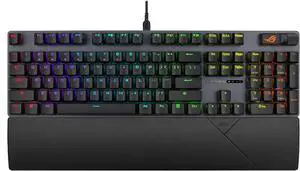
ASUS ROG Strix Scope II RX Gaming Keyboard - IP57-rated, Dampening Foam, Pre-lubed ROG RX Red Optical Switches, ABS Keycaps, multi-function controls, Xbox Game Bar function hotkeys, RGB - Black
- Brand: ASUS
- Name: XA12 ROG STRIX SCOPE II RX/RXRD/CA/ABS
- Part Number: 90MP0350-BKAA00
- Keyboard Interface: USB 2.0 (TypeC to TypeA)
- Model #: 90MP0350-BKAA00
- Item #: N82E16823193169
- Return Policy: 30-Day Return Policy
$99.99
$139.99
Free Shipping
I just got this and set it up and it feels sooooo good. It looks good, nice and quiet and the fact that you can use it with or without the cord a real plus. Out of all the gaming keyboards I have owned over the years this has been the most expensive but easily worth it. Super easy to set up and use.
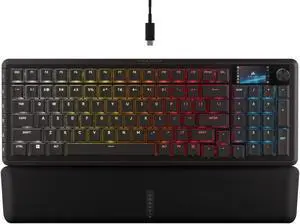
Corsair Vanguard 96 Wired Mechanical Gaming Keyboard – 96% Layout, MLX Plasma Linear Switches, 8000Hz Polling, LCD Display, Virtual Stream Deck, G-Keys, SOCD Flashtap, QWERTY US – Black
- Brand: Corsair
- Name: CORSAIR VANGUARD 96
- Part Number: CH-91E901E-NA
- Keyboard Interface: USB 2.0
- Model #: CH-91E901E-NA
- Item #: N82E16823816175
- Return Policy: 30-Day Return Policy
$119.99
$179.99
Free Shipping
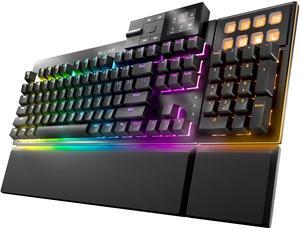
be quiet! Dark Mount Mechanical Keyboard | Tactile | Hot-Swappable Lubricated Silent Switches | Detachable Numpad and Media Dock | Programmable ARGB Keys | Quality PBT Double Shot Keycaps | BT002US
- Brand: be quiet!
- Keyboard Interface: USB 2.0
- Design Style: Gaming
- Layout: Full-size
- Model #: BT002US
- Item #: 9SIA68VKGP7367
- Return Policy: View Return Policy
$199.90
$254.90
Free Shipping
- For me, its the perfect balance of key feedback vs quietness. - Customizable layout of the numpad and media controller is a HUGE plus. I'm sick of it being forced on one side or the other depending on the manufacturer. - Customizable buttons and intuitive RGB controls. - I've had zero issues with the software. I feel some people may not understand why some functions do not work with Windows and blame the software. For instance, rebinding the apps buttons above the numpad, you cannot use most apps installed via Microsoft Store. This is a problem with how Windows installs those apps and does not allow control of them via other software. I had to uninstall Spotify and then reinstall the non-Microsoft Store version to bind it. Macro's have worked as well, although I did have to restart the app for the changes to work. NBD though to me.
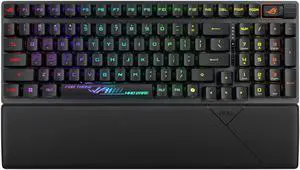
ASUS ROG Strix Scope II 96 RX Wireless Gaming Keyboard, Optical Switches, Low Latency 2.4GHz, RGB, Compact 96% Layout
- Brand: ASUS
- Name: X902 SCOPE II 96 RX WL/BLK/RXRD/CA/ABS
- Part Number: 90MP03S0-BKAA00
- Keyboard Interface: USB + 2.4GHz + Bluetooth
- Model #: 90MP03S0-BKAA00
- Item #: N82E16823193171
- Return Policy: 30-Day Return Policy
$129.99
$179.99
Free Shipping
Great mechanical key feel and action, LED lighting customization, extra USB port on back of keyboard
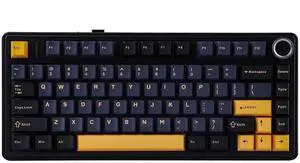
EPOMAKER x Aula F75 Gasket Mechanical Keyboard, 75% Wireless Hot Swappable Gaming Keyboard with Five-Layer Padding&Knob, Bluetooth/2.4GHz/USB-C, RGB (Black, LEOBOG Reaper Switch)
- Brand: EPOMAKER
- Name: F75
- Material: Polybutylene Glycol
- Keyboard Interface: USB / 2.4GHz / Bluetooth
- Model #: 6b745e03-bc8d-4bfe-8d91-b2ef1a0980e8
- Item #: 9SIAN1MKNU6123
- Return Policy: View Return Policy
$63.99
$79.99
Free Shipping
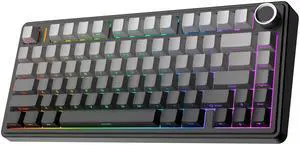
EPOMAKER x Aula F75 Gasket Mechanical Keyboard, 75% Wireless Hot Swappable Gaming Keyboard with Five-Layer Padding&Knob, Bluetooth/2.4GHz/USB-C, RGB (Black Gradient, LEOBOG Reaper Switch)
- Brand: EPOMAKER
- Material: Polybutylene Glycol
- Keyboard Interface: USB
- Design Style: Classic
- Model #: F75-B0D3F69XSP
- Item #: 9SIAN1MKNU6148
- Return Policy: View Return Policy
$63.99
$79.99
Free Shipping
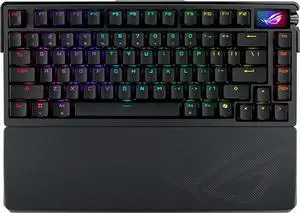
ASUS ROG Azoth Extreme Wireless Mechanical Gaming Keyboard – 75% TKL, ROG NX Storm Clicky Switches, PBT Keycaps, Aluminum Chassis, Carbon Fiber, Gasket Mount, Color OLED Screen, PC/Mac Support - Black
- Model #: 90MP03MB-BKAA01
- Item #: N82E16823193160
- Return Policy: 30-Day Return Policy
$349.99
$399.99
Free Shipping
I love it, the screen is so good and the keyboard feels crisp, it's perfect
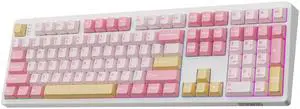
EPOMAKER TH108 Full Size Mechanical Keyboard, Wireless Gaming Keyboard with 8000mAh Battery, Creamy Gasket, 108 Keys, Hot Swap, Custom Driver, RGB Backlight (Pink, Sea Salt Silent)
- Brand: EPOMAKER
- Name: TH108
- Material: Plastic
- Design Style: Contemporary
- Model #: TH108-B0F83PYDS9
- Item #: 9SIAN1MKNU6042
- Return Policy: View Return Policy
$71.99
$89.99
Free Shipping
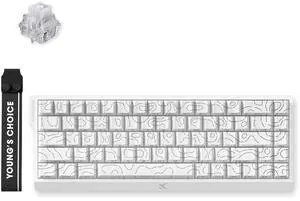
MCHOSE ACE 68 60% Mechanical Gaming Keyboard Wired Rapid Trigger Hall Effect Keyboard Magnetic Switch Hyper-Fast 8000Hz Adjustable Actuation, Hot Swap, RGB PC MAC Laptop (White Topographic/Ice Rhino)
- Brand: MCHOSE
- Name: Hall Effect Magnetic Keyboard
- Part Number: MC-Ace68-17
- Keyboard Interface: USB Type-C
- Model #: MC-Ace68-17
- Item #: N82E16823942015
- Return Policy: 30-Day Return Policy
$49.99
$59.00
Free Shipping
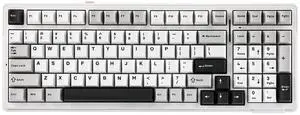
EPOMAKER x Aula F99 Wireless Mechanical Keyboard, Hot Swappable Gasket Custom Gaming Keyboard with Five-Layer Padding, Bluetooth/2.4GHz/USB-C, 8000mAh Battery (White Grey, Graywood V3 Switch)
- Brand: EPOMAKER
- Material: Plastic
- Design Style: Classic
- Mechanical Keyboard: Gaming
- Model #: F99-B0CSYN1HBQ
- Item #: 9SIAN1MKNU6144
- Return Policy: View Return Policy
$58.09
$82.99
Free Shipping
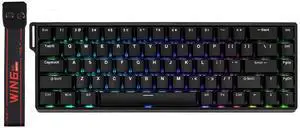
EPOMAKER Aula WIN68 HE Magnetic Keyboard with Adjustable Actuation, Hall Effect Switches, 65% Wired Compact Keyboard, 8000 Hz Polling Rate, Hot-Swappable (Black)
- Brand: EPOMAKER
- Name: WIN68 HE
- Material: Plastic
- Keyboard Interface: USB-C
- Model #: WIN68 HE
- Item #: 9SIAN1MKNU6082
- Return Policy: View Return Policy
$34.99
$49.99
Free Shipping

EPOMAKER TH99 PRO 96% Mechanical Keyboard with Screen & Knob, 10000mAh, 2.4Ghz/BT, Hot Swap, Custom Driver, RGB Backlight, PBT Keycap, Wireless Gaming Keyboard for PC/Mac (Blue&White, Sea Salt Silent)
- Brand: EPOMAKER
- Name: TH99 PRO
- Material: Plastic
- Keyboard Interface: USB / 2.4GHz / Bluetooth
- Model #: TH99 PRO-B0G4LJGX63
- Item #: 9SIAN1MKS54731
- Return Policy: View Return Policy
$76.49
$89.99
Free Shipping
EPOMAKER TH108 Full Size Mechanical Keyboard, Wireless Gaming Keyboard with 8000mAh Battery, Creamy Gasket, 108 Keys, Hot Swap, Custom Driver, RGB Backlight (Pink, Creamy Jade)
- Brand: EPOMAKER
- Name: TH108
- Material: Plastic
- Design Style: Contemporary
- Model #: TH108-B0F83RFMHP
- Item #: 9SIAN1MKNU6041
- Return Policy: View Return Policy
$71.19
$88.99
Free Shipping
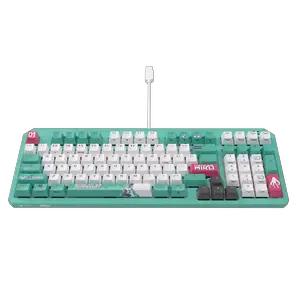
ASUS TUF Gaming K3 Gen II Hatsune Miku Edition Optical-Mechanical RGB Keyboard with IP57 Waterproof and Dust Resistance
- Brand: ASUS
- Keyboard Interface: USB 2.0
- Design Style: Standard
- Layout: 96%
- Model #: 90MP0460-BKAA30
- Item #: N82E16823193159
- Return Policy: 30-Day Return Policy
$84.99
$99.99
Free Shipping
Hatsune Miku themed USB-A to C keyboard. Three keyboard angle settings. Flat, low, and a surprisingly comfortable high angle. Responsive keys with a satisfying feel and pleasing amount of audible feedback when hit. Two options for connectivity. USB AND a wireless receiver. Comes with a few additional keys and a key puller. Also includes several switches for replacement if needed.
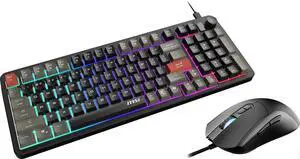
MSI Forge GK110 Gaming Keyboard & GM320 Mouse Combo, RGB Lighting, Anti-Ghosting Keys, Ergonomic Mouse, PC
- Model #: FORGE GK110 COMBO
- Item #: N82E16823167070
- Return Policy: 30-Day Return Policy
$29.99
$44.99
Free Shipping
Nice tactile response. Simple layout, don't need a map to figure out all the lights. Great for the money!
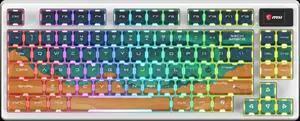
MSI FORGE GK600 TKL Wireless Gaming Keyboard – MARS Edition, Hot-Swappable 5-Pin, Tri-Mode (2.4GHz/Bluetooth/USB-C), Linear Mechanical Switches, RGB
- Brand: MSI Computer
- Model #: S11-43CEU01-HH9
- Item #: N82E16823167074
- Return Policy: 30-Day Return Policy
$79.99
$99.99
Free Shipping
- Switches sound amazing - Reliable with tri-mode connectivity - Cool keycaps and don't wobble when typing fast - Switches to Mac to Windows with an easy switch
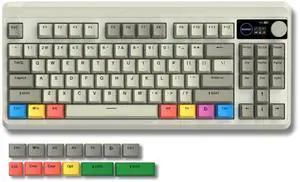
Womier Retro 75% Gaming Keyboard with OLED Display&Knob, M87 Pro Bluetooth 5.1/2.4GHz /USB-C Wireless Mechanical Keyboard with Hot-Swappable Custom Switch, Compact Gamer RGB Keyboard-Grey
- Brand: COSTOM
- Series: M87 Pro
- Name: M87 Pro
- Part Number: SHH87 Pro-bai
- Model #: M87 Pro
- Item #: 9SIBPGJKRF3954
- Return Policy: View Return Policy
$73.14
$76.99
Free Shipping
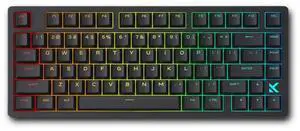
MCHOSE Jet 75 Rapid Trigger Keyboard 75% Percent, Hall Effect Black Gaming Keyboard, Wired RGB Custom Mechanical Keyboards with Magnetic Switch, PBT Keycaps (Black)
- Brand: MCHOSE
- Name: Hall Effect Magnetic Keyboard
- Part Number: HW-Jet75-1
- Keyboard Interface: USB Type-C
- Model #: HW-Jet75-1
- Item #: N82E16823942019
- Return Policy: 30-Day Return Policy
$69.99
$79.00
Free Shipping
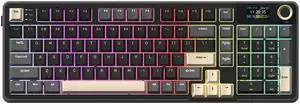
Rosewill Neon S96 Wireless Mechanical Gaming Keyboard, 98-Key Layout w/ Volume Knob, Bluetooth / 2.4GHz / USB-C, Hot-Swappable Red Switches, RGB Backlit, 3750mAh Battery, Windows & macOS, Black
- Brand: Rosewill
- Keyboard Interface: USB + 2.4GHz + Bluetooth
- Design Style: Gaming
- Layout: 96%
- Model #: NEON S96
- Item #: N82E16823201139
- Return Policy: 30-Day Return Policy
$49.99
$79.99
Free Shipping
solidly built, key strokes feel so smooth and buttery, while still having the nice click.
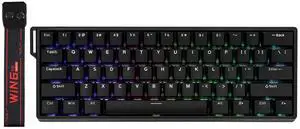
EPOMAKER Aula WIN60 HE 60% Wired Magnetic Keyboard with Adjustable Actuation, 8000 Hz Polling Rate, Hall Effect Switches, Hot-Swap, for FPS Games (Black)
- Brand: EPOMAKER
- Name: WIN60 HE
- Material: Plastic
- Keyboard Interface: USB-C
- Model #: WIN60 HE-B0DSFPVSHT
- Item #: 9SIAN1MKNU6066
- Return Policy: View Return Policy
$32.19
$45.99
Free Shipping
Really nice packaging, keyboard actually feels nice compared to a lot of ones it's price