
Your Browsing History


Judah R.
Joined on 02/15/03
0
0
Aerospace engineering manager and tech enthusiast
product reviews
- 10
Love everything but the Wi-Fi
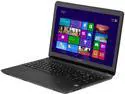
SONY VAIO F Series 15.5" Intel Core i3-3227U 4GB Memory DDR3 1600 Windows 8 64-Bit SVF15212CXB
Pros: - Thin - Light - Great aesthetic design - Large, innovative trackpad with gesture support - Stunning 1080p screen - Gigabit Ethernet - Easily upgradeable - LED-backlit keyboard - Actually useful OEM software - Great value for money - HDMI out allows you to drive 1920x1200 external display with extended desktop - Relatively little crapware - Stays cool under load - Small power supply
Cons: - Bad Wi-Fi. This laptop uses the Broadcom BCM43142, which from Google searches seems to be pretty much the worst Wi-Fi card ever. No 5 GHz support, and super slow. You can pretty much forget about HD streaming out of the box. It's that bad - Low RAM. 4 GB is a crock, modern PCs need at least 6 GB IMO - Core i3 - Don't expect to get all day performance out of the battery - Disc tray locks but leaves a gap open on the underside - Difficult to disable OEM update apps without uninstalling them - Slow HDD. Yes, 5400 rpm laptop HDDs are par for the course. No, we don't have to accept this, especially when 7200 rpm HDDs used to be on the market
Overall Review: $620 for a 1080p screen + Gigabit Ethernet is a deal, especially considering that the next less expensive non-Sony laptop with those specs costs nearly $200 more. Fortunately it's 2 biggest shortcomings can be fixed for less than $200: an 8 GB stick of RAM + a decent N900 Wi-Fi adapter can be had for $120 total. The Core i3 won't blow anyone away, but it's fast enough for web surfing, watching video and productivity. Sony threw in a few help and PC management/update apps that aren't obtrusive or obnoxious and actually work (!!!) All things said, this is a great light duty laptop, especially for users who already have a high powered, big iron machine on hand and don't necessarily need another hot rod.
9/21/2013See more detail
Inexpensive, but lacks basic features
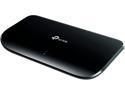
TP-Link 8 Port Gigabit Ethernet Network Switch | Plug and Play | Desktop or Wall-Mount | Plastic Case Ethernet Splitter | Fanless | Traffic Optimization | Unmanaged (TL-SG1008D)
Pros: - The lowest $/port of any GigE switch out there - Easy setup
Cons: - For all the features claimed, it lacks LED link speed indication: the LED glow the same color regardless of link speed, which bodes poorly for troubleshooting in the future. Most other switches have LEDs that glow green for GigE links and amber/orange for slower links. For this reason, I have no choice but to dock it 2 eggs.
Overall Review: You get what you pay for. I'll add this to the outer fringes of my network so as to minimize the link speed troubleshooting issue above.
4/23/2014See more detail
Excellent for productivity if you don't mind light bleed
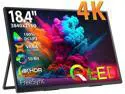
UPERFECT 18.4" 4K Portable Monitor Ultra HD Gaming Display HDMI Type C*2 Laptop Screen UHD Gaming Monitor 10Bit Adjustable Stand
Pros: - Bright - Excellent picture quality - Adjustable angle - Relatively thin and light for its size - Requires only 1 port for both power and video - Supports daisy chaining
Cons: - Significant light bleed - Case/sleeve sold separately - No HDR support - Unimpressive viewing angle
Overall Review: I picked this up after finding my usual ASUS 1080p portable monitor limiting due to its resolution. I wanted to be get full productivity on my living room couch, and 2 HD displays wasn't cutting it in comparison to my 2x 4K + 1440p basement office setup. Shockingly, the UPERFECT is the only 18" or smaller 4K portable monitor I could find. I daresay I was the only 4K portable monitor I could find, *period*. Setup is easy, especially if you use a Thunderbolt or USB 4 port. Just plug 1 end of the USB-C cable that came with the monitor into the port on your laptop and the other into either USB-C port on the monitor and you're done. Lesser ports will either require using 1 of the USB-C input ports for power and/or a lower refresh rate to prevent signal dropout. Unlike some other portable monitors that send both power and video over USB, the UPERFECT doesn't require installation of separate drivers to work, which makes it perfect for enterprise laptops that typically don't allow that for non-admin accounts. 4K at 18 in is a pretty high pixel density, and so if you're using 100% scaling you'll either need excellent vision or to get the display close enough for you to read it clearly. I found this a challenge on my couch and wound up jury-rigging an Uncaged Ergonomics laptop stand with a throw pillow to get it close and level. The display is very bright, with excellent image quality and razor sharpness. However, there is significant light bleed and no HDR support. Viewing angle is also rather narrow, but thanks to the high pixel density the display will likely be so close to you that won't matter much. Lastly, unless you plan on making the monitor a permanent installation - which I would not recommend thanks to the lack of tilt or height adjustment or VESA mount support - ensure you order the matching case (sold separately) as there's nothing in the box to protect the display besides a thin shipping sheath. Be sure to keep the sheath too. Overall, this display is a godsend for mobile or non-desk productivity as long as you're not working with a group of people who also need to see the display. I would not recommend it for professional video or image editing due to the light bleed unless your absolutely need the display resolution.
10/26/2025See more detail
You get what you pay for
Patriot P400 Lite M.2 PCIe Gen 4 x4 1TB SSD, Solid State Drive - P400LP1KGM28H Up to 3,500MB/s
Pros: - Least expensive Western brand name SSD
Cons: - Runs hot: 62 C in laptop as is - Utility software very limited - Weird initial crashes
Overall Review: Installed this on a Core 8th gen Lenovo IdeaPad Flex 5, upgrading from the 256 GB Samsung the laptop shipped with. Seemed to work fine after installation. However, after closing the laptop lid and leaving it for a while I'd return to the laptop still running but the display off and unresponsive to anything. Opened the laptop back up and reseated both the SSD and the RAM, then powered it back on and ran Lenovo Vantage hardware test. So far, so good since then, but I've ordered a tried and true WD Blue ($11 more) just in case that I'll return if everything works out with the Patriot. Utility software is absolutely bottom of the barrel bare bones stuff compared to Samsung Magician. That said, I deliberately avoided Samsung for this purchase as I wanted save money. The SSD runs at a whopping 62 C when idle, which might be a record across all storage devices I've ever owned. As max operating temp is 70 C this is not a drive you want to use for heavy file transfer applications as it will likely throttle. Kinda odd Patriot didn't include as much as a cheap thermal pad with temps that high, but at this price point I guess that's PFTC. Rating it 3 eggs for now due to the above. If you can afford or want to spend more for better, do so.
10/26/2025See more detail
Confirmed compatible with HP Envy 17-cw1087nr (SKU: 9U7B8UA#ABA)
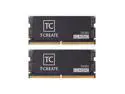
Team T-CREATE CLASSIC 64GB (2 x 32GB) 262-Pin DDR5 SO-DIMM DDR5 5600 (PC5 44800) Laptop Memory Model CTCCD564G5600HC46ADC-S01
Pros: - Laptop boots and runs just fine - Free sticker included - Much better packaging than Crucial - Actually in stock
Cons: - Obvious ESL on product page
Overall Review: I picked this up to upgrade my new Intel® Core™ Ultra 7 155U HP Envy 17 from the stock 16 GB RAM. It installed just fine and runs well. This (64 GB) appears to be the max RAM the laptop supports, despite the CPU supporting up 96 GB. I tried 96 GB and the laptop wouldn't even POST.
2/1/2025See more detail
Works just fine in HP 15z-fc000 741Q9AV_1 laptop
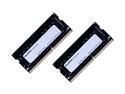
Mushkin Enhanced Essentials 64GB (2 x 32GB) 260-Pin DDR4 SO-DIMM DDR4 3200 (PC4 25600) Laptop Memory Model MES4S320NF32GX2
Pros: - Easy open packaging - Reusable packaging
Cons: - None experienced so far
Overall Review: I bought a new laptop for my mom and decided to max it out using aftermarket parts so she'd never have to worry about upgrading it or running out resources. Mushkin are pretty barebones compared to more established RAM brands, but I haven't noticed any difference in performance, stability, etc. in the almost 5 years I've used their products.
6/26/2023See more detail