
Your Browsing History


Paul L.
Joined on 06/05/04
0
0
product reviews
- 61
Nice Workgroup/SOHO switch
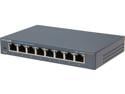
TP-Link 8 Port Gigabit Ethernet Network Switch | Ethernet Splitter | Sturdy Metal w/ Shielded Ports | Plug-and-Play | Traffic Optimization | Unmanaged (TL-SG108)
Pros: 8 ports, 10M/100M/1G ethernet FDX, auto MDIX. Steel case (very nice). Strong mounting keys for wall or shelf securing. Low power switching wall cube power supply.
Cons: None really - it is what it is, a unmanaged switch. For this price point, nit-picking would be unfair. But, I would like to see the port LEDs visible if it were to be wall mounted. I would also like to see the power jack on the same side as the network connectors so all cabling would come out one side. One small issue is the two mounting keys, punched into the metal case, are oriented in such a way that the locking notch faces away from the direction I would typically want, which would have the cables falling downward away from the switch to minimize bend stress due to gravity. In this orientation, the switch would not lock onto the mounting screws. I would like to see a 3-way or 4-way key which would cover all mounting configurations. This would add nothing to the cost.
Overall Review: This is my first Eggxpert review. I want to be fair, so I am not going to downgrade this product for missing features which would price it into another class. This is a small SOHO/Workgroup switch with all the usual features. The plus side is that it had a nice heavy steel case, and mounting keys on the bottom that won't pull out if you mount the switch to a wall or shelf. That is a big plus. The only downside, which is common for switches in this price range, is that the LEDs for the switch ports are integrated to the connector, so if you mount the switch to the wall, the LEDs won't be that visible. Another downside, also common for switches of this type, is that the power jack is on the opposite side of the case from the network ports. From a cable management point of view, my ideal would be power jack on same side as network ports, and LED indicators visible from top as well as port side. To be fair to this switch again, that would increase cost, and put it in a different class. One nice thing being asked to Eggxpert review this product is I can take it apart, which I did. Inside I found the usual suspects, integrated switch IC with epoxy mounted heat sink, but was surprised to find a good quality double sided PC board with the back side hatched for EMI/RFI suppression. For an inexpensive product, that is a sign that someone is paying attention in the design of this product. It also had a nice internal buck regulator, which adds to efficiency. I do not have the equipment to check some of the advertised features like jumbo frames, or perform stress test to check that the switch fabric is truly non-blocking, so I have to take these on faith. In general, I like this switch, and think it would be a good choice for someone looking for an 8 port unmanaged switch in the moderate price range.
5/6/2013See more detail
Disappointed
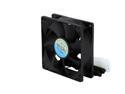
MASSCOOL FD08025B1M3/4 80mm Cooling Fan
Pros: Moves a lot of air. Inexpensive. 3 pin (with tach) and 4-pin power connector gives a variety of supply options.
Cons: Noisy. Much louder than expected. Attached 4 pin power connector exposes 12V, which can contact metal inside case unless you cover with tape or other cover.
Overall Review: 26.5DbA spec should be almost silent. This is quite loud, I would estimate at 36+ DbA I think noise is from cavitation due to the relatively high speed motor. Fan blades are not sculpted to reduce such cavitation, as more expensive fans do. BUT- if you want to move a lot of air with a low priced fan, this is a good choice. I won't return these, I'll keep them in my spare box in case I need a replacement.
8/23/2007See more detail
Very nice little router
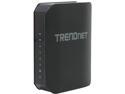
TRENDnet TEW-733GR N300 Wireless Gigabit Router IEEE 802.11b/g/n, IEEE 802.3/3u/3ab
Pros: Inexpensive when on sale or on Shell shocker. Wireless N. All the usual suspects for features. Gigabit WAN and LAN. If you just plug and go, wizard configuration is simple. Comes with WPA enabled and a good (though complicated) password with sticker on interior wrapper and on bottom of box. Same with WPS. Some attention has been paid to security here!
Cons: Pretty dumbed down interface. You have to read between the lines to configure it how you want it, unless you just plug and go. Documentation has not caught up with firmware (shipped 1.0 May 2013, installed 1.01 Sept 2013)
Overall Review: I had to play with the menus to get it configured just the way I want. Configured two for WiFi roaming in house, one as router with DHCP, one as access point to cover dead spots. If you don't use the plug-and-go wizard, you have to read between the lines of the manual to set the configuration the way you want. One very nice feature added in the updated firmware is one click access point mode found on Main > Wan tab. Not documented, but basically turns off all the routing leaving switch and wireless to be an access point. Control IP is obtained by DHCP from the host network, so you have to look that up on the DHCP server to access the configuration menus. Without this feature, you have to turn off the DHCP server on the unit you want to be AP and configure control IP to be in range of host network. Not that hard, but a drag if you ever change host network configuration and end up with incompatible subnets. With the Access Point Mode enabled, if the host subnet changes, the AP will get a new in-range control IP address from the DHCP server, so you're not locked out. Nice feature, and could really use a description in the documentation.
10/21/2013See more detail
To be avoided
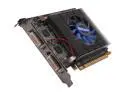
Galaxy 61TGF4AM5UNX MDT GeForce GT 610 1GB 64-bit DDR3 PCI Express 2.0 x16 HDCP Ready Multi-display Video Card
Pros: Probably OK if you want to use for advertising or some other type of display marketing
Cons: DOES NOT SUPPORT individual monitors. The manufacturer's website says you can have a triple monitor setup in what they call Split Monitor mode where each of the monitors stand alone, in an extended Windows Desktop configuration,but it does not work. Two monitors will always combine into a span mode. Period. Their in-house software allows some independent monitor functionality, but it doesn't remember configuration between reboot. In short, this card is essentially useless. You will always get video split across two monitors in a 3 or 4 monitor configuration. I just called Tech Support, and was told that "The low end cards don't support that", i.e, split monotir mode. The included manual and quick install guide says it does, but it does not! This makes this card useless for any business application, and unless you like staring at the gap between your monitors, is pretty poor for gaming. If you want to set up a multi-media show at a mall store, it might be OK since nobody pays attention to those anyway.
Overall Review: Thank G*d I didn't spend a lot for this muffler. I got it on sale, and after rebate, am not out of pocket much.
4/21/2013See more detail
Very nice laptop for the price
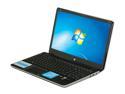
HP Pavilion 15.6" AMD A8-4500M 6GB Memory Windows 7 Home Premium 64-Bit B5S11UA#ABA
Pros: Nice big bright screen, reasonable weight, included 10-key keypad, long battery life, fingerprint scanner. fast processor that runs cool.
Cons: power connection comes out the side, which I find to be inconvenient. I like the back better. Lots of bloatware.
Overall Review: Did not buy from NewEgg- got it on sale elsewhere on pre-windows 8 clearance. Very nice laptop but came with extreme amounts of HP bloatware. What I did: created my backup set of DVDs just for safety, entered the system recovery and restored using just the basic image and drivers. I forget which selection to make from the menu, but the choice is obvious. One choice restores everything, and one restores just he essentials. Works much better without the bloatware.
12/12/2012See more detail
Nice phones
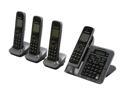
Panasonic KX-TG7644M Link-To-Cell 1.9 GHz Digital DECT 6.0 4X Handsets Cordless Phones Integrated Answering Machine
Pros: Can link to cell to replace landline, backup in case of outage, or as we did, just to transfer the phonebook so we don't have to enter by hand. Intuitive operation, but you need the book for some of the advanced features.
Cons: None
8/20/2012See more detail