

Your Browsing History


Jeremy B.
Joined on 06/17/11
0
0
product reviews
- 10
Decent Gaming laptop
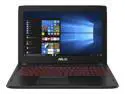
ASUS FX502VM-AS73 Gaming Laptop Intel Core i7 7th Gen 7700HQ (2.80 GHz) 16 GB DDR4 Memory 1 TB HDD 128 GB SSD NVIDIA GeForce GTX 1060 3 GB GDDR5 VR Ready 15.6" Windows 10 Home 64-Bit
Pros: Really, the laptop does everything I want it to do. I can use it for work, school and play. It runs quietly and fairly quickly.
Cons: As an aspect of basically having a desktop graphics card, it gets hot when playing graphically intensive games. Recommend a laptop cooler for your gaming sessions.
Overall Review: The only real problem I have is that mine hates to boot up. It often crashes at the Asus screen, and forces me to preform a hard shutdown. I think It is because the boot is having a hard time discovering the OS. Trying to fix it I remember that it didn't always see the OS drive in the bios. I would send it out but... college; kinda need it at the moment.
2/14/2018See more detail
OK MB, mostly works
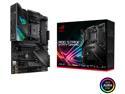
ASUS AMD AM4 ROG Strix X570-F Gaming ATX Motherboard with PCIe 4.0, Dual M.2, SATA 6Gb/s, USB 3.2 Gen 2
Cons: - ASUS Customer Service
Overall Review: Overall, this is a good Motherboard. It works, it was easy to assemble. There are only a couple of issues I have had so far. Firstly, the BIOS are slow to load up. Really don't like that my fans all rev way up every time I turn on the PC. There also seems to be a problem with saving settings? I don't know why but my ram has to cycle every time I turn the PC on as well. Everything has passed stress tests so I don't know why it does this. It is kinda annoying. Sometimes the RBG on the motherboard doesn't turn on and requires a restart to work. The Aura software isn't great either. I can't sync certain colors between all of my RBG; mainly orange and purple which seem to be off for the MB. Customer service sucks for ASUS. They basically wash their hands of the product once it arrives at your door. To note: this is my first high end PC, but I have built 2 mid range PC's in the past with no issues.
12/28/2019See more detail
So far this is decent
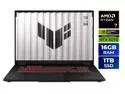
ASUS TUF Gaming - 18" WQXGA 240 Hz - AMD Ryzen 7 260 - GeForce RTX 5070 Laptop GPU - 16GB (8GBx2) Memory DDR5 5600 - 1TB PCIe SSD - Windows 11 Home (FA808UP-NS74)
Pros: - Big screen - great for productivity; with cravat. - 6 hr battery life with general use means loads of time to work if power is out or unavailible; with cravat - Powerful? Requires framegen. POE2 looked great on it, but locked to 60fps with dlss, so difficult to gauge performance in this instance.
Cons: - Weak iGPU. Default for desktop session. Cannot handle the 240 hz refresh rate. - Performance mode kills battery. Balanced mode kills cpu performance. - 50 series gpu means weaker performance without up-scaling/frame gen.
Overall Review: I haven't used this long enough to give a direct recommendation. What I will entail is my initial setup. The set up for windows 11 took about 1.5 hours. Because of mandatory updates. after some initial set up, I started using in earnest when I started noticing screen tearing and artifacting. My assumption was that it was using the iGPU by default, which proved to be true after researching the asus optimus stuff. Set the refresh rate to 60 hz and determined the iGPU could not handle 240 hz as the issue become unnoticeable. This sent me on a journey to force the dGPU as the default. Got there after a couple of hours and now everything is right with the world. I think I lose a little battery life but I would rather set my monitor to 240 hz (144 would have been nice but not in the drop down) as advertised. Annoying to have to do.
12/27/2025See more detail
Not the most stable was the root cause of a lot of issues.
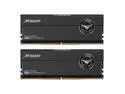
Team T-Force XTREEM 48GB (2 x 24GB) 288-Pin PC RAM DDR5 8200 (PC5 65600) Desktop Memory Model FFXD548G8200HC38EDC01
Overall Review: This kit has been super finicky. I was never able to run at the advertised speed due to stability, but stability plagued me even at 6000mhz profiles. Random freezes and crashes, which have caused me to have to reinstall os due to interrupted updates. Hitching. I can't recommend this kit. Very unhappy. I dealt with it because I didn't have the money to replace it.
9/26/2025See more detail
It's a MB? Has issues.
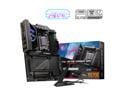
MSI MPG X870E CARBON WIFI Motherboard, ATX - Supports AMD Ryzen 9000 / 8000 / 7000 Processors, AM5 - 110A SPS VRM, DDR5 Memory Boost 8400+MT/s (OC), PCIe 5.0 x16 & 4.0 x16, M.2 Gen5, Wi-Fi 7, 5G LAN
Overall Review: I have been using Asus for a long time and wanted to try something different and not break the bank on this build. I had started using MSI stuff and wan't too, too bad but I'm just finding a hard time caring all that much for this MB. The bios are hit or miss. I can easily play with clocks in the bios, which is great, but a lot of other features are missing that I didn't think I would miss. First, there is no way to turn off rgb with powering on the system and because mystic light makes me have to open up msi center every time to toggle it off then on again to make the rgb behave the way I want (which is off because no one uses LEDs that can do a good static orange). Oh, and apparently you can't uninstall it now, so good like with 3rd party AIO rgb solutions, because mystic light takes precedent. Second, Asus has an automated fan optimization that msi center's thing can't hold a candle to, so my fans are not optimized, and manually doing it in msi center doesn't seem to do a thing. Right now I can't play TWWH3 because the fans can't keep up. Third, I've tried to reach out to MSI for help several times and the agents end the chat every time I try to get help. I almost wish I had splurged on the Asus MB at this point. I've built several PCs at this point and can usually figure out the issues, but this is annoying for no good reason.
12/1/2024See more detail
Runs hot with AIO
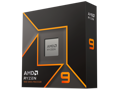
AMD Ryzen 9 9950X - Ryzen 9 9000 Series Granite Ridge (Zen 5) 16-Core 4.3 GHz - Socket AM5 170W - Radeon Graphics Processor - 100-100001277WOF
Cons: Averages 50c idle with MSI meg core liquid 360 at base clock.
Overall Review: Not sure what is going on here, but it shouldn't be idling that high.
12/1/2024See more detail
seller reviews
- 1
Buyer Beware
I have had nothing but a hard time with this seller. They sent my first kit to the wrong address. The box for the second kit arrived in rough shape and possibly tampered with. I haven't used either of the kits and they are in the condition they were sent to me. Trying to refund the purchase and the seller is trying to weasel out of it. Just want these gone and my money back. Pretty simple. Don't buy from them unless you want a hassle.
On-time
Delivery
Product
Accuracy
Customer Service
Satisfactory
12/15/2019See more detail