
Your Browsing History


Lee D.
Joined on 03/24/02
0
1
product reviews
- 11
No S-Video
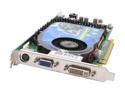
XFX GeForce 6800GS 256MB GDDR3 PCI Express x16 SLI Support Graphics Card PVT42GUAD7
Comments: The specs on this card are incorrect. It comes with VIVO out, not S-Video as it mentions in the product specs. Otherwise, a good card.
11/15/2005See more detail
The BIOS Update and WiFi Drivers OUCH!
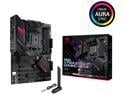
Asus ROG STRIX B550-F GAMING WIFI II AMD AM4 (3rd Gen Ryzen) ATX Gaming Motherboard (PCIe 4.0,WiFi 6E, 2.5Gb LAN, BIOS FlashBack, HDMI 2.1, Addressable Gen 2 RGB Header and AURA Sync)
Pros: Solid build quality with plenty of features. Physical layout works well for standard AMD cooler and RAM and installation is pretty straightforward (except for drivers).
Cons: 1. If you choose to not install Armory crate when installing windows 11, you will be hampered with issues making it challenging to install network and WiFi drivers, even if you run the drivers from an ASUS driver install utility and even if you use the "have disk" method and try to install them from the CD that comes with the mobo. You have to read posts that explain how to move the exe of the separate NIC install utility into a specific folder (within the unzipped driver install package) in order to get the hardwired NIC to install properly. What usually happens is it starts to install, the screen flickers, then it just quits (unless you move the exe). This was the most challenging driver install I have experienced since the days of Windows 95!! 2. The Wi-Fi drivers were especially hard to install. I had to install a separate ASUS driver utility to get the correct Media Tek WiFi drivers in place. Armory Crate was installed as a form of surrender but it also was not able to install the Wi-Fi drivers properly. 3. Updating BIOS is very tricky. I attempted to update using a USB drive and failed with 4 different USB sticks that were all formatted using FAT32. The 5th USB, a cruizer mini from the early part of the year 2,005 was the only one that worked for me. I am not sure my issues stemmed from skipping the armory crate install during the Windowss 11 fresh build process, but it seems harder than expected for a modern build. I have built a lot of PC's in my day and this one was rough.
Overall Review: This one was bad on driver and bios update for me, but I got it done, just took me more time.
3/13/2026See more detail
Same as EVGA
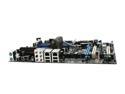
BFG Tech BFG680i SLi LGA 775 NVIDIA nForce 680i SLI ATX Intel Motherboard
Pros: Good chipset, easy to overclock.
Cons: Same board as EVGA and ECS. I called the BFG rep, these three are made by NVIDIA and rebranded with a different name. The EVGA has a better warranty, has higher quality cables, and as of now, is a lower price.
Overall Review: Update to the P24 BIOS, the board is an excellent performer...even reads wireless keyboards and mice in the BIOS environment.
2/12/2007See more detail
Great Board
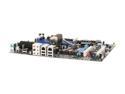
EVGA 122-CK-NF68-AR LGA 775 NVIDIA nForce 680i SLI ATX Intel Motherboard
Pros: Very easy to overclock, it read my SATA drives fine and my IDE and floppy fine as well. Overall a very high quality board. The EVGA support doesn't have that phony foreign mobo company feel. The support team responds to queries and they back up their products. This is a major plus when purchasing a mobo.
Cons: 3 pin fan connector near LAN does not work. SATA 5 and 6 are really 1 and 2. Sata 1 and 2 are very close to where you may mount a hard drive, so be careful where you place your drive. No 64bit Vista drivers on disc, must download.
Overall Review: I flashed the BIOS with the most recent update before I even installed: Vista 64 2 GB Dominator 800MHZ 8800GTS E6600 OC to 2.85 (very mild) 150GB Raptor 400GB Barracuda Plextor PX760A FD Silencer 610 Praetorian Case
2/3/2007See more detail
ASUS is Over Rates
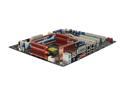
ASUS Striker Extreme LGA 775 NVIDIA nForce 680i SLI ATX The Ultimate Gaming Motherboard
Pros: The board is full of features and has a nice look. You can tweak settings like a pro.
Cons: Go to the ASUS website and get a feel for their support...it is almost non-existant. They always get high marks in PC mags, but lots of their boards get many revisions, making BIOS updates tricky..don't use the wrong BIOS on a the same board with a different rev number. They aren't as good as people think.
Overall Review: Get an EVGA, the bugs have been worked out. I am running one with a 150 Raptor, 400GB storage dive, E6600, 8800GTS, Vista 64, and a silencer 610. The board overclocks very easy...save your money and get a board backed up by the manufacturer.
2/3/2007See more detail
PCB Not Black
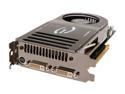
EVGA GeForce 8800 GTS 640MB GDDR3 PCI Express x16 SLI Support Graphics Card 640-P2-N821-AR
Pros: Fast card, ready for DX10, excellent choice for building a new PC with Vista. Nice build quality. Great support from EVGA.
Cons: PCB is green, not black as shown in the pictures. Card is exceptionally long. Make sure you have room (can't imagine how much longer the GTX is)
2/2/2007See more detail