
Your Browsing History


Lutz H.
Joined on 08/31/01
0
0
product reviews
- 61
Top quality keyboard
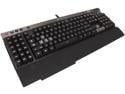
Corsair Raptor K50 Gaming Keyboard (CH-9000007-NA)
Pros: First Impressions: Let this be said first: this keyboard makes a statement on your desk. It is large, since it has both a numeric keypad and the macro keypad. It’s also visually striking; the aluminum plate on the top side is beautiful. The wrist rest (detachable) does a nice job of positioning my hands without tiring them, the texture is smooth and comfortable. There are 4 feet, two in front and two in the back, to adjust tilt in different ways, and Corsair opted for nice, large anti-skid pads under keyboard and wrist rest. Layout: The keyboard has a large number of functions, such as volume control, media player control, backlight control and of course macro key control. Corsair has found a good layout and grouping for the functions, and I felt at home rather quickly. The actual key layout is standard ANSI, and I like that Corsair stuck to it. The keys: This being a keyboard review, the keys deserve some attention. This is a rubber dome switch keyboard, so let’s get this out of the way first: mechanical keys are superior. However, there is a cost issue and it seems Corsair wants to make the high level of functionality available at a lower price point; they do have mechanical offerings for extra money. That said, the keys are decent for being rubber dome. The stem, which is the part that sits inside the key and reacts to the user pushing the key down by depressing the rubber dome and activating the switch, is a rather sturdy solution on those keys. Due to the construction, the keys do not wobble nearly as much as most other rubber domes I have tested. It’s a simple test, put your fingers on the keys without pushing the keys down, and wiggle with the hand. A lot of keyboards fail that test and provide too much play, making typing inaccurate and frustrating. The switches Corsair is using do not have that problem, and as a result typing is enjoyable on the K50. The key caps are on the smaller side, but I don’t find that to be bad at all. I have relatively large fingers and had no trouble at all touch typing. The larger keys (Shift, Enter, Space etc) have good stabilizers under them, so that if you press down on the edge of the large Shift key, for instance, it does not grind or get stuck. Lastly, the printing on the key caps is not a traditional print per se, the legends are clear plastic that goes through the entire cap, so that you can see the lighting through the key. The font looks good and clear, and I suppose there will be next to no wear down on the actual legends, another common concern on many other keyboards. The backlight is fun to play with. It works as advertised and I find it pleasing because I’m not tied to any particular color, the RGB adjustments are easy to work with and functional. The user gets to pick a different color for each profile of macro keys (M1/M2/M3), an instant visual indicator that the profile was switched. The volume “wheel” feels very cool to spin, a very nice change from the many +/- keys I have s
Cons: First impressions: The thick, braided USB cord is a little bit of an eyesore, and I wish there was an option to route that cable out the sides instead the back center. If anything, though, this cord is unlikely to break. The price seems a little steep for a rubber dome keyboard, but the very rich feature set together with the overall build quality of this keyboard really adds to the appeal and justifies the price to customers who value the macro key functionality. Functionality: No PS/2 converter is delivered with this keyboard. Corsair is straightforward about this and makes it clear this is a USB only keyboard. While it’s understandable that some old standards have to go some time, I feel it’s too early for PS/2 to go because on many motherboards, you can’t get into the BIOS with USB keyboards unless they are specifically supported. On my LGA1155 board, I can’t get into the BIOS at all, I need another keyboard to do so. It’s something to be aware of, especially if you have a slightly older system. I don’t know how prevalent this issue is on newer systems. Corsair’s suggestion to ask the motherboard manufacturer to include support for the K50 will mostly fall on deaf ears, I have tried similar things with various manufacturers and always got a polite rejection. The driver software is mostly self-explanatory. I do wish I could include mouse clicks in macros, or to at least see a statement making it clear what exactly can be or can’t be recorded in a macro. This quest for mouse clicks in macros had me a little frustrated.
Overall Review: This is the nicest rubber dome keyboard I have ever used. In particular the stable key stems and the usage of proper stabilizers on larger keys really elevate the typing experience. I would wager that a whole lot of people aren’t so concerned with rubber dome over mechanical keys unless they are professional writers, in which case they are unlikely to be looking towards high end macro keyboards for gamers to begin with. Up until now I have been using a Cherry MX brown mechanical and I prefer its keys, however, I’m in no way having a bad typing experience with the K50 and will stay with it for the time being; the macro functionality is very tempting to really get to know, and really, this keyboard just looks GOOD on my desk.
9/25/2013See more detail
I can't recommend it
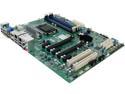
SUPERMICRO MBD-X10SAE-O ATX Server Motherboard LGA 1150 Intel C226 DDR3 1600
Pros: The motherboard layout is sensible. It has a lot of fan headers on it, and the number of expansion slots is great, particularly if you have some older PCI hardware to re-use. Feature wise, this board is hard to beat, it's got everything from onboard sound to IPMI. For affordable and feature rich server boards, Supermicro is the only game in town (for better or worse.) The BIOS exposes a lot of options and is well structured. Booting from USB devices works flawlessly.
Cons: The worst aspect of this board has been that it seems to trip over itself with all the hardware that's on it. I've installed FreeNAS on it, as well as Debian Linux, and both of them complained about interrupt storms. I was able to mitigate those to a degree by disabling onboard sound and 1394 (firewire) so that FreeNAS' kernel would stop sending messages, but the interrupt rate is still outrageously high and costs a lot of CPU time. But what's the point of all this onboard hardware when I have to disable it? Maybe it's a defect on my board, but I am leery of it at this point. This is with PCB REV 1.01 and BIOS 2.0a. I will try their MBD-X10SL7-F-O board because it's highly recommended in the FreeNAS community and because I liked some aspects of this board. The worst aspect is that Supermicro's support simply did not respond to my very detailed inquiries for 4 business days. It's unacceptable that there wasn't even as much as an acknowledgement that somebody is looking into it. You're stuck with the goodwill and support of the user community, which for this particular model is not very large.
Overall Review: A few details that might help others with their implementation: The board has a hardware watchdog, which is nice if your OS supports it. But when it doesn't, and you have it enabled and the jumper set to 'restart' on watchdog event, you might see your board reboot after 5 minutes of installing some OS or doing whatever task with it. If that happens to you, just disable the watchdog in BIOS until you get a driver for it. Also, don't look too hard for the BIOS reset jumper, it's just 2 solder pads you have to short. This is documented somewhere, but the manual that's linked on Supermicro's site will have you look for a jumper. It works fine once you know that. Please realize that this board does not have dedicated graphics on it. The graphics ports are for CPU integrated only. If you buy a Xeon without GPU, you will need a graphics card. This is in contrast to the X10SL7-F-O, which does have (rudimentary but fine for server use) onboard graphics. Lastly, I'd really only recommend this for server use if you have legacy PCI devices you must use. For server use, the MBD-X10SL7-F-O just is better balanced because it has a nice LSI controller on it already.
3/13/2015See more detail
DOA
Mushkin Enhanced Reactor 2.5" 1TB SATA III MLC Internal Solid State Drive (SSD) MKNSSDRE1TB
Pros: Newegg shipping was fast, and they issue a free return label to me.
Cons: Item was DOA, tested in multiple machines. Doesn't even show up as a SATA device on the controller with known good cables. I'm disappointed that I have to deal with this when I really needed a working device quickly.
4/17/2016See more detail
Update to initial review
CORSAIR Voyager GO 16GB USB 3.0 OTG Flash Drive CMFVG-16GB-NA
Pros: I like that the drives are small. They fit side-by-side on motherboard connectors, so using 2-4 of them is easy to do without extension cables.
Cons: 3 weeks into using 2 of these drives, they both flaked out. FreeNAS reported 25 and 55 checksum errors, respectively. That's not an acceptable performance, so I replaced both drives with Lexar drives from another distributor and hope those are better. The 2 drives I had were set up as mirrored (ZFS) boot drives for freeNAS 9.3. It ran fine for a few weeks.
Overall Review: The issues I found may not be visible in typical Windows usage.
4/20/2015See more detail
Good build
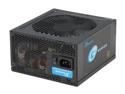
SeaSonic SSR-450RM 450W ATX12V / EPS12V SLI Ready CrossFire Ready 80 PLUS GOLD Certified Modular Active PFC Power Supply New 4th Gen CPU Certified Haswell Ready
Pros: This is running my NAS 24x7 and has done so for a couple of weeks now. It's a quiet power supply, the fan is not audible over the NAS hard drives. I really like that it uses the same cabling as my SeaSonic 660XP2 I have in another machine. I can swap cables between them without worry, and they look similar as well. So, a big plus when you use a bunch of different SeaSonics. Haswell ready, has all the plugs you can imagine. Worked right away on a Supermicro X10SL7-F and Xeon 1231 v3.
Cons: None.
Overall Review: An excellent power supply for a server that needs about 200-230 Watts under full load. Plenty of room for growth without going overboard; consider that a higher powered PSU will have more loss even if it has a higher rating.
3/30/2015See more detail
Works well
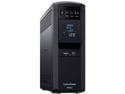
CyberPower CP1500PFCLCD PFC Sinewave UPS Systems - 1500VA/1000W, 120 VAC, NEMA 5-15P, Mini-Tower, Sine Wave, 12 Outlets, LCD, PowerPanel
Pros: This is protecting a pfsense router and a NAS. The USB connection to the pfsense machine works well. The setup for 'nut' in pfsense: Set the type to 'Tripplite AVR USB' and set the port to 'Auto USB' It will recognize the UPS properly and can read all the diagnostics from it just fine. It will NOT think it's a tripplite, that's just a workaround to get communications going. I like the display, very geeky and slick. The unit is very quiet. Spacing of the outlets is okay, you get enough outlets to protect anything that has business being on a UPS. I like that cabling for USB is included; all too many manufacturers skimp on this kind of thing.
Cons: None.
Overall Review: This is a complete package, works very well with Windows as well as FreeBSD out of the box without going through any mental gymnastics.
3/30/2015See more detail