

Your Browsing History


ERIC W.
Joined on 01/08/05
0
0
product reviews
- 18
No sideport memory!
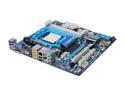
GIGABYTE GA-MA785GMT-UD2H AM3 AMD 785G HDMI Micro ATX AMD Motherboard
Pros: - AM3 - Good chipsets - mATX - Tons of USB, video, Firewire, SATA, etc. connections - Decent on-board video (compared to other solutions) - All solid caps, thick copper - Able to throttle power way back when not doing much.
Cons: - The other reviewer is wrong, THERE IS NO SIDEPORT MEMORY ON THIS BOARD! And why does Newegg sell this board rather than the one with 128MB sideport memory (GA-MA785GPMT-UD2H)? A complete mystery... other than that the board is nearly perfect, though some will likely complain about most of the SATA getting covered by humongous video cards.
Overall Review: My build: - GIGABYTE GA-MA785GMT-UD2H AM3 AMD 785G HDMI Micro ATX AMD Motherboard - AMD Athlon II X2 250 Regor 3.0GHz Socket AM3 65W Dual-Core Processor - G.SKILL 4GB (2 x 2GB) DDR3 1600 (PC3 12800) F3-12800CL9D-4GBNQ - LG 22X DVD±R DVD Burner Black IDE Model GH22NP20 - Antec New Solution NSK3480 Black/ Silver MicroATX Mid Tower Computer Case 380W Power - Random 320GB Seagate HD I had laying around Ordered the above on Thursday, arrived ~24 hours later, had all HW assembled and SW installed in ~4 hours. New build really kicks compared to my older system! Now impatiently awaiting the arrival of the monitor...
8/8/2009See more detail
4 BENT PINS!
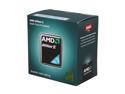
AMD Athlon II X2 250 - Athlon II X2 Regor Dual-Core 3.0 GHz Socket AM3 65W Processor - ADX250OCGQBOX
Pros: Incredible dual core at a great price!
Cons: Mine came with four bent pins in a row on the outside of the chip. I mean bent all the way over. I think it was due to the very hard non-static foam AMD uses underneath the processor, coupled with the fact that they place the processor at the outside of the box. A couple of minutes after the discovery I had them fairly straight again and safely in the ZIF socket, but I was sweating bullets - AND I AM VERY UNHAPPY ABOUT THAT AMD!!!!
Overall Review: Buy it anyway, no way will Intel give you anything as amazing as this at this price.
1/6/2010See more detail
Good Basic Drive!
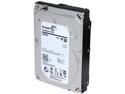
Seagate ST4000NC001 4TB 5900 RPM 64MB Cache SATA 6.0Gb/s 3.5" Terascale Hard Drive Bare Drive
Pros: Old school drive (presumably not shingled) from goHardDrive. Unused, no hours on the drive per SMART. Runs nice and cool, even in an open USB cradle. 5400 RPM (I prefer slower rotating drives).
Cons: Wish they offered an 8TB version of this.
Overall Review: Took a couple of days via my slow USB connections to transfer 4TB of files off of an older backup device, and this drive never got more than warm in the plastic vertical uncooled cradle. New drives are crazy right now with all the games they're playing, so I'm glad I was able to get a little bit older one. Might buy another one!
12/10/2020See more detail
Buyer's Remorse
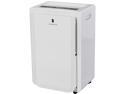
Friedrich D70BP 70 Pint Dehumidifier, Built-in Drain Pump
Pros: It dehumidifies when you plug it in and turn it on.
Cons: Hysteresis of humidistat is a fixed 10% which is much too wide for the sensors. Temp and humidity sensors are poorly located so readings jump wildly when unit turns on / off. Drain pump lasted a year before wearing out (I checked, a captive brass spring wore out). Drain pump switch styrofoam block float needed serious adjustment to work in the first place, and it looks like a serious mold collector. Difficult getting inside the unit to work on it, something like 25 screws hold the outer plastic sides and they interlock so you have to remove a lot of stuff to gain access. Operation of the control unit is rather cryptic - unit often just sits there when you turn it on and lower the humidity setting, only to come on sometime later when it seemingly feels like it - strong AI? Fan is pretty loud on the high setting but what do you expect from an air mover?
Overall Review: Advice on the web is to buy a bigger unit than you need and let it cycle, though that is highly contingent on the placement of the sensors and quality of the control logic, both of which are quite weak in this unit. I don't mind too much adjusting things from the factory, but the pump wearing out after one season is really lame.
8/3/2015See more detail
Quite Nice!
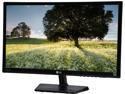
LG 23" 60Hz IPS FHD LCD Monitor IPS 5ms (GTG) D-Sub, HDMI 23MP47HQ
Pros: IPS panel. LED backlight. Bright! DSUB & HDMI inputs. Stand is fine. Narrow bezel.
Cons: No DVI input. No HDMI cable in the box (but they include a VGA?) Had to mess with XP to remove black border and blurriness via HDMI (not LGs fault, see below).
Overall Review: Works like a champ! I've got the brightness down to 33 and it's plenty bright. Comes with driver disk, I copied the "IPSFULLHD.icm" and "IPSFULLHD.inf" files to my desktop and installed them from there via driver update in control panel | system. Driver isn't signed (they never are). Actually works really nice via VGA, which I had to do until the HDMI cable I ordered arrived. Switched to HDMI and got blurry screen with a 1" black border all around. Didn't have Catalyst Control Center installed (it slows down windows boot and shutdown) so edited the registry with these instructions I found on the web: Open regedit and go to: HKEY_LOCAL_MACHINE\\SYSTEM\\CurrentControlSet\\Control\\Video\\ In there, there'll be some keys looking like this: {ECA904C2-25E6-4680-9B2C-44EBC0EC9190} (with different numbers and letters ;o) Highlight the "Video" key at the top of the tree, and do a search for "1920x1080" (or whatever resolution you want to change). You'll find some keys in subfolders named 0000, 0001, etc. The keys will begin with DALR6 DFPXXXXxYYYYx0xFF XXXX= Horizontal resolution YYYY= Vertical resolution FF= Display frequency Before you continue, take a backup of the original keys by right-clicking the {xxxxxxxx-xxxx-xxxx-xxxx-xxxxxxxxxxxx}-type key, and select "Export" Click on the key matching the screen resolution and frequency you want to remove the borders of. A lot of the key will consist of "00", but there'll be a few non-00 entries. Change all of these to 00. Effects will take place next time you change the screen resolution to a resolution you changed. I wonder how many people don't know to do this? I see lots of reviews crabbing about black borders.
5/12/2015See more detail
Nice cable!
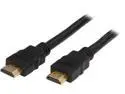
Rosewill HDMI Pro-3 – 3-Foot Black High Speed HDMI Cable with 3D & 4K Supported, 10.2 Gbps Transfer Rate - Male to Male
Pros: Works! Fairly flexible for being as thick as it is. Low price (particularly when compared to in-town ripoffs).
Cons: None.
Overall Review: Cables are shorter than you think they are! This one works fine if your computer case is right next to or (my favorite) directly behind your monitor, but I recommend you buy a 2 meter / 6 footer to have more flexibility in locating things.
5/12/2015See more detail