


Your Browsing History


Liam C.
Joined on 01/28/14
0
0
product reviews
- 16
Great little 65w CPU. 55mm thick heatsink and fan might be too tall for your low profile needs.
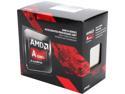
AMD A10-7860K with AMD Quiet Cooler Quad-Core Socket FM2+ 65W AD786KYBJCSBX Desktop Processor AMD Radeon R7
Pros: Low power usage keeps it cooler and makes it a great candidate for a low profile or media PC. Turbo speed at 4.0 Ghz isn't bad at all. Reportedly, the 7860k will overclock to 4.5Ghz with appropriate cooling, though I can't verify that because I won't be overclocking this chip. :)
Cons: It is approximately $40 CAD more expensive than the A8-7600 CPU at the time of me writing this, which makes this potentially a worse value than the 7600, which will do 3.8 Ghz, versus the 7860's 4.0 Ghz. That's not a big difference. If you're trying to get the best bang for your buck, don't want to overclock at all, and still want a quad core that will only use 65w, you might consider the A8-7600.
Overall Review: The stock cooler that comes with this CPU is just about 55mm thick, so keep that in mind if you're planning on using this in a low-profile case you'll need 55mm from the surface of the CPU and some space between the top of the fan and the case so air can get in and out. I am not currently overclocking, but the stock fan and heatsink seems like it would be reasonably capable of managing, though the construction of the heatsink is mostly aluminum and it has a 70mm fan. Your needs may vary, but for comparison, the Noctua NH-L9a cooler is just 37mm thick, but then you've got to get that on top of the cost of the CPU. The Noctua has a 92mm fan as measured though, and is slimmer. I think it takes up a bit more width and length, the Noctua does, over the stock cooler. I am going to use the Noctua for this CPU, because I'm putting this in an In-win CE685 slim case, and I want to make sure there's enough room for air above the fan.
1/4/2017See more detail
Looks nice, works well when it's not the primary router in a mesh
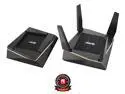
ASUS (RT-AX92U 2 Pack) Performance Mesh Tri-Band AX6100 WiFi Routers - Whole Home WiFi Mesh with 802.11AX (WiFi 6) AX Technology includes 4 LAN 1 USB 3.1 1 USB 2.0
Pros: Works OK as a secondary unit in a multi-router Asus meshnet. Decent range, throughput speed is impressive for 802.11ac.
Cons: As a stand-alone router, I couldn't get any of three devices with WiFi 6 / 802.11ax to connect to this router on the .ax standard. It would connect as WiFi 5 / 802.11ac, and that was plenty fast, but the other protocol wouldn't work. This was true for two WiFi 6 cell phones and a WiFi 6 laptop. I also saw no option in the web GUI to switch to 160 MHz channel width, even though I'm pretty sure it's supposed to support that. Feels like a rush-to-market WiFi 6 product.
Overall Review: Thankfully the 802.11ac speeds were more than enough to out-pace my internet connection, but if you have a >1 Gbps internet connection, and this router is going to be your primary router, and you have WiFi 6 devices, this isn't a good pick for you. If this is going to be secondary, using ethernet backhaul, in a large house or small office, then it works fine, again, more on 802.11ac than 802.11ax.
8/25/2021See more detail
So fast my PC can't detect it!
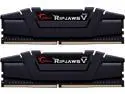
G.SKILL Ripjaws V Series 32GB (2 x 16GB) DDR4 4000 (PC4 32000) Desktop Memory Model F4-4000C14D-32GVK
Pros: This is one of the fastest DDR4 memory kits available, with a first word latency of 7.0 ns.
Cons: My computer couldn't detect it. It showed up as two 8GB sticks (not 2x 16GB sticks), and only 2133MHz speed. I think the memory controller in the 10th gen Intel series can't run 4000x14, and this won't be on anyone's QVL. So... like, it's fast if your memory controller knows what it is! I might have to return mine though...
Overall Review: Fast. So fast, it didn't work with my 10th gen Intel CPU / Asus Hero XII motherboard.
1/12/2022See more detail
Well made, feels sturdy, works
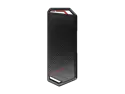
ASUS ROG STRIX Arion Aluminum Alloy M.2 NVMe SSD External Portable Enclosure Case Adapter, USB 3.2 Gen 2 Type-C (10 Gbps), USB-C to C and USB-C to A Cables, Fits PCIe 2280/2260/2242/2230 M Key/B+M Key
Pros: This is a well-made, attractive-looking, functional piece of kit. I've tried with two different M.2 drives, and both were visible to Windows right away (both were already formatted). Comes with two USB cables, one for Type-C, one for Type-A. Feels sturdy.
Cons: None really. I think it does need the drives to be already formatted before it can use them though, but I'm not certain.
Overall Review: I would recommend this to others if they needed a nice external M.2 drive adapter, for sure. Great little product.
8/25/2021See more detail
Blisteringly fast, came with Samsung VRAM
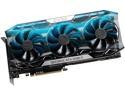
EVGA GeForce RTX 2080 Ti FTW3 ULTRA GAMING, 11G-P4-2487-KR, 11GB GDDR6, iCX2 & RGB LED
Pros: Mine came with Samsung VRAM, avoiding whatever issues others have been having around the Micron VRAM found on other cards. This card will overclock well - my VRAM is +600Mhz and core is +100MHz and this is the first time that I've been able to see minimum framerates on a 3440x1440 monitor that are at 100Hz. I don't regret getting this card for a second. Three fans, super thick heatsink, but doesn't droop in the slot much, so that's good.
Cons: I wish it came with BF:V and Anthem like some other cards were, but ... meh.
2/17/2019See more detail
Fantastic, bright, crisp, great value!
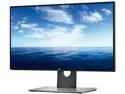
Dell UltraSharp U2518D 25" QHD 2560x1440 2K Resolution 60Hz Mini-DisplayPort HDMI DisplayPort USB 3.0 Hub Anti-Glare Backlit LED IPS Monitor
Pros: Noticeably brighter than most monitors I've used, with a perfect resolution at the size it is to seem crisp and high resolution. My personal taste would be not to bother with any higher resolution at a 25" screen size. Handy height adjustable stand has preset 'snap points' so that when you're rotating the monitor to plug in the cables or just to keep it in vertical orientation, there are precise little clicks almost to get the monitor there. Lots of connectivity options. No visible distortion or colour or brightness variation from one side to the other. Very thin bezel is nice. Have played some games and the 5ms response time isn't noticeable versus other 1ms gaming monitors I've used.
Cons: If you were dead set on gaming, the 60Hz refresh limitation may, or may not, bother you. For most people, 60Hz is more than enough and the limitation is probably more that your video card can't reliably push 60Hz, but if you're gaming all day on this, I'd get a different monitor with a higher refresh rate. The buttons on the bottom kind of feel cheap, but I touch them so infrequently it doesn't really bother me. No major complaints.
Overall Review: Would definitely buy again. Great value, great visuals and colour delivery.
4/18/2018See more detail