
Your Browsing History


Mark L.
Joined on 02/21/09
0
0
product reviews
- 11
Cool and Quick: Linux/MythTV w/VDPAU
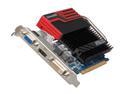
ASUS GeForce GT 430 (Fermi) 1GB DDR3 PCI Express 2.0 x16 Graphics Card ENGT430 DC SL/DI/1GD3
Pros: Takes up only a single PCIe slot width. Fanless, totally silent. Fits inside Antec Fusion case with headroom to spare. 96 Stream processors == full VDPAU support in Linux / MythTV. Very low power consumption when idle.
Cons: Not low-profile. Long heatsink.
Overall Review: Difficult to know from the photos, but this really does take up only a single PCIe slot width. So another card can go into the slot right next to it, which is not normally the case with fanless cards. The card is tall, but still fits inside the Antec Fusion HTPC case, with height to spare. The clock speeds drop really, really low (from 1400MHz down to 100MHz) when idle, saving power and helping keep the planet green. Even when running at full clock speed, the card doesn't get very hot (55C here). "96 Stream Processors" means it can handle all of the fancy VDPAU video playback options without issue -- MythTV "Advanced/2X" deinterlacing, 1080p, high-quality scaling, IVTC, etc. The best card available for Linux/MythTV today.
2/7/2012See more detail
Nice but flawed by BIOS
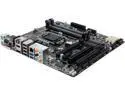
GIGABYTE GA-Q87M-D2H LGA 1150 Intel Q87 HDMI USB 3.0 Micro ATX Intel Motherboard With UEFI BIOS
Pros: Has the exact combination of PCIe/PCI slots I needed in mATX form factor to fit my HTPC case.
Cons: WakeOnLAN is horribly broken -- machine wakes up immediately after shutdown even without a LAN cable connected. No workaround found yet, other than completely disabling it in the BIOS. BIOS has menu settings for AMT BIOS extensions, but no information on how to activate or deactivate the AMT. And the menu settings vanish mysteriously after first view. No built-in "flash BIOS update from a USB stick" functionality. Nearly all other GigaByte mobos include it, but not this one.
Overall Review: Well constructed, excellent selection of ports and connectors, fast booting. Lack of functional WakeOnLAN is a dealbreaker though.
12/19/2013See more detail
HDHR4-US: better than earlier versions
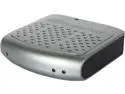
SiliconDust HDHR4-2US(CA) HDHomeRun Connect 2-Tuner ATSC DLNA/UPnP Compatible Streaming Media Player
Pros: No drivers. It just sits on the LAN. Can be located close to the antenna / coax-feed, rather than having to be near/inside the PVR. Really good third-party Android apps are available for signal montior, playback. The HDHR4 (aka. "HDHomeRun Connect") finally has a decent tuner, measurably better than earlier versions. 5-7dB better than the HDHR3 on signals here.
Cons: Not quite as sensitive as the HVR-950Q USB sticks, but very close, and without the buggy driver hassles of the USB sticks.
Overall Review: Get it. It simplifies life.
9/16/2015See more detail
Wonderful N150 AP !
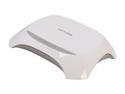
TP-LINK TL-WR720N Wireless N150 Router, 150Mbps, Internal Antenna, IP QoS
Pros: Excellent no-fuss wireless AP, with very low power consumption. Dead simple setup -- newest firmware July/2013. Cheap, good range, excellent N150 performance. Typical connect speed in our house is 60-80mbits/sec.
Cons: Not compatible with DD-WRT or Tomato. But not really an issue.
Overall Review: Great to see this kind of performance and functionality at this price point. Tempted to purchase a second one ($15!!) just to try out the WDS capabilities. I'm not using this as a "firewall/router", but merely as a wireless AP. The router stuff in it looks "typically good", but not needed in my situation.
9/14/2013See more detail
Fantastic Router for Tomato/USB
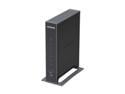
NETGEAR N300 Open-Source Gigabit WiFi Router 128MB NAND and 128MB RAM, 480 MHz MIPS 74K Processor (WNR3500Lv2)
Pros: Full support for alternative Open Source firmware (DD-WRT/TomatoUSB/etc). Vertical mount for excellent convection -- cool and reliable. GigE networking, regularly passes LAN traffic at 100MBytes/sec+. CPU, RAM, and Flash to spare. Using Tomato/USB (beta builds) here.
Cons: Wifi is not dual-band 300/300, but the price is lower as a result! USB throughput is terrible (5-10MBytes/sec), though this issue seems commonplace with routers.
Overall Review: Totally trouble-free over the past 6 months. Fast, silent, runs cool, never needs a reboot or power-cycle. Using it with a 50mbit/sec Cable internet connection here.
2/13/2012See more detail
Works great with Linux too
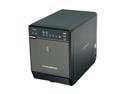
Mediasonic HF2-SU2S2 3.5" Black SATA I/II USB 2.0 & eSATA Pro Box 4 Bay Enclosure
Pros: Works with Linux (using 3.0.9 kernel here). Small, very small. Quiet. Runs cool. Good fan control options.
Cons: Fan rattles slightly at slowest speed. Oddball fan size (80x80x20mm), difficult to find a ball-bearing replacement fan in that size. No "auto power-on" after power-failure, so NOT suitable for primary NAS/server uses.
Overall Review: Have never tried the USB2 port -- simply too slow. The eSATA ports work very well with the NCQ-capable JMicron controllers found on most mobos these days.
11/25/2011See more detail