
Your Browsing History


Patrick H.
Joined on 11/03/06
0
0
product reviews
- 5
Best power supply I've ever owned in 20 years of building PCs
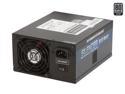
PC Power and Cooling Silencer 910W High Performance 80PLUS Silver SLI CrossFire ready Power Supply
Pros: +Single rail 12v +Each line pushes the advertised amperage +Nearly silent when under 50% load +Very efficient with little power lost as heat +Runs very cool even at 75-100% load (45 celcius at 100% load) +5V never drops below 5.05V +Very little vdroop when overclocking +Great price for the power and build quality you get +Older form factor which causes less heat to build up in the tower +Non modular and lots of cables +Cables have sleeves +At least three heatsinks to help dissipate heat inside PSU +7 year warranty!
Cons: -Does make a whining sound when over 50% load, but not as bad as many other PSUs -All the cables/cords are incredibly stiff which can be great or bad depending on your setup and tower. Bad in my case, but workable
Overall Review: After using and building PCs for over 20 years, I've always had a thing for BFG power supplies. Since they are no longer manufactured, I needed a new PSU for my P45 (FSB @ 400), Q6600 overclock (3.6GHz, 1.5V), Geforce GTX 470 overclock (750, 3500, 1500, 1.087V), 3 7200RPM SATA3 & many USBs. I first bought a 750W Corsair because of their great reputation and was immediately disappointed. It couldn't keep up it's advertised voltages, and caused slowdowns when my system was at 100% load. The 12v rail was not up to the task. Also the build quality was poor and the fan was so loud and obnoxious. I took a gamble on this PSU based on its great reviews. I can say this is the best PSU I've ever used. They say the best PSUs are the ones you don't know are there. This is the case. It's almost silent when under 50% load. The single 12v rail has no problem keeping up with my demanding need. The 5v rail never drops below 5.05V. Also the form factor is great for my older case and keeps insides
12/23/2011See more detail
Great performance, low power draw and incredibly low temps
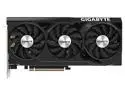
GIGABYTE WINDFORCE GeForce RTX 4070 12GB GDDR6X PCI Express 4.0 x16 ATX Graphics Card GV-N4070WF3OC-12GD
Pros: -Great performance for the power draw requirements -Temps are great. Idle at 28c and full load max at 56c -Form factor / size is identical to the RTX 2070 that it replaced
Cons: -Price is a bit too expensive. $400-500 is a better value
Overall Review: This replaced an RTX 2070 and couldn't be happier. The temps are incredibly impressive. 56c at full load as opposed to the 86c the 2070 would run at. Also very happy with one single 8 pin power connector. Build quality is great. Design is bland but wasn't looking for anything eye popping.
4/28/2023See more detail
A fantastic motherboard for those looking to breath new life into your old Core 2 Quad
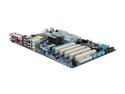
GIGABYTE GA-P45T-ES3G LGA 775 Intel P45 ATX Intel Motherboard
Pros: -Cheap -Supports older Core 2 Duo/Quad CPUs -DDR3 1600MHz support -Great bios & overclocking tools -Decent overheating prevention -Very stable when sensibly overclocking -Great motherboard to teach others how to overclock
Cons: -Northbridge gets extremely hot, with stock heat sink, when running memory at 1600MHz (FSB Freq @ 400MHz) -Southbridge heat sink is tiny, and can get hot -Only one PCIEx16 slot
Overall Review: First off, I consider myself very lucky to be one of the last people to buy this before it was deactivated. I just bought the game Skyrim, which is CPU dependant. My Q6600 2.4GHz was limited by my OEM motherboard. I was shocked to see a LGA775 motherboard with DDR3 support that had been manufactured this year. The main reason for buying this was the low price, brand name & to overclock my Q6600. Moving from DDR2 to DDR3 was great also. I bought four 2GB G.Skill Ripjaws DDR3 1600 (PC3 12800) sticks. With bios ver. F1, they worked right off the bat but at higher latency than the recommended 9-9-9-24. I set the timings manually and they've been very stable. My Q6600 was able to get to 3.1GHz from 2.4GHz by setting FSB to 345 and multiplyer to 9, using memory ratio 1:1. One gripe I have is when trying to run the memory at 1600MHz and CPU at 3.2MHz (400 * 8), it was stable but the north bridge was way too hot. I might buy an aftermarket heat sink for it. All in all, great MB, great pric
11/24/2011See more detail
For the price, this is amazing memory
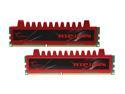
G.SKILL Ripjaws Series 4GB (2 x 2GB) DDR3 1600 (PC3 12800) Desktop Memory Model F3-12800CL9D-4GBRL
Pros: Nice heat sinks to allow for those high speeds. I was able to get the memory up to 1600MHz easy by changing the FSB freq to 400 in bios. This of course overclocked my Q6600 to 3.6GHz from 2.4Ghz too. Booted up with no issues in my new GIGABYTE GA-P45T-ES3G LGA 775 Intel P45 ATX Intel Motherboard Has been running stable at 1600MHz for a week so far. The timings I used are 9-9-9-24 and voltage at 1.5V. easy.
Cons: None really
Overall Review: This memory, for the price, is amazing. Don't even second guess yourself, get them
11/18/2011See more detail
Great Motherboard for the Price. Tweakers (you know who you are) should enjoy it.
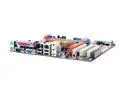
PC CHIPS P23G (V3.0) LGA 775 VIA P4M800 PRO Micro ATX Intel Motherboard
Pros: 1. BIOS has many options, especially for you tweakers 2. Incredibly stable with my Pentium D 950 3.4Ghz, two 2GB sticks of DDR2 Kingston RAM 4200 running at 533, GeForce 7600 GS 512MB, two IDE hard drives, one SATA hard drive, one PCI wireless ethernet card, one IDE dvd burner, and my 400W PS. 3. Supports both DDR2 and DDR... GET DDR2: MAJOR DIFFERENCE! Especially in gaming! 4. Worked well at OCing. Doesn't get too much of a boost, but enough to notice.
Cons: 1. Doesn't like two different brand name/speed sticks of RAM. Had problems running two of the same brand 512MB sticks of DDR running at 400. 2. Needs a large tower to be comfortable with 2 IDE drives, 1 SATA, and full ram. 3. Placement of the IDE, SATA, and RAM slots could be more comfortable.
Overall Review: Overall, I love this motherboard. It's really fun to mess around with. BIOS has every option I wanted. You can OC your CPU or RAM easily in BIOS, along with adjusting RAM Timings. The Spread Spectrum option in BIOS is great for those with electronic interference near their monitors (like myself). I haven't tried out the new Intel Core Duos yet, though I'm sckeptical that the increaed cache is enough to be have a 2.4GHZ Core Duo beat my 3.4GHZ Dual Core Penitum D 950. Like I said in my PROS section, this motherboard can handle a lot of drives, but make sure you have a good power supply. I recommend 400W and higher for this one (also if using an AGP Video card too). A 350W PS might be enough (careful). I've had this board running constantly since I got it 3 months ago, and I haven't had one problem or instance of slow down. All my stability software comes out positive everytime. Again, this is a great board for its low price, and is recommended to beginners and especially advanced users.
11/3/2006See more detail