
Your Browsing History


MR J.
Joined on 02/04/04
0
0
product reviews
- 14
Good enough
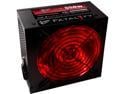
PC Power & Cooling Fatal1ty Gaming Series 550 Watt 80+ Semi-Modular Active PFC Performance Grade ATX PC Power Supply (OCZ550FTY)
Pros: Worked on the first try. Large fan and not too noisey. Good amount of cable connectors. The SATA cable has many connectors on it for Raid setups. Has built-in surge supressor technology.
Cons: 20+4 pin motherboard connectors should be able to be locked together. The 20 pin connector snaps in, but the 4 pin one alongside it does not snap to anything and therefore has a potential for working loose. I have seen this design on many power supplies. Cannot turn the led off.
Overall Review: It comes with a little zipper bag for the cables. I would rather pay less and not have to recylce a bag after I connect the cables. I would also like to be able to have external led light switches on power supplies. I don't need to impress anybody with light and would prefer to not have one.
1/29/2010See more detail
Piece of junk
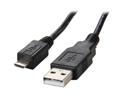
Rosewill 6.5-Foot USB 2.0 A Male to Micro USB B (5-Pin) Cable, Black (RC-6-USB-AM-MB-BK)
Pros: Nothing. I cannot use it.
Cons: The micro usb connector does not hold tightly. The only way to make it work is to hold it in. But with one slight jiggle it disconnects (when you breathe). At first I thought the problem was because the rubber shoulder was too big. It actually was and did not allow the connector to be inserted into my phone all the way. I cut away the extra rubber around the micro usb connector and it did go in further, but still caused bad connections. It is solid junk. I should have just went to the Verizon store and bought a good one. It is not even worth shipping back because of postage and the fact that I cut a bit of the rubber off of the connector so it would slide all the way in. This cable has too big of an end for micro usb and the contacts on the connector itself are lame. I could have lived with trimming the rubber connector, but the contacts are still junk.
Overall Review: If somebody is shopping for a cable like this, be SURE that the micro USB connector does not have a big rubber shoulder. The reason being is that the micro usb port on a lot of cell phones and other devices like this are recessed.
12/30/2010See more detail
WD warranty is horrid on Black Drives
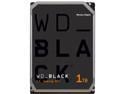
WD Black 1TB Performance Desktop Hard Disk Drive - 7200 RPM SATA 6Gb/s 64MB Cache 3.5 Inch - WD1003FZEX
Pros: Worked for a few years.
Cons: Drive failed in a mirror. WD shipped wrong replacement drive that was the wrong size and model. Original drive was a 3Gb, replacement was a 6Gb that would not work at more than 1.5Gb, even with jumper on the drive to force it. They said that they would ship me another drive in 4 days and ship it overnight. It never happened and I got no email telling me that there was a problem. I called back over a week later and was told that I would have to wait indefinitely for a correct replacement. It has already been 19 days. They have my original drive and will not fix it. They said that they do not remanufacture drives. However, the wrong replacement drive they shipped me has a remanufactured sticker on it. The replacement drive only has a 5 month warranty and it is useless to me. Completely unacceptable customer service and warranty.
Overall Review: All hard drive manufacturers should stock replacements throughout the warranty period. Inventory is not rocket science. I can't be the first person this has happened to. They should already have a plan for when they do not have a drive. They could have sent a matched pair of native 3Gb drives and cloning software to clone my good mirror. I then could have sent back the good drive. Sending me a larger drive with technology that my motherboard does not support is not doing me a favor. It is aggravating and poor customer service. I will not be purchasing WD drives in the future. I need real support and service.
1/27/2015See more detail
Good motherboard so far.
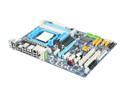
GIGABYTE GA-MA770T-UD3P AM3 AMD 770 ATX AMD Motherboard
Pros: Fired up on the first try. Plenty of fan connectors. Plenty of SATA ports. Plenty of extra misc. ports on motherboard if you need them someday. (com, lpt, etc).
Cons: The motherboard failed to correctly configure my memory. It defined it as 1333 instead of 1600. I used memory that was specified on Gigabytes web site for this motherboard. I manually adjusted the memory and it booted up fine with the corrected settings (no operating system yet, though).
Overall Review: I have not installed the operating system yet (Server Essentials 2008 R2) so I can not comment on that part. The manual is outdated and the bios screens do not match. We need more info on bios settings in these motherboard manuals so we can determine what to select and why. I do not overclock anything, but I would still like to optimize these settings.
1/29/2010See more detail
Good adjustable fan
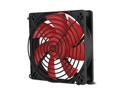
Rosewill RFX-120 - 120mm Computer Case Cooling Fan - Black Frame with Red Fan Blades, 2-Ball Bearing, Silent, 2-Speed with PWM Control
Pros: Comes with rear mounted variable speed adjuster that inserts into a rear expansion slot so you can adjust the speed outside of the case.
Cons: None.
Overall Review: The adjustment works very well. The wiring also allows the speed to be sensed by the computer motherboard. You can actually see the rpms change in the bios when you adjust the speed for sound and flow levels.
1/29/2010See more detail
One Step above tin foil
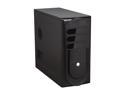
Rosewill R230-P-BK Black SECC Steel ATX Mid Tower Computer Case
Pros: Can house a 120mm fan in front of the drives so noise is reduced, but airflow is good. Can install 4 hard drives. Has room for 2 3.5" external devices.
Cons: Backplane for mounting adapter cards is only slightly stiffer than tin foil. I always srew down my adpater cards instead of replying on cheap "pinch" technology. If you try to screw your cards down, the bracket will bend and nearly rip; the holes are not pre-drilled. Rear fan air path is reduced because of fan adpater and grill for 120mm fans. Front tilting access for usb and audio will break after 5 uses (if that). Air flow through front will cause dust to collect on outside of case (screen mesh). Non-adjustable side CPU horn blocks airlow to 120mm rear fan and does not align to CPUs. Take it off.
Overall Review: What train wrecked this case is the design of the back panel. In order to reduce costs, they tried to flatten the back so adpater cards actually stick out of the rear of the case. This would not have been so bad, but the metal is so thin it will rip. I had to redrill the hole on the "pinch" metal bracket because it would not close with screws in the adapters. Also, for builders, this case takes waaaay too long to do builds. The rear fan has to be removed to put in the motherboard and the front and side panels must be removed for drives. Also do not use this case if you replace parts a lot in your computer. It will not take it. The feet do not snap in tight and causes the case to not be sturdy on the floor. The rear 120 mm fan is not designed for the case, so they inserted an adapter; effectively reducing air flow to that of a smaller fan. This case is just plain too cheap. Spend a little more; especially if you are going to resell custom builds. In reality, this is a $5 case.
1/29/2010See more detail