
Your Browsing History


Andrew M.
Joined on 01/18/07
0
0


product reviews
- 21
Very happy with the value of the monitors.
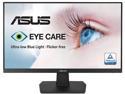
ASUS VA27EHE 27" Full HD 1920 x 1080 75Hz VGA HDMI Adaptive-Sync Asus Eye Care Low Blue Light and Flicker-Free Frameless Design LED Backlit IPS Monitor
Pros: - Lightweight (less than 10 lbs) - Easy installation onto monitor arms - Easy setup (plug and play with HDMI) - Box included power and HDMI cables - Sleek and simple design
Cons: - Included cables are 4' (would have preferred 6' cables) - Buttons are behind the monitor (rear facing buttons are tricky to adjust)
Overall Review: - I bought these 27" monitors to go with the 48" long adjustable height desk I recently purchased, which included 2 monitor arms (see picture). Installation was easy, and the monitors work perfectly fine with the CalDigit docking station I use with my MacBook Pro. I use these monitors for day-to-day use and not for gaming. - I would recommend these monitors considering the price range I found them in, when searching for monitors on Newegg. Great value. - One thing I would change if I could: the lengths of the included cables. The power cables *just* reach the power strip on the floor; however, the power strip floats in the air when I raise the desk to standing height. The HDMI cable lengths work for the docking station that currently sits on my desk, but they will be too short once I hook up my desktop computer, which will sit on the ground. I will have to purchase 6' HDMI cables to reach the ground. - The buttons on the back are a little cumbersome when adjusting the settings; however, I would rather keep the sleek design than move the buttons to the front.
5/28/2021See more detail
RALink utility: "This card does not exist" - Defective item?
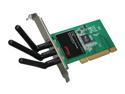
Rosewill RNX-N300X IEEE 802.11b/g, IEEE 802.11n Draft 2.0 (PCI Interface) Wireless Adapter (2T3R) Up to 300Mbps Wireless Download Data Rates 64/128-Bit WEP, WPA PSK and WPA2 PSK (TKIP and AES)
Pros: Small, sleek size with 3 antennae makes this wireless card appealing.
Cons: I am running XP on an early 2000's Dell. Wanted to upgrade from a Linksys Wireless B card so I bought this from Newegg during a Shell Shocker deal. I installed the card and booted the computer, the computer did not detect the card. Installed drivers and rebooted computer, still no detection, not even by RALink utility. Thought I may have physically seated it wrong, so I reseated the card and rebooted, reinstalled, rinse, repeat...
Overall Review: It was a good price; however, I feel that I gambled and lost. Unfortunately, I didn't bother opening the box until 3 months after I bought it (due to work travel) - which means no chance of requesting a replacement =(
11/7/2010See more detail
Love the display and colors, but the fans are LOUD and GCC needs a facelift
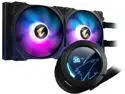
GIGABYTE GP-AORUS WATERFORCE X 280 Water Cooler
Pros: - The installation was not difficult. The instruction map is clear and the physical installation was straightforward. Not any more difficult than the Corsair H100i I bought and installed 9 years ago on my previous build. - The fan lights are vibrant and easy to play with using the Gigabyte Control Center software that can be downloaded from the website. - The LCD screen is great. I enjoy glancing at my case and seeing the temperatures directly on the screen (I have the mode that shows both CPU and water temps).
Cons: - The fans are loud. Especially compared to the Fractal Design Meshify's stock fans. I cannot stress this enough. I use GCC's lowest preset, which is to keep the fans spinning below 1000 RPMs until the CPU temperature exceeds 50 C. When the fans go above 1000 RPMs, they are LOUD. - GCC's interface needs a significant improvement. The software reminds me of Corsair Link (an early predecessor of iCUE that I used back in 2014).
Overall Review: - I bought this AIO so that it could be used in the same ecosystem as the Gigabyte GPU and Gigabyte motherboard I also bought from Newegg. While GCC works, the software is very underwhelming and I wish they'd update it so it would be less buggy. - If fan noise is not an issue for you, I recommend this product because the LCD screen is a fun feature to have. - If fan noise is a concern, I would consider looking at alternative AIOs that have reviews that indicate the fans are relatively quiet. Specs: - GIGABYTE Z790 AORUS ELITE AX LGA 1700 Intel Z790 ATX Motherboard - Intel Core i7-13700K - GIGABYTE GP-AORUS WATERFORCE X 280 Water Cooler - GIGABYTE AORUS GeForce RTX 3070 MASTER 8GB GDDR6 PCI Express 4.0 ATX Video Card - G.SKILL Trident Z5 RGB Series 64GB (2 x 32GB) 288-Pin PC RAM DDR5 5600 Desktop Memory - CORSAIR HXi Series HX750i 750W 80 PLUS PLATINUM Power Supply - Team Group T-FORCE VULCAN Z 2.5" 1TB SATA III 3D NAND Internal Solid State Drive - Fractal Design Meshify 2 RGB Black ATX Mid Tower Computer Case
8/18/2023See more detail
Easy setup, extremely light, great price point
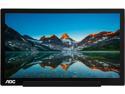
AOC I1601FWUX 16" (Actual size 15.6") IPS USB-C Powered Portable Monitor, 1920 x 1080, 5ms, Smart Cover/Stand
Pros: - Lightweight. - Ease of use with included USB-C to USB-C data cable (it was plug-and-play on my MacBook Pro). - Included magnetic cover works well as a stand.
Cons: - None that I can think of.
Overall Review: I needed a lightweight, portable monitor for ad-hoc WFH setups, and this monitor completely filled my needs. - For Mac users, rotation of the monitor is different than what the PDF of the product manual dictates: you do not need additional drivers. On the Mac, go to Settings > Displays and use the "rotate monitor" option to rotate the monitor from landscape to portrait. - If you don't have your laptop plugged into a power source, this monitor will rapidly drain your battery power. - Don't make the mistake of using an Apple USB-C cable like I did. Apple's cables are power only, and you need to use the included USB-C cable because it is a data+power cable. At the price point I purchased, I am happy with the monitor.
1/27/2021See more detail
Product works as advertised, but setup requires you to create an account with TP-Link
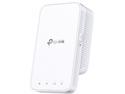
TP-Link AC1200 WiFi Extender (RE300), Covers Up to 1500 Sq.ft and 25 Devices, Up to 1200Mbps, Supports OneMesh, Dual Band Internet Repeater, Range Booster
Pros: - Simple Packaging - Unobtrusive (doesn't block both outlets when plugged in) - Works as advertised - Setup works with a dedicated TP-Link phone app
Cons: - Setup on the app requires you to create a TP-Link account; but maybe that's the standard operating procedure for range extenders?
Overall Review: I bought this product because my WFH setup is on a different floor than the Wi-Fi router and my video calls were consistently dropping. The range extender is plugged in between the office and the router and now I have significantly fewer dropped video calls. I was disappointed about one aspect: in order to set up this device on the TP-Link app, you *must* create an account with TP-Link. I personally don't see the need for this, but maybe this is how all range extenders work these days? Admittedly I did not try setting up through the web on a laptop to see if I would be required to create an account.
1/27/2021See more detail
The best for the price
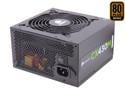
CORSAIR CX-M series CX430M 430W 80 PLUS BRONZE Active PFC ATX12V & EPS12V Modular Power Supply
Pros: -Reputable brand -High quality -Mesh mobo connecter cable -Modular -Quiet
Cons: Some GPUs recommend a 450W PSU (e.g. SAPPHIRE 100358L Radeon HD 7770).
Overall Review: This power supply is perfect for an entry level build. I got it to power my microATX mobo; however, I ran into a predicament when I upgraded the GPU to the one mentioned in Cons. I decided to roll the dice and use the 430W PSU even though a 450W PSU. It's been about 4 months and there's no discernible issue yet.
2/17/2014See more detail