
Your Browsing History


Brendan B.
Joined on 11/21/01
0
0
product reviews
- 31
FIRST THING - UPDATE BIOS - edited "cons" and "Other"
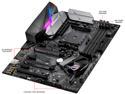
ASUS ROG STRIX X370-F GAMING AM4 AMD X370 ATX AMD Motherboard
Pros: Stable at stock Works with 32 GB G.Skill PC3200 RGB 10% overclock of Ryzen 7 1700 with no voltage bump - haven't tried higher.
Cons: EDIT: one month in - and there is some electronic interference coming through the speaker jacks. Not loud, but if your ambient noise is close to silent, you do hear it. No, it is not my phone - it is quieter than cell phone interference. Not a deal breaker, but it may drive you to get USB speakers instead of using the rear panel audio. I haven't been able to map the interference to computer activity, so not sure what is causing it. I don't notice it during gaming or playing music, only during ambient silence. Two physical RGB headers, but only one logical. Both headers treated as one item in AuraSync. Disappointing. No BIOS reset button - have to pull cmos battery or use USB stick to reload saved BIOS. EDIT - there is a reset jumper, I just didn't read the manual properly and missed it, not as good as a button, but at least there's a jumper and you do NOT need to pull the battery>
Overall Review: Shipped with May BIOS - it would post, but windows wouldn't install. Updated to latest BIOS and no issues. Tried the BIOS's auto overclocking application, and it went into a no-bios screen reboot cycle until I pulled the power and CMOS battery. AISuite III overclocking seems to work ok, though it seems to lose settings when system turned off, so just bumped the multipler in BIOS. AISuite III fan control is.... acceptable. barely. EDIT: after re-calibrating a few times, my 3 pin fans are now much more controllable and respond to the fan curves much better. I would, however, recommend getting 4 pin PWM fans for more control options other than just the motherboard software.
2/12/2018See more detail
hardware failure after 6 months
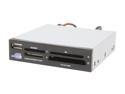
Rosewill RCR-102 52-in-1 USB 2.0 3.5" Internal Card Reader w/ USB port
Pros: Read everything I threw at it while it lasted.
Cons: three days ago, when I pulled out my CF card, the upper left-most pin came out with it. Luckily it didn't stay stuck in the CF card. Build quality needs to be better.
1/23/2009See more detail
Minimalist style with *just* the right amount of flair
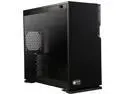
IN WIN 101C Black SECC, ABS, PC, Tempered Glass ATX Mid Tower Computer Case
Pros: Sleek. 4 pre-installed standoffs around the socket so you have fewer to put in yourself. The plastic radiator mount has a finish that is identical to that of the metallic part of the case. Well done - even if you DON'T see it under your fans/radiator. :) The tabs for taking the glass side on and off work very well, and the attached border makes it easy to handle and take off and put on without getting fingerprints all over the glass. Just enough space in back for decent cable routing - the top PSU mount works well and can hold larger power supplies. I'm using a Seasonic X850 and it has tons of room. There are "enough" feed throughs on the mobo tray, though they could be a tad bigger. With 3 fan wires, USB cable, 3 LED fan frame wires, case wires and video card power - the lower feed through gets a little tight. Finish seems durable, but see cons. Case feels quality almost everywhere. See cons for where not.
Cons: Getting the radiator mount to slot back into position was just a bit tricky - had to work at it for several minutes after I got my radiator on as it wouldn't *quite* line up. Like others note - the case could be about 0.5 to 1.0 centimeters taller to make it easier to use the lower aft cable feed through with ATX motherboards. While the side panel mounting works well, the plastic tabs used to do it feel very cheap/brittle. Take care when using. I haven't broken them, but it feels like it wouldn't take much. The matte finish on the top of my case scratched on a sharp piece of plastic when I turned it over to install the bottom case fans. Seems to hold up against fingernails, but that little blemish is annoying and unexpected.
Overall Review: Loaded up with 6 fans (3 bottom, one rear, two on radiator) all with Phanteks fan frames on them and it looks very, very nice. Hard to see my motherboard (Asus Strix 370-F) with its dark color and the tinted glass though - even with 6 LED fan frames. I didn't think it was tinted that much, but its tinted enough to *mostly* hide the motherboard. Guess I gotta add an LED strip!
1/14/2018See more detail
ICY COLD
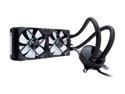
Fractal Design Celsius S24 240mm Silent High Performance Slim Expandable All-In-One CPU Liquid / Water Cooler, LGA 1700 Ready / AM5 Compatible
Pros: Easy install. Keeps Ryzen 7 1700 at 28°C at idle and stock clocks while only turning 500 RPM on the fans. At 500 rpm, the fans are very, very quiet - nearly silent.
Cons: Needs a glowing fractal on the pump. So plain jane! Initially used the factory thermal compound, but wanted to reposition the tubes, and when I pulled off the pump, the thermal compound only covered about 80% of the processor's heat spreader.
Overall Review: One of the fans has an oh so slight wobble. No discernible noises, and seems to run fine. When fan speed gets high - just a low thrummmmm from both of them, not annoying at all. Very smooth white noise. However, in normal usage, fans never, ever go high speed, so you never hear it.
1/14/2018See more detail
My Latest attempt to find good quality and reasonable price

ROCCAT Kone Pure Military ROC-11-713 7 Buttons 1 x Wheel USB Wired Optical Core Performance Gaming Mouse - Desert Strike
Pros: Bought at the beginning of March to replace a wireless gaming mouse that started randomly dropping signal momentarily on a regular basis. So far I like it. Works great for fingertip grip and my larger than average but not huge hands. Responsiveness and liftoff threshold fits my usage habits well.
Cons: Software is SLOOOOOW. Takes up to a minute (or more!) to save changes to the profile. Luckily, I don't change things much once I find what I like. deducting one egg for that.
Overall Review: Longevity unknown, but if it lasts more than a year, a great buy at less than 30 bucks.
4/5/2016See more detail
Bought a second one
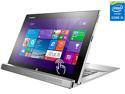
Lenovo Miix 2 11 Detachable 2in1 Tablet- Intel Core i5 4GB Memory 128GB SSD 11.6" Touchscreen Windows 8.1 with Dock (59413201)
Pros: As noted below, I bought one for the visiting mother in law. She left last week and I missed it so much I bought another one for myself, even though the price had gone up $20.00 in the interim - I even paid for faster shipping!
Cons: Price keeps rising, it is now even more expensive than at the time of my second purchase, so the value is getting worse. Still decent, but not as good as before. For the current five ninety nine as of the second week in january you're getting close to (though still under) some items with halfway decent keyboards.
Overall Review: I will use this 90% as a tablet, so will almost never use the keyboard, so that was not an issue for me.
1/7/2015See more detail