I tried to build a gaming PC and ran into an issue. I couldn’t find any solution online and hope someone can help here. The PSU is Corsair RM1000e (year 2025 model) and graphic card is ASUS RTX™ 5060 Ti OC 8GB DDR7. The mother board is ASUS ROG STRIX Z890-A. The graphic card has a 12v 2x6 (12-pins) connector (as power input) and I can directly connect it to the 12v 2x6 (12-pins) power output of PSU. However, if I make such connection, the PC won’t start. The PSU only provides minimum power to the mother board (because I can see my DRAM lighted up). All other devices (such as case fans, CPU, etc) are off. If I disconnect the graphic card from the PSU, the PC can start normally. Although I haven’t installed any OS yet, I can enter the BIOS. In addition, all RGB fans are running and lighted up.
I have tried another power cable (12-pin to two 8-pins) that came with graphic card, but it doesn’t work. The red light shows up next to the graphic card’s power input (seems like not enough power). At first I thought it was PSU problem, so I requested for a replacement (same model), but problem remains. So it shouldn’t be the PSU issue. Not sure what to do next.
if the pc won’t turn on, i would unplug a lot of the extra components to try to post first.
a lot of times, a component might be plugged in all the way or if u have a faulty part (like maybe ram), the entire pc may not turn on. try to POST with just the CPU and RAM (if ur cpu has integrated graphics, that’s helpful, otherwise install ur gpu too)
Thank you for the advice. I tired. As soon as I disconnect the graphic card from the PSU, everything works. I use mother board’s HDMI port for display, and I can enter BIOS. If I connect graphic card to PSU, the PSU refuses to operate. Seems like some kind of power protection from the PSU.
hmmm… That’s really good that you located the problem to JUST the gpu. Does the GPU work on another computer? Or does another GPU work on that computer? Just another lead to try if you have that option.
No, sadly, I can’t test it out on another PC. My old PC is PCIe gen3. And this one is PCIe Gen5. I checked everywhere (including ASUS website), current PSU is compatible with it. Do you think it is graphic card issue? But happen to ASUS, it is just unlikely.
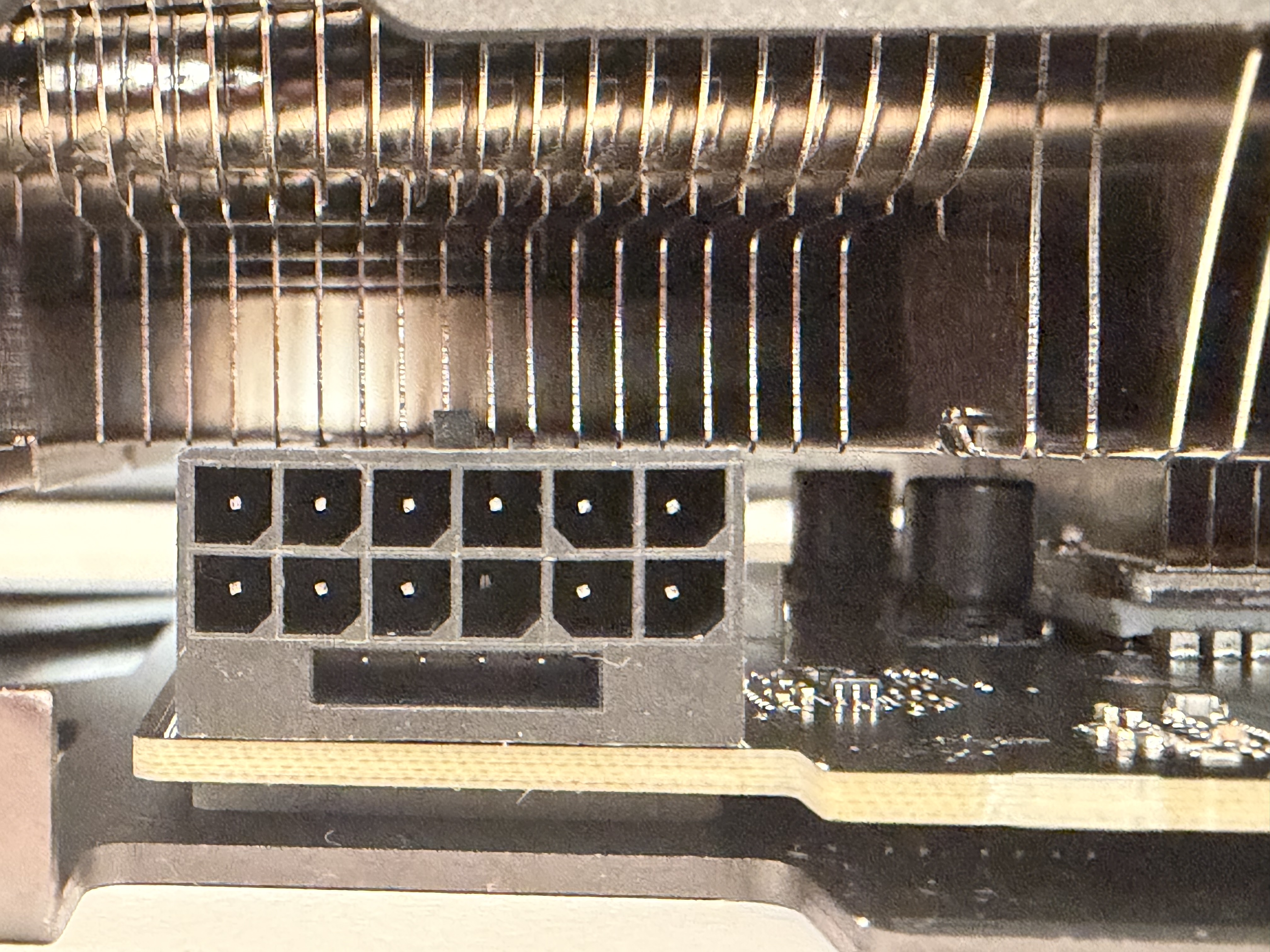
I searched more information about the power connector. The new PSU is using V12-2x6 (PCIe 5.1) which is a newer version of 12VHPWR (PCIe 5.0). And when I tried to figure out what the version is supported by graphic card, I found something strange about the connector (as shown in picture). Seems like it is missing one wire/pin (bottom 3rd from the right). Is it normal?
you can test the gpu in a PCIE3 slot to see if it works. PCIE is backwards compatible, the card will only be able to transfer data at PCIE3 speeds. For test purposes it will work you would just get poor performance. I would start there.
Also the GPU should power up with both 12v high power versions. 12V-2×6 (PCIe 5.1) is a safety-refined version of 12VHPWR with improved pin sequencing and seating detection, not a new electrical standard ( the whole 5090 debacle). It is fully compatible with 12VHPWR GPUs and cannot by itself cause a no-boot or PSU shutdown.
It is possible you have a busted pin in slot 3 of the 12vhpwr but im not sure if that would cause an issue until you put the gpu under load. If im correct that is a 12v supply pin.
The next step is to test the GPU in another system (Gen3 is fine) and ideally with another PSU. If it behaves the same, the GPU is almost certainly defective. Tough to fully diagnose over chat, but the symptoms point more toward a GPU-side fault than a compatibility issue.
Re-reading your post, you’re already on a second PSU with identical behavior. At that point the PSU and cables are effectively ruled out. I’d test the GPU in your old PC (PCIe Gen3 is fine). If it trips that system as well, it strongly indicates an internal short or failed VRM stage on the GPU. Lets see what happens.
The other thing you could do is see if someone you know has an old GPU hanging around and put it in your current computer and if it boots up then you know it’s the GPU.
Thank you for the advices. I actually purchased the same GPU and confirmed that the old one is defective. In other words, the busted pin was the root cause. The PSU actually did the right thing to shut down the power. I guess it is just bad luck after all.