


 All CategoriesAll CategoriesAll Categories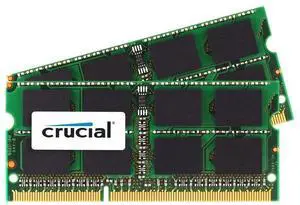


System-specific memory has a significant effect on your device's performance. Memory is also called Random Access Memory (RAM), and selecting the correct type is important, as it needs to match the specifications of your device. The Double Data Rate (DDR) generation, for example, needs to match your motherboard. DDR 2 is what older computers use, and DDR 3 goes with motherboards created after 2007, with the latest motherboards being designed to work with DDR 4. Determine how much RAM you can install by checking your operating system. If you are using Windows®, it will vary between the 32-bit version, which can handle 4GB of RAM at most, and the 64-bit version, which can handle up to 3TB of RAM. Also check to see if the version is Pro or Home. When choosing system-specific RAM, first double-check the specifications of both your motherboard and your operating system.
Reduce latency and prevent programs from crashing due to overload with sufficient system-specific memory. Gamers need a minimum of 8GB of RAM, and creative professionals require at least 16GB to run programs that use a lot of processing power. RAM modules are available from as little as 128MB up to 64GB. The number of RAM modules you can purchase depends on how many Dual In-Line Memory Module (DIMM) slots your motherboard has. Bear in mind that smaller motherboards (mITX- Mini-ITX and mATX- Micro-ATX) only have two slots, whereas the larger ATX and Extended-ATX (eATX) models have four or more. Get around limited space issues by purchasing a RAM module with a higher amount of memory. DIMM is specifically designed for use as desktop RAM, as these modules fit into the available slots of a desktop computer.
Upgrade your laptop by increasing the amount of RAM. Small Outline Dual Inline Memory Module (SO-DIMM) options are the correct choice for laptop RAM. SO-DIMM slots accommodate the smaller and slimmer case of laptops. As with a desktop, check what your operating system and motherboard can handle. Use Unbuffered Non-Error Correction Code memory, abbreviated as unbuffered non-ECC registered RAM and also known as Static RAM (SRAM), for personal computers and laptops for work, entertainment, or gaming purposes. This type of RAM is faster, which is especially important for gamers and creative professionals.
Because servers run constantly and process so much data, it is best to purchase dedicated server memory. Unlike desktop computers and laptops, servers require ECC registered RAM, also known as Dynamic Random Access Memory or DRAM. ECC registered memory finds errors and corrects them, which helps prevent data corruption without needing manual input. This lets your servers transfer data faster, keeps your data safe and places a smaller electrical load on your computer without requiring input from the user.