
When a 72-hour model training run fails at hour 71, the cost isn’t just time — it’s trust in your infrastructure. Intel Xeon W-Series AI workstations are built for exactly this scenario: long-cycle professional workloads where silent memory corruption, driver conflicts, or software compatibility issues are not acceptable risks. If you’re evaluating an AI workstation for enterprise CAD simulation, financial modeling, or medical imaging pipelines, the Xeon W platform’s ISV certification and hardware-level ECC memory protection deserve serious attention. This guide covers the full platform — what Xeon W5 and W7 deliver, where they fit versus AMD Threadripper PRO and Ryzen 9, and which Newegg configurations are available today.
What Sets Xeon W Apart: ISV Certification Explained
ISV stands for Independent Software Vendor. When a workstation carries ISV certification for a given application — ANSYS Mechanical, Autodesk Maya, DaVinci Resolve Studio, or SAS Viya, for example — it means the hardware and software vendor have jointly tested and validated that combination. You get a documented, supported configuration.
For professional users, this matters in three concrete ways:
Support escalation. When something goes wrong, your support ticket doesn’t get bounced between CPU vendor and software vendor. Certified configurations have a defined owner. HP’s Z-series workstations, which carry ISV certifications from Autodesk, Dassault, and others, are designed to deliver this accountability.
Driver and firmware stability. ISV-certified workstations receive specific driver versions that have been validated with your software. Consumer platforms receive drivers optimized for gaming and general use; professional platforms receive drivers optimized for precision and stability over raw throughput.
Qualified for regulated industries. Healthcare organizations running AI-assisted diagnostic tools, financial firms running quantitative models, and engineering firms submitting FEA results to regulatory bodies all require software that runs on documented, validated hardware. An uncertified consumer workstation can run the same code — but may not satisfy audit or compliance requirements.
The Intel W790 chipset, which underpins both the W5 and W7 product lines, was designed from the ground up for workstation use: eight memory channels, up to 112 PCIe 5.0 lanes on the higher-end W7 SKUs, and support for registered ECC DDR5. These are not consumer platform features bolted into a workstation case — they are architectural choices that reflect the Xeon W’s intended workload profile.
ECC Memory — Why It Matters for AI Workloads
ECC stands for Error-Correcting Code. Standard DDR5 RAM operates without any mechanism to detect or correct bit-level errors caused by cosmic rays, power fluctuations, or temperature-induced charge leakage. These events are rare — but across 128 GB to 2 TB of memory running continuously for days, rare becomes statistically probable.
For a gaming session or a web browser, a single-bit memory error typically manifests as an application crash — annoying, but recoverable. For AI workloads, the failure modes are more insidious:
- Silent gradient corruption. A training loop accumulates corrupted gradient values without throwing an error. The model converges — but to a subtly wrong local minimum. You won’t know until validation metrics diverge unexpectedly, potentially after days of compute time.
- Faulty activation maps in inference. A medical imaging model produces a slightly different probability score because a weight matrix was silently modified in memory. Downstream decisions change. The audit trail shows the correct model was loaded.
- Financial model drift. A Monte Carlo simulation runs 10,000 iterations. One iteration uses a corrupted matrix. The aggregate result is within expected variance — but wrong.
ECC memory detects and corrects single-bit errors in hardware, transparently, without interrupting the running process. It can detect (though not always correct) multi-bit errors. Xeon W platforms support registered ECC DDR5, which adds a buffer register between the memory controller and the DIMM, enabling larger memory configurations — up to 2 TB on W7 systems — with maintained signal integrity.
For workloads that run overnight or across weekends, high-capacity registered ECC configurations aren’t a premium feature — they’re infrastructure.

Xeon W5 vs W7: Choosing the Right Tier
The Xeon W product line splits into two tiers, each targeting a different scale of professional workload.
Xeon W5 (W5-2400 and W5-3400 Series)
The W5 family runs on the same W790 platform as the W7, with a reduced core count and narrower memory/PCIe configuration. Key W5 SKUs include:
| Processor | Cores / Threads | Base / Boost | Memory Channels | PCIe 5.0 Lanes | TDP |
|---|---|---|---|---|---|
| Xeon w5-2455X | 12C / 24T | 3.2 / 4.6 GHz | 4-channel DDR5 | 64 lanes | 200W |
| Xeon w5-3423 | 12C / 24T | 2.1 / 4.2 GHz | 8-channel DDR5 | 64 lanes | 200W |
| Xeon w5-3525 | 16C / 32T | 3.1 / 4.4 GHz | 8-channel DDR5 | 64 lanes | 200W |
The W5-2400 sub-series uses a 4-channel memory configuration versus 8-channel on the W5-3400 and all W7 SKUs. The 8-channel W5-3423 or W5-3525 is the correct entry point if your workload is memory-bandwidth sensitive — FEA solvers, large dataset preprocessing, or inference batching where data movement is the bottleneck.
Xeon W7 (W7-3400 and W7-2400 Series)
The W7 family steps up to higher core counts and, on the 3400 sub-series, up to 112 PCIe 5.0 lanes — enough to run dual professional GPUs at full x16/x16 bandwidth plus multiple NVMe storage controllers without lane contention.
| Processor | Cores / Threads | Base / Boost | Memory Channels | PCIe 5.0 Lanes | TDP |
|---|---|---|---|---|---|
| Xeon w7-3445 | 28C / 56T | 2.6 / 4.3 GHz | 8-channel DDR5 | 112 lanes | 270W |
| Xeon w7-3465X | 28C / 56T | 2.5 / 4.8 GHz | 8-channel DDR5 | 112 lanes | 300W |
| Xeon w7-3545 | 32C / 64T | 2.4 / 4.0 GHz | 8-channel DDR5 | 112 lanes | 270W |
The W7-3545’s 32 cores with 8-channel DDR5 is the target for parallel simulation workloads — structural analysis, CFD, and multi-threaded data preprocessing pipelines where adding cores has clear throughput returns. For single-threaded ISV applications like certain legacy CAD solvers, the W7-3465X’s higher boost clock (4.8 GHz) is more relevant than the W7-3545’s raw core count.
Which Tier for Which Workload
| Workload | Recommended Tier | Reasoning |
|---|---|---|
| AI inference with a single professional GPU | W5-3423 or W5-3525 | 8-channel BW; cost-efficient |
| Long-cycle ML training (single GPU) | W5-3525 or W7-3445 | ECC protection + data-loading headroom |
| Multi-GPU training or simulation + AI hybrid | W7-3445 or W7-3545 | PCIe lane budget for dual x16 GPU |
| High-core-count FEA / CFD | W7-3545 | 32C scales well with solver parallelism |
| ISV CAD + AI inference hybrid | W7-3465X | High boost for sequential CAD; PCIe for GPU |
| Financial modeling (large in-memory datasets) | W7-3545 | 8-channel BW + ECC for data integrity |

Current Xeon W Workstation Options on Newegg
Newegg currently lists several configured AI workstation systems built on the Xeon W platform.
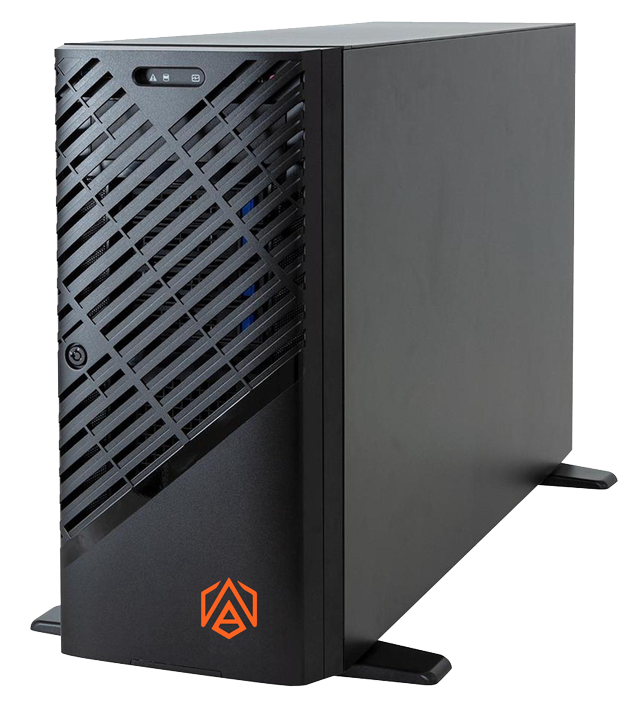
ABS Zaurion Aqua — Xeon W5-2455X / RTX Pro 6000 Blackwell
The most capable prebuilt currently available on Newegg: ABS’s Zaurion Aqua pairs the 12-core Xeon w5-2455X with the NVIDIA RTX Pro 6000 Blackwell — NVIDIA’s current flagship professional workstation GPU, carrying 96 GB of GDDR7 memory and full ISV driver certification. The configuration ships with 64 GB DDR5, a 1 TB NVMe M.2 SSD, and a 1.92 TB SATA SSD on Ubuntu. Priced at approximately $18,599 (down from $20,999), this is a purpose-built professional AI workstation — not a consumer machine in workstation clothing.
HP Z6 G5 — Xeon W5-3423 and W5-3525 Configurations
HP’s Z6 G5 is the volume-production Xeon W5 tower, available in multiple configurations. The W5-3423 base config starts around $4,400; the W5-3525 with RTX 4000 Ada Generation 20 GB sits at approximately $6,000. All Z6 G5 systems use the Intel W790 chipset with 8-channel DDR5 ECC and carry HP’s ISV certification portfolio covering Autodesk, Dassault Systèmes, and Siemens applications. Pairing a Z6 G5 with additional high-speed NVMe storage is straightforward given the platform’s PCIe lane headroom.
HP Z8 Fury G5 — Xeon W7-3545 Configurations
For W7-class workloads, HP’s Z8 Fury G5 starts at approximately $5,550 in base configuration and scales to over $10,000 with upgraded GPU options. The W7-3545’s 32 cores and 112 PCIe 5.0 lanes make this the right chassis for dual-GPU configurations or for building out a high-capacity NVMe storage array alongside the GPU without bandwidth contention.
Note that HP Z6 G5 and Z8 Fury G5 systems are currently listed as out of stock on Newegg — use the Auto Notify feature to be alerted when stock returns.
Ideal AI Workloads for Xeon W
The Xeon W platform isn’t suited for every AI use case. Here’s where its specific characteristics directly translate to better outcomes:
Long-cycle model training. Training a custom vision transformer on a proprietary medical dataset might take 48–96 hours on a single GPU. ECC memory ensures that a memory error at hour 47 doesn’t silently corrupt your checkpoint and force a full restart. This is the single clearest argument for Xeon W over consumer platforms for professional training pipelines.
AI-assisted CAD and simulation. Finite element analysis solvers like ANSYS Mechanical are incorporating ML-accelerated meshing and solver prediction. Running these tools requires both ISV certification (for support accountability) and substantial memory bandwidth for loading large model geometries. The W5-3525’s and W7-3545’s 8-channel DDR5 delivers up to approximately 307 GB/s of memory bandwidth — critical for large FEA models that require frequent CPU-to-GPU data transfers.
Medical imaging inference pipelines. FDA-cleared AI diagnostic tools specify validated hardware configurations. Running inference on a non-certified platform may technically produce the same numerical output, but it doesn’t satisfy the validated configuration requirement. Xeon W workstations paired with certified NVIDIA RTX Pro GPUs are explicitly designed for this use case.
Financial quantitative modeling. SAS, MATLAB, and Python-based quant pipelines running large in-memory Monte Carlo simulations benefit from both ECC (data integrity across long runs) and high memory capacity. The W7-3545’s support for up to 2 TB of registered ECC DDR5 means a quant model with a 500 GB working dataset can stay entirely in memory.
Multi-tenant enterprise deployments. Enterprise IT teams managing shared workstations across an engineering organization appreciate ISV certification for an additional reason: reproducibility. When every engineer’s workstation runs the same validated hardware and driver stack, support issues are easier to diagnose and resolve, and results are comparable across machines.
Software Stack: CUDA, oneAPI, and Intel Tools
Getting the software stack right is as important as the hardware selection.
NVIDIA CUDA on Xeon W. The Xeon W CPU has no native CUDA capability — CUDA runs on the attached NVIDIA GPU. What Xeon W provides is a stable, high-bandwidth PCIe 5.0 connection between the CPU and GPU, minimizing data transfer bottlenecks in training pipelines that move large tensors between system memory and GPU VRAM. Current PyTorch and TensorFlow builds support all NVIDIA professional GPUs on Xeon W without special configuration. The NVIDIA GPU lineup ranges from RTX-series consumer cards to RTX Pro professional cards, all CUDA-capable.
Intel oneAPI. If your workload targets an Intel GPU (the Arc Pro series for professional workstations), Intel’s oneAPI toolkit provides a unified programming model. oneAPI’s Data Parallel C++ (DPC++) runs on both Intel CPUs and Intel GPUs, and the Intel Extension for PyTorch (IPEX) enables GPU-accelerated training and inference on Intel Xe-based graphics. For organizations standardized on Intel hardware across their full stack, this is a viable path to GPU-accelerated AI inference without NVIDIA licensing overhead.
Intel OpenVINO. For inference-focused deployments — AI-assisted quality inspection, video analytics, or diagnostic imaging — Intel’s OpenVINO toolkit is designed to optimize and deploy neural networks efficiently on Intel hardware. OpenVINO can quantize models and deploy them on the Xeon W’s CPU cores or on an attached Intel GPU, making it relevant for workloads that don’t require a full NVIDIA professional GPU for inference serving.
Linux support. All HP Z-series and ABS Zaurion platforms support Ubuntu. For data science and ML engineering teams, this matters: containerized ML workflows, Jupyter environments, and GPU driver management are significantly more mature on Linux than on Windows. The ABS Zaurion Aqua configuration ships with Ubuntu pre-installed, ready for immediate use.
Xeon W vs Threadripper PRO vs Ryzen 9
The three dominant platforms for professional workstations serve overlapping but distinct use cases:
https://c1.neweggimages.com/BizIntell/item/Server%20-%20systems/Server%20Workstation%20Systems/59-991-004a/8a1.png
| Platform | Cores (max current) | Memory | PCIe Lanes | HW ECC | ISV Certified | Best For |
|---|---|---|---|---|---|---|
| Intel Xeon W7-3545 | 32C / 64T | 8-ch DDR5, 2 TB max | 112 × PCIe 5.0 | Yes | Yes (HP Z-series) | ISV software, certified pipelines, ECC-critical AI |
| AMD Threadripper PRO 7995WX | 96C / 192T | 8-ch DDR5, 3 TB max | 128 × PCIe 5.0 | Yes | Yes (select OEMs) | Maximum core count, HPC, massively parallel workloads |
| AMD Ryzen 9 9950X | 16C / 32T | 2-ch DDR5, 192 GB max | 28 × PCIe 5.0 | No | No | Consumer AI, local LLM inference, cost-efficient builds |
AMD Threadripper PRO is the correct choice when core count is the primary bottleneck — genomics pipelines, very large CFD simulations, and HPC workloads that scale linearly to 64+ cores. The 7995WX’s 96 cores deliver compute density that no current Xeon W SKU matches. The tradeoff is platform cost: Threadripper PRO workstations carry a meaningful price premium over equivalent Xeon W configurations at moderate core counts.
AMD Ryzen 9 is the budget-rational choice for individual data scientists and ML engineers who don’t require ISV certification or hardware ECC. A Ryzen 9 9950X paired with a consumer NVIDIA GPU will outperform an entry W5 Xeon workstation on single-GPU training throughput at significantly lower total cost. The Ryzen 9 platform doesn’t support hardware ECC in the same way as Xeon W, and it carries no ISV certification — these are the explicit tradeoffs for the cost savings.
Xeon W occupies the space between these two poles: more ISV certification depth than Threadripper PRO in HP Z-series configurations, better core-count-per-dollar than Threadripper PRO at moderate core counts (12–32 cores), and hardware ECC plus professional driver support that Ryzen 9 doesn’t provide.

Decision Matrix
| Scenario | Recommendation |
|---|---|
| Running ANSYS, Catia, or SolidWorks with AI acceleration; vendor support required | Xeon W — ISV certification is essential |
| 72-hour+ ML training on proprietary data in a regulated environment | Xeon W — ECC + audit trail value |
| AI pipeline where FDA validation or financial audit compliance applies | Xeon W — validated configurations required |
| Maximum core count is the primary bottleneck (96+ cores needed) | Threadripper PRO — Xeon W tops out at 60 cores in current W9 series |
| Individual data scientist; local LLM or image generation; budget is primary driver | Ryzen 9 — no ECC needed; cost-efficient GPU pairing |
| Mixed team: some ISV CAD users, some data scientists, single support contract | Xeon W — single certified platform for team standardization |
| Enterprise IT managing 10+ workstations with unified imaging and deployment | Xeon W (HP Z-series) — HP’s enterprise management tools, unified support |
| Inference-only; high throughput; no long-cycle training; no regulatory requirement | Ryzen 9 — lower cost; Xeon W premium not justified |
Conclusion
Intel Xeon W-Series AI workstations answer a specific question: what should an organization choose when compute performance matters, but not as much as the certifications, memory integrity, and support accountability that make professional AI deployments auditable and defensible? The combination of hardware ECC memory, 8-channel DDR5 bandwidth, PCIe 5.0 lane density, and ISV certification depth makes Xeon W the correct platform for regulated-industry AI, long-cycle training pipelines, and enterprise IT environments that need a single validated hardware stack.
For the highest-performance single configuration available today, the ABS Zaurion Aqua — pairing the Xeon w5-2455X with the NVIDIA RTX Pro 6000 Blackwell — is a fully integrated AI workstation built precisely for mission-critical professional work. For teams scaling across multiple workstations, HP’s Z6 and Z8 Fury G5 configurations offer the ISV certification depth and enterprise management tooling that fleet deployment requires.
If your workload sits outside these requirements — if you need 64+ cores above all else, or if cost efficiency matters more than certification — AMD Threadripper PRO and Ryzen-based builds deserve equal consideration. As AI workloads grow more complex and their outputs increasingly enter regulated pipelines, the value of a certified, ECC-protected platform compounds — and the Xeon W’s premium becomes easier to justify at the procurement table.
Related Posts
- 1440p OLED or 4K IPS: The Monitor Question I Keep Getting
- Best Graphics Cards for 1080p Gaming in 2026
- Best Power Supplies in 2026
- Best Gaming Laptops in 2026
- How Much Memory an AM5 Build Actually Needs in 2026
Frequently Asked Questions
Common questions about Intel Xeon W-Series AI Workstation