
A graphics card used to be a gaming purchase. In 2026 it is just as likely to be a creative tool: the same GPU that renders a game at high frame rates also generates images in Stable Diffusion, runs a local large language model, exports a 4K timeline and bakes lighting in a 3D scene. What changed is that the workloads creators and developers care about are limited less by raw speed and more by one number on the box: video memory. Below are the best graphics cards on Newegg right now for AI and content creation, organized from a capable 16GB value pick up to the 32GB flagship, with the specifications that actually decide whether a job finishes or fails. All prices were checked on Newegg on August 15, 2026.
Why VRAM Matters for AI and Creators
For gaming, a card that runs out of memory just drops a few frames. For creation, running out of VRAM is a hard wall. A local language model has to fit its weights entirely in the card’s memory; a Stable Diffusion or video model needs room for the model plus the image or clip it is working on; a 3D renderer must hold the whole scene. When you exceed the card’s memory, the job either slows to a crawl as it spills to system RAM or simply refuses to load. That is why VRAM capacity, not clock speed, is the first spec to check. For serious AI work, 16GB is the practical floor, 24GB and up gives real breathing room, and the 32GB flagship lets you run larger models and higher resolutions that smaller cards cannot touch.
What to Look For
Three things matter most. First, VRAM capacity: 16GB handles most Stable Diffusion work, mainstream video editing and mid-size language models; 24GB or 32GB unlocks the largest local LLMs, high-resolution generation and heavy 3D scenes. Second, CUDA acceleration: the majority of AI and creative applications, from PyTorch to the popular Stable Diffusion and video tools, are built first for NVIDIA’s CUDA platform, so an NVIDIA GeForce RTX card is the safest choice for a creator who lives in those apps. Third, value for the workload: AMD’s Radeon RX cards deliver excellent price-to-performance for video editing, 3D viewport work and gaming, and they are a smart buy if CUDA-only AI apps are not your priority. Match the card to what you actually run, and do not overpay for memory you will never fill.
The Field at a Glance
| GPU | Price | VRAM | Best for |
|---|---|---|---|
| ASRock Radeon RX 9060 XT | $469.99 | 16GB | Best value 16GB |
| ASRock Radeon RX 9070 XT | $719.99 | 16GB | Editing and 3D value |
| MSI Ventus RTX 5060 Ti | $799.99 | 16GB | Entry CUDA AI |
| GIGABYTE RTX 5070 | $839.99 | 12GB | All-round creation |
| GIGABYTE Eagle RTX 5070 Ti | $1,119.99 | 16GB | The sweet spot |
| GIGABYTE WindForce RTX 5080 | $1,599.99 | 16GB | High-end creation |
| GIGABYTE RTX 5090 | $4,699.99 | 32GB | No-compromise flagship |
Best Value 16GB: ASRock Radeon RX 9060 XT, $469.99
If you want the most memory for the least money, the ASRock Challenger Radeon RX 9060 XT 16GB is the standout. Its 16GB of VRAM is enough for Stable Diffusion, 1080p and 4K video editing and solid 3D viewport work, and AMD’s price-to-performance here is hard to beat. It is the pick for a student creator who edits and games but is not tied to CUDA-only AI apps. If you want more muscle for timeline exports and 3D on the same value platform, the ASRock Challenger Radeon RX 9070 XT 16GB at $719.99 steps up performance while keeping the same 16GB.
Entry to CUDA AI: MSI Ventus RTX 5060 Ti, $799.99
For creators who need CUDA, the MSI Ventus GeForce RTX 5060 Ti 16GB is the affordable way in. Its 16GB of memory paired with NVIDIA’s CUDA and Tensor cores runs the mainstream AI tools that assume an NVIDIA card, making it the natural first GPU for someone learning Stable Diffusion or fine-tuning small models. If you would rather trade a little memory for more raw speed, the GIGABYTE GeForce RTX 5070 12GB at $839.99 is a strong all-round creation card, though its 12GB is the one caveat for the largest AI models.
The Sweet Spot: GIGABYTE Eagle RTX 5070 Ti, $1,119.99
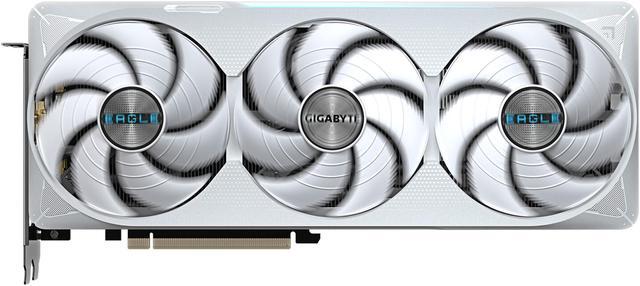
The GIGABYTE Eagle GeForce RTX 5070 Ti 16GB is the card we would put in most serious creator builds. It combines a full 16GB of VRAM with enough CUDA horsepower to make image generation quick, video exports fast and 3D work smooth, all well under the flagship’s price. For creators who want more headroom still, the GIGABYTE WindForce GeForce RTX 5080 16GB at $1,599.99 pushes performance higher on the same 16GB memory pool.
No-Compromise Flagship: GIGABYTE RTX 5090, $4,699.99
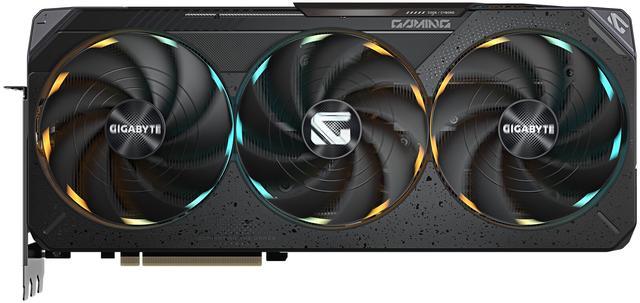
When nothing can hold you back, the GIGABYTE GeForce RTX 5090 32GB is the tool. Its 32GB of VRAM runs local large language models, high-resolution generation and complex 3D scenes that smaller cards simply cannot load, and its CUDA performance shortens every AI and render job. At $4,699.99 it is a professional purchase, but for anyone whose work is bounded by memory, it is the only card on this list that removes the ceiling entirely.
The Verdict
For most creators, the $1,119.99 RTX 5070 Ti is the smart buy, pairing 16GB and CUDA acceleration at a sane price. Value hunters who do not need CUDA-only AI should look hard at the $469.99 RX 9060 XT, while professionals who run large local models should step up to the 32GB RTX 5090. Whatever your budget, check VRAM first. You can compare current cards and prices in Newegg’s graphics card listings.
Read More
- NVIDIA GeForce RTX and Studio — Official overview of CUDA, Tensor cores and Studio drivers for creators.
- Puget Systems: GPUs for Content Creation — Real-world benchmarks of GPUs across editing, rendering and AI workloads.
- Tom’s Hardware GPU Hierarchy — A ranked ladder of current graphics cards by performance tier.
- AMD Radeon Graphics — Manufacturer specifications for the Radeon RX lineup.
- Newegg: Graphics Cards — Browse and filter current GPUs by VRAM, chipset and price.