
I went ultrawide about three years ago and the thing that surprised me was not the games. It was that I stopped using a second monitor. Two documents side by side on one 34-inch panel turned out to be more comfortable than two separate screens with a bezel down the middle, and I have not gone back.
Whether that trade works for you depends almost entirely on what you do with the screen, so here they are sorted that way rather than by size.
Who Should Skip Ultrawide Entirely?
Competitive shooter players, mostly. Many games render 21:9 by extending the field of view, which is lovely, but some anti-cheat-heavy competitive titles either letterbox the image or give the wider view to everyone anyway. If your play is ninety percent one competitive game, check how it handles 21:9 before committing.
Everyone else, the extra width is genuinely useful and it is hard to give up once you have it.
Scenario One: You Want the Best Image, Full Stop
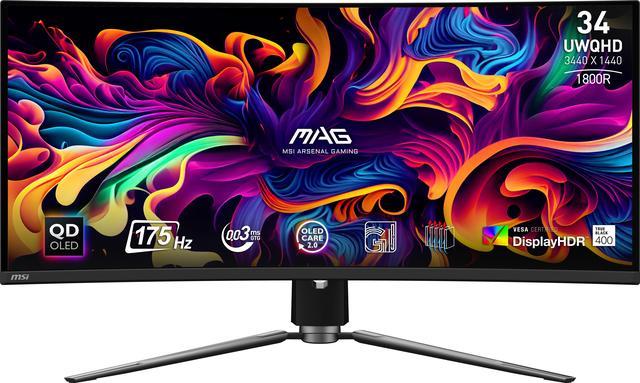
The MSI MAG 341CQP QD-OLED is the one I would buy for mixed work and games. It is 34 inches at 3440 x 1440, 175Hz, 0.03ms grey-to-grey, with a 1,500,000:1 contrast ratio and DisplayHDR True Black 400 certification. It lists 250 nits in SDR and 1000 nits in HDR, and carries DisplayPort 1.4a, two HDMI 2.1 inputs and a USB-C port with DisplayPort alt mode and 15W of charging, plus a KVM.
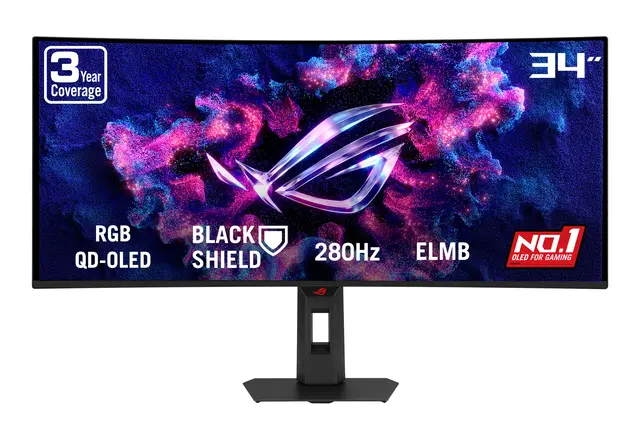
If frame rate matters more than the KVM, the ASUS ROG Strix XG34WCDMS pushes the same 3440 x 1440 QD-OLED panel to 280Hz at 0.03ms, with a 1300 cd/m2 HDR peak, HDR10, DisplayPort 1.4, USB-C and two HDMI 2.1 inputs, and three USB 3.2 Gen 1 Type-A ports. At 16.31 lbs with the stand it is also the lighter of the two.
Scenario Two: You Want Brightness and a Bright Room
OLED panels on this list sit at 250 nits in normal use, which is fine in controlled lighting and dim next to a window. The VA panels here are the answer to that.
The GIGABYTE G34WQC2 is 34 inches of VA at 3440 x 1440 and 200Hz, with 450 cd/m2 brightness, a 4000:1 contrast ratio, 1ms response, DisplayHDR 400, two DisplayPort 1.4 and two HDMI 2.0 inputs, and built-in speakers. That contrast figure is four times what an IPS panel manages, and while it is not OLED it looks far better in a lit room than the numbers suggest.
The MSI MPG 346CQRF X24 takes the same approach faster: a Rapid VA panel at 240Hz and 0.5ms, 400 cd/m2, 4000:1, DisplayHDR 400, with DisplayPort 1.4a, two HDMI 2.1 inputs and a USB-C port carrying 98W of power delivery. That last number is the one to notice if a laptop shares the desk.
Scenario Three: You Want Screen Space Above All
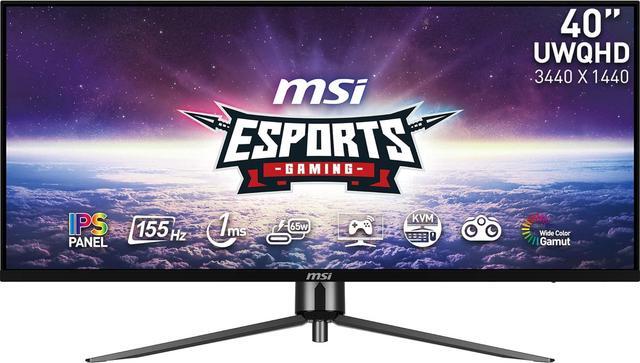
The MSI MAG401QR is 40 inches at the same 3440 x 1440, which means everything is physically larger rather than sharper. It is IPS at 155Hz with 1ms MPRT, 400 cd/m2, a 1000:1 contrast ratio, DisplayHDR 400, DisplayPort 1.4a, USB-C, two HDMI 2.0b inputs and a KVM. For reading and writing all day it is the most comfortable panel here, and the 1000:1 contrast is the price.
For the genuinely extreme option, the ASUS ROG Strix XG49VQ is 49 inches of 32:9 VA at 3840 x 1080, 144Hz, 4ms, 450 cd/m2 and a 3000:1 contrast ratio with DisplayHDR 400. Note the vertical resolution: 1080 pixels tall, which is the trade for that width. It is two 1080p monitors fused together, and for spreadsheets and flight simulators that is exactly right.
Scenario Four: Your First Ultrawide
If you are not sure whether the shape suits you, spending less to find out is sensible. The SAMSUNG Odyssey G5 is 34 inches of VA at 3440 x 1440 and 165Hz, 1ms, 250 cd/m2, 2500:1, HDR10, with DisplayPort 1.4 and one HDMI 2.0 input, at 12.3 lbs with the stand, which makes it the lightest panel here.
The Acer Nitro XZ340CUR covers the same ground at 240Hz with 1ms, 250 nits, HDR10, DisplayPort 1.4 and two HDMI 2.1 inputs. Higher refresh rate, same resolution, similar brightness.
What I Would Pick
Work and games on one screen, controlled lighting: MAG 341CQP QD-OLED. Same but frame rate first: ROG Strix XG34WCDMS. Bright room: G34WQC2 for value, MPG 346CQRF X24 if you also want 240Hz and laptop charging. Reading all day: MAG401QR at 40 inches. Maximum width and you know what you are getting into: XG49VQ. First ultrawide: Odyssey G5, or the Acer Nitro if refresh rate matters.
The practical warning I would give anyone: check your desk depth. A 34-inch curved panel wants more distance from your eyes than a 27-inch flat one, and a shallow desk turns the curve from comfortable into claustrophobic. The full range is in Newegg’s ultrawide gaming monitor listings.
Frequently Asked Questions
Do all games support 21:9 ultrawide? Most modern ones do, and they handle it by extending the field of view horizontally. Older titles and some competitive games either letterbox the image with black bars or stretch it, and a handful restrict the wider view deliberately for fairness. It is worth checking your two or three most-played games before buying rather than assuming.
Is 3440 x 1440 harder to drive than 1440p? Yes, by roughly a third more pixels than a standard 2560 x 1440 panel. It sits between 1440p and 4K in demand, so a card comfortable at 1440p will manage 3440 x 1440 with a small drop, and one that struggles at 1440p will struggle more. The 49-inch 3840 x 1080 panel is a different case, since its pixel count is closer to 1440p than to 4K.
Should I choose OLED or VA for an ultrawide? OLED gives you the 1,500,000:1 contrast and 0.03ms response on the MSI and ASUS panels here, at 250 nits in normal use. VA panels like the GIGABYTE G34WQC2 and MSI MPG 346CQRF reach 400 to 450 cd/m2 with contrast around 4000:1, which is far better than IPS and far short of OLED. Room lighting is the deciding factor more than anything else.
What is the difference between 21:9 and 32:9? 21:9 is a single wide screen, typically 34 or 40 inches at 3440 x 1440. 32:9, like the ASUS ROG Strix XG49VQ at 3840 x 1080, is roughly two 16:9 monitors side by side in one panel. The 32:9 format gives enormous width but only 1080 pixels of height, which is limiting for anything with a tall document or timeline.
Can I use an ultrawide with a laptop? Yes, and a USB-C input makes it far tidier. The MSI MPG 346CQRF X24 carries 98W of power delivery over USB-C, which is enough to charge most laptops while carrying video, and the MAG 341CQP offers 15W alongside its KVM. Without USB-C you are running a separate video cable and a separate charger.
Read More
- RTINGS: The Best Ultrawide Monitors — Lab-measured contrast, brightness and response time across 21:9 and 32:9 panels.
- Tom’s Hardware: Monitor Reviews and Buying Guides — Ongoing monitor reviews organised by panel type and resolution.
- VESA: DisplayHDR Performance Criteria — What DisplayHDR 400 and DisplayHDR True Black 400 actually certify.
- MSI: MAG 341CQP QD-OLED — Manufacturer specifications for the 34-inch QD-OLED panel, including its burn-in warranty terms.
- Newegg: Ultrawide Gaming Monitors — Compare current panels by size, aspect ratio, refresh rate and port selection.