
A tidy desk starts with the two tools your hands touch most: the keyboard and the mouse. A good wireless keyboard and mouse combo clears the cable clutter, frees up USB ports, and lets you position each piece exactly where your posture wants it. Whether you are grinding through spreadsheets, writing papers late into the night, or bouncing between a laptop and a tablet, the right pairing quietly makes every hour at the desk more comfortable.
Below we rank five standout combos for work and study, from a rock-bottom budget classic to a premium powerhouse, plus the best options for compact desks, tired wrists, and Mac users. All prices were checked on Newegg on August 6, 2026.

Why It Matters
You may spend six, eight, or ten hours a day with your fingers on these two devices. Small annoyances add up: a mushy spacebar, a mouse that skips on your desk, batteries that die mid-deadline, or a receiver that hogs your only spare USB port. A well-chosen combo removes all of that friction at once. It also matters for shared and hybrid spaces. If you rotate between a home office and a campus library, a quiet, compact, long-battery combo keeps you productive without disturbing anyone or lugging cables around.
What to Look For
Wireless type: 2.4GHz vs Bluetooth. A 2.4GHz USB receiver is plug-and-play and rock solid, ideal for a desktop that stays put. Bluetooth frees the USB port entirely and pairs with phones and tablets, though it can be slower to wake. The best combos offer both, so you can dedicate the receiver to your PC and use Bluetooth for a second device.
Battery life. Look for keyboards rated in months or years on AA cells, or rechargeable models that top up over USB-C. Longer intervals mean fewer interruptions.
Ergonomics. A gentle keyboard tilt, a cushioned palm rest, and a mouse that fills your hand reduce strain during long sessions.
Quiet keys. Silent-touch switches and soft-click mice are a courtesy in open offices, shared dorms, and video calls.
Multi-device switching. Easy-switch buttons let you jump between a work laptop, a personal desktop, and a tablet with one press, so one combo runs your whole setup.
Comparison Table
| Combo | Connection | Layout | Standout Feature | Price |
|---|---|---|---|---|
| Logitech MK270 (Best Budget) | 2.4GHz USB receiver | Full-size with numpad | Set-and-forget value | $29.99 |
| Logitech Pebble 2 for Mac (Best Compact) | Bluetooth | Slim compact | Whisper-quiet slim profile | $54.99 |
| Logitech Wave Keys MK670 (Best Ergonomic) | 2.4GHz + Bluetooth | Wavy full-size + palm rest | Cushioned ergonomic curve | $79.99 |
| Logitech MX Keys S Combo (Best Premium) | 2.4GHz + Bluetooth | Full-size backlit | Smart backlight + MX Master mouse | $199.99 |
| Logitech MX Keys for Business Gen 2 | 2.4GHz + Bluetooth | Full-size backlit | Managed security for teams | $199.99 |
Best Budget: Logitech MK270 Wireless Combo
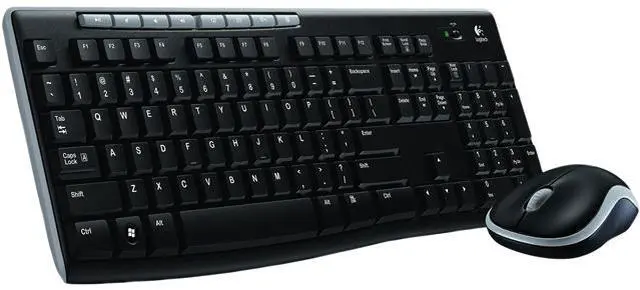
The Logitech MK270 Wireless Combo is the default recommendation for anyone who just wants a reliable, no-drama setup. At $29.99 it delivers a full-size keyboard with a number pad, a comfortable contoured mouse, and a single tiny 2.4GHz receiver that pairs both instantly. Battery life is measured in years on the keyboard and months on the mouse, so you can genuinely forget about it. It is the perfect first upgrade for a student desk or a second workstation.
Best Compact: Logitech Pebble 2 Combo for Mac
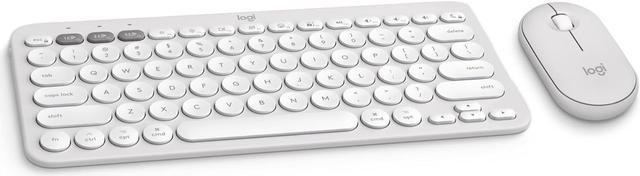
Short on desk space or always on the move? The Logitech Pebble 2 Combo for Mac ($54.99) pairs a slim, low-profile keyboard with a rounded, pocketable mouse. Bluetooth keeps your USB ports open, the keys are pleasantly quiet for libraries and shared rooms, and the minimalist design looks right next to a MacBook or iPad. It is also cross-platform, so Windows users who love a clean, compact look are welcome too.
Best Ergonomic: Logitech Wave Keys MK670 Combo
If long sessions leave your wrists aching, the Logitech Wave Keys MK670 Ergonomic Combo ($79.99) is built for you. Its gently waved key layout and integrated cushioned palm rest keep your hands in a more natural position, while the shaped mouse supports a relaxed grip. It connects over both a 2.4GHz receiver and Bluetooth, so it slots into almost any setup. For heavy typists, this is comfort that pays off by the end of the day.

Best Premium: Logitech MX Keys S Combo
Power users who want the best of everything should look at the Logitech MX Keys S Combo ($199.99). It bundles the backlit MX Keys S keyboard, whose smart backlight lights up as your hands approach, with the acclaimed MX Master series mouse and its hyper-fast scroll wheel. Multi-device Easy-Switch lets you flow across three machines, and USB-C recharging keeps both topped up. For teams that need centralized management and enterprise security, the closely related Logitech MX Keys Combo for Business Gen 2 ($199.99) offers the same premium feel with IT-friendly controls.
Best for Mac
Mac users are spoiled here. The compact Pebble 2 for Mac above is the easy everyday pick, but the MX Keys S and Business combos are also fully Mac-optimized with dedicated key layouts, making either a superb choice for creative and professional workflows.
One More Desk Upgrade
Going wireless often means working from a laptop, and laptop ports fill up fast. A Rosewill 8-in-1 USB-C Hub ($29.99) adds HDMI, extra USB, and card slots so your combo, monitor, and drives all connect through one cable.
Final Verdict
For most people, the MK270 delivers unbeatable value, the Pebble 2 wins tight and portable setups, and the Wave Keys MK670 is the comfort champion. If budget is no object, the MX Keys S Combo is the do-everything flagship. Want to weigh more options? Browse the full wireless keyboard and mouse combo listings or shop wireless mouse listings on Newegg to build your ideal desk.
Read More
- PCMag: best keyboards guide — independent, lab-tested rankings to compare typing feel and features.
- Logitech combos hub — the manufacturer’s full lineup with specs and compatibility details.
- OSHA computer workstations eTool — an official ergonomics reference for healthy desk posture.
- Logitech MX Keys S combo video reviews — hands-on impressions before you buy.
- Newegg Keyboards & Mice category — browse the wider selection of desk input gear.