
Buying DDR5 memory in 2026 is trickier than it used to be. The platform side has settled down: DDR5 is the only choice for current AMD AM5 and Intel LGA 1851 builds, kits are stable, and a clear sweet spot has emerged. The complication is price. DDR5 retail pricing has climbed sharply this year, so the kit you eyed a few months ago may cost noticeably more today. This guide cuts through the noise and shows you exactly which speed, capacity, and overclocking profile to buy for gaming and for productivity, without overpaying for numbers you will never feel.
Why It Matters
Memory is one of the few components where the right choice is cheap insurance and the wrong choice quietly costs you performance. On AMD Ryzen 7000 and 9000 chips, DDR5-6000 lines up perfectly with the Infinity Fabric at a 1:1 ratio, which is why it has become the default recommendation. Run memory slower than your platform likes and you can leave 5 to 10 percent of gaming performance on the table; reach too high and you risk instability or pay a premium for gains you cannot see. Productivity workloads such as video editing, 3D rendering, and local AI models care more about capacity, where running out of RAM can grind a project to a halt.
There is also a hidden trap many builders fall into. DDR5 kits do not run at their advertised speed out of the box. Without enabling an overclocking profile in your BIOS, the memory defaults to a slow JEDEC baseline, often DDR5-4800. That means a fast kit can perform like a budget one until you flip a single setting. Getting the buying decision right and the setup right is what separates a snappy build from a sluggish one. You can browse current options on the Newegg DDR5 RAM listings as you read.
What to Look For
Three things decide a DDR5 purchase: speed, capacity, and the overclocking profile that unlocks them.
Speed and latency. Speed is measured in MT/s and latency in CAS Latency (CL). For 2026, DDR5-6000 CL30 is the gaming sweet spot on AMD, and DDR5-6000 to DDR5-6400 suits Intel Core Ultra builds. Beyond DDR5-6400 the gaming gains shrink to a rounding error for most people, and very fast kits can be harder to stabilize. The difference between CL30 and CL36 is typically just 1 to 3 FPS in CPU-bound games and basically nothing when the GPU is the bottleneck, so do not lose sleep over a few points of latency.

Capacity. A 32GB kit, usually two 16GB modules, is the standard for gaming in 2026 and handles every current title with room for background apps. Step up to 64GB only if you do serious creative work, run virtual machines, or keep large local AI models loaded. Always buy a matched dual-module kit rather than a single stick so you get dual-channel bandwidth, and avoid mixing kits later if you can help it.
EXPO vs XMP. These are the one-click overclocking profiles that get your kit to its rated speed. AMD calls its version EXPO; Intel uses XMP 3.0. Most quality kits today carry both, so they work on either platform, but it is worth confirming. After install, enable EXPO or XMP in your BIOS or the RAM will sit at the slow JEDEC default. This single step is the most common reason a new build feels slower than expected.
A note on price. DDR5 has gotten more expensive in 2026, with retail pricing up significantly since the start of the year. Because pricing is moving quickly, treat any dollar figure as a snapshot and check the live listing before you buy.
| Kit | Speed / Latency | Capacity | Profile | Best For |
|---|---|---|---|---|
| G.SKILL Flare X5 | DDR5-6000 CL30 | 32GB (2x16GB) | AMD EXPO + XMP | Best AMD gaming value |
| Kingston Fury Beast | DDR5-6000 CL30-CL36 | 16GB-64GB | EXPO + XMP 3.0 | Reliable all-rounder |
| Corsair Vengeance | DDR5-6000 CL30 | 32GB or 64GB | EXPO + XMP | Productivity / capacity |
| Crucial Pro OC | DDR5-6400 CL38 | 32GB (2x16GB) | XMP 3.0 + EXPO | Intel speed builds |
| G.SKILL Trident Z5 Neo | DDR5-6000 CL30 | 32GB or 64GB | AMD EXPO + XMP | RGB flagship |
Detailed Picks
Best AMD gaming value: G.SKILL Flare X5 32GB DDR5-6000 CL30. This kit is the default recommendation for a reason. It hits the DDR5-6000 CL30 sweet spot with tight 30-38-38-96 timings at 1.35V, carries AMD EXPO with an Intel XMP 3.0 profile as well, and its low 33mm module height clears even large tower air coolers. For a Ryzen 7000 or 9000 gaming rig, it delivers essentially flagship gaming performance without the RGB tax.
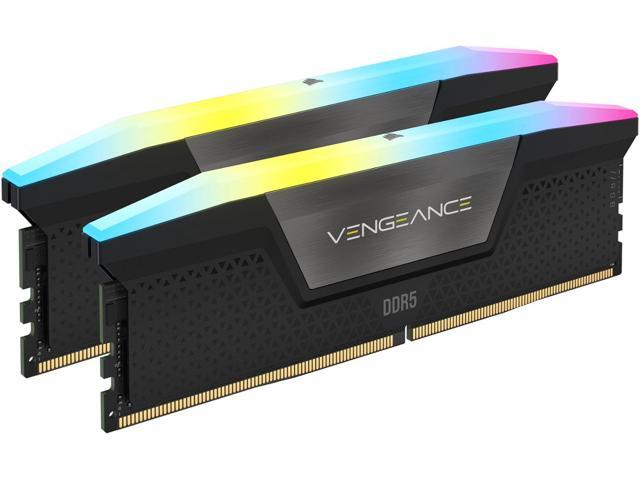
Reliable all-rounder: Kingston Fury Beast DDR5. Fury Beast is the safe pick when you want broad compatibility and a long track record. It ships in capacities from 16GB up to 64GB and speeds from 5200 all the way to 6800 MT/s, with on-die ECC for stability and both EXPO and XMP 3.0 profiles so it slots into any current platform. For a no-drama build at 32GB DDR5-6000, it is hard to go wrong.
Best for productivity and capacity: Corsair Vengeance 64GB DDR5-6000 CL30. When your workload is editing, rendering, or local AI rather than just gaming, capacity wins. The Vengeance 64GB (2x32GB) kit pairs a generous capacity with a still-fast DDR5-6000 CL30 spec and dual EXPO and XMP support, all under a low-profile heat spreader that plays nicely with big coolers. It is the go-to for creators who also game on the same machine.
Best for Intel speed builds: Crucial Pro Overclocking DDR5-6400 CL38. Intel Core Ultra chips can take advantage of a bit more frequency, and this Crucial Pro kit targets exactly that. It runs DDR5-6400 at 38-40-40-84 in its primary profile, with a secondary profile that drops to DDR5-6000 at tighter 36-38-38-80 timings, and supports both XMP 3.0 and EXPO. It is a tidy match for Arrow Lake and Zen 5 builders who want a little extra headroom.
RGB flagship: G.SKILL Trident Z5 Neo. If you want the looks to match the performance, the Trident Z5 Neo RGB delivers DDR5-6000 CL30 in 32GB and 64GB configurations with AMD EXPO and a striking RGB light bar. Performance is on par with the Flare X5; you are paying for the aesthetics, which is perfectly reasonable in a windowed showpiece build. Compare current memory across brands in the Newegg Memory category.
Final Verdict
For the vast majority of builders in 2026, the answer is simple: a 32GB DDR5-6000 CL30 kit with both EXPO and XMP profiles. On AMD it is the proven sweet spot, on Intel it is an excellent baseline, and it leaves money in your budget for the parts that move the needle more, like your GPU. The G.SKILL Flare X5 is the value champion, Kingston Fury Beast is the reliable all-rounder, and the Corsair Vengeance 64GB is the call when productivity demands more headroom. Whatever you choose, remember the two rules that matter most: buy a matched dual-module kit, and enable EXPO or XMP in your BIOS so you actually get the speed you paid for. With prices elevated this year, lock in the right kit once rather than chasing marginal speed gains, and your memory will serve the build well for years.
Related Posts
- How Much RAM Do You Actually Need in 2026?
- How Much Memory an AM5 Build Actually Needs in 2026
- CL36, CL30, CL28 or CL26? Picking a DDR5-6000 Latency Tier
- Best G.SKILL Trident Z5 NeoX RGB Kits with AMD EXPO ULL in 2026
- Best CPU Coolers in 2026
Frequently Asked Questions
Answers to common questions about this topic.