Running AI on your own computer used to mean a weekend of compiling code and hunting for model files. That's no longer the case. Local AI has grown into a full ecosystem, with open models, shared file formats, polished desktop apps and software stacks from every major chip maker. At CES 2026, NVIDIA said the number of developers using PC-class models had grown tenfold, and AMD reported up to a tenfold year-over-year increase in ROCm downloads.
The catch is that the pieces have to fit together. Here's how I think about the local AI stack, layer by layer, and the hardware I'd pair with each ecosystem.
Layer 1: Open Models and Their Licenses
Everything starts with open-weight models you can download and run yourself. OpenAI's gpt-oss models, Google's Gemma 4 family and Mistral's smaller releases use the permissive Apache 2.0 license. Others, including Meta's Llama 4 and some of Alibaba's newer Qwen releases, come under their own community licenses with extra conditions, so read the terms before you build a product on them.
Size is the other filter. Plenty of strong models fit on a 16GB to 32GB graphics card once they're quantized, while the biggest open releases still need data-center hardware.
Layer 2: Engines and File Formats
The engine is the code that actually runs the model. The most important one is llama.cpp, an open-source project with more than 130,000 stars on GitHub. It runs on almost anything, with backends for CUDA, AMD's HIP, Vulkan, Intel's SYCL, Apple's Metal and Qualcomm's Hexagon. In February 2026, the team behind it, ggml.ai, joined Hugging Face.
llama.cpp also defined GGUF, the single-file model format you'll see all over Hugging Face. A GGUF file holds the weights and metadata together, usually in a quantized version that fits consumer hardware.
For serving models to many users at once, vLLM is the go-to engine, but it runs on Linux and doesn't support Windows natively.
Layer 3: The Apps You Actually Use
- Ollama is a desktop app, command-line tool and background service that downloads and runs models with one command. It exposes an OpenAI-compatible API, so apps written for cloud AI can point at your own PC instead.
- LM Studio is the friendliest desktop app, and it has been free for work use since July 2025. It can also act as an MCP host, which lets local models call tools such as file access or web search.
- Open WebUI gives you a ChatGPT-style browser interface on top of Ollama and other back ends, and it can run fully offline.
- ComfyUI is the node-based app most people use for local image and video generation.
On the operating system side, Microsoft's Windows ML went generally available in September 2025. It hands work to vendor execution providers, including NVIDIA's TensorRT for RTX, Intel's OpenVINO, AMD's Vitis AI and Qualcomm's QNN, and on Windows PCs, Microsoft's Foundry Local uses Windows ML to run its ready-to-use models.
Layer 4: The Chip Makers' Software
NVIDIA has the deepest support thanks to CUDA. At CES 2026, it said its work with the open-source community sped up token generation on mixture-of-experts models by up to 35 percent in llama.cpp and up to 30 percent in Ollama on RTX PCs.
AMD announced ROCm 7.2 at CES 2026, extending support across both Windows and Linux, and Ollama uses ROCm for Radeon cards. Strix Halo machines are the standout: AMD lets Windows assign up to 96GB of a 128GB system's memory to graphics.
Intel centers its stack on OpenVINO and its AI Playground app. Its older IPEX-LLM project was archived in January 2026, so I'd skip guides that still rely on it.
Qualcomm targets the NPU. Snapdragon X2 Elite chips carry NPUs rated at 80 to 85 TOPS, and the Qualcomm AI Hub offers optimized models for them.
Hardware Picks for Each Ecosystem
NVIDIA desktop: The MSI GeForce RTX 5080 16G Suprim Liquid SOC gives you 16GB of GDDR7 on a 256-bit bus and runs every app above.
NVIDIA for a laptop: The GIGABYTE AORUS GeForce RTX 5060 Ti AI BOX is an external RTX 5060 Ti with 16GB of GDDR7 that connects over Thunderbolt 5, so a thin laptop with a Thunderbolt port that supports external GPUs can use CUDA tools at a desk.
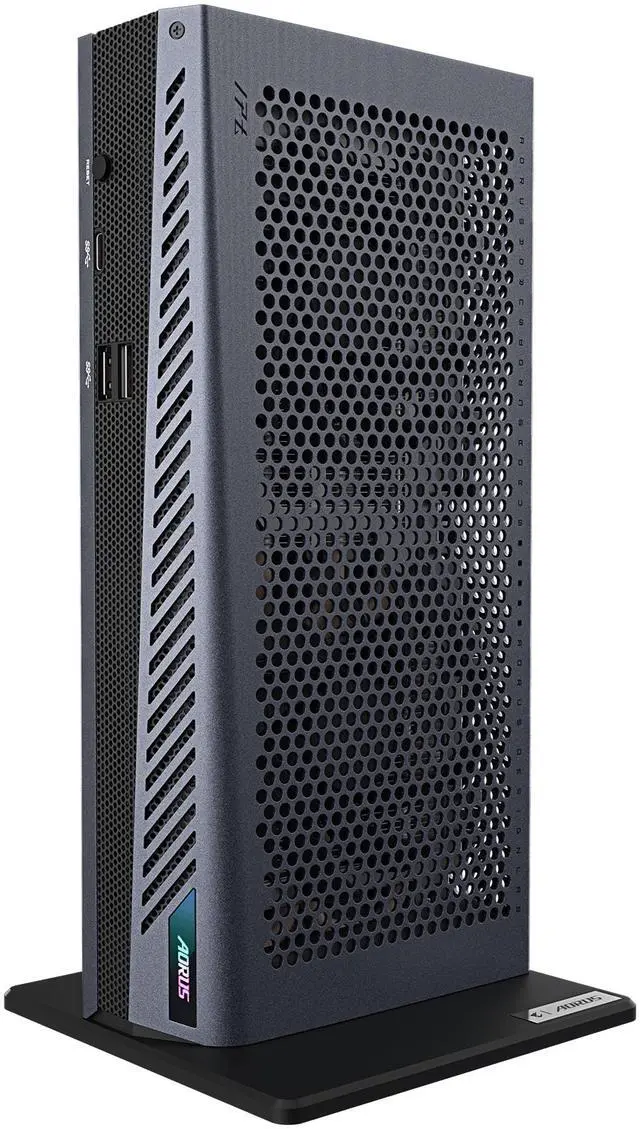
AMD ROCm: The GIGABYTE Radeon AI Pro R9700 AI TOP carries 32GB of GDDR6 on a 256-bit bus, enough for quantized 27B to 32B models with room for context.
AMD unified memory: The HP Z2 Mini G1a Workstation packs a Ryzen AI Max+ PRO 395, 128GB of memory and 10 Gigabit Ethernet into a mini PC, which makes it a good shared model server for a small team.
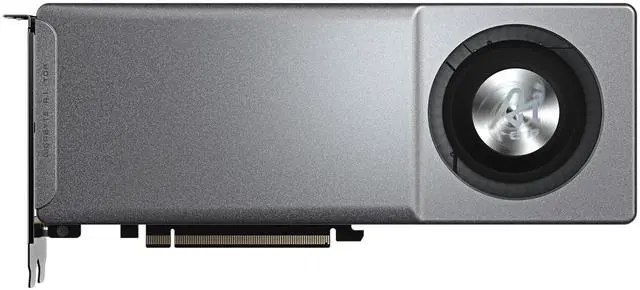
Intel: The MAXSUN Intel Arc Pro B60 Dual 48G Turbo puts two 24GB Arc Pro B60 GPUs on one card. LTT Labs notes it needs a motherboard that can split its slot into x8/x8, which isn't widely supported on consumer boards, so check yours first.
Qualcomm: The Microsoft Surface Pro 12th Edition pairs the Snapdragon X2 Elite with 32GB of memory, a good fit for NPU apps and small models on the go.
Edge AI: The NVIDIA Jetson AGX Thor Developer Kit brings 128GB of LPDDR5X and up to 2,070 FP4 TFLOPS (sparse) to robotics and on-device projects.
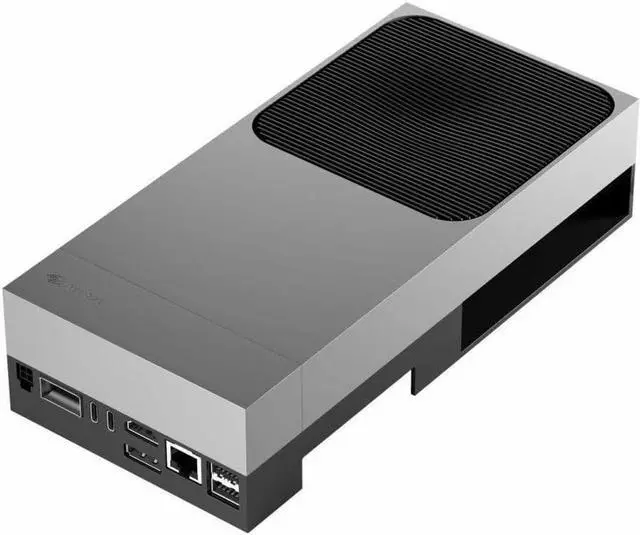
Storage for every ecosystem: Model files add up fast, so I'd give them their own drive. The WD_BLACK SN8100 4TB is a PCIe 5.0 SSD rated at up to 14,900MB/s reads, which shortens model load times.
Frequently Asked Questions
What's the easiest way to start with local AI? Install LM Studio or Ollama, download a model and start chatting. Both are free, both run on Windows, macOS and Linux, and both can expose a local API that other apps can use.
Does local AI work on AMD and Intel graphics cards? Yes. Ollama supports AMD GPUs through ROCm and Vulkan, llama.cpp has Vulkan and SYCL backends that cover Radeon and Arc cards, and Intel maintains OpenVINO. NVIDIA still has the broadest support thanks to CUDA.
What is a GGUF file? GGUF is the model file format used by llama.cpp. It packs a model's weights and metadata into a single file, and it supports quantized versions that cut memory use. Hugging Face hosts more than 200,000 models in GGUF.
Can local AI models use tools and plug-ins? Yes, through the Model Context Protocol (MCP). LM Studio has worked as an MCP host since version 0.3.17, so a local model can call MCP servers for things like file access or web search.
Is Windows or Linux better for local AI? For a single PC, both work well with Ollama, LM Studio and llama.cpp. Linux still has the edge for serving models to many users, since vLLM doesn't run natively on Windows.
Read More
- Hugging Face: GGUF -- How the GGUF format works and how to find GGUF models on the Hub.
- Hugging Face: Welcome Gemma 4 -- Google's open Gemma 4 models and the local tools that support them.
- LM Studio Docs: Use MCP Servers -- How to connect MCP servers to local models in LM Studio.
- NVIDIA Developer Blog: Open-Source AI Tool Upgrades on RTX PCs -- NVIDIA's speedups for llama.cpp, Ollama and ComfyUI on GeForce RTX.
- Microsoft Learn: What Is Windows ML? -- How Windows ML runs AI models across CPUs, GPUs and NPUs.