Acer Aspire Go 15 AI Ready Laptop - Intel Core i9-13900H - 16GB RAM - 512GB SSD - Windows 11 Home (NX.JSDAA.001)
  •  
  • $799.99 –
  • Save: 11%
  • $199.99
  • $299.99
  • Save: $100.00 (33%)
  • Free 30-day Returns
  • Price alert
    Shop it at NeweggBusiness.

    iVANKY FusionDock Pro 1+ 14-in-1 Triple DisplayLink Dock for MacBook M2-M5, 3x HDMI 2.0, Triple 4K@60Hz, 96W PD, 10Gbps, 2.5GbE, SD/TF 4.0, 180W Adapter

    Limited time offer, ends 10/07 By ivanky Official Store

    (1 from ivanky.com) Write a Review
    • Fusion Dock Pro 1+
    • Fusion Dock Pro 2
    • Fusion Dock Pro 3
    • Black
    • Blue
    • Grey-Blue
    • 1. Install the DisplayLink driver first-HDMI 2& 3 need it. MacOS 15 users: use DisplayLink Driver v1.11 (Oct 8,2024) for best performance.
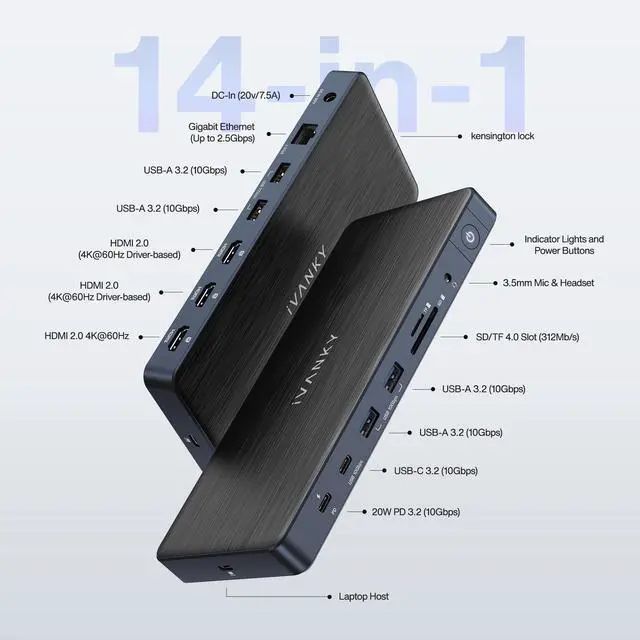
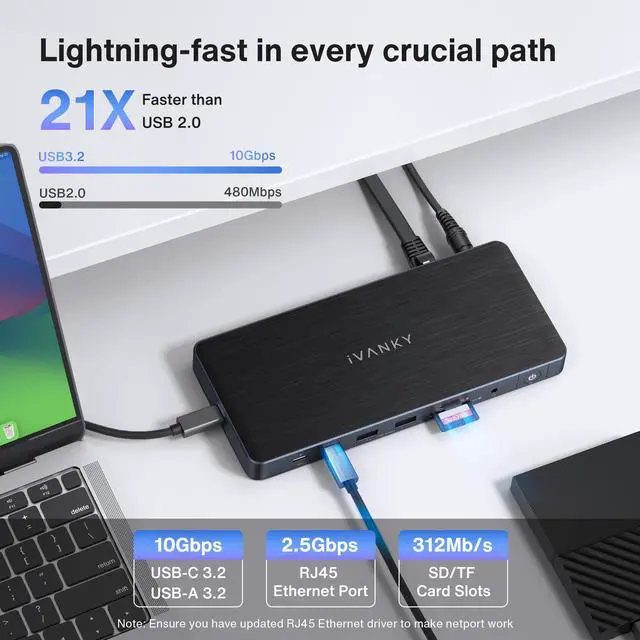
    • 2. 14-in-11/0: two 10Gbps USB-C (20W PD +7.5W), four 10Gbps USB-A3.2, SD/TF 4.0 at 312 MB/s, and 2.5GbE RJ45 for stable wired speed.
    • 3. Triple 4K@60Hz displays via three HDMI ports after driver install. HDMI converts to VGA/DV with an adapter orcable.
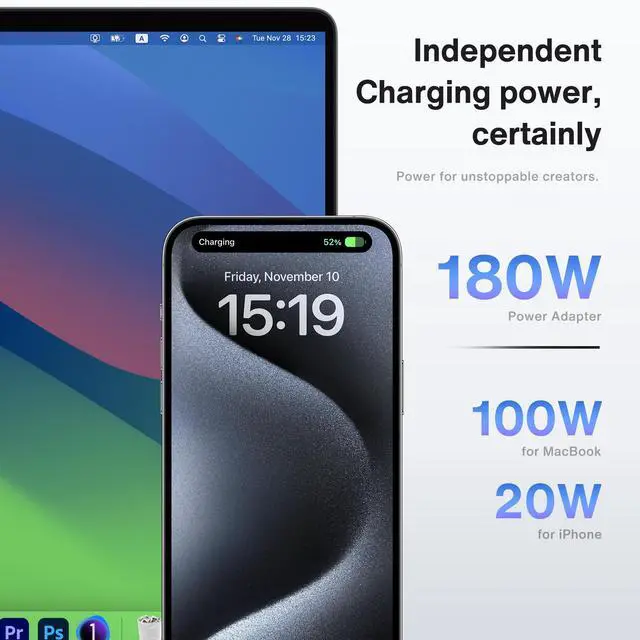
    • 4. 150W adapter powers the dock and charges your laptop up to 100W via upstream USB-C, plus 20w PD for USB-C devices across three USB-C ports.
    • 5. iVANKY FusionDock Pro 1+ includes a 24-month warranty and responsive support; we replace any defective unit free of charge.
    +
    +
    Overview
    Specs
    Reviews (1)
    avatar

    Any questions? Our AI mode will help you find out quickly.

    displaylink dock
    macbook docking station
    macbook dock
    displaylink dock
    displaylink

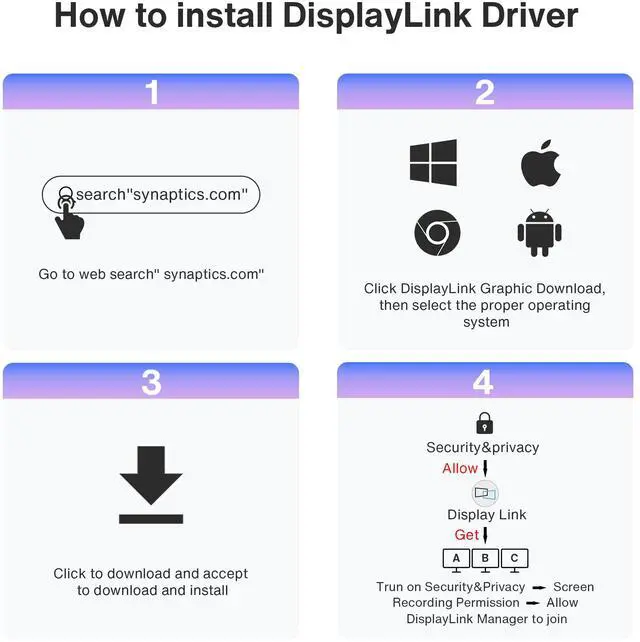
    HOW to Install DisplayLink Driver

    DisplayLink Driver Install Guide

    Note for MacOS 15 Users: The FusionDock Pro series boasts broad compatibility and supports most MacBooks with a full-function USB-C port. To ensure optimal performance with MacOS 15, please upgrade or download the DisplayLink Driver to version 1.11, released on October 8, 2024

    displaylink dock
    macbook docking station
    macbook dock
    displaylink dock
    displaylink

    HOW to Install DisplayLink Driver

    DisplayLink Driver Install Guide

    Note for MacOS 15 Users: The FusionDock Pro series boasts broad compatibility and supports most MacBooks with a full-function USB-C port. To ensure optimal performance with MacOS 15, please upgrade or download the DisplayLink Driver to version 1.11, released on October 8, 2024

    iVANKY FusionDock Pro 1+ 14-in-1 DisplayLink Docking Station Triple 4K@60Hz, 96W PD, 2.5GbE

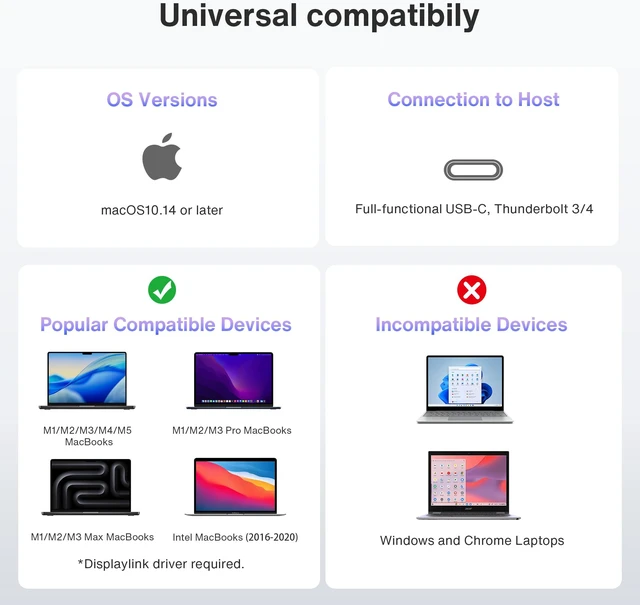
    Connect your MacBook to three 4K@60Hz displays and a full set of peripherals through one dock. The FusionDock Pro 1+ works with most MacBooks equipped with a full-function USB-C port (M2/M3/M4/M5), and its 180W power adapter charges your laptop up to 96W while it drives your displays.

    DisplayLink Driver Required

    This is a

    Triple 4K@60Hz Displays

    With the driver installed, connect up to three monitors at 4K@60Hz through the

    Fast Data Ports

    One

    Charging for Laptop and Devices

    The included 180W power adapter

    Please Note

    1. DisplayLink driver installation is required before the HDMI 2/3 ports will output video; download the latest driver from the DisplayLink or Synaptics website
    2. macOS 15 users: update the DisplayLink driver to version 1.11 (released October 8, 2024) for proper performance
    3. Works with most MacBooks featuring a full-function USB-C port; verify your model's support status before purchase
    4. VGA/DVI output requires a separate adapter or converter, sold separately

    What's in the Box:

    1. Main unit*1
    2. Power adapter*1
    3. Power adapter AC cable*1
    4. Power adapter DC cable*1
    5. USB-C to USB-C cable*1

    Warranty & Returns

    Warranty, Returns, And Additional Information

    Warranty

    • Please contact the Seller directly for warranty information. Warranty information may also be found on the Manufacturer's website.
    • CONTACT

    Return Policies

    Manufacturer Contact Info

    LOADING...