
Your Browsing History




Any questions? Our AI beta will help you find out quickly.
Pairing instructions
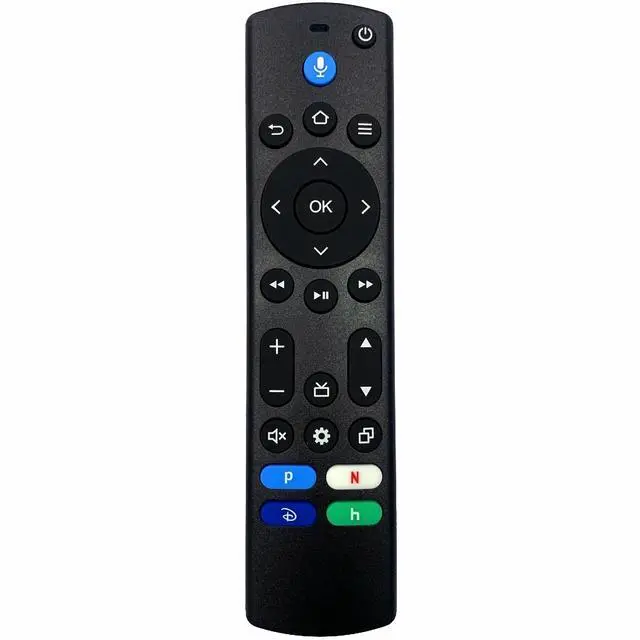
For a streaming device: Restart your device by unplugging the power cable, then plugging it back in. Press and hold the 'Home' button on the new remote for at least 10 seconds. The LED on the remote will slowly flash. Continue holding down the 'Home' button until the LED starts to rapidly flash. A notification will appear on your screen indicating that your remote is successfully paired.
For a Smart TV: Press the 'Home button', navigate to Settings at the top of the screen, then select Remotes & BT Devices > Remotes > Add New Remote.
Voice Remote Compatibility
Compatible TV-Streaming devices:
TV Cube (3rd Gen.)
TV Stick 4K Max (2nd Gen.)
TV Stick 4K Plus
TV Stick 4K Select
Compatible AMZ Smart TVs:
Smart 2-Series
Smart 4-Series
Smart Omni Series
Smart Omni QLED Series
Smart Omni Mini-LED Series
Compatible Hisense Smart TVs:
A7 Series: 43A7NF, 50A7NF, 55A7NF, 65A7NF, 75A7NF
QD6 Series: 43QD65NF, 50QD65NF, 55QD65NF, 65QD65NF, 75QD65NF
U6HF Series: 50U6HF, 58U6HF, 65U6HF, 75U6HF
Compatible Insignia Smart TVs:
F20 Series
24-inch Class: NS-24DF310NA19, NS-24DF310NA21, NS-24DF311SE21, NS-24F201NA23, NS-24F202NA22, NS-24F202NA23
32-inch Class: NS-32DF310NA19, NS-32F201NA22, NS-32F201NA23, NS-32F202NA22, NS-32F202NA23
39-inch Class: NS-39DF310NA21, NS-39F201NA23
42-inch Class: NS-42F201NA22, NS-42F201NA23
F30 Series
43-inch Class: NS-43DF710NA21, NS-43F301NA22, NS-43F301NA25
50-inch Class: NS-50DF710NA21, NS-50F301NA22, NS-50F301NA24
55-inch Class: NS-55DF710NA21, NS-55F301NA22, NS-55F301NA25
58-inch Class: NS-58F301NA22, NS-58F301NA25
65-inch Class: NS-65DF710NA21, NS-65F301NA23
70-inch Class: NS-70DF710NA21, NS-70F301NA23
75-inch Class: NS-75F301NA22
F50 Series
NS-50F501NA22, NS-55F501NA22, NS-65F501NA22, NS-70F501NA22, NS-70F501NA25, NS-75F501NA25, NS-85F501NA25
Compatible Panasonic Fire-Smart TVs:
W95A Series: 55W95AP, 65W95AP, 75W95AP, 85W95AP
Z85A Series: 55Z85AP, 65Z85AP
Z95A Series: 65Z95AP
Compatible Pioneer Smart TVs
PN32451, PN43651, PN43951, PN50951, PN55851
Compatible TCL Smart TVs:
Q Series: 43Q570F
S3 Series: 32S350F, 40S350F
S4 Series: 43S450F, 50S450F, 55S450F, 65S450F, 75S450F
Compatible Toshiba Smart TVs:
C350 Series: 43C350KU, 50C350KU, 55C350KU, 65C350KU, 75C350KU; 43C350LU, 50C350LU, 55C350LU, 65C350LU, 75C350LU
M550 Series: 55M550KU, 65M550KU, 75M550KU
V35 Series: 32V35KU, 43V35KU
Note: This is an aftermarket product of Leankle brand. If the voice remote does not work after being idle for weeks or longer, please pair it with your device again.
What's in the box: A voice remote control and a user guide.
| Brand | Leankle |
| Special Feature | Voice Search |
| Color | Black |
| Max Number of Supported Devices | 1 |