




 here!
here!
I’m your shopping assistant for PC builds, upgrades, and everything tech.
Got questions? Ask away!
Start a conversation
here!
I’m your shopping assistant for PC builds, upgrades, and everything tech.
Got questions? Ask away!
Start a conversation Top Rated Top Rated




Any questions? Ask CelesteSM will help you find out quickly.
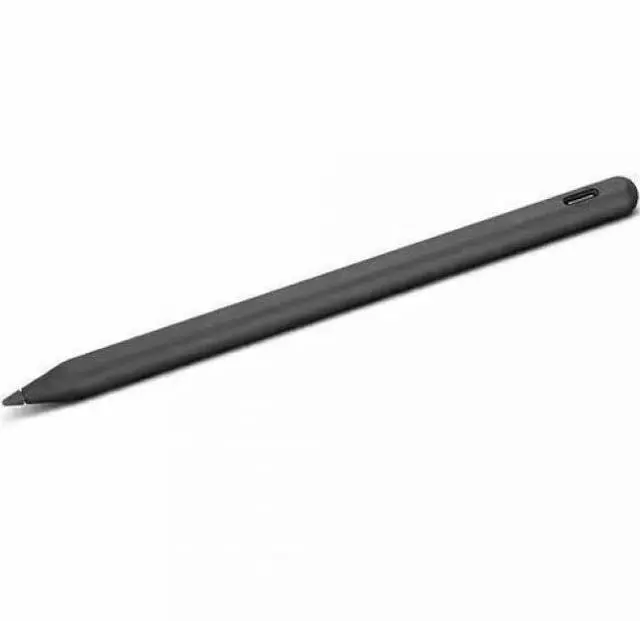
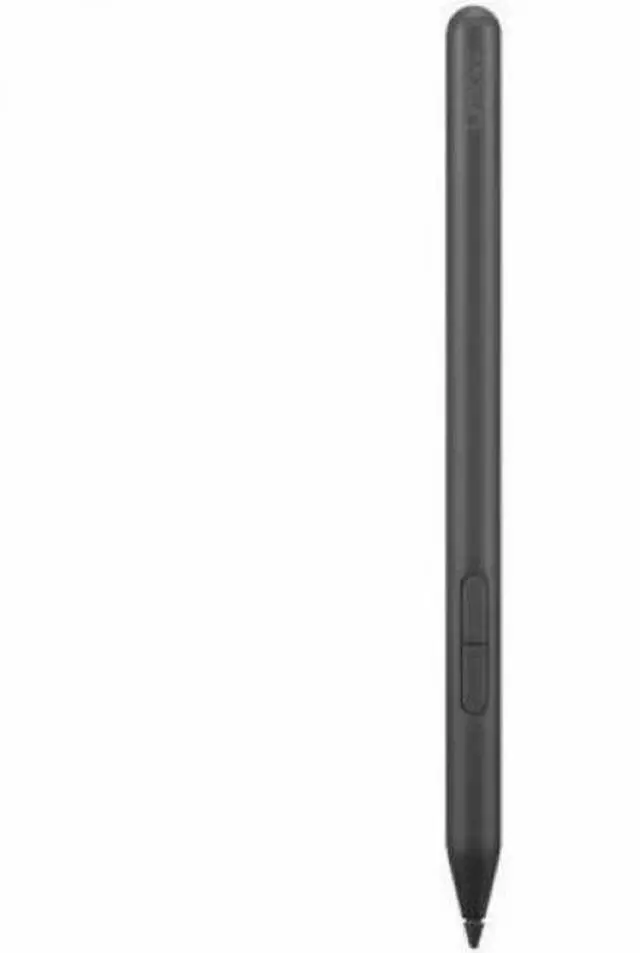
The Lenovo Yoga Pen is a black stylus accessory designed for notebook devices, making it suitable for Lenovo users who want a simple pen input option for writing, tapping, or basic navigation on compatible laptops.
| Attribute | Value |
|---|---|
| Best For | Single black stylus/pen intended for use with the listed Lenovo notebook and 2-in-1 models (see Compatibility) and sold as a single unit |
| Compatibility | Compatible with the listed Lenovo notebook and 2-in-1 models: ThinkBook 14 2-in-1 G5 IAU; ThinkPad L13 2-in-1 Gen 6 (AMD); ThinkPad P1 Gen 8; ThinkPad P16 Gen 3; ThinkPad T14s 2-in-1 Gen 1; ThinkPad T1g Gen 8; ThinkPad X1 2-in-1 Gen 10 Aura Edition; Yoga 7 2-in-1 14AKP10; Yoga 7 2-in-1 14ILL10; Yoga 7 2-in-1 16AKP10; Yoga 7 2-in-1 16ILL10; Yoga 9 2-in-1 14ILL10; Yoga Book 9 14IAH10 |
| Physical Dimensions & Weight | Item size 8.7 x 3 x 1.7 inches; packaged size 220 x 75 x 40 millimeters; package weight 0.08 kilograms |
| Batteries & Power | Uses one AAAA alkaline battery (1 battery); batteries are required and included, installed in the equipment and packaged with the product; multiple battery-powered components present |
| Package Contents & Quantity | Contains one unit per package (package quantity 1; number of items 1; unit count 1) |
| Identification & Manufacturer | Lenovo manufacturer, model number 4X81U29637 |
| Color | Black |
Q: Lenovo Yoga Pen vs Lenovo Precision Pen 2: which should I buy for a Yoga laptop?
A: Choose the Lenovo Yoga Pen if you want the simpler match for a compatible Yoga laptop: Lenovo positions it as the companion pen for Yoga PCs, with USB-C charging, magnetic attachment, and Lenovo Pen Settings support on supported Yoga systems. Choose Precision Pen 2 if you specifically want a broader multi-device pen and you have already confirmed compatibility with your exact laptop. For most Yoga-laptop buyers, the safer decision is Yoga Pen for everyday note-taking and sketching, while Precision Pen 2 makes more sense when cross-device flexibility matters more than the most straightforward Lenovo-Yoga fit.
Q: Lenovo Yoga Pen vs Lenovo Digital Pen 2: which is better for everyday note-taking?
A: Pick Lenovo Yoga Pen when you want a rechargeable pen with a more premium, cable-charged setup and magnetic carry on supported Yoga systems. Pick Digital Pen 2 when lower upfront cost and basic handwritten input matter more than charging convenience. In practical buying terms, Yoga Pen fits users who write often and want fewer battery-related interruptions, while Digital Pen 2 is the value choice for lighter note-taking if your device supports it.
Q: Lenovo Yoga Pen vs an integrated Lenovo pen: which is the better choice?
A: Choose Lenovo Yoga Pen if your laptop supports it and you prefer a full-size external pen with magnetic attachment and USB-C charging. Choose an integrated Lenovo pen if your system has a built-in pen garage and you value always having the pen stored and charged inside the notebook. The trade-off is convenience style: Yoga Pen is better for users who want a larger pen body for longer writing sessions, while an integrated pen is better for users who prioritize carry convenience and not forgetting the pen.
Q: Should I buy Lenovo Yoga Pen or move up to Lenovo Yoga Pen 2?
A: Buy Lenovo Yoga Pen if you want the standard Lenovo Yoga stylus experience and you are shopping for a compatible current Yoga notebook accessory without paying for extra packaging or newer positioning. Move up to Yoga Pen 2 if your laptop explicitly supports it and you want Lenovo's newer pen positioning, including magnetic attach and the higher-end companion focus shown on newer Yoga models. The practical decision is simple: Yoga Pen covers mainstream writing and sketching needs, while Yoga Pen 2 is the step-up option for buyers pairing a pen with newer premium Yoga hardware.
Q: Will this Lenovo Yoga Pen work with any Lenovo laptop or only certain models?
A: It is only a good buy if your Lenovo device specifically supports an active pen and uses the same pen protocol. Retail Q&A for Lenovo Yoga systems repeatedly shows that pen compatibility is model-specific: some Yoga 2-in-1 laptops support Lenovo Yoga Pen or Lenovo Digital Pen 2, while other touch Lenovo models do not support pen input at all. If your laptop only has touch and no active-pen support, this pen is not a safe purchase.
Q: Is this pen good for note-taking, meetings, and basic office annotation?
A: Yes, if your compatible Lenovo notebook supports active pen input, this type of Lenovo pen is generally suited to handwritten notes, document markup, and everyday office use. Retail discussions around comparable Lenovo pens consistently center on note-taking and annotation rather than heavy art workflows. It is a practical accessory for meetings and classroom-style writing, but the main requirement is confirmed compatibility with the target device.
Q: Who is this pen most suitable for?
A: This pen is most suitable for Lenovo Yoga or other Lenovo notebook owners who already know their device supports an active stylus. It fits users who want handwriting, simple sketching, PDF markup, or more precise navigation than finger touch. It is less suitable for buyers who are unsure about device compatibility, because the biggest trade-off in this category is that Lenovo pens are often limited to specific hardware families and protocols.
Q: Is this a better choice than buying a universal stylus?
A: Usually yes for a supported Lenovo notebook, because an active Lenovo-compatible pen can provide proper pen input features that generic capacitive styluses cannot. The trade-off is flexibility: universal styluses work on more screens but are less precise and may not support full pen functions, while Lenovo-specific pens are more useful only when the laptop supports the correct active-pen standard.
Q: Is the Lenovo Yoga Pen a good choice for note-taking?
A: Yes, it appears suitable for basic note-taking on compatible Lenovo Yoga devices. Reddit discussion repeatedly describes it as working well for writing once compatibility is sorted out, but not as a feature-rich pen for advanced shortcut workflows.
Q: Should you buy the Lenovo Yoga Pen if you want Bluetooth pen shortcuts in Windows?
A: Probably not. Reddit discussion indicates this pen may work for writing without offering the Bluetooth-based Windows pen features some buyers expect, such as certain button shortcut integrations. It is a better fit for simple pen input than for users who rely on customizable Windows pen controls.
Q: Is the Lenovo Yoga Pen an easy recommendation for all Lenovo Yoga laptops?
A: No. A repeated theme in Reddit posts is that pen compatibility across Lenovo Yoga models is confusing and model-specific. This pen is a safer purchase only if your exact laptop model lists it as compatible.
Q: Who is the Lenovo Yoga Pen best suited for?
A: It is best suited for Lenovo Yoga owners who need a simple stylus for handwriting, tapping, and basic on-screen annotation on a confirmed-compatible notebook. It is less suitable for buyers who want universal compatibility, integrated storage, or advanced pen-button features.
Q: What is a practical trade-off to know before buying the Lenovo Yoga Pen?
A: A practical trade-off is accessory support and ownership friction. Reddit discussion suggests replacement nib availability can be unclear, so this pen is a better fit for buyers comfortable staying within Lenovo's parts ecosystem rather than expecting easy third-party replacements.


 Lenovo