• $19.99
  • $29.99
  • Save: $10.00 (33%)
  • Free 30-day Returns
  • Sold by Direct from manufacturerLenovo
    Top Rated
    4.5 (1,125 seller ratings)

    Shipped by Direct from manufacturerLenovo

    Price alert

    Best Sellers

    Newegg
    • $38.99
    • + FREE SHIPPING
    Shop it at NeweggBusiness.

    Meet Your Seller

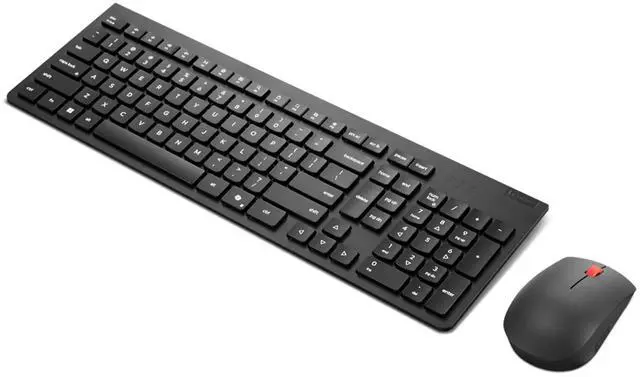
    Lenovo Essential Wireless Combo Keyboard & Mouse Gen2 AI - US English

    • Reliable 2.4 GHz wireless connection
    • Be eco-friendly with 65% post-consumer recycled plastic for both keyboard and mouse
    • Low-profile 2.5-zone keyboard layout for effortless typing
    • LED Indicator for keyboard: Low-battery, FnLock, NumLock
    • Adjustable tilt leg and spill-resistant keyboard design
    • One-touch dedicated media controls from F1-F12 for productivity
    • Download the driver to support the hotkey functions from F1-F12
    • AES-128 encryption for the keyboard
    • Full-size ambidextrous mouse for left or right-hand comfort
    +
    +
    Overview
    Specs
    Reviews
    See all Q & A

    Any questions? Ask CelesteSM will help you find out quickly.

    Designed for the modern professional, the Lenovo Essential Wireless Combo Keyboard & Mouse Gen 2 delivers functionality, comfort, and style. The slim 2.5 -zone keyboard, with its responsive keys, promotes a premium silent typing experience and improves your working efficiency with specialized Microsoft Copilot Key, while the standard-size mouse perfectly complements its keyboard counterpart in design and utility. The 2.4GH z receiver provides a stable keyboard and mouse connection for maximum reliability. Plus, with 65% post-consumer recycled plastic in its construction, this combo is as sustainable as it is productive.

    Includes 3-year limited hardware warranty, and global product support.
    Download driver first to enable hotkey functions:

    Warranty & Returns

    Warranty, Returns, And Additional Information

    Warranty

    • Please contact the Seller directly for warranty information. Warranty information may also be found on the Manufacturer's website.
    • CONTACT

    Return Policies

    • Return for refund within: 30 days
    • Return for replacement within: 30 days
    • This item is covered by Lenovo Return Policy

    Manufacturer Contact Info

    LOADING...
    LOADING...

    The Lenovo Essential Wireless Combo Keyboard & Mouse Gen2 AI is a US English 2.4 GHz wireless set with a low-profile 2.5-zone keyboard and full-size ambidextrous mouse, suited to everyday work and home-office users who want one coordinated input set.

    Recommended For

    • Desk-based office workers who want one wireless keyboard-and-mouse set for everyday typing, email, and document work; Lenovo positions the combo for professional use and highlights quiet typing and media shortcuts.
    • People setting up a shared or multi-user desk who need a full-size keyboard and a mouse designed for either hand.
    • Users who want a simple wireless setup for a desktop or docked laptop and can connect the shared 2.4 GHz receiver.
    • Workstations where long intervals between battery changes matter more than rechargeable peripherals; Lenovo specifies up to 15 months for the keyboard and 18 months for the mouse, depending on use.

    Real-World Use Scenarios

    • For everyday email, document editing, and web-based office work, the keyboard and mouse provide a single wireless set for routine typing and pointer tasks.
    • In a shared home or office workspace, the keyboard’s key-silencing design is intended to make routine typing less distracting to people nearby.
    • At a desk where users share the mouse, its ambidextrous design supports left- or right-handed use without needing a separate handed mouse.
    • When setting up a laptop or desktop workstation, one USB receiver connects both peripherals, reducing the need for separate keyboard and mouse cables.
    • While working at a computer, users can reach F1–F12 media controls to adjust playback-related functions; Lenovo notes that the driver is needed to support the hotkeys.
    • On a Windows PC, users can press the Copilot key to open Copilot when it is available and enabled, or Windows Search otherwise.