

Your Browsing History

Meet Your Seller



3 HDMI Triple USB C Docking Station, PULWTOP Laptop Docking Station Dual 4K Display for MacBook M1/M2/M3/Windows, Universal USB C Dock with Power Adapter, PD, 10Gbps USBC/A Data,2 USB-A 2.0, Ethernet
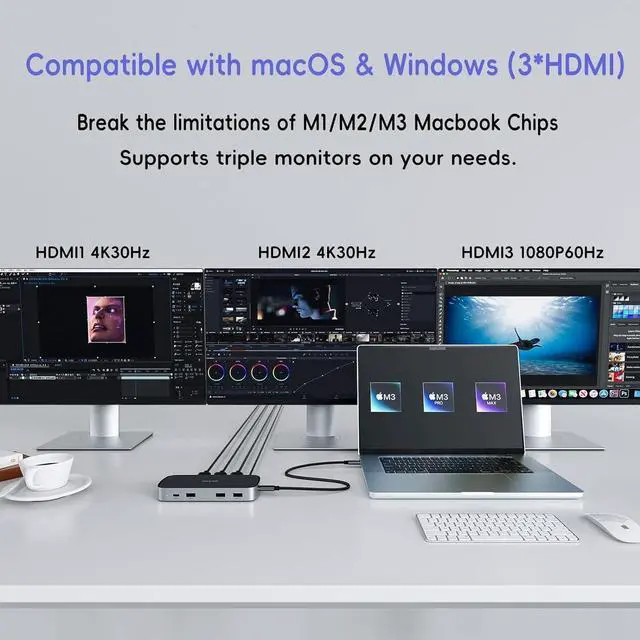
- Triple Displays for M1/M2/M3 MacBook : After installing the Siliconmotion driver, PULWTOP docking station can break the single extend display limitation of M1/M2/M3 Macbook, which is compatible with MacBook Pro/MacBook Air M1 M2 M3 2023 2022 2021 2020 2019 13" 14" 15" 16". It supports to extend triple monitors to make your own workspace. [NOTE]: The triple expansion function of PULWTOP universal docking station could only be used after installing the Siliconmotion driver.
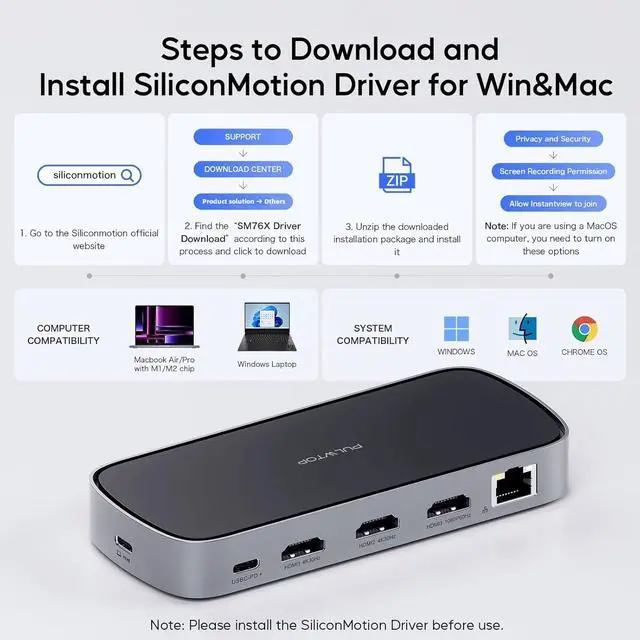
- 4K Triple Extended Display: Just installing the Siliconmotion driver, our laptop station could achieve triple monitor display. HDMI1 supports up to 4K@30HZ, HDMI2 supports up to 4K@30Hz and HDMI3 supports up to 1080P@60Hz. Macbook docking station mirror mode and extend mode could be used based on your needs. (Support both SST & MST) Note: HDMI2 and HDMI3 wont work if the driver isnt installed. NOTEPlease find the "SM76X Driver Download" in the siliconmotion website according to the process SUPPORTDOWNLOAD
+
+
Overview
Specs
Reviews

Any questions? Our AI mode will help you find out quickly.
Try me now
Triple Displays for M1/M2/M3 MacBook : After installing the Siliconmotion driver, PULWTOP docking station can break the single extend display limitation of M1/M2/M3 Macbook, which is compatible with MacBook Pro/MacBook Air M1 M2 M3 2023 2022 2021 2020 2019 13" 14" 15" 16". It supports to extend triple monitors to make your own workspace. [NOTE]: The triple expansion function of PULWTOP universal docking station could only be used after installing the Siliconmotion driver.
4K Triple Extended Display: Just installing the Siliconmotion driver, our laptop station could achieve triple monitor display. HDMI1 supports up to 4K@30HZ, HDMI2 supports up to 4K@30Hz and HDMI3 supports up to 1080P@60Hz. Macbook docking station mirror mode and extend mode could be used based on your needs. (Support both SST & MST) Note: HDMI2 and HDMI3 wont work if the driver isnt installed. NOTEPlease find the "SM76X Driver Download" in the siliconmotion website according to the process SUPPORTDOWNLOAD CENTERDocument (Product Solution to select Others) and kindly download SM76x Driver before use.
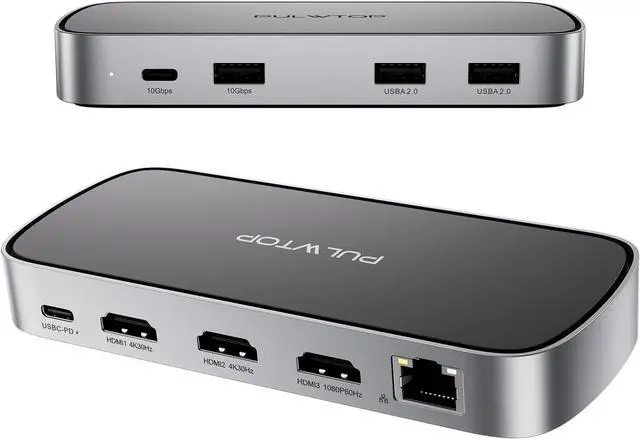
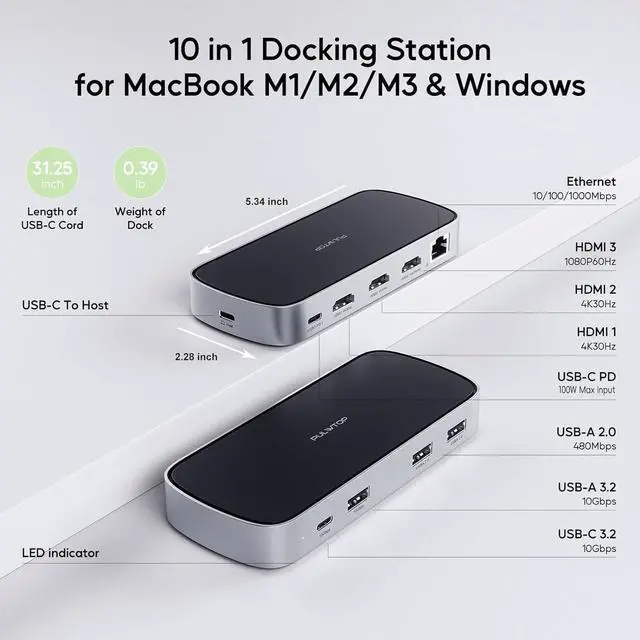
9 IN 1 Docking Station: The universal docking station with 65W power adapter (included), 100W USB C-PD, 3 HDMI Ports, 2 USB-A 2.0, 10Gbps USB C and USB-A Data, Ethernet. This laptop dock expands your workstation to vastly improve efficiency while working. [NOTE]: The cable of included power adapter only for USB-PD Input charging, not for data transfer. The other included cable is fully functional and can be used by connecting your laptop to this triple docking station.
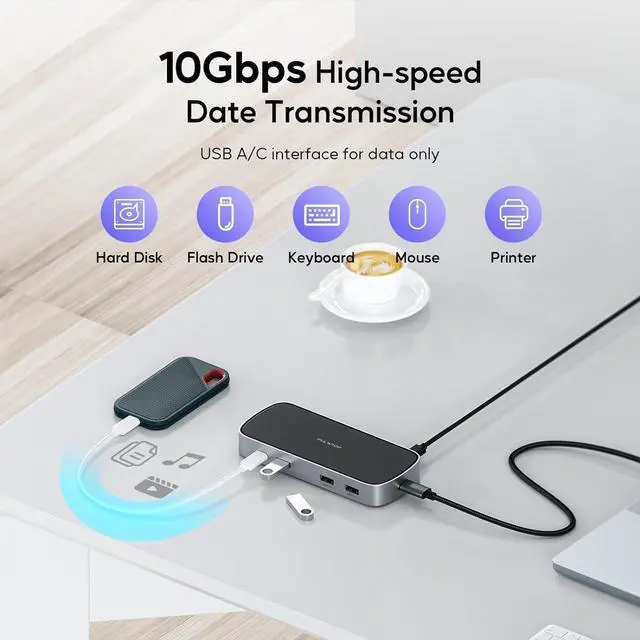
10G High-Speed Data Transmission: PULWTOP USB-C docking station has a 10Gbps usb-c port and a 10Gusb-A port, which can transfer videos, pictures or large files in seconds. The docking station also have two 2.0 USB-A ports to provide the most stable connection for your mouse and keyboard. NOTEPlease find the "SM76X Driver Download" in the siliconmotion website according to the process SUPPORTDOWNLOAD CENTERDocument (Product Solution to select Others) and kindly download SM76x Driver before use.
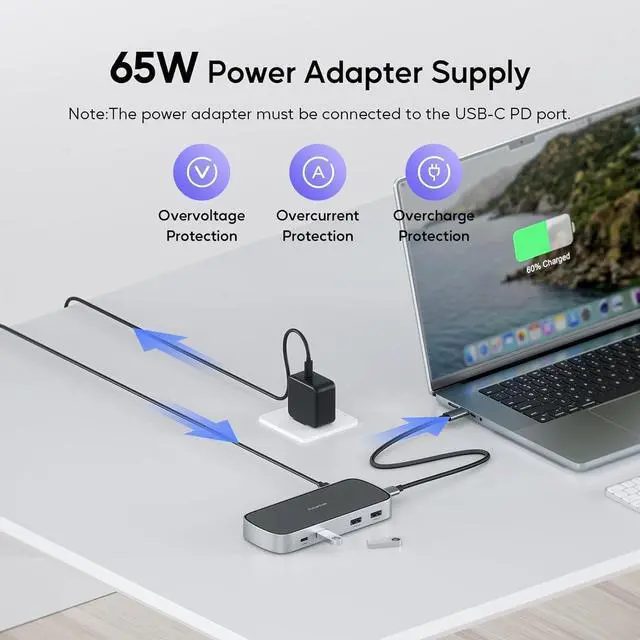
Included 65W Power Supply: For more stable experience, we have matched 65W adpter in the box, you can offers up to 50W to charge your laptop directly ( Ps: the adpter with US/UK/EU plug), The laptop docking station support PD100W max, if you need to use the adapter by yourself, we recommend to use the adapter above 60W. NOTEPlease find the "SM76X Driver Download" in the siliconmotion website according to the process SUPPORTDOWNLOAD CENTERDocument (Product Solution to select Others) and kindly download SM76x Driver before use.
4K Triple Extended Display: Just installing the Siliconmotion driver, our laptop station could achieve triple monitor display. HDMI1 supports up to 4K@30HZ, HDMI2 supports up to 4K@30Hz and HDMI3 supports up to 1080P@60Hz. Macbook docking station mirror mode and extend mode could be used based on your needs. (Support both SST & MST) Note: HDMI2 and HDMI3 wont work if the driver isnt installed. NOTEPlease find the "SM76X Driver Download" in the siliconmotion website according to the process SUPPORTDOWNLOAD CENTERDocument (Product Solution to select Others) and kindly download SM76x Driver before use.
9 IN 1 Docking Station: The universal docking station with 65W power adapter (included), 100W USB C-PD, 3 HDMI Ports, 2 USB-A 2.0, 10Gbps USB C and USB-A Data, Ethernet. This laptop dock expands your workstation to vastly improve efficiency while working. [NOTE]: The cable of included power adapter only for USB-PD Input charging, not for data transfer. The other included cable is fully functional and can be used by connecting your laptop to this triple docking station.
10G High-Speed Data Transmission: PULWTOP USB-C docking station has a 10Gbps usb-c port and a 10Gusb-A port, which can transfer videos, pictures or large files in seconds. The docking station also have two 2.0 USB-A ports to provide the most stable connection for your mouse and keyboard. NOTEPlease find the "SM76X Driver Download" in the siliconmotion website according to the process SUPPORTDOWNLOAD CENTERDocument (Product Solution to select Others) and kindly download SM76x Driver before use.
Included 65W Power Supply: For more stable experience, we have matched 65W adpter in the box, you can offers up to 50W to charge your laptop directly ( Ps: the adpter with US/UK/EU plug), The laptop docking station support PD100W max, if you need to use the adapter by yourself, we recommend to use the adapter above 60W. NOTEPlease find the "SM76X Driver Download" in the siliconmotion website according to the process SUPPORTDOWNLOAD CENTERDocument (Product Solution to select Others) and kindly download SM76x Driver before use.
Warranty & Returns
Warranty, Returns, And Additional Information
Warranty
- Please contact the Seller directly for warranty information. Warranty information may also be found on the Manufacturer's website.
- CONTACT
Return Policies
- Return for refund within: 30 days
- Return for replacement within: 30 days
- This item is covered by HAITAO CROSS BORDER E-COMMERCE LIMITED Return Policy
Manufacturer Contact Info
- For a directory of all our manufacturers, please click below.
- Manufacturers Directory
LOADING...