

Your Browsing History
Most customers receive within 5-7 days.


Meet Your Seller

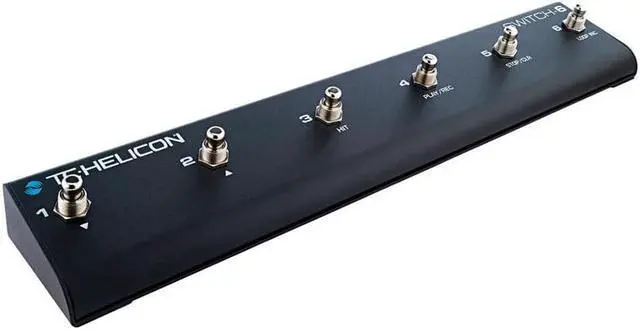

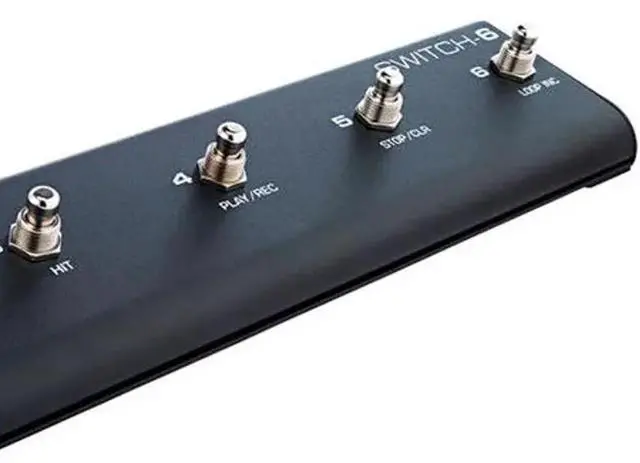


TC Electronic Switch 6 Amplifier Footswitch #000-DG300-00010
- Compatibility:VoiceLive Touch 2 and VoiceLive 3 Professional Performance System
- Number of foot switches:Six Individual Switches
- Construction:Heavy-duty Metal
Overview
Specs
Reviews

Any questions? Our AI mode will help you find out quickly.
Try me now
Even More Remote Control
Switch-6 extends the control of compatible TC-Helicon vocal/guitar processors to fit your unique performance style and needs. The six footswitches can be customized for a multitude of functions, which will let you loop, toggle individual effects, change presets, engage HIT or even use as a guitar pedalboard ...and more.
Six individual footswitches for remote control of programmable functions, (consult the manual or the Switch-6 setup menu screen on your unit for exact options)
Heavy-duty metal construction designed for gigging
Works with VoiceLive Touch 2, VoiceLive 3 and Play Electric
Includes TRS cable
How To Set It Up
Craig shows how to set up your VoiceLive 3 and VoiceLive Touch 2 with the Switch-6 pedal for even more switch-based control of your vocals, guitar FX and looping.
Creative Command
Create your own favorite control scheme or use the preprogrammed setups on your unit. No matter what setup you choose, Switch-6 offers a handy shortcut for getting the sounds you want, when you want them. The durable design means that it won't quit before you do.
Remember To Update
Switch-6 requires the latest firmware to be installed on VoiceLive 3, VoiceLive Touch 2 or Play Electric. If you don't have it, you can download it for free via VoiceSupport - their free app for PC/Mac. Just follow the steps below:
Download and install VoiceSupport
Connect your TC-Helicon unit to your computer using the supplied USB cable
Launch VoiceSupport
After the updates have downloaded, click on the Firmware tab
Click on the topmost firmware version. It will likely say "New" next to it
Allow the update process to complete. Do Not Unplug Or Reboot Your Unit.
The device will come back to normal operating status on its own If you have trouble connecting to VoiceSupport.
Switch-6 extends the control of compatible TC-Helicon vocal/guitar processors to fit your unique performance style and needs. The six footswitches can be customized for a multitude of functions, which will let you loop, toggle individual effects, change presets, engage HIT or even use as a guitar pedalboard ...and more.
Six individual footswitches for remote control of programmable functions, (consult the manual or the Switch-6 setup menu screen on your unit for exact options)
Heavy-duty metal construction designed for gigging
Works with VoiceLive Touch 2, VoiceLive 3 and Play Electric
Includes TRS cable
How To Set It Up
Craig shows how to set up your VoiceLive 3 and VoiceLive Touch 2 with the Switch-6 pedal for even more switch-based control of your vocals, guitar FX and looping.
Creative Command
Create your own favorite control scheme or use the preprogrammed setups on your unit. No matter what setup you choose, Switch-6 offers a handy shortcut for getting the sounds you want, when you want them. The durable design means that it won't quit before you do.
Remember To Update
Switch-6 requires the latest firmware to be installed on VoiceLive 3, VoiceLive Touch 2 or Play Electric. If you don't have it, you can download it for free via VoiceSupport - their free app for PC/Mac. Just follow the steps below:
Download and install VoiceSupport
Connect your TC-Helicon unit to your computer using the supplied USB cable
Launch VoiceSupport
After the updates have downloaded, click on the Firmware tab
Click on the topmost firmware version. It will likely say "New" next to it
Allow the update process to complete. Do Not Unplug Or Reboot Your Unit.
The device will come back to normal operating status on its own If you have trouble connecting to VoiceSupport.
Warranty & Returns
Warranty, Returns, And Additional Information
Warranty
- Please contact the Seller directly for warranty information. Warranty information may also be found on the Manufacturer's website.
- CONTACT
Return Policies
- Return for refund within: 30 days
- Return for replacement within: non-replaceable
- This item is covered by Adorama Return Policy
Manufacturer Contact Info
- For a directory of all our manufacturers, please click below.
- Manufacturers Directory
LOADING...