

Your Browsing History
- Free 30-day Returns
$35.99

Meet Your Seller

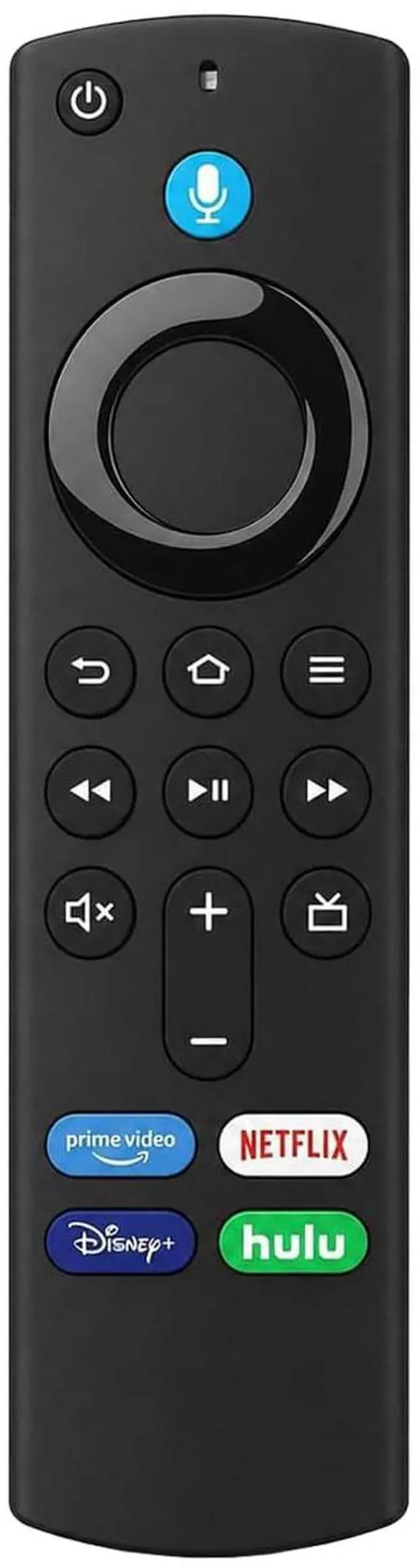

Voice Remote Control Replacement for Hisense Smart TV 55U65QF 65U65QF 75U65QF 85U65QF 100U65QF 50QD7QF 55QD7QF 75QD7QF 65QD7QF 85QD7QF 50E6QF 43E6QF 55E6QF 65E6QF 43A7NF 50A7NF 55A7NF 40A4NF 32A4NF
Limited time offer, ends 10/01 By Yihe Global Store
- Voice Remote Control Replacement for Hisense Smart TV 55U65QF, 65U65QF, 75U65QF, 85U65QF, 100U65QF, 50QD7QF, 55QD7QF, 75QD7QF, 65QD7QF, 85QD7QF, 50E6QF, 43E6QF, 55E6QF, 65E6QF, 43A7NF, 50A7NF, 55A7NF, 40A4NF, 32A4NF. How to Pair: 1. Press the Home button, navigate to Settings at the top of the screen, then select > CONTROLLERS & DEVIC > Voice Remotes with Alexa > Add New Remote. 2. Your TV device will search for remotes it can connect with, then display them in a list. 3. Begin using the voice control feature. If unable to use, it indicates unsuccessful pairing. Please repeat the above steps. 4 Shortcut Buttons for Quick Access: Equipped with 4 dedicated shortcut buttons, letting you launch your favorite apps instantly with a single click. Durable & Reliable: This remote is crafted from sustainable ABS materials, making it safe and easy to use for all age groups
+
+
Overview
Specs
Reviews

Any questions? Our AI mode will help you find out quickly.
Try me now
Voice Remote Control Replacement for Hisense Smart TV 55U65QF, 65U65QF, 75U65QF, 85U65QF, 100U65QF, 50QD7QF, 55QD7QF, 75QD7QF, 65QD7QF, 85QD7QF, 50E6QF, 43E6QF, 55E6QF, 65E6QF, 43A7NF, 50A7NF, 55A7NF, 40A4NF, 32A4NF.
How to Pair: 1. Press the Home button, navigate to Settings at the top of the screen, then select > CONTROLLERS & DEVIC > Voice Remotes with Alexa > Add New Remote. 2. Your TV device will search for remotes it can connect with, then display them in a list. 3. Begin using the voice control feature. If unable to use, it indicates unsuccessful pairing. Please repeat the above steps. 4 Shortcut Buttons for
Quick Access: Equipped with 4 dedicated shortcut buttons, letting you launch your favorite apps instantly with a single click.
Durable & Reliable: This remote is crafted from sustainable ABS materials, making it safe and easy to use for all age groups
How to Pair: 1. Press the Home button, navigate to Settings at the top of the screen, then select > CONTROLLERS & DEVIC > Voice Remotes with Alexa > Add New Remote. 2. Your TV device will search for remotes it can connect with, then display them in a list. 3. Begin using the voice control feature. If unable to use, it indicates unsuccessful pairing. Please repeat the above steps. 4 Shortcut Buttons for
Quick Access: Equipped with 4 dedicated shortcut buttons, letting you launch your favorite apps instantly with a single click.
Durable & Reliable: This remote is crafted from sustainable ABS materials, making it safe and easy to use for all age groups
Warranty & Returns
Warranty, Returns, And Additional Information
Warranty
- Please contact the Seller directly for warranty information. Warranty information may also be found on the Manufacturer's website.
- CONTACT
Return Policies
- Return for refund within: 30 days
- Return for replacement within: 30 days
- This item is covered by Yihe Global Store Return Policy
Manufacturer Contact Info
- For a directory of all our manufacturers, please click below.
- Manufacturers Directory
LOADING...