Your Browsing History
- Free 30-day Returns
$365.99
Meet Your Seller
TobenONE 18-in-2 MacBook Docking Station Dual Monitor 4K@60Hz, 150 Power Adapter, 20W Charging, USB C Docking Station with 2 HDMI&DP, 7 USB, 2.5Gbps Ethernet, 2 Audio, Dock Stand for MacBook Pro
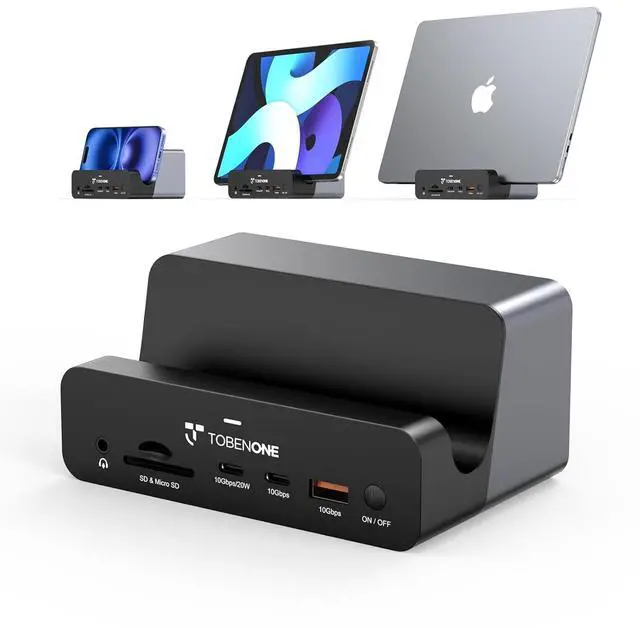
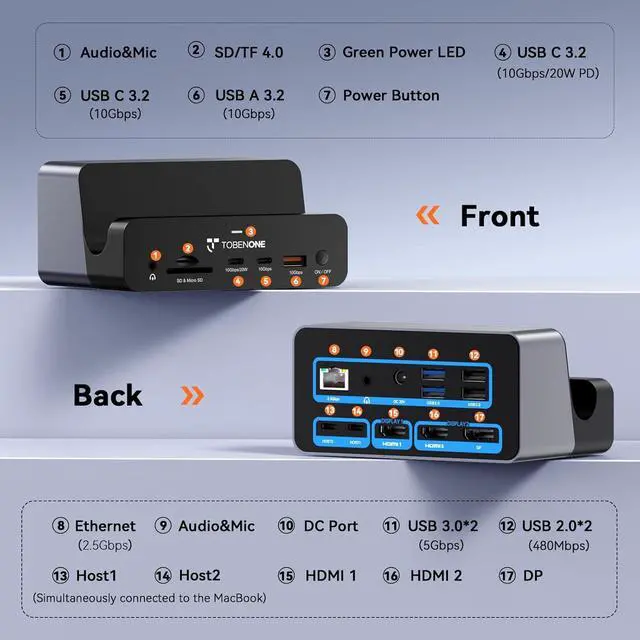
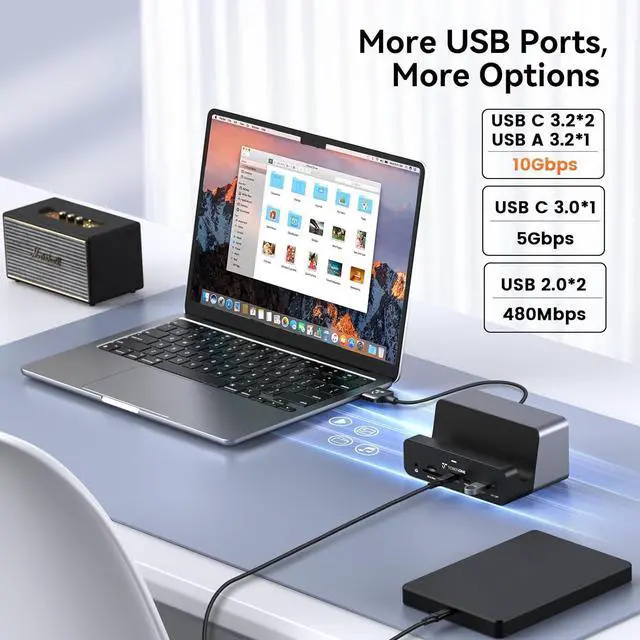
- : UDS040M MacBook dual-monitor docking station comes fully equipped with 2×HDMI, 1×DP, 8×USB-A&USB-C, 2.5G Ethernet, SD4.0+TF4.0 card reader, HOST port, DC power input and dual audio jacks, plus a built-in storage slot. All-in-one abundant ports eliminate frequent plug/unplug of different adapters; the built-in holder keeps your laptop, tablet or smartphone upright to tidy up your desktop, perfectly catering to daily use of office staff and home remote workers
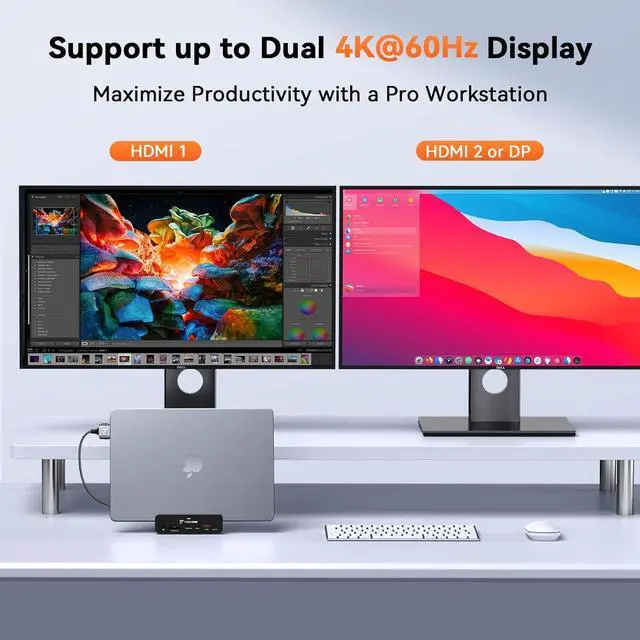
- @ : Built-in dual HDMI + single DP video ports, plug-and-play design, supports up to dual 4K@60Hz (DP1.4 specification) display output. Instantly expand your screen space to run split-screen multitasking, data comparison and business presentation at ultra-crisp 4K visuals, drastically cutting tab-switching waste and greatly boosting your office efficiency
+
+
Overview
Specs
Reviews
Any questions? Our AI beta will help you find out quickly.
Try me now
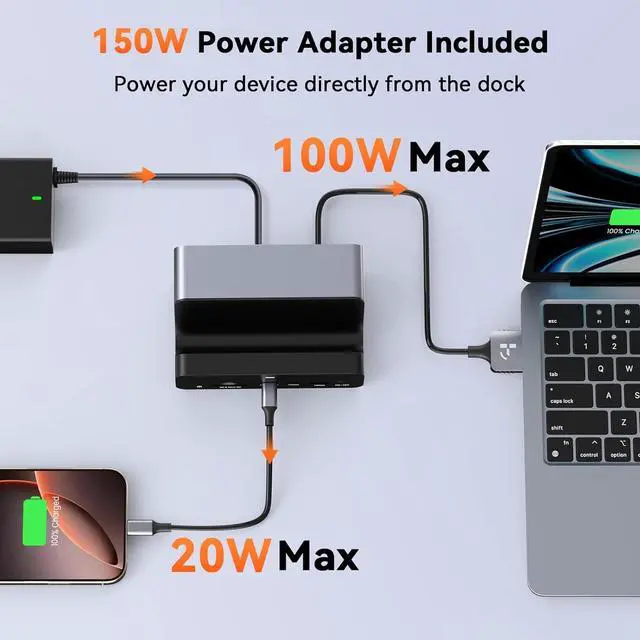
-: Bundled with a 150W original power adapter, the mac docking station delivers max 100W pass-through PD charging for host MacBook, alongside an extra front-facing USB-C port with up to 20W quick charge output. Charge your MacBook at full-speed without extra wall chargers; top up your smartphone/earbuds/tablet conveniently via the front quick-charge port, streamlining desktop power arrangement and clearing messy charging cables
-: Precisely optimized for multiple
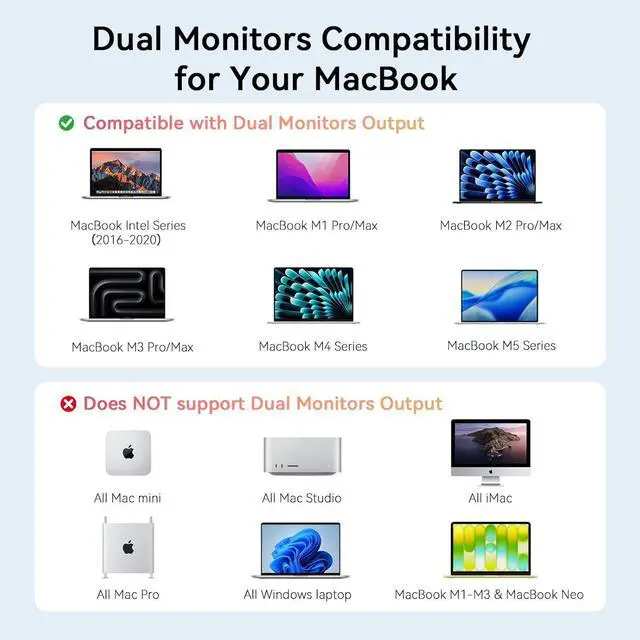
Intel/M-series MacBook: M1/M2/M3/M4/M5 Pro/Max MacBooks, MacBook Series(2016-2020). Plug directly without driver installation for matched MacBooks, no extra setup needed to get all docking functions running smoothly out of box.
Note: Incompatible with Windows laptops & Mac Studio; M1/M2/M3 base-chip MacBooks only support single external monitor output
.
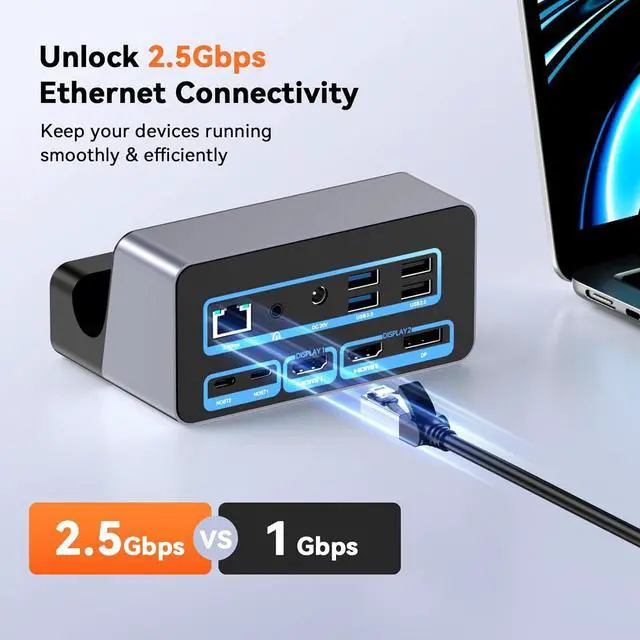
&: Integrated 2.5G bps wired Ethernet port and independent dual audio jacks that support two audio devices connected simultaneously with system-based output switching. 2.5G stable wired network beats unstable Wi-Fi for big-file downloading, cloud sync and online conference; dual audio ports let you swap between headphones/speakers freely on video calls, streaming and music playback for flexible personalized audio experience
1 Holder Multiple Usage
2 Efficient Wire Management
1 Unlock 2.5G bps Ethernet
2 Flexible Audio Options
3 Professional SD/TF 4.0
4 18-IN-2
5 Package Included
How many monitors can I connect to this MacBook docking station?
This MacBook docking station only can extend dual monitor via 2HDMI or HDMI+DP
Is this Macbook docking station compatible with my laptop?
This Macbook dock is only compatible with macOS laptops and not with Windows devices or Mac Studio. In addition, if the laptop is equipped with an M1, M2, or M3 chip, only one screen can be extended.
What should I do when the dock cannot work?
Please unplug all cables and replug again to have a test. If still cannot work, please contact our customer services.
Can MacBook with M1 M2 M3 chip extend dual monitor?
MacBook with M1 M2 M3 chip cannot extend dual monitor, but Macbook with M1 Pro/M1 Pro Max/M2 Pro/ M2 Pro Max/M3 Pro/ M3 Pro Max can extend dual monitor.

-: Precisely optimized for multiple
Intel/M-series MacBook: M1/M2/M3/M4/M5 Pro/Max MacBooks, MacBook Series(2016-2020). Plug directly without driver installation for matched MacBooks, no extra setup needed to get all docking functions running smoothly out of box.
Note: Incompatible with Windows laptops & Mac Studio; M1/M2/M3 base-chip MacBooks only support single external monitor output
.
&: Integrated 2.5G bps wired Ethernet port and independent dual audio jacks that support two audio devices connected simultaneously with system-based output switching. 2.5G stable wired network beats unstable Wi-Fi for big-file downloading, cloud sync and online conference; dual audio ports let you swap between headphones/speakers freely on video calls, streaming and music playback for flexible personalized audio experience
1 Holder Multiple Usage
2 Efficient Wire Management
1 Unlock 2.5G bps Ethernet
2 Flexible Audio Options
3 Professional SD/TF 4.0
4 18-IN-2
5 Package Included
How many monitors can I connect to this MacBook docking station?
This MacBook docking station only can extend dual monitor via 2HDMI or HDMI+DP
Is this Macbook docking station compatible with my laptop?
This Macbook dock is only compatible with macOS laptops and not with Windows devices or Mac Studio. In addition, if the laptop is equipped with an M1, M2, or M3 chip, only one screen can be extended.
What should I do when the dock cannot work?
Please unplug all cables and replug again to have a test. If still cannot work, please contact our customer services.
Can MacBook with M1 M2 M3 chip extend dual monitor?
MacBook with M1 M2 M3 chip cannot extend dual monitor, but Macbook with M1 Pro/M1 Pro Max/M2 Pro/ M2 Pro Max/M3 Pro/ M3 Pro Max can extend dual monitor.
Warranty & Returns
Warranty, Returns, And Additional Information
Warranty
- Please contact the Seller directly for warranty information. Warranty information may also be found on the Manufacturer's website.
- CONTACT
Return Policies
- Return for refund within: 30 days
- Return for replacement within: 30 days
- This item is covered by Group Can Trading Limited Return Policy
Manufacturer Contact Info
- For a directory of all our manufacturers, please click below.
- Manufacturers Directory
LOADING...