





I have created an account on the Arenti APP, how do I connect to the camera?
1-Click the '+' icon on the page & choose B2 Kit
2-Click the bottom & enter the correct wifi inform
3-Scan the 2-D barcode on App at an appropriate distance
4-After the beep sound, click the button & wait for 20 seconds, the set up is finished
What should I notice when connecting to the camera?
1-Make sure the red light is flashing before setting up
2-The device only supports 2.4G, if the router is a Dual Band, please disable 5g, and then turn on 5g after the connection
3-Make sure the device and mobile phone are connected to the same Wi-Fi
How to pair the monitor to the camera?
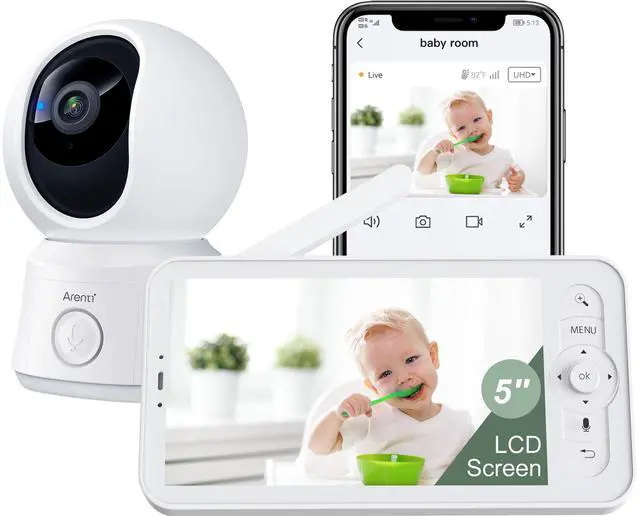
1-Press menu button on the monitor, and select the rightmost button - Camera.
2-Select the camera you need to pair.
3-Long press the camera pairing button until you hear the prompt tone.
4-Press OK button on the monitor screen to start pairing.
The color of indicator lights especially glaring in the dark room, how can i turn it off?
You can turn it off on the screen by following steps:
1-Press menu button
2-Select the rightmost icon
3-Select "Light"
4-Select "Status Light" to turn it off
The night vision indicator on camera is flicking on and off, and the clicking sound the camera makes wakes up my baby.
This indicates that there may be lights in the room.
It is recommended to change the direction of the camera so that it does not face the light source.
Arenti Security Camera
 Baby Monitor B2 Kit |  Arenti B2 CAM |  Baby Monitor B2 Set |  Baby Monitor D3 Kit |  Baby Monitor A4 Kit |  Baby Monitor Mount |  64GB Memory Card | |
|---|---|---|---|---|---|---|---|
Customer Reviews | — | — | — | — | — | — | — |
Price | — | — | — | — | — | — | — |
Free APP | Yes | Yes | Yes | Yes | Yes | — | — |
Super Night Vision | Yes | Yes | Yes | Yes | Yes | — | — |
Clear Two-way Audio | Yes | Yes | Yes | Yes | Yes | — | — |
Resolution | 720P-1080P | 1080P | 720P-1080P | 720P-3MP | 4MP | — | — |
Use | Indoor/Baby/Pet | Indoor/Baby/Pet | Indoor/Baby/Pet | Indoor/Baby/Pet | Indoor/Baby/Pet | Indoor/Baby/Pet | — |
Wi-Fi Connection | HaLow & 2.4GHz Wi-Fi | HaLow & 2.4GHz Wi-Fi | HaLow & 2.4GHz Wi-Fi | HaLow & 2.4GHz Wi-Fi | 5GHz & 2.4GHz | — | — |
Detection | Motion & Sound Detection | Motion & Sound Detection | Motion & Sound Detection | Motion & Sound Detection | Motion & Sound Detection | — | — |
Power supply | 5V/1A Plug-in Power | 5V/1A Plug-in Power | 5V/1A Plug-in Power | 5V/1A Plug-in Power | 5V/1A Plug-in Power | — | — |
Local Storage | Micro SD card, up to 256GB | MicroSD card, up to 256GB | Micro SD card, up to 256GB | Micro SD card, up to 256GB | MicroSD card, up to 256GB | — | — |




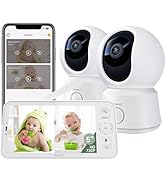
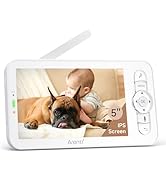


I have created an account on the Arenti APP, how do I connect to the camera?
1-Click the '+' icon on the page & choose B2 Kit
2-Click the bottom & enter the correct wifi inform
3-Scan the 2-D barcode on App at an appropriate distance
4-After the beep sound, click the button & wait for 20 seconds, the set up is finished
What should I notice when connecting to the camera?
1-Make sure the red light is flashing before setting up
2-The device only supports 2.4G, if the router is a Dual Band, please disable 5g, and then turn on 5g after the connection
3-Make sure the device and mobile phone are connected to the same Wi-Fi
How to pair the monitor to the camera?
1-Press menu button on the monitor, and select the rightmost button - Camera.
2-Select the camera you need to pair.
3-Long press the camera pairing button until you hear the prompt tone.
4-Press OK button on the monitor screen to start pairing.
The color of indicator lights especially glaring in the dark room, how can i turn it off?
You can turn it off on the screen by following steps:
1-Press menu button
2-Select the rightmost icon
3-Select "Light"
4-Select "Status Light" to turn it off
The night vision indicator on camera is flicking on and off, and the clicking sound the camera makes wakes up my baby.
This indicates that there may be lights in the room.
It is recommended to change the direction of the camera so that it does not face the light source.
Arenti Security Camera
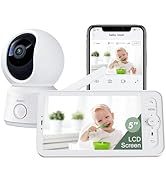
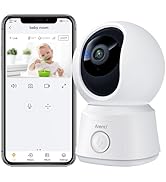
Baby Monitor B2 Kit | Arenti B2 CAM | Baby Monitor B2 Set | Baby Monitor D3 Kit | Baby Monitor A4 Kit | Baby Monitor Mount | 64GB Memory Card |
|---|---|---|---|---|---|---|
| Customer Reviews | ||||||
| — | — | — | — | — | — | — |
| Price | ||||||
| — | — | — | — | — | — | — |
| Free APP | ||||||
| Yes | Yes | Yes | Yes | Yes | — | — |
| Super Night Vision | ||||||
| Yes | Yes | Yes | Yes | Yes | — | — |
| Clear Two-way Audio | ||||||
| Yes | Yes | Yes | Yes | Yes | — | — |
| Resolution | ||||||
| 720P-1080P | 1080P | 720P-1080P | 720P-3MP | 4MP | — | — |
| Use | ||||||
| Indoor/Baby/Pet | Indoor/Baby/Pet | Indoor/Baby/Pet | Indoor/Baby/Pet | Indoor/Baby/Pet | Indoor/Baby/Pet | — |
| Wi-Fi Connection | ||||||
| HaLow & 2.4GHz Wi-Fi | HaLow & 2.4GHz Wi-Fi | HaLow & 2.4GHz Wi-Fi | HaLow & 2.4GHz Wi-Fi | 5GHz & 2.4GHz | — | — |
| Detection | ||||||
| Motion & Sound Detection | Motion & Sound Detection | Motion & Sound Detection | Motion & Sound Detection | Motion & Sound Detection | — | — |
| Power supply | ||||||
| 5V/1A Plug-in Power | 5V/1A Plug-in Power | 5V/1A Plug-in Power | 5V/1A Plug-in Power | 5V/1A Plug-in Power | — | — |
| Local Storage | ||||||
| Micro SD card, up to 256GB | MicroSD card, up to 256GB | Micro SD card, up to 256GB | Micro SD card, up to 256GB | MicroSD card, up to 256GB | — | — |
Arenti Baby Monitor