

Your Browsing History

Meet Your Seller


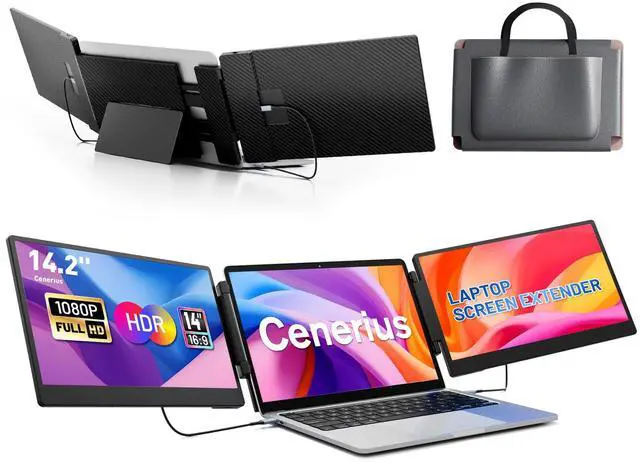

14.2" Laptop Screen Extender, FHD 1080P IPS Portable Monitor for Laptop, Triple Screen Monitor Extender, Compatible with 13"-17" Laptops, HDMI/USB-A/C Plug&Play for Windows, Mac, Android
Limited time offer, ends 08/26 By WanJin World Shop
- **Premium 14.2" IPS Visual Experience** This laptop screen extender features dual 14.2-inch Full HD IPS screens, distinguishing it from single-screen options with a 74% NTSC color gamut, 300 nits brightness, and a 1000:1 contrast ratio. Every detail is sharp and vibrant, ideal for office tasks, gaming, and media streaming. It incorporates advanced low blue light filtering, anti-glare, and flicker-free technology to reduce eye strain and ensure comfortable viewing, even over extended periods. **Boost Your Productivity** This portable laptop extender supports extend, mirror, and portrait display modes, streamlining your workflow and minimizing constant tab switching. It expands your screen space to manage multiple applications like emails, spreadsheets, and video calls concurrently, making it suitable for remote workers, programmers, and traders. The integrated multifunctional button allows quick adjustment of brightness, volume, and display settings for any scenario. **Versatile and Portable Design** Built for mobility, this extender includes a 90-degree folding kickstand for simple setup and compact storage. Its sturdy frame with rubber pads shields your laptop and the extender from scratches and everyday wear, while the flexible screen width adjustment accommodates laptops from 13 to 17 inches. Lightweight and small, it's an excellent companion for home offices, business trips, and travel. **Plug-and-Play Wide Compatibility** This monitor extender works seamlessly with Win
+
+
Overview
Specs
Reviews

Any questions? Our AI mode will help you find out quickly.
Try me now
**Premium 14.2" IPS Visual Experience** This laptop screen extender features dual 14.2 -inch Full HD IPS screens, distinguishing it from single-screen options with a 74% NTSC color gamut, 300 nits brightness, and a 1000:1 contrast ratio. Every detail is sharp and vibrant, ideal for office tasks, gaming, and media streaming. It incorporates advanced low blue light filtering, anti-glare, and flicker-free technology to reduce eye strain and ensure comfortable viewing, even over extended periods. **Boost Your Productivity** This portable laptop extender supports extend, mirror, and portrait display modes, streamlining your workflow and minimizing constant tab switching.
It expands your screen space to manage multiple applications like emails, spreadsheets, and video calls concurrently, making it suitable for remote workers, programmers, and traders. The integrated multifunctional button allows quick adjustment of brightness, volume, and display settings for any scenario. **Versatile and Portable Design** Built for mobility, this extender includes a 90-degree folding kickstand for simple setup and compact storage. Its sturdy frame with rubber pads shields your laptop and the extender from scratches and everyday wear, while the flexible screen width adjustment accommodates laptops from 13 to 17 inches.
Lightweight and small, it's an excellent companion for home offices, business trips, and travel. **Plug-and-Play Wide Compatibility** This monitor extender works seamlessly with Windows, Mac OS, Chrome OS, Linux, Android, Switch, PS5, PS4, and Xbox. No drivers are needed for most devices; simply connect using the included HDMI, USB-A, or Type-C cables for a quick, straightforward setup. It is engineered to integrate smoothly with your current devices, letting you enhance productivity immediately. **Setup Notes** For MacBook users with M1, M2, or M3 chips, an additional H5 adapter cable is required.
First, connect a USB cable to the "Type C" port for power, then connect the H5 cable to the "For Video Only" port, and download and install the driver as prompted to enable dual-screen support. If the screen shows "No Cable" or goes into power-saving mode after connection, please use an HDMI-to-USB-C adapter to connect to the "For Video Only" port. **Package Contents** The package
It expands your screen space to manage multiple applications like emails, spreadsheets, and video calls concurrently, making it suitable for remote workers, programmers, and traders. The integrated multifunctional button allows quick adjustment of brightness, volume, and display settings for any scenario. **Versatile and Portable Design** Built for mobility, this extender includes a 90-degree folding kickstand for simple setup and compact storage. Its sturdy frame with rubber pads shields your laptop and the extender from scratches and everyday wear, while the flexible screen width adjustment accommodates laptops from 13 to 17 inches.
Lightweight and small, it's an excellent companion for home offices, business trips, and travel. **Plug-and-Play Wide Compatibility** This monitor extender works seamlessly with Windows, Mac OS, Chrome OS, Linux, Android, Switch, PS5, PS4, and Xbox. No drivers are needed for most devices; simply connect using the included HDMI, USB-A, or Type-C cables for a quick, straightforward setup. It is engineered to integrate smoothly with your current devices, letting you enhance productivity immediately. **Setup Notes** For MacBook users with M1, M2, or M3 chips, an additional H5 adapter cable is required.
First, connect a USB cable to the "Type C" port for power, then connect the H5 cable to the "For Video Only" port, and download and install the driver as prompted to enable dual-screen support. If the screen shows "No Cable" or goes into power-saving mode after connection, please use an HDMI-to-USB-C adapter to connect to the "For Video Only" port. **Package Contents** The package
Warranty & Returns
Warranty, Returns, And Additional Information
Warranty
- Please contact the Seller directly for warranty information. Warranty information may also be found on the Manufacturer's website.
- CONTACT
Return Policies
- Return for refund within: 30 days
- Return for replacement within: 30 days
- This item is covered by WanJin World Shop Return Policy
Manufacturer Contact Info
- For a directory of all our manufacturers, please click below.
- Manufacturers Directory
LOADING...