

Your Browsing History

Meet Your Seller

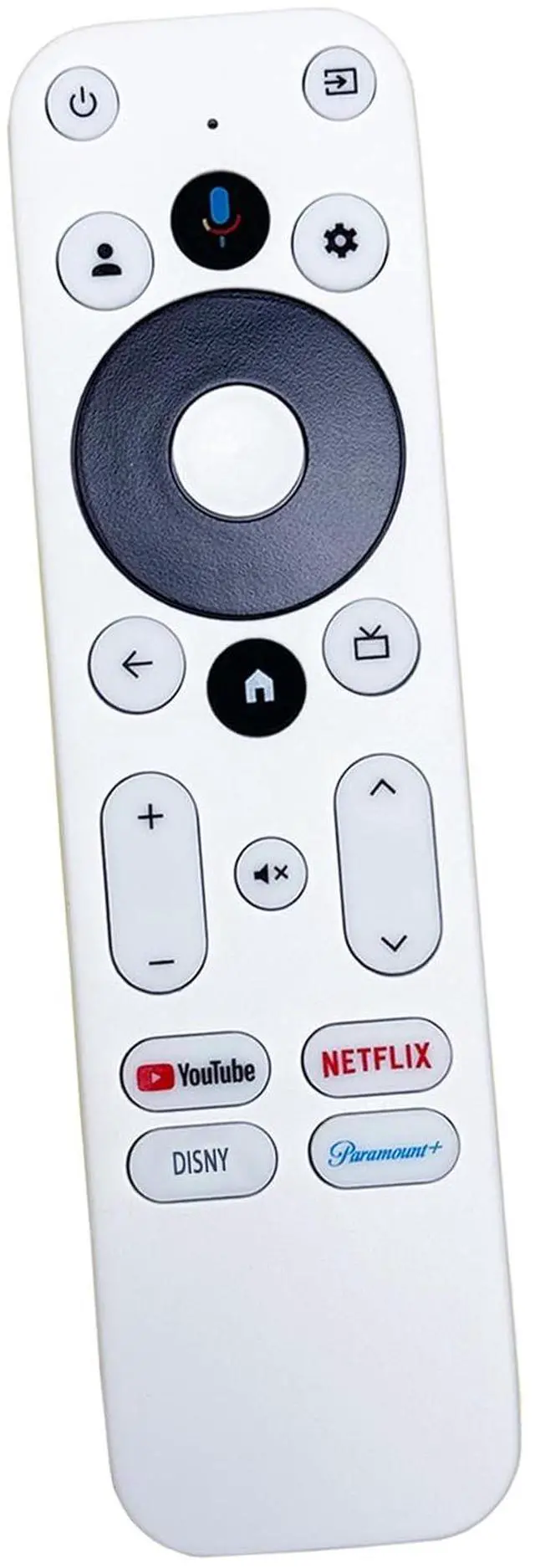

Replacement Remote Control Compatible with Onn TV FHD 4K UHD 4K Pro 4K Plus Streaming Stick TV Box 100026240 100024646 28078468 100135769 not Compatible with Other Brand
Limited time offer, ends 09/18 By WanJin World Shop
- This remote is designed for use with: 100024646, 100026240, 28078468, 100135769. It is not compatible with TCL TVs. First, use your original TV remote to power on the TV. Go to Settings, then select Remote Control Settings. After the TV shows the remote name "ONN Remote", press the pairing button on this replacement remote to finish pairing. If this replacement remote cannot power off the TV, use it to open the TV's settings menu. Locate remote control settings, then remote control button settings. Choose the matching TV brand to let the replacement remote learn the button functions from your original TV remote. This will allow the replacement remote to control the TV power function. Please confirm the button layout matches your device before ordering. Differences could mean it is not suitable for your TV streaming device. Package. This replacement remote is incompatible with the following models: 100005395, 100005396, 100005397, 100005842, 100005843, 100005844, 100007147, 100012584, 100012585, 100012586, 100012587, 100012588, 100012589, 100012590, 100018971, 100021261, 100024699, 100044717, 100058007, 100068372, 100069454, 100069992, 100071700, 100071705, 100074926, 3226000855, 3226000858, 3226001051. The remote is specifically for Onn UHD Streaming Device models: 100024646, 100026240, 28078468, 100135769. It does not work with other brand TV streaming devices. If the following buttons (Power, Volume+, Volume-, Mute, InputSource) on the remote do not respond: Remove the ne
+
+
Overview
Specs
Reviews

Any questions? Our AI mode will help you find out quickly.
Try me now
This remote is designed for use with: 100024646, 100026240, 28078468, 100135769. It is not compatible with TCL TVs. First, use your original TV remote to power on the TV. Go to Settings, then select Remote Control Settings. After the TV shows the remote name "ONN Remote", press the pairing button on this replacement remote to finish pairing. If this replacement remote cannot power off the TV, use it to open the TV's settings menu. Locate remote control settings, then remote control button settings. Choose the matching TV brand to let the replacement remote learn the button functions from your original TV remote. This will allow the replacement remote to control the TV power function. Please confirm the button layout matches your device before ordering. Differences could mean it is not suitable for your TV streaming device. Package. This replacement remote is incompatible with the following models: 100005395, 100005396, 100005397, 100005842, 100005843, 100005844, 100007147, 100012584, 100012585, 100012586, 100012587, 100012588, 100012589, 100012590, 100018971, 100021261, 100024699, 100044717, 100058007, 100068372, 100069454, 100069992, 100071700, 100071705, 100074926, 3226000855, 3226000858, 3226001051. The remote is specifically for
Onn UHD Streaming Device models: 100024646, 100026240, 28078468, 100135769. It does not work with other brand TV streaming devices. If the following buttons (Power, Volume+, Volume-, Mute, InputSource) on the remote do not respond: Remove the new alkaline batteries and reinsert them. Test the 5 buttons again. If they still do not function: Navigate to your TV's Settings > Remote and Accessories > Set up Remote Button > Add Device > TV/Sound bar/AV Receiver. Follow the on-screen instructions to complete the pairing
Onn UHD Streaming Device models: 100024646, 100026240, 28078468, 100135769. It does not work with other brand TV streaming devices. If the following buttons (Power, Volume+, Volume-, Mute, InputSource) on the remote do not respond: Remove the new alkaline batteries and reinsert them. Test the 5 buttons again. If they still do not function: Navigate to your TV's Settings > Remote and Accessories > Set up Remote Button > Add Device > TV/Sound bar/AV Receiver. Follow the on-screen instructions to complete the pairing
Warranty & Returns
Warranty, Returns, And Additional Information
Warranty
- Please contact the Seller directly for warranty information. Warranty information may also be found on the Manufacturer's website.
- CONTACT
Return Policies
- Return for refund within: 30 days
- Return for replacement within: 30 days
- This item is covered by WanJin World Shop Return Policy
Manufacturer Contact Info
- For a directory of all our manufacturers, please click below.
- Manufacturers Directory
LOADING...