

Your Browsing History

Meet Your Seller




USB C Docking Station Dual Monitor 4K@60Hz, 11-in-1 Vertical Laptop Stand Dock, 100W PD, 10Gbps Data, Gigabit Ethernet, Compatible with Dell Lenovo HP Windows Laptops, Black
Limited time offer, ends 08/26 By FiveMacro Store
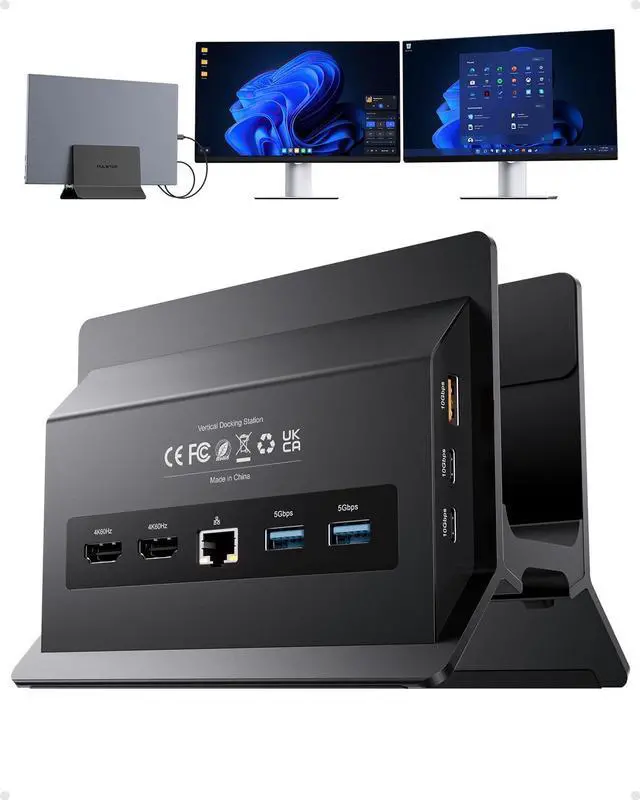
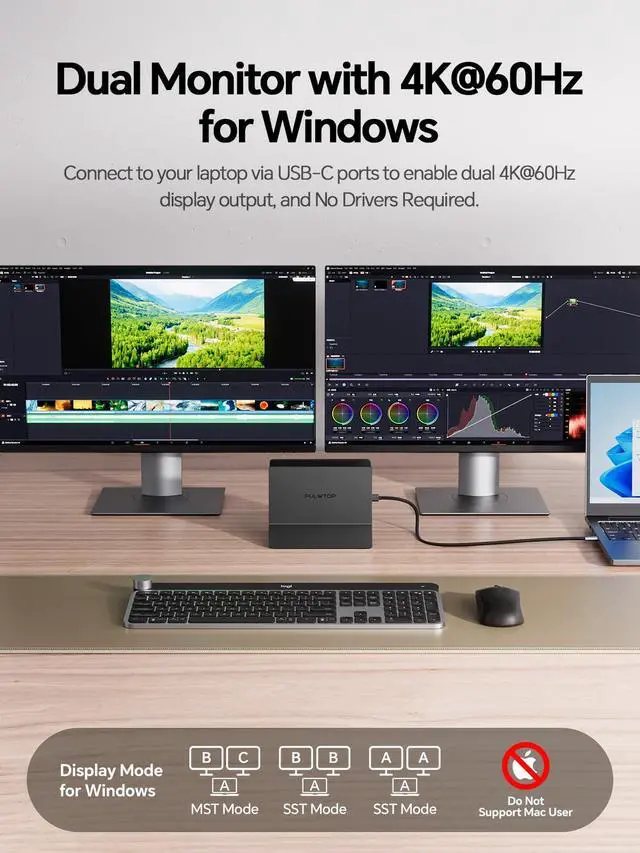
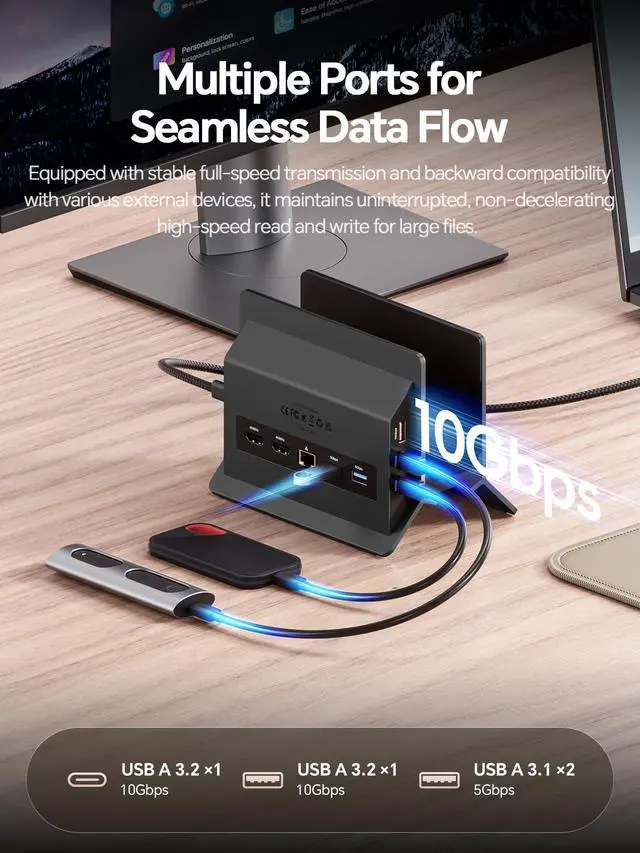
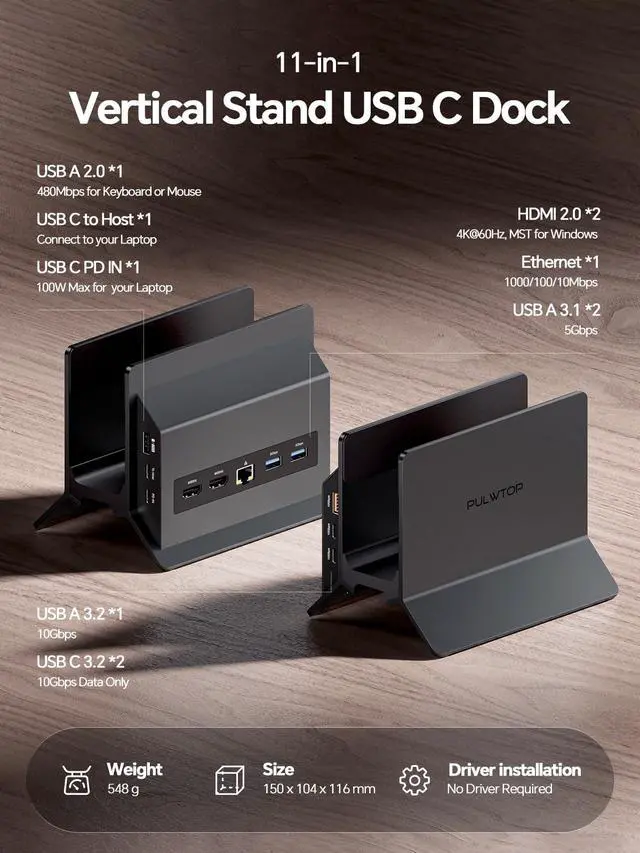
- Complete 11-in-1 Connectivity This USB-C hub offers extensive port expansion for Windows laptops: 2× HDMI (4K@60Hz), 2× USB-C Gen2 (10Gbps), 1× USB-A Gen2 (10Gbps), 2× USB 3.0 (5Gbps), Gigabit Ethernet, USB 2.0, USB-C PD 100W charging, and a USB-C host port. Easily connect two external monitors for tasks, gaming, or media, along with all your key peripheralsmouse, keyboard, external drivesvia a single USB-C cable. Dual Monitor 4K@60Hz Hub for Windows Laptops Transform your Windows laptop into a highly efficient dual-monitor workstation with this USB-C dock. Featuring MST (Multi-Stream Transport), it powers two separate 4K@60Hz displays for extended or mirrored viewingperfect for office multitasking, creative projects, stock trading, or engaging gaming. Plug and play, no drivers needed. Note: Does NOT support Mac systems. Rapid 10Gbps Data Transfer With USB-C 3.2 Gen 2 & USB-A 3.2 Gen 2 ports (10Gbps), this USB-C docking station enables swift transfer of large files like 4K videos, photo collections, or backups. Two USB-A 3.0 ports (5Gbps) accommodate printers and external HDDs, plus a dedicated USB-A 2.0 port for reliable, low-latency mouse/keyboard connection. Note: USB-C ports are for data only (no video output or charging). PD Charging & Gigabit Ethernet The USB-C PD port accepts up to 100W input and provides 85W charging to your laptop. The Gigabit Ethernet port delivers fast, stable wired internet excellent for lag-free gaming, 4K streaming, and seamless v
+
+
Overview
Specs
Reviews

Any questions? Our AI mode will help you find out quickly.
Try me now
Complete 11-in-1 Connectivity This USB-C hub offers extensive port expansion for
Windows laptops: 2× HDMI (4K@60Hz), 2× USB-C Gen2 (10Gbps), 1× USB-A Gen2 (10Gbps), 2× USB 3.0 (5Gbps), Gigabit Ethernet, USB 2.0, USB-C PD 100W charging, and a USB-C host port. Easily connect two external monitors for tasks, gaming, or media, along with all your key peripheralsmouse, keyboard, external drivesvia a single USB-C cable. Dual Monitor 4K@60Hz Hub for Windows Laptops Transform your Windows laptop into a highly efficient dual-monitor workstation with this USB-C dock. Featuring MST (Multi-Stream Transport), it powers two separate 4K@60Hz displays for extended or mirrored viewingperfect for office multitasking, creative projects, stock trading, or engaging gaming. Plug and play, no drivers needed.
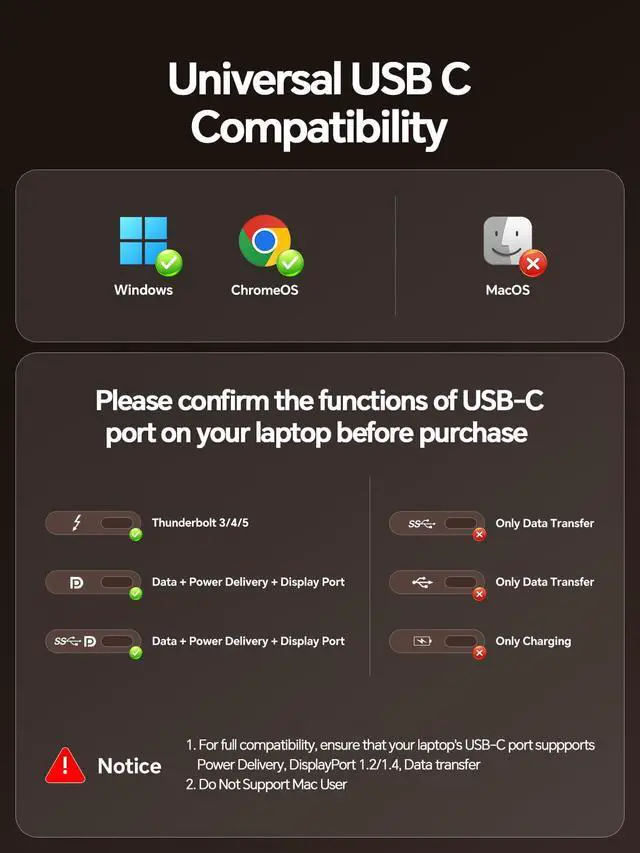
Note: Does NOT support Mac systems. Rapid 10Gbps Data Transfer With USB-C 3.2 Gen 2 & USB-A 3.2 Gen 2 ports (10Gbps), this USB-C docking station enables swift transfer of large files like 4K videos, photo collections, or backups. Two USB-A 3.0 ports (5Gbps) accommodate printers and external HDDs, plus a dedicated USB-A 2.0 port for reliable, low-latency mouse/keyboard connection.
Note: USB-C ports are for data only (no video output or charging). PD Charging & Gigabit Ethernet The USB-C PD port accepts up to 100W input and provides 85W charging to your laptop. The Gigabit Ethernet port delivers fast, stable wired internet excellent for lag-free gaming, 4K streaming, and seamless video calls.
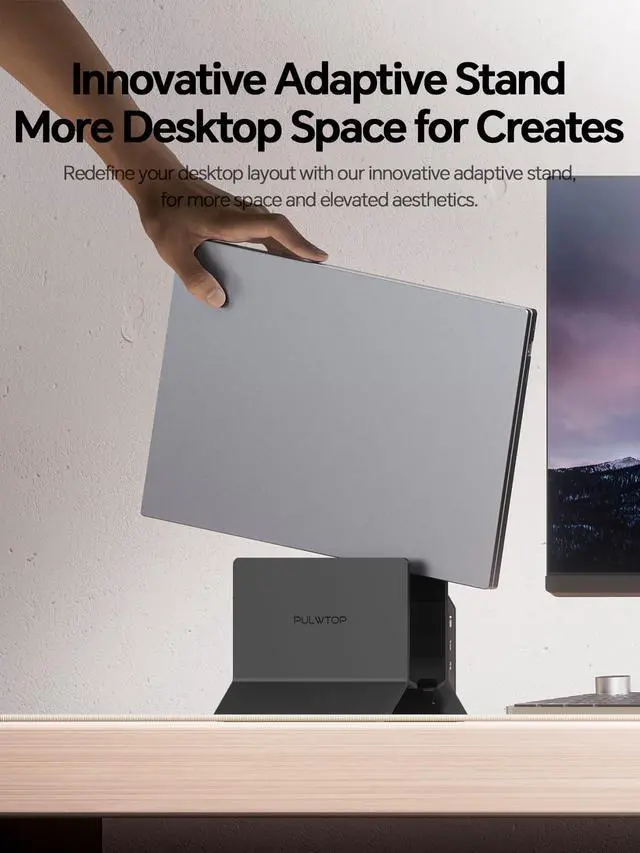
Note: Power adapter is not included. A 65W or higher PD adapter is suggested for consistent laptop charging. 2-in-1 Vertical Laptop Stand & Docking Station Compact design with enhanced cooling. This vertical USB-C docking station merges a laptop stand and a fully-featured hub into one streamlined unit. Works with Thunderbolt 3/4/5, USB4, and full-featured USB-C Windows laptops, including models from Dell, Lenovo, HP, and ThinkPad.
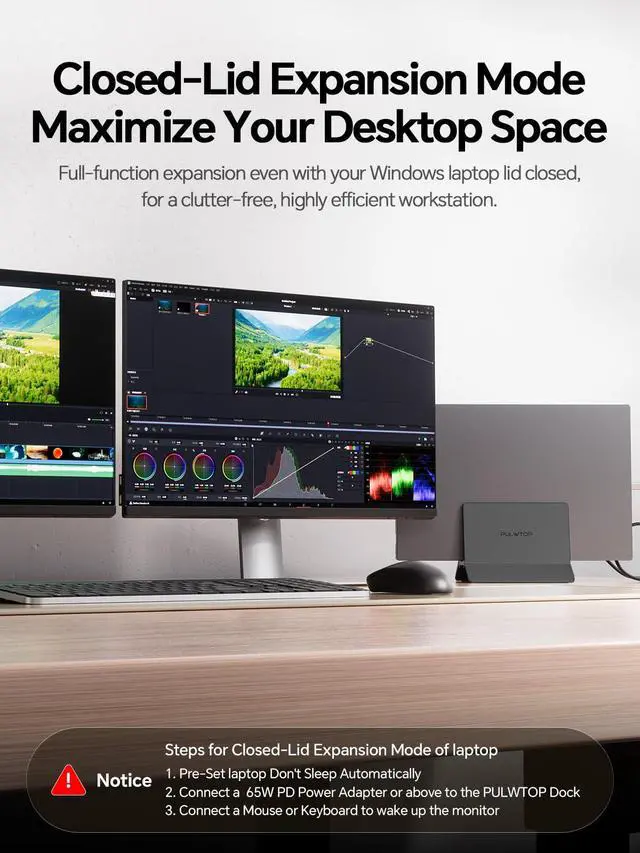
Note: For clamshell mode with an external display, connect a PD adapter to the PD port and a mouse to a USB 2.0 port to activate the screen
Windows laptops: 2× HDMI (4K@60Hz), 2× USB-C Gen2 (10Gbps), 1× USB-A Gen2 (10Gbps), 2× USB 3.0 (5Gbps), Gigabit Ethernet, USB 2.0, USB-C PD 100W charging, and a USB-C host port. Easily connect two external monitors for tasks, gaming, or media, along with all your key peripheralsmouse, keyboard, external drivesvia a single USB-C cable. Dual Monitor 4K@60Hz Hub for Windows Laptops Transform your Windows laptop into a highly efficient dual-monitor workstation with this USB-C dock. Featuring MST (Multi-Stream Transport), it powers two separate 4K@60Hz displays for extended or mirrored viewingperfect for office multitasking, creative projects, stock trading, or engaging gaming. Plug and play, no drivers needed.
Note: Does NOT support Mac systems. Rapid 10Gbps Data Transfer With USB-C 3.2 Gen 2 & USB-A 3.2 Gen 2 ports (10Gbps), this USB-C docking station enables swift transfer of large files like 4K videos, photo collections, or backups. Two USB-A 3.0 ports (5Gbps) accommodate printers and external HDDs, plus a dedicated USB-A 2.0 port for reliable, low-latency mouse/keyboard connection.
Note: USB-C ports are for data only (no video output or charging). PD Charging & Gigabit Ethernet The USB-C PD port accepts up to 100W input and provides 85W charging to your laptop. The Gigabit Ethernet port delivers fast, stable wired internet excellent for lag-free gaming, 4K streaming, and seamless video calls.
Note: Power adapter is not included. A 65W or higher PD adapter is suggested for consistent laptop charging. 2-in-1 Vertical Laptop Stand & Docking Station Compact design with enhanced cooling. This vertical USB-C docking station merges a laptop stand and a fully-featured hub into one streamlined unit. Works with Thunderbolt 3/4/5, USB4, and full-featured USB-C Windows laptops, including models from Dell, Lenovo, HP, and ThinkPad.
Note: For clamshell mode with an external display, connect a PD adapter to the PD port and a mouse to a USB 2.0 port to activate the screen
Warranty & Returns
Warranty, Returns, And Additional Information
Warranty
- Please contact the Seller directly for warranty information. Warranty information may also be found on the Manufacturer's website.
- CONTACT
Return Policies
- Return for refund within: 30 days
- Return for replacement within: 30 days
- This item is covered by FiveMacro Store Return Policy
Manufacturer Contact Info
- For a directory of all our manufacturers, please click below.
- Manufacturers Directory
LOADING...