

Your Browsing History

Meet Your Seller


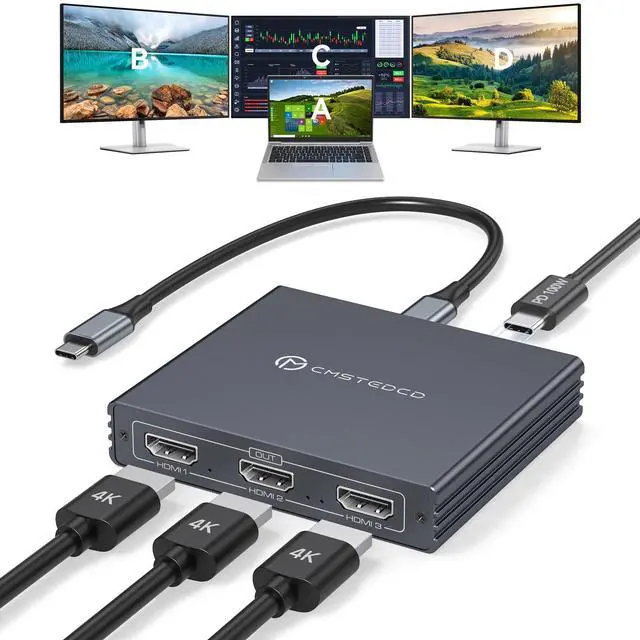
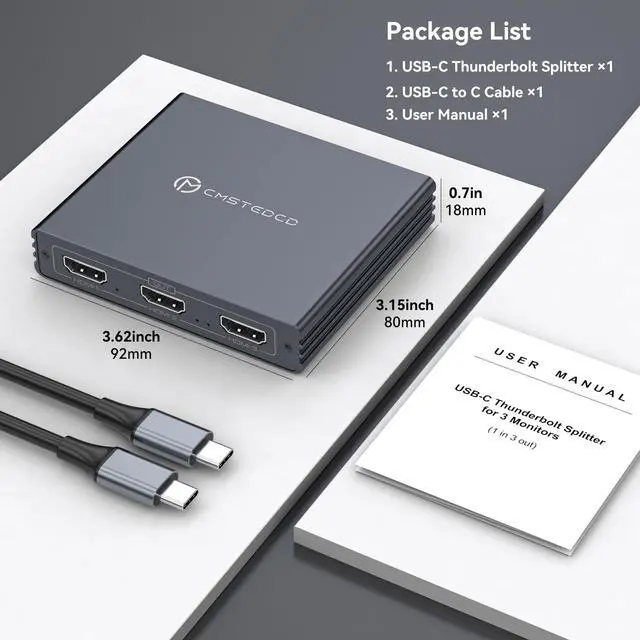


USB C to 3 HDMI Adapter 4K60Hz HDMI Splitter Extended Display 3 Monitors MST HUB USBC Splitter 1 in 3 Out with 100W PD Charging, Compatible with Laptop,PC,USB-C Graphics Card
Limited time offer, ends 08/26 By WanJin World Shop
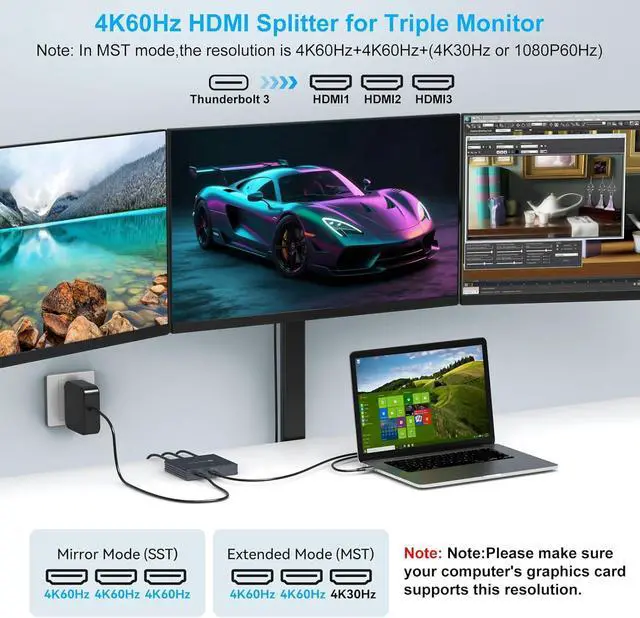
- Pre-Purchase Note: 1. This device functions only when directly connected to laptops equipped with Thunderbolt 3/4 or a full-featured USB-C port (which supports video output). 2. Mac OS does NOT support MST multi-screen extended mode. 3. Achieving 4K 60Hz resolution and 3-screen extended display requires your computer's graphics card to support the corresponding specifications. 4. Connect the HDMI output port to the monitor using an HDMI 2.0 cable, and then connect the Type-C input port to the computer's Thunderbolt 3 port using a Type-C to C cable. 3 Displays in One for Enhanced Multitasking: This HDMI splitter (1 input, 3 outputs) can extend a USB-C source to three separate HDMI monitors. Reports, code, and design scripts can be viewed simultaneously, eliminating the need for repeated window switching and boosting multitasking efficiency. Note: Your laptop must support Thunderbolt 3 or higher. Using a conversion cable or docking station to connect the computer to the product's USB-C input port is not supported. 4K 60Hz High-Definition Experience: This Thunderbolt splitter features 3 HDMI ports that support 4K 60Hz resolution, delivering crisp and fluid picture quality. It is suitable for high-definition video viewing and fine design work, presenting detailed visual effects. Note: 1. Graphics card support is required. 2. In MST mode, when the output configuration is HDMI+HDMI+HDMI, the supported resolutions are 4K 60Hz + 4K 60Hz + (1080P 60Hz or 4K 30Hz). Extended Mode and
+
+
Overview
Specs
Reviews

Any questions? Our AI mode will help you find out quickly.
Try me now
Pre-Purchase Note:
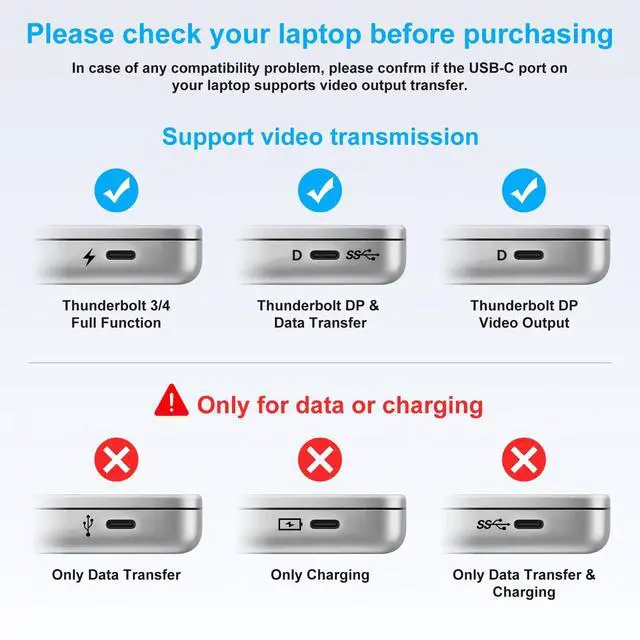
1. This device functions only when directly connected to laptops equipped with Thunderbolt 3/4 or a full-featured USB-C port (which supports video output).
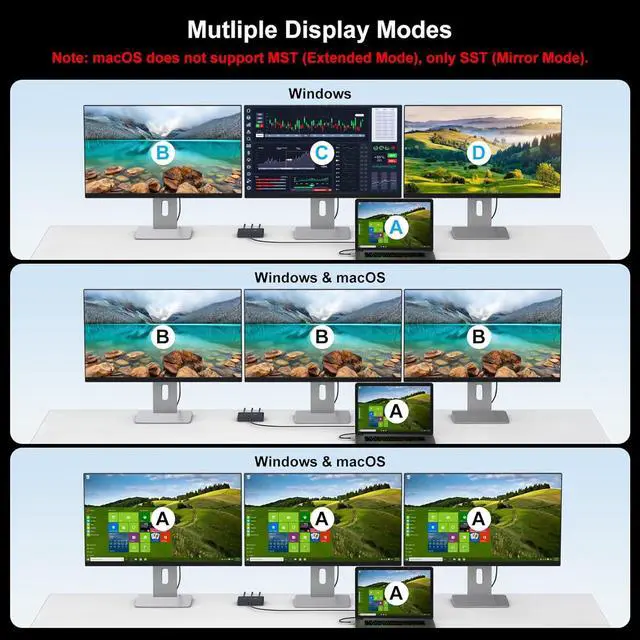
2. Mac OS does NOT support MST multi-screen extended mode.
3. Achieving 4K 60Hz resolution and 3-screen extended display requires your computer's graphics card to support the corresponding specifications.
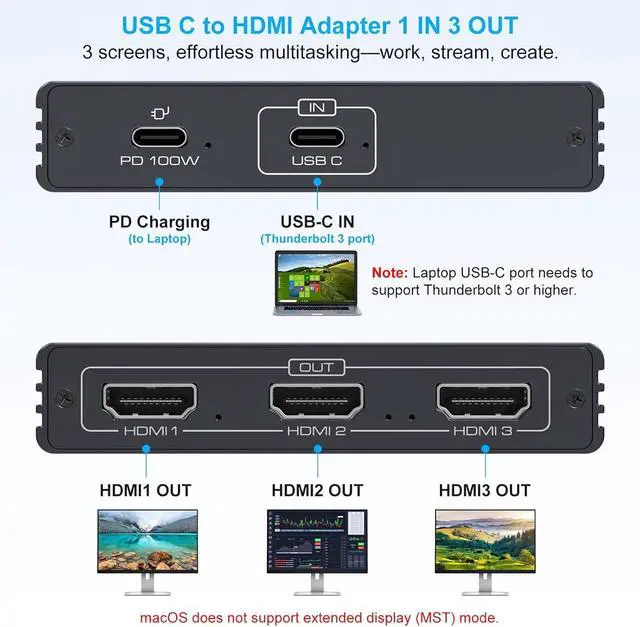
4. Connect the HDMI output port to the monitor using an HDMI 2.0 cable, and then connect the Type-C input port to the computer's Thunderbolt 3 port using a Type-C to C cable. 3 Displays in One for
Enhanced Multitasking: This HDMI splitter (1 input, 3 outputs) can extend a USB-C source to three separate HDMI monitors. Reports, code, and design scripts can be viewed simultaneously, eliminating the need for repeated window switching and boosting multitasking efficiency.
Note: Your laptop must support Thunderbolt 3 or higher. Using a conversion cable or docking station to connect the computer to the product's USB-C input port is not supported.
4K 60Hz High-Definition Experience: This Thunderbolt splitter features 3 HDMI ports that support 4K 60Hz resolution, delivering crisp and fluid picture quality. It is suitable for high-definition video viewing and fine design work, presenting detailed visual effects.
Note:
1. Graphics card support is required.
2. In MST mode, when the output configuration is HDMI+HDMI+HDMI, the supported resolutions are 4K 60Hz + 4K 60Hz + (1080P 60Hz or 4K 30Hz). Extended Mode and
Mirror Mode: This USB-C to
HDMI adapter supports:
1.
Extended Mode: The computer and three monitors can display three distinct images (ABCD), ideal for multi-screen synchronized presentations.
2.
Mirror Mode: The three monitors display the same image (AAAA/ABBB), expanding the workspace and adapting to various usage scenarios.
Note: The Mac OS system does not support MST mode. Please ensure the computer is configured for Extended Mode and that the external monitor is powered on.
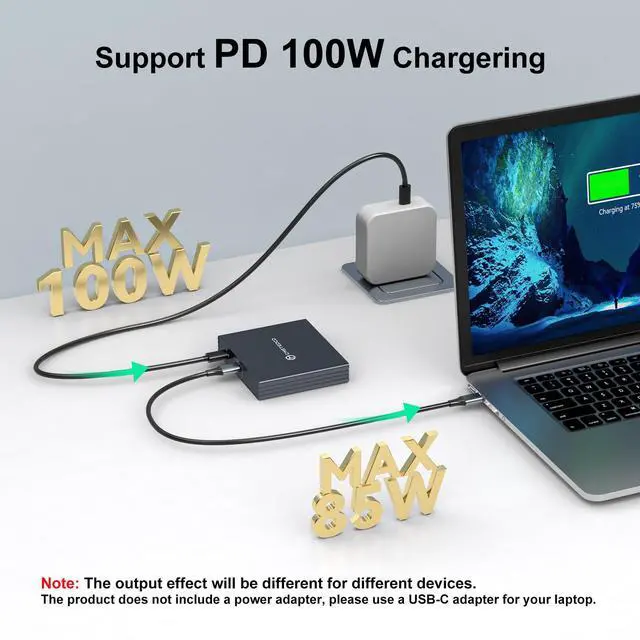
PD 100W Power Supply: This HDMI splitter incorporates PD 100W fast charging technology. It can simultaneously provide a maximum input power of 100W for laptops, allowing for charging while the device is operational without power interruption. This helps maintain your device's charge, ensuring efficient work continues without disruption from a low battery.
Note: Output performance may vary with different devices. This product does not include a power adapter; please utilize your laptop's USB-C adapter instead
1. This device functions only when directly connected to laptops equipped with Thunderbolt 3/4 or a full-featured USB-C port (which supports video output).
2. Mac OS does NOT support MST multi-screen extended mode.
3. Achieving 4K 60Hz resolution and 3-screen extended display requires your computer's graphics card to support the corresponding specifications.
4. Connect the HDMI output port to the monitor using an HDMI 2.0 cable, and then connect the Type-C input port to the computer's Thunderbolt 3 port using a Type-C to C cable. 3 Displays in One for
Enhanced Multitasking: This HDMI splitter (1 input, 3 outputs) can extend a USB-C source to three separate HDMI monitors. Reports, code, and design scripts can be viewed simultaneously, eliminating the need for repeated window switching and boosting multitasking efficiency.
Note: Your laptop must support Thunderbolt 3 or higher. Using a conversion cable or docking station to connect the computer to the product's USB-C input port is not supported.
4K 60Hz High-Definition Experience: This Thunderbolt splitter features 3 HDMI ports that support 4K 60Hz resolution, delivering crisp and fluid picture quality. It is suitable for high-definition video viewing and fine design work, presenting detailed visual effects.
Note:
1. Graphics card support is required.
2. In MST mode, when the output configuration is HDMI+HDMI+HDMI, the supported resolutions are 4K 60Hz + 4K 60Hz + (1080P 60Hz or 4K 30Hz). Extended Mode and
Mirror Mode: This USB-C to
HDMI adapter supports:
1.
Extended Mode: The computer and three monitors can display three distinct images (ABCD), ideal for multi-screen synchronized presentations.
2.
Mirror Mode: The three monitors display the same image (AAAA/ABBB), expanding the workspace and adapting to various usage scenarios.
Note: The Mac OS system does not support MST mode. Please ensure the computer is configured for Extended Mode and that the external monitor is powered on.
PD 100W Power Supply: This HDMI splitter incorporates PD 100W fast charging technology. It can simultaneously provide a maximum input power of 100W for laptops, allowing for charging while the device is operational without power interruption. This helps maintain your device's charge, ensuring efficient work continues without disruption from a low battery.
Note: Output performance may vary with different devices. This product does not include a power adapter; please utilize your laptop's USB-C adapter instead
Warranty & Returns
Warranty, Returns, And Additional Information
Warranty
- Please contact the Seller directly for warranty information. Warranty information may also be found on the Manufacturer's website.
- CONTACT
Return Policies
- Return for refund within: 30 days
- Return for replacement within: 30 days
- This item is covered by WanJin World Shop Return Policy
Manufacturer Contact Info
- For a directory of all our manufacturers, please click below.
- Manufacturers Directory
LOADING...