

Your Browsing History

Meet Your Seller


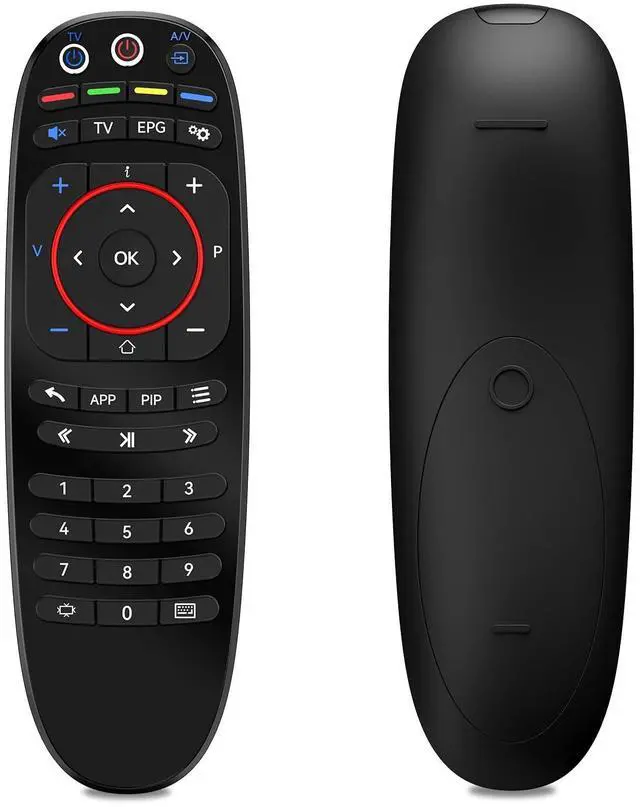


Replacement Remote Control for INFOMIR MAG 254 MAG 256 MAG 322 MAG 250 MAG 324 324w2 MAG 424 MAG 524 Mag 524W3 MAG 544 MAG 520 MAG 322 MAG420 MAG 544 W3 Linux Set-Top IPTV Boxes T4HU1615/41KA
Limited time offer, ends 09/18 By JadeEssence Shop
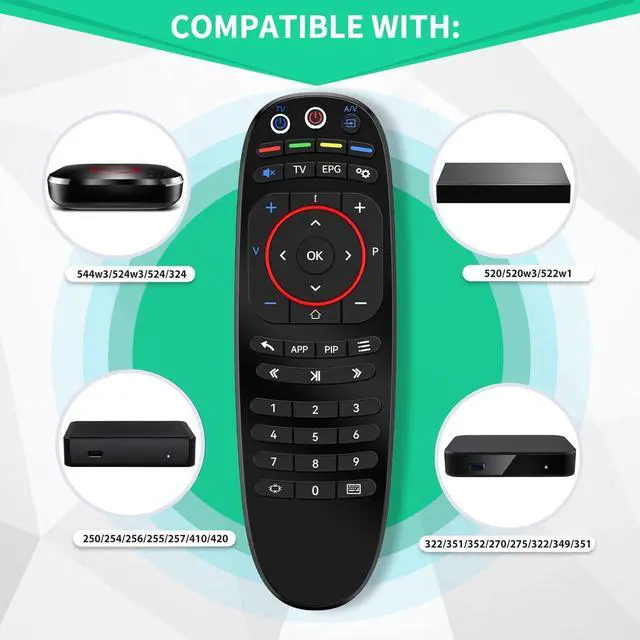
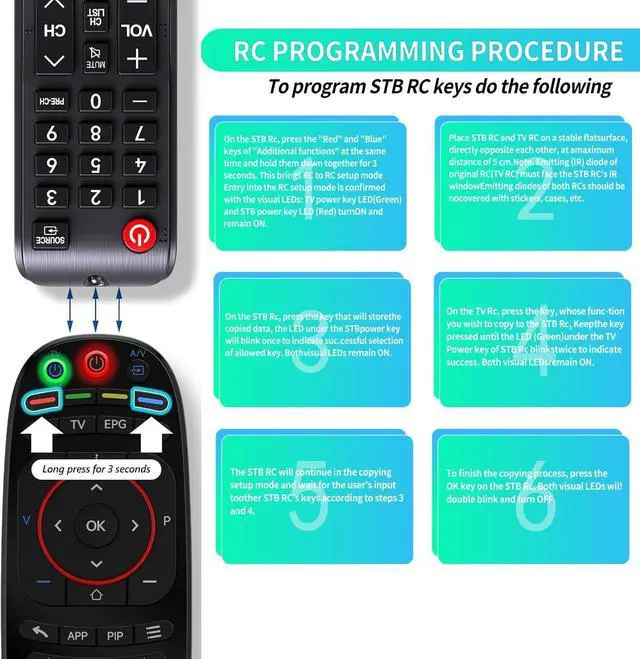
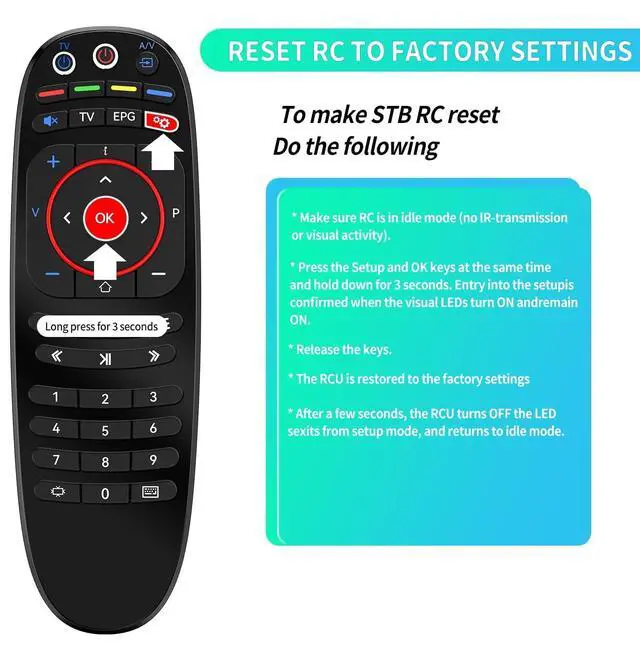
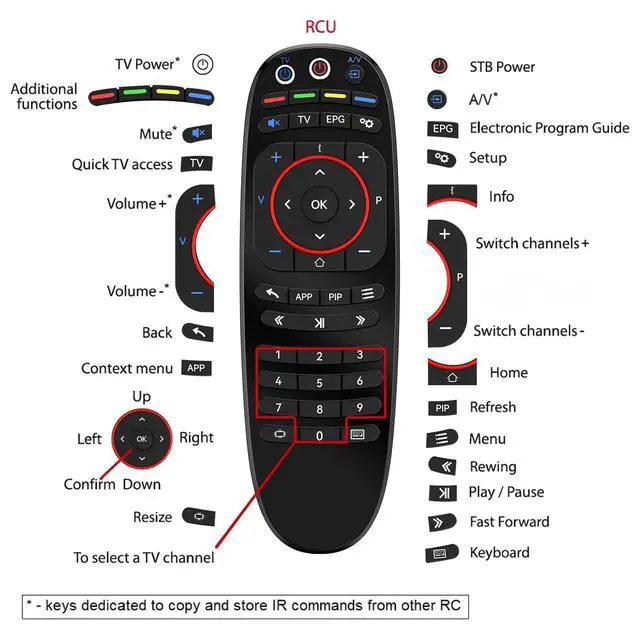
- Compatible with INFOMIR IPTV Box Models: MAG 524, MAG 256, MAG 322, MAG 250, MAG 324, MAG 424, MAG 524, Mag 524W3, MAG 544 Linux Set-Top IPTV Boxes. How To Program Buttons: Position the infrared LEDs of both Remote Controls (STB RC and TV RC) facing each other at a maximum distance of 5 cm. On the STB RC, press the 'Red' and 'Blue' buttons in the 'Additional functions' area simultaneously and hold them together for 3 seconds. Setup access is confirmed when the visual LEDs under the 'TV power' button (Green) and 'STB power' button (Red) illuminate and stay ON. On the STB RC, press the button that will store the copied data; the LED under the 'STB power' button will blink once and remain ON to show the selected button is ready. On the TV RC, press the button whose function you want to copy to the STB remote. Hold that button until the LED under the 'TV Power' button (Green) on the STB RC flashes twice to signal a successful operation. Both visual LEDs stay ON. The STB RC will remain in the copying setup mode and will await user input for other STB remote buttons following steps 3 and 4. To complete the copying process, press the 'OK' button on the STB RC. Both LEDs will blink twice and then turn OFF. Reset: Ensure the RC is in idle mode (no IR-transmission or visual activity). Press the 'SETUP' and 'OK' buttons at the same time and hold them (for about 2 seconds) until the visual LEDs under the 'TV Power' button (Green) and 'STB Power' button (Red) turn ON. Then, release both
+
+
Overview
Specs
Reviews

Any questions? Our AI mode will help you find out quickly.
Try me now
Compatible with
INFOMIR IPTV Box Models: MAG 524, MAG 256, MAG 322, MAG 250, MAG 324, MAG 424, MAG 524, Mag 524W3, MAG 544 Linux Set-Top IPTV Boxes.
How To Program Buttons: Position the infrared LEDs of both Remote Controls (STB RC and TV RC) facing each other at a maximum distance of 5 cm. On the STB RC, press the 'Red' and 'Blue' buttons in the 'Additional functions' area simultaneously and hold them together for 3 seconds. Setup access is confirmed when the visual LEDs under the 'TV power' button (Green) and 'STB power' button (Red) illuminate and stay ON. On the STB RC, press the button that will store the copied data; the LED under the 'STB power' button will blink once and remain ON to show the selected button is ready. On the TV RC, press the button whose function you want to copy to the STB remote. Hold that button until the LED under the 'TV Power' button (Green) on the STB RC flashes twice to signal a successful operation. Both visual LEDs stay ON. The STB RC will remain in the copying setup mode and will await user input for other STB remote buttons following steps 3 and 4. To complete the copying process, press the 'OK' button on the STB RC. Both LEDs will blink twice and then turn OFF.
Reset: Ensure the RC is in idle mode (no IR-transmission or visual activity). Press the 'SETUP' and 'OK' buttons at the same time and hold them (for about 2 seconds) until the visual LEDs under the 'TV Power' button (Green) and 'STB Power' button (Red) turn ON. Then, release both pressed buttons. The LEDs will turn OFF within 1 second. The reset is complete
INFOMIR IPTV Box Models: MAG 524, MAG 256, MAG 322, MAG 250, MAG 324, MAG 424, MAG 524, Mag 524W3, MAG 544 Linux Set-Top IPTV Boxes.
How To Program Buttons: Position the infrared LEDs of both Remote Controls (STB RC and TV RC) facing each other at a maximum distance of 5 cm. On the STB RC, press the 'Red' and 'Blue' buttons in the 'Additional functions' area simultaneously and hold them together for 3 seconds. Setup access is confirmed when the visual LEDs under the 'TV power' button (Green) and 'STB power' button (Red) illuminate and stay ON. On the STB RC, press the button that will store the copied data; the LED under the 'STB power' button will blink once and remain ON to show the selected button is ready. On the TV RC, press the button whose function you want to copy to the STB remote. Hold that button until the LED under the 'TV Power' button (Green) on the STB RC flashes twice to signal a successful operation. Both visual LEDs stay ON. The STB RC will remain in the copying setup mode and will await user input for other STB remote buttons following steps 3 and 4. To complete the copying process, press the 'OK' button on the STB RC. Both LEDs will blink twice and then turn OFF.
Reset: Ensure the RC is in idle mode (no IR-transmission or visual activity). Press the 'SETUP' and 'OK' buttons at the same time and hold them (for about 2 seconds) until the visual LEDs under the 'TV Power' button (Green) and 'STB Power' button (Red) turn ON. Then, release both pressed buttons. The LEDs will turn OFF within 1 second. The reset is complete
Warranty & Returns
Warranty, Returns, And Additional Information
Warranty
- Please contact the Seller directly for warranty information. Warranty information may also be found on the Manufacturer's website.
- CONTACT
Return Policies
- Return for refund within: 30 days
- Return for replacement within: 30 days
- This item is covered by JadeEssence Shop Return Policy
Manufacturer Contact Info
- For a directory of all our manufacturers, please click below.
- Manufacturers Directory
LOADING...