

Your Browsing History

Meet Your Seller


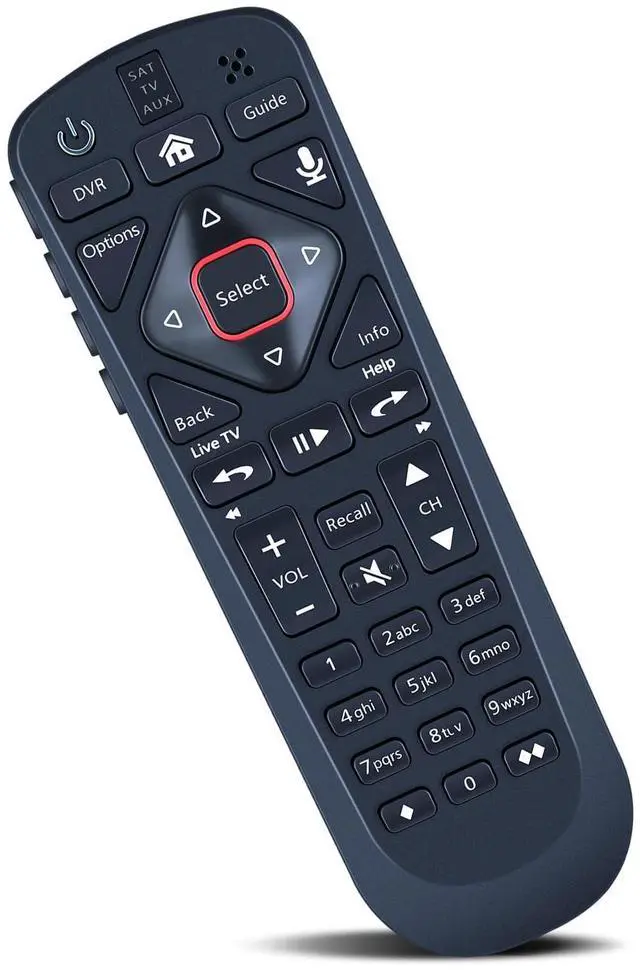

Replacement Voice Remote Control Compatible for Dish Network 54.0 UHF
- Compatible with Dish Network 54.0 UHF. **Activate Your Remote** Open the front panel of your receiver and press the SYS INFO button. Press the SAT button on the side of the remote. You will hear three beeps from the remote, showing it has paired with your receiver. **Pair Your Remote** 1. Press the home button twice. 2. Select Settings and then Remote Control. 3. Select TV and then TV Pairing Wizard. 4. Follow the prompts. 5. You can also pair your remote with an auxiliary device such as a Blu-ray player or stereo. **Unpairing Procedure** 1. Press and hold the SAT button on the side of the remote. After 3 seconds, the indicator light flashes. Release the buttons. 2. Press and hold the "Home" button and "Guide" button at the same time. After 3 seconds, the buzzer will beep three times. Release the buttons. If the remote cannot be connected, please unpair first. Then try to pair it with your device
+
+
Overview
Specs
Reviews

Any questions? Our AI mode will help you find out quickly.
Try me now
Compatible with Dish Network 54.0 UHF. **Activate Your Remote** Open the front panel of your receiver and press the SYS INFO button. Press the SAT button on the side of the remote. You will hear three beeps from the remote, showing it has paired with your receiver. **Pair Your Remote** 1. Press the home button twice. 2. Select Settings and then Remote Control. 3. Select TV and then TV Pairing Wizard. 4. Follow the prompts. 5. You can also pair your remote with an auxiliary device such as a Blu-ray player or stereo.
**Unpairing Procedure** 1. Press and hold the SAT button on the side of the remote. After 3 seconds, the indicator light flashes. Release the buttons. 2. Press and hold the "Home" button and "Guide" button at the same time. After 3 seconds, the buzzer will beep three times. Release the buttons. If the remote cannot be connected, please unpair first. Then try to pair it with your device
**Unpairing Procedure** 1. Press and hold the SAT button on the side of the remote. After 3 seconds, the indicator light flashes. Release the buttons. 2. Press and hold the "Home" button and "Guide" button at the same time. After 3 seconds, the buzzer will beep three times. Release the buttons. If the remote cannot be connected, please unpair first. Then try to pair it with your device
Warranty & Returns
Warranty, Returns, And Additional Information
Warranty
- Please contact the Seller directly for warranty information. Warranty information may also be found on the Manufacturer's website.
- CONTACT
Return Policies
- Return for refund within: 30 days
- Return for replacement within: 30 days
- This item is covered by JadeEssence Shop Return Policy
Manufacturer Contact Info
- For a directory of all our manufacturers, please click below.
- Manufacturers Directory
LOADING...