

Your Browsing History

Meet Your Seller


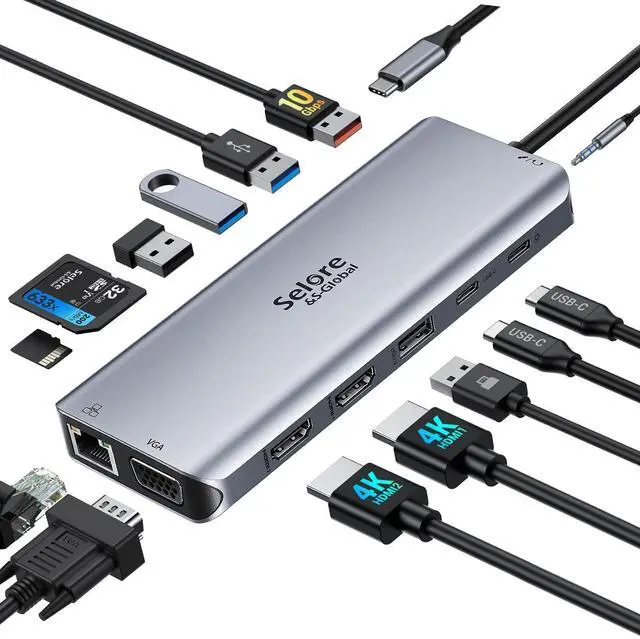


USB C Docking Station Dual Monitor 14-in-1 Triple Display Dual HDMI & VGA | 10Gbps Data Transfer, 100W PD, Gigabit Ethernet, SD/microSD Card Reader, Audio, USB-C Hub for Dell HP Lenovo MacBook
Limited time offer, ends 08/27 By JadeEssence Shop
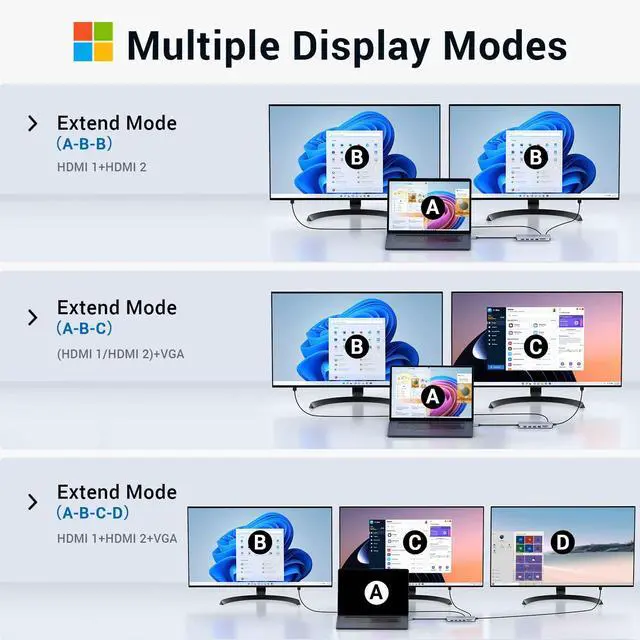
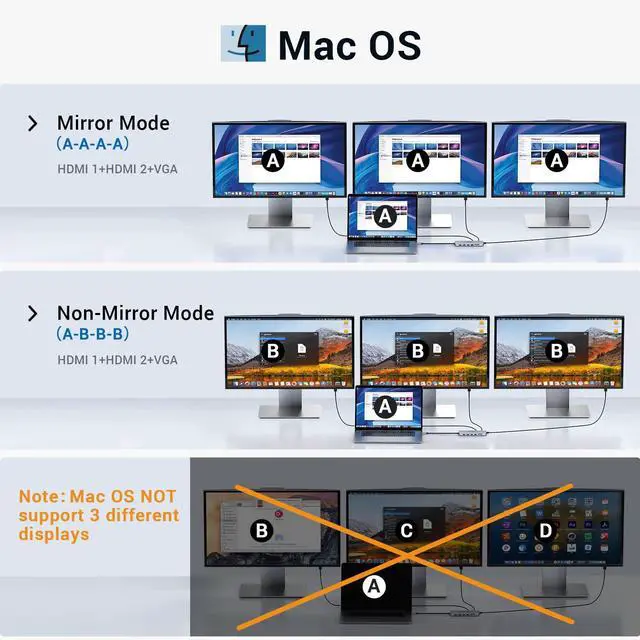
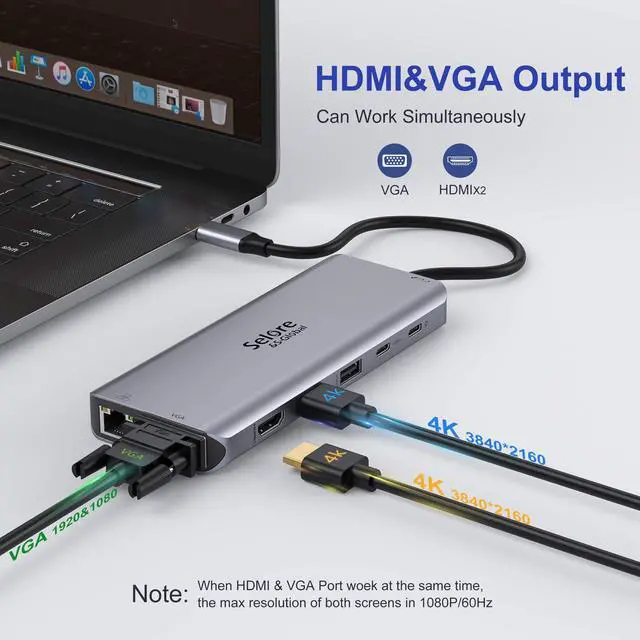
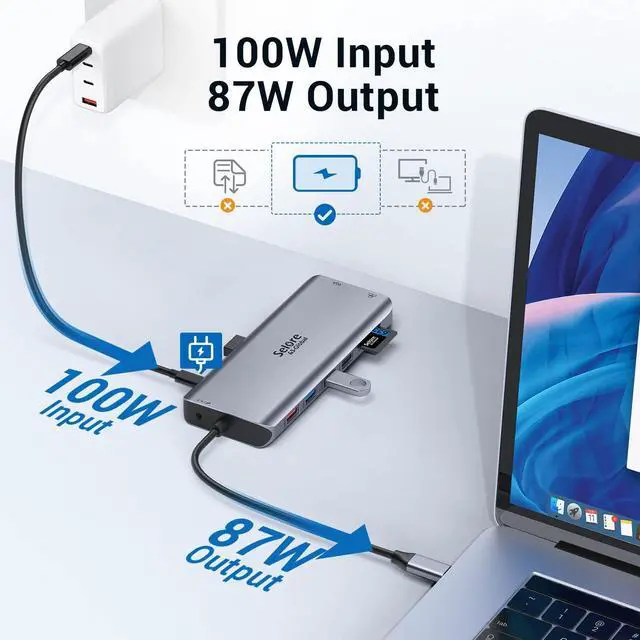
- 14-in-1 Triple Display Docking Station: Connect with a single USB-C cable to access: 2×HDMI (4K@30Hz each), VGA (1080p/60Hz), 10Gbps USB-C & USB-A ports, 2×USB 3.0 (5Gbps), 2×USB 2.0 (480Mbps), Gigabit Ethernet, SD & micro SD card readers, 3.5mm audio, and PD 3.0 charging (100W input, 87W output). On Windows systems, triple display is supported via MST (using 2 HDMI + VGA or alongside the laptop's own screen). On macOS, dual extended display is supported (MST is not supported). Note: Triple display functionality requires MST support; macOS does not support MST. 4K HDMI & VGA Video Output: Dual HDMI ports provide 4K resolution at 30Hz, while the VGA port supports 1080p at 60Hz. With Windows, you can utilize HDMI + VGA together with the laptop's built-in display for a three-screen setup. With macOS, connect two external monitors (HDMI+HDMI or HDMI+VGA) for an extended desktop. Excellent for presentations and multitasking. Note: 4K@30Hz ensures smooth video playback; VGA requires compatible monitors or projectors. 10Gbps Fast Data Transfer: The USB-C 3.1 and USB-A 3.1 ports enable data transfer speeds up to 10Gbpsperfect for transferring large files quickly. Two USB 3.0 ports (5Gbps) and two USB 2.0 ports (480Mbps) offer flexible connectivity for various peripherals. The SD & microSD card slots support speeds up to 5Gbps and cards with capacities up to 512GB. 100W PD Charging & Gigabit Ethernet: The USB-C PD 3.0 port accepts up to 100W input (delivering up to 87W output to yo
+
+
Overview
Specs
Reviews

Any questions? Our AI mode will help you find out quickly.
Try me now
14-in-1 Triple
Display Docking Station: Connect with a single
USB-C cable to access: 2×HDMI (4K@30Hz each), VGA (1080p/60Hz), 10Gbps USB-C & USB-A ports, 2×USB 3.0 (5Gbps), 2×USB 2.0 (480Mbps), Gigabit Ethernet, SD & micro SD card readers, 3.5 mm audio, and PD 3.0 charging (100W input, 87W output). On Windows systems, triple display is supported via MST (using 2 HDMI + VGA or alongside the laptop's own screen). On macOS, dual extended display is supported (MST is not supported).
Note: Triple display functionality requires MST support; macOS does not support MST. 4K HDMI &
VGA Video Output: Dual HDMI ports provide 4K resolution at 30Hz, while the VGA port supports 1080p at 60Hz. With Windows, you can utilize HDMI + VGA together with the laptop's built-in display for a three-screen setup. With macOS, connect two external monitors (HDMI+HDMI or HDMI+VGA) for an extended desktop. Excellent for presentations and multitasking.
Note: 4K@30Hz ensures smooth video playback; VGA requires compatible monitors or projectors.
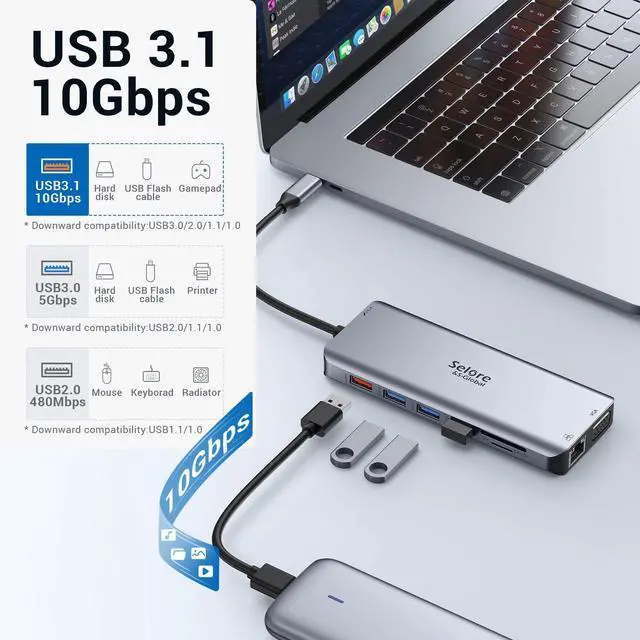
10Gbps Fast Data Transfer: The USB-C 3.1 and USB-A 3.1 ports enable data transfer speeds up to 10Gbpsperfect for transferring large files quickly. Two USB 3.0 ports (5Gbps) and two USB 2.0 ports (480Mbps) offer flexible connectivity for various peripherals. The SD & microSD card slots support speeds up to 5Gbps and cards with capacities up to 512GB. 100W
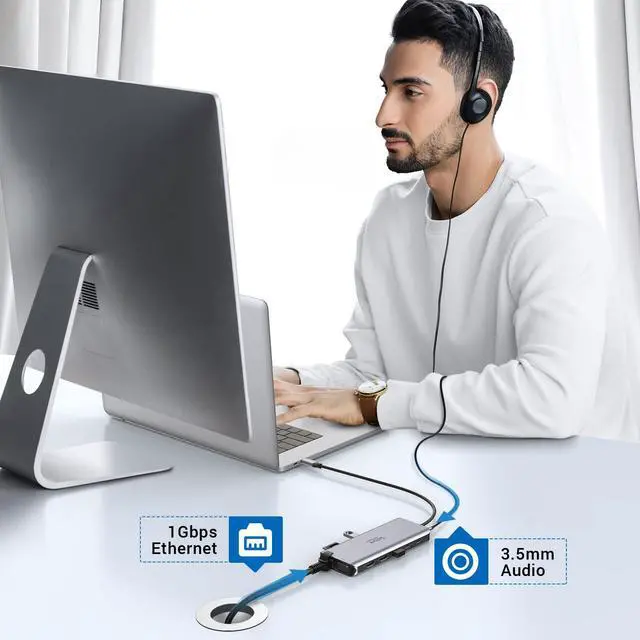
PD Charging & Gigabit Ethernet: The USB-C PD 3.0 port accepts up to 100W input (delivering up to 87W output to your laptop) when paired with a 100W power adapter (sold separately). The Gigabit Ethernet port provides stable wired network connections up to 1000Mbps for video calls, downloads, and gaming.
Broad Compatibility: Designed for laptops supporting DP Alt Mode or Thunderbolt
3. Compatible with MacBook Pro/Air (20162020), iPad Pro 2018, Dell XPS/Latitude, Lenovo Yoga, and Surface models. Not compatible with HP Pavilion, EliteBook Folio, Lenovo IdeaPad, or devices lacking DP Alt Mode support. Please verify your USB-C port supports video output before purchasing
Display Docking Station: Connect with a single
USB-C cable to access: 2×HDMI (4K@30Hz each), VGA (1080p/60Hz), 10Gbps USB-C & USB-A ports, 2×USB 3.0 (5Gbps), 2×USB 2.0 (480Mbps), Gigabit Ethernet, SD & micro SD card readers, 3.5 mm audio, and PD 3.0 charging (100W input, 87W output). On Windows systems, triple display is supported via MST (using 2 HDMI + VGA or alongside the laptop's own screen). On macOS, dual extended display is supported (MST is not supported).
Note: Triple display functionality requires MST support; macOS does not support MST. 4K HDMI &
VGA Video Output: Dual HDMI ports provide 4K resolution at 30Hz, while the VGA port supports 1080p at 60Hz. With Windows, you can utilize HDMI + VGA together with the laptop's built-in display for a three-screen setup. With macOS, connect two external monitors (HDMI+HDMI or HDMI+VGA) for an extended desktop. Excellent for presentations and multitasking.
Note: 4K@30Hz ensures smooth video playback; VGA requires compatible monitors or projectors.
10Gbps Fast Data Transfer: The USB-C 3.1 and USB-A 3.1 ports enable data transfer speeds up to 10Gbpsperfect for transferring large files quickly. Two USB 3.0 ports (5Gbps) and two USB 2.0 ports (480Mbps) offer flexible connectivity for various peripherals. The SD & microSD card slots support speeds up to 5Gbps and cards with capacities up to 512GB. 100W
PD Charging & Gigabit Ethernet: The USB-C PD 3.0 port accepts up to 100W input (delivering up to 87W output to your laptop) when paired with a 100W power adapter (sold separately). The Gigabit Ethernet port provides stable wired network connections up to 1000Mbps for video calls, downloads, and gaming.
Broad Compatibility: Designed for laptops supporting DP Alt Mode or Thunderbolt
3. Compatible with MacBook Pro/Air (20162020), iPad Pro 2018, Dell XPS/Latitude, Lenovo Yoga, and Surface models. Not compatible with HP Pavilion, EliteBook Folio, Lenovo IdeaPad, or devices lacking DP Alt Mode support. Please verify your USB-C port supports video output before purchasing
Warranty & Returns
Warranty, Returns, And Additional Information
Warranty
- Please contact the Seller directly for warranty information. Warranty information may also be found on the Manufacturer's website.
- CONTACT
Return Policies
- Return for refund within: 30 days
- Return for replacement within: 30 days
- This item is covered by JadeEssence Shop Return Policy
Manufacturer Contact Info
- For a directory of all our manufacturers, please click below.
- Manufacturers Directory
LOADING...