

Your Browsing History

Meet Your Seller


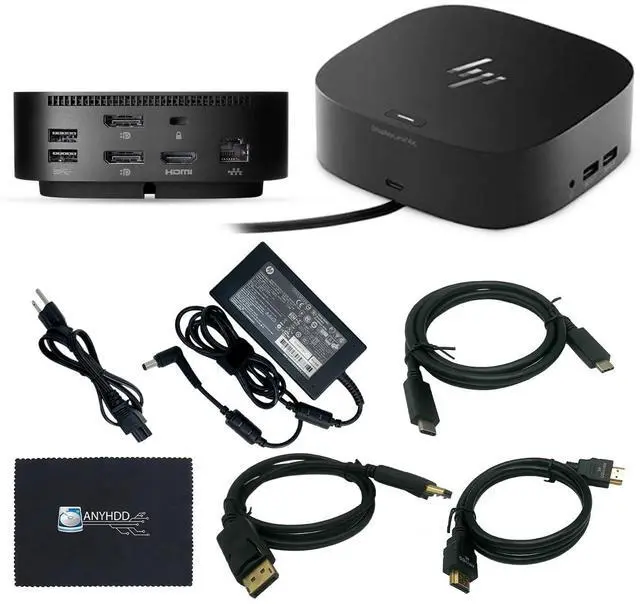

HP 5TW13UT#ABA Universal Dock G2 - for Notebook 120W Power, USB Type C with HDMI, Display Port Cable and C to C Cable with Cloth
- Front Interface: Contains one USB-C port for data and power output, as well as one USB 3.2 Gen 2 port that supports high-speed 10Gbps data transfer. Side Ports & Security: Features two USB 3.2 Gen 1 ports (one on each side) providing 5Gbps speeds and device charging, along with a standard Kensington lock slot (lock sold separately). Rear Connectivity: Includes one Thunderbolt 4 port, two USB 3.2 Gen 1 charging ports (5Gbps), one HDMI 2.0 port, two DisplayPort 1.4 outputs, an AC power input, a wired Ethernet port, and a USB-C DisplayPort Alt Mode connection. Wide Device Support: Thoroughly tested to ensure dependable compatibility with selected systems and a variety of Apple, Dell, and Lenovo laptops that support USB-C power delivery. Before purchase, please verify your computer is USB-C compatible. If you experience issues, attempt updating the dock firmware
+
+
Overview
Specs
Reviews

Any questions? Our AI mode will help you find out quickly.
Try me now
Front Interface: Contains one USB-C port for data and power output, as well as one USB 3.2 Gen 2 port that supports high-speed 10Gbps data transfer.
Side Ports & Security: Features two USB 3.2 Gen 1 ports (one on each side) providing 5Gbps speeds and device charging, along with a standard Kensington lock slot (lock sold separately).
Rear Connectivity: Includes one Thunderbolt 4 port, two USB 3.2 Gen 1 charging ports (5Gbps), one HDMI 2.0 port, two DisplayPort 1.4 outputs, an AC power input, a wired Ethernet port, and a USB-C DisplayPort Alt Mode connection.
Wide Device Support: Thoroughly tested to ensure dependable compatibility with selected systems and a variety of Apple, Dell, and Lenovo laptops that support USB-C power delivery. Before purchase, please verify your computer is USB-C compatible. If you experience issues, attempt updating the dock firmware
Side Ports & Security: Features two USB 3.2 Gen 1 ports (one on each side) providing 5Gbps speeds and device charging, along with a standard Kensington lock slot (lock sold separately).
Rear Connectivity: Includes one Thunderbolt 4 port, two USB 3.2 Gen 1 charging ports (5Gbps), one HDMI 2.0 port, two DisplayPort 1.4 outputs, an AC power input, a wired Ethernet port, and a USB-C DisplayPort Alt Mode connection.
Wide Device Support: Thoroughly tested to ensure dependable compatibility with selected systems and a variety of Apple, Dell, and Lenovo laptops that support USB-C power delivery. Before purchase, please verify your computer is USB-C compatible. If you experience issues, attempt updating the dock firmware
Warranty & Returns
Warranty, Returns, And Additional Information
Warranty
- Please contact the Seller directly for warranty information. Warranty information may also be found on the Manufacturer's website.
- CONTACT
Return Policies
- Return for refund within: 30 days
- Return for replacement within: 30 days
- This item is covered by HuiXu South Artware Return Policy
Manufacturer Contact Info
- For a directory of all our manufacturers, please click below.
- Manufacturers Directory
LOADING...