Your Browsing History
Meet Your Seller
KAGO 4 Port VGA KVM Switch with 4 Cables | 3 USB 2.0 Ports, 1920x1440 Full HD, Wired Desktop Controller, Plug & Play
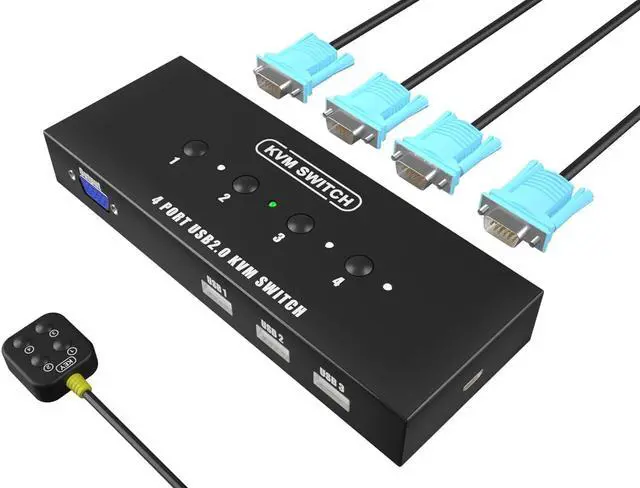
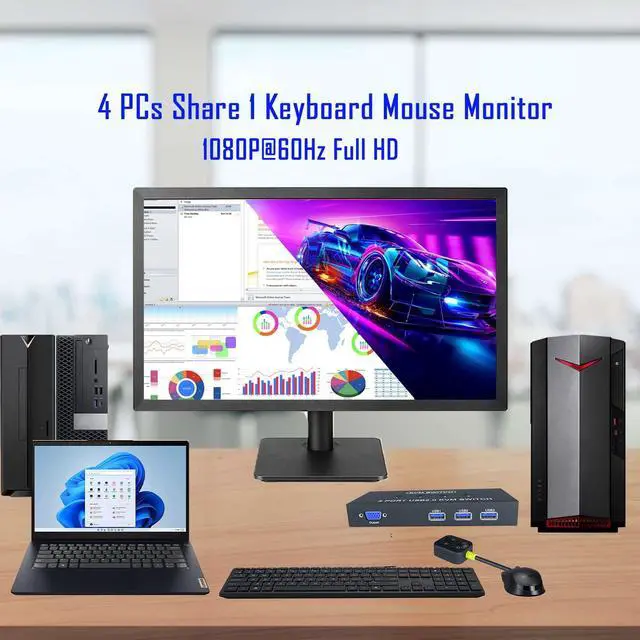
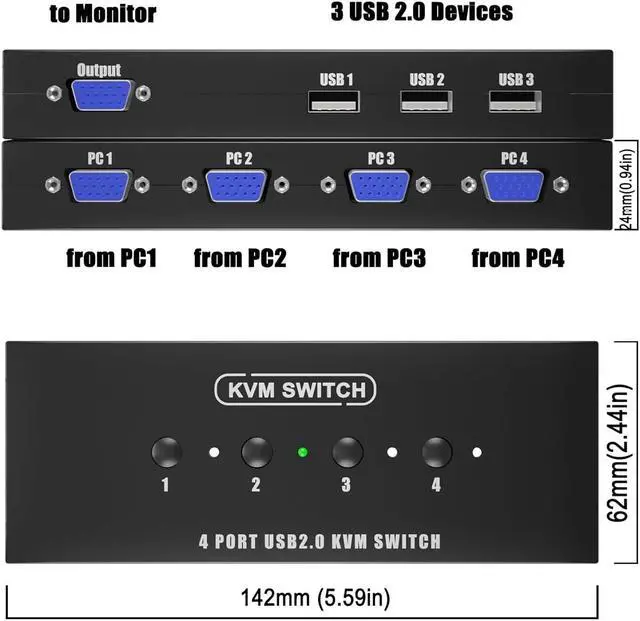
- 4-Port Efficiency Seamlessly switch between 4 computers using just 1 monitor and 3 USB 2.0 peripherals. Perfect for streamlining your workspace and sharing printers, scanners, or U-disks across multiple systems.
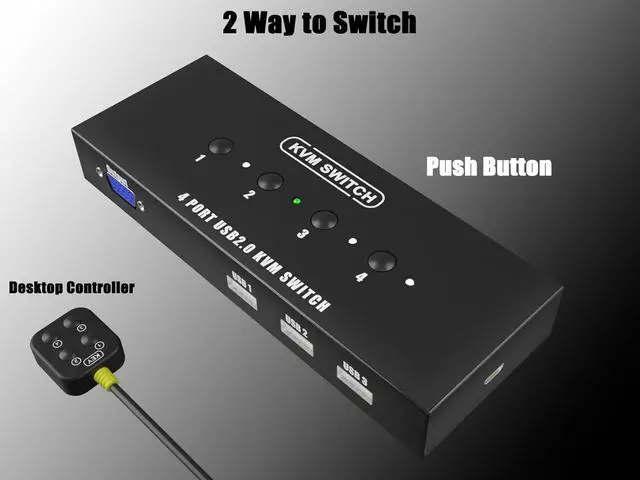
- Dual Switching Modes Enjoy flexible control with two convenient methods: use the built-in panel buttons or the included Wired Desktop Controller. Keep your cables hidden and your desktop clutter-free.
- Full HD 1080P Visuals Supports high-resolution video up to 1920x1440 (including 1080P). Experience crystal-clear image quality with auto-recognition technology for ultra-wide screen displays.
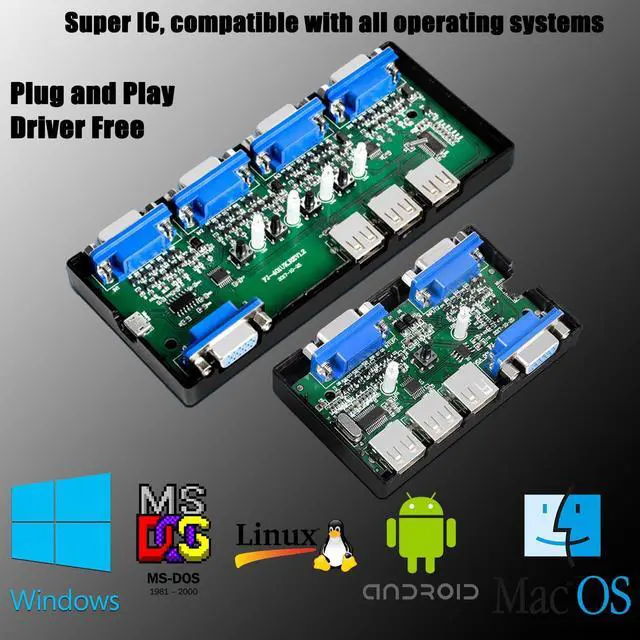
- Universal Compatibility Fully driver-free and plug-and-play. Compatible with Windows 11/10/8/7, Mac OS, Linux, Chrome OS, and more. Ideal for offices, multimedia classrooms, and research labs.
- Complete Kit Included Everything you need in one box: 1x VGA KVM Switch, 4x specialized KVM cables (USB + VGA combined), and 1x desktop controller. Note: Not compatible with docking s
+
+
Overview
Specs
Reviews
Any questions? Our AI mode will help you find out quickly.
Try me now
4-Port Efficiency Seamlessly switch between 4 computers using just 1 monitor and 3 USB 2.0 peripherals. Perfect for streamlining your workspace and sharing printers, scanners, or U-disks across multiple systems.
Dual Switching Modes Enjoy flexible control with two convenient methods: use the built-in panel buttons or the included Wired Desktop Controller. Keep your cables hidden and your desktop clutter-free.
Full HD 1080P Visuals Supports high-resolution video up to 1920x1440 (including 1080P). Experience crystal-clear image quality with auto-recognition technology for ultra-wide screen displays.
Universal Compatibility Fully driver-free and plug-and-play. Compatible with Windows 11/10/8/7, Mac OS, Linux, Chrome OS, and more. Ideal for offices, multimedia classrooms, and research labs.
Complete Kit Included Everything you need in one box: 1x VGA KVM Switch, 4x specialized KVM cables (USB + VGA combined), and 1x desktop controller.
Note: Not compatible with docking stations or USB-C only hosts.
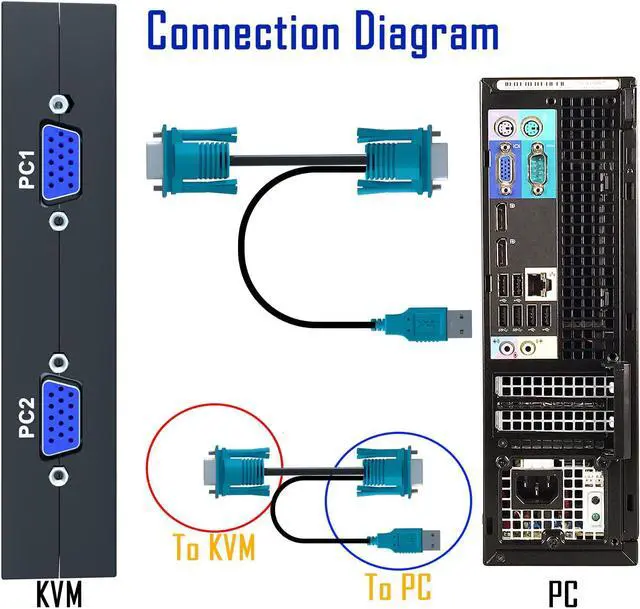
Easy to install - connect and use, specially made VGA KVM cable, one end of the cable is a USB 2.0 port and VGA high-quality durable cable, when in use, plug the USB + VGA head cable into the computer, USB is used to power the KVM Switch and transfer USB Data, VGA is used for computer audio and video transfer. The other end of the cable (ONLY VGA Male) is connected to the VGA input of the 4 port KVM Switch. Plug and play, no need for additional power supply.
After connecting the KVM keyboard and mouse, it is best to refresh the keyboard and mouse drivers for each PC to ensure that the keyboard and mouse of a single computer work normally after connecting to KVM. This way, the keyboard and mouse can be used correctly when switching between two computers. Please contact technical support through to answer any questions during use.
What You Get: 1* KAGO 4 Port VGA KVM Switch, 4* KVM VGA Cables, 1* Desktop Controller, 1* User Guide.
NOTE: 1. This KVM switch is not compatible with those host devices that have only USB C ports and do not have any USB A ports. 2. Not supported for use with docking station. 3. If you connect a wireless keyboard and mouse, please ensure that its working range meets the product requirements (within 1m/ 3.3 ft for a single USB device, and within 0.3 m/ 0.98 ft for multiple USB devices).

Dual Switching Modes Enjoy flexible control with two convenient methods: use the built-in panel buttons or the included Wired Desktop Controller. Keep your cables hidden and your desktop clutter-free.
Full HD 1080P Visuals Supports high-resolution video up to 1920x1440 (including 1080P). Experience crystal-clear image quality with auto-recognition technology for ultra-wide screen displays.
Universal Compatibility Fully driver-free and plug-and-play. Compatible with Windows 11/10/8/7, Mac OS, Linux, Chrome OS, and more. Ideal for offices, multimedia classrooms, and research labs.
Complete Kit Included Everything you need in one box: 1x VGA KVM Switch, 4x specialized KVM cables (USB + VGA combined), and 1x desktop controller.
Note: Not compatible with docking stations or USB-C only hosts.
Easy to install - connect and use, specially made VGA KVM cable, one end of the cable is a USB 2.0 port and VGA high-quality durable cable, when in use, plug the USB + VGA head cable into the computer, USB is used to power the KVM Switch and transfer USB Data, VGA is used for computer audio and video transfer. The other end of the cable (ONLY VGA Male) is connected to the VGA input of the 4 port KVM Switch. Plug and play, no need for additional power supply.
After connecting the KVM keyboard and mouse, it is best to refresh the keyboard and mouse drivers for each PC to ensure that the keyboard and mouse of a single computer work normally after connecting to KVM. This way, the keyboard and mouse can be used correctly when switching between two computers. Please contact technical support through to answer any questions during use.
What You Get: 1* KAGO 4 Port VGA KVM Switch, 4* KVM VGA Cables, 1* Desktop Controller, 1* User Guide.
NOTE: 1. This KVM switch is not compatible with those host devices that have only USB C ports and do not have any USB A ports. 2. Not supported for use with docking station. 3. If you connect a wireless keyboard and mouse, please ensure that its working range meets the product requirements (within 1m/ 3.3 ft for a single USB device, and within 0.3 m/ 0.98 ft for multiple USB devices).
Warranty & Returns
Warranty, Returns, And Additional Information
Warranty
- Please contact the Seller directly for warranty information. Warranty information may also be found on the Manufacturer's website.
- CONTACT
Return Policies
- Return for refund within: 30 days
- Return for replacement within: 30 days
- This item is covered by Aiwu Store Return Policy
Manufacturer Contact Info
- For a directory of all our manufacturers, please click below.
- Manufacturers Directory
LOADING...